FIDO UAF Architectural Overview
FIDO Alliance Proposed Standard 02 February 2017
The English version of this specification is the only normative version. Non-normative translations may also be available.
Copyright © 2013-2017 FIDO Alliance All Rights Reserved.
Abstract
The FIDO UAF strong authentication framework enables online services and websites, whether on the open Internet or within enterprises, to transparently leverage native security features of end-user computing devices for strong user authentication and to reduce the problems associated with creating and remembering many online credentials. The FIDO UAF Reference Architecture describes the components, protocols, and interfaces that make up the FIDO UAF strong authentication ecosystem.
Status of This Document
This section describes the status of this document at the time of its publication. Other documents may supersede this document. A list of current FIDO Alliance publications and the latest revision of this technical report can be found in the FIDO Alliance specifications index at https://www.fidoalliance.org/specifications/.
This document was published by the FIDO Alliance as a Proposed Standard. If you wish to make comments regarding this document, please Contact Us. All comments are welcome.
THIS FIDO ALLIANCE SPECIFICATION IS PROVIDED “AS IS” AND WITHOUT ANY WARRANTY OF ANY KIND, INCLUDING, WITHOUT LIMITATION, ANY EXPRESS OR IMPLIED WARRANTY OF NON-INFRINGEMENT, MERCHANTABILITY OR FITNESS FOR A PARTICULAR PURPOSE.
This document has been reviewed by FIDO Aliance Members and is endorsed as a Proposed Standard. It is a stable document and may be used as reference material or cited from another document. FIDO Alliance ‘s role in making the Recommendation is to draw attention to the specification and to promote its widespread deployment.
Table of Contents
- 2.1 FIDO UAF Client
- 2.2 FIDO UAF Server
- 2.3 FIDO UAF Protocols
- 2.6 FIDO UAF Authenticator Metadata Validation
1. Introduction
This section is non-normative.
This document describes the FIDO Universal Authentication Framework (UAF) Reference Architecture. The target audience for this document is decision makers and technical architects who need a high-level understanding of the FIDO UAF strong authentication solution and its relationship to other relevant industry standards.
The FIDO UAF specifications are as follows:
- FIDO UAF Protocol
- FIDO UAF Application API and Transport Binding
- FIDO UAF Authenticator Commands
- FIDO UAF Authenticator-Specific Module API
- FIDO UAF Registry of Predefined Values
- FIDO UAF APDU
The following additional FIDO documents provide important information relevant to the UAF specifications:
- FIDO AppID and Facets Specification
- FIDO Metadata Statements
- FIDO Metadata Service
- FIDO Registry of Predefined Values
- FIDO ECDAA Algorithm
- FIDO Security Reference
- FIDO Glossary
1.1 Background
This section is non-normative.
- Developing technical specifications defining open, scalable, interoperable mechanisms that supplant reliance on passwords to securely authenticate users of online services.
- Operating industry programs to help ensure successful worldwide adoption of the specifications.
- Submitting mature technical specifications to recognized standards development organization(s) for formal standardization.
There are two key protocols included in the FIDO architecture that cater to two basic options for user experience when dealing with Internet services. The two protocols share many of underpinnings but are tuned to the specific intended use cases.
Universal Authentication Framework (UAF) Protocol
The UAF protocol allows online services to offer password-less and multi-factor security. The user registers their device to the online service by selecting a local authentication mechanism such as swiping a finger, looking at the camera, speaking into the mic, entering a PIN, etc. The UAF protocol allows the service to select which mechanisms are presented to the user.
Once registered, the user simply repeats the local authentication action whenever they need to authenticate to the service. The user no longer needs to enter their password when authenticating from that device. UAF also allows experiences that combine multiple authentication mechanisms such as fingerprint + PIN.
This document that you are reading describes the UAF reference architecture.
Universal 2nd Factor (U2F) Protocol
The U2F protocol allows online services to augment the security of their existing password infrastructure by adding a strong second factor to user login. The user logs in with a username and password as before. The service can also prompt the user to present a second factor device at any time it chooses. The strong second factor allows the service to simplify its passwords (e.g. 4-digit PIN) without compromising security.
During registration and authentication, the user presents the second factor by simply pressing a button on a USB device or tapping over NFC. The user can use their FIDO U2F device across all online services that support the protocol leveraging built-in support in web browsers.
Please refer to the FIDO website for an overview and documentation set focused on the U2F protocol.
1.2 FIDO UAF Documentation
This section is non-normative.
To understand the FIDO UAF protocol, it is recommended that new audiences start by reading this architecture overview document and become familiar with the technical terminology used in the specifications (the glossary). Then they should proceed to the individual UAF documents in the recommended order listed below.
- FIDO UAF Overview: This document. Provides an introduction to the FIDO UAF architecture, protocols, and specifications.
- FIDO Technical Glossary: Defines the technical terms and phrases used in FIDO Alliance specifications and documents.
- Universal Authentication Framework (UAF)
- UAF Protocol Specification : Message formats and processing rules for all UAF protocol messages.
- UAF Application API and Transport Binding Specification: APIs and interoperability profile for client applications to utilize FIDO UAF.
- UAF Authenticator Commands: Low-level functionality that UAF Authenticators should implement to support the UAF protocol.
- UAF Authenticator-specific Module API: Authenticator-specific Module API provided by an ASM to the FIDO client.
- UAF Registry of Predefined Values: defines all the strings and constants reserved by UAF protocols.
- UAF APDU: defines a mapping of FIDO UAF Authenticator commands to Application Protocol Data Units (APDUs).
The remainder of this Overview section of the reference architecture document introduces the key drivers, goals, and principles which inform the design of FIDO UAF.
Following the Overview, this document describes:
- A high-level look at the components, protocols, and APIs defined by the architecture
- The main FIDO UAF use cases and the protocol message flows required to implement them.
- The relationship of the FIDO protocols to other relevant industry standards.
1.3 FIDO UAF Goals
This section is non-normative.
In order to address today’s strong authentication issues and develop a smoothly-functioning low-friction ecosystem, a comprehensive, open, multi-vendor solution architecture is needed that encompasses:
- User devices, whether personally acquired, enterprise-issued, or enterprise BYOD, and the device’s potential operating environment, e.g. home, office, in the field, etc.
- Authenticators 1
- Relying party applications and their deployment environments
- Meeting the needs of both end users and Relying Parties
- Strong focus on both browser- and native-app-based end-user experience
This solution architecture must feature:
- FIDO UAF Authenticator discovery, attestation, and provisioning
- Cross-platform strong authentication protocols leveraging FIDO UAF Authenticators
- A uniform cross-platform authenticator API
- Simple mechanisms for Relying Party integration
- Support strong, multi-factor authentication: Protect Relying Parties against unauthorized access by supporting end user authentication using two or more strong authentication factors («something you know», «something you have», «something you are»).
- Build on, but not require, existing device capabilities: Facilitate user authentication using built-in platform authenticators or capabilities (fingerprint sensors, cameras, microphones, embedded TPM hardware), but do not preclude the use of discrete additional authenticators.
- Enable selection of the authentication mechanism: Facilitate Relying Party and user choice amongst supported authentication mechanisms in order to mitigate risks for their particular use cases.
- Simplify integration of new authentication capabilities: Enable organizations to expand their use of strong authentication to address new use cases, leverage new device’s capabilities, and address new risks with a single authentication approach.
- Incorporate extensibility for future refinements and innovations: Design extensible protocols and APIs in order to support the future emergence of additional types of authenticators, authentication methods, and authentication protocols, while maintaining reasonable backwards compatibility.
- Leverage existing open standards where possible, openly innovate and extend where not: An open, standardized, royalty-free specification suite will enable the establishment of a virtuous-circle ecosystem, and decrease the risk, complexity, and costs associated with deploying strong authentication. Existing gaps — notably uniform authenticator provisioning and attestation, a uniform cross-platform authenticator API, as well as a flexible strong authentication challenge-response protocol leveraging the user’s authenticators will be addressed.
- Complement existing single sign-on, federation initiatives: While industry initiatives (such as OpenID, OAuth, SAML, and others) have created mechanisms to reduce the reliance on passwords through single sign-on or federation technologies, they do not directly address the need for an initial strong authentication interaction between end users and Relying Parties.
- Preserve the privacy of the end user: Provide the user control over the sharing of device capability information with Relying Parties, and mitigate the potential for collusion amongst Relying Parties.
- Unify end-User Experience: Create easy, fun, and unified end-user experiences across all platforms and across similar Authenticators.
2. FIDO UAF High-Level Architecture
This section is non-normative.
The FIDO UAF Architecture is designed to meet the FIDO goals and yield the desired ecosystem benefits. It accomplishes this by filling in the status-quo’s gaps using standardized protocols and APIs.
The following diagram summarizes the reference architecture and how its components relate to typical user devices and Relying Parties.
The FIDO-specific components of the reference architecture are described below.
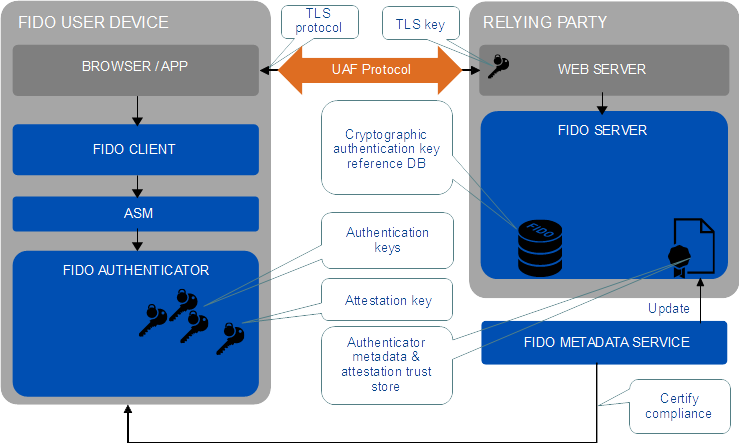 Fig. 1 FIDO UAF High-Level Architecture
2.1 FIDO UAF Client
A FIDO UAF Client implements the client side of the FIDO UAF protocols, and is responsible for:
- Interacting with specific FIDO UAF Authenticators using the FIDO UAF Authenticator Abstraction layer via the FIDO UAF Authenticator API.
- Interacting with a user agent on the device (e.g. a mobile app, browser) using user agent-specific interfaces to communicate with the FIDO UAF Server. For example, a FIDO-specific browser plugin would use existing browser plugin interfaces or a mobile app may use a FIDO-specific SDK. The user agent is then responsible for communicating FIDO UAF messages to a FIDO UAF Server at a Relying Party.
The FIDO UAF architecture ensures that FIDO client software can be implemented across a range of system types, operating systems, and Web browsers. While FIDO client software is typically platform-specific, the interactions between the components should ensure a consistent user experience from platform to platform.
2.2 FIDO UAF Server
A FIDO UAF server implements the server side of the FIDO UAF protocols and is responsible for:
- Interacting with the Relying Party web server to communicate FIDO UAF protocol messages to a FIDO UAF Client via a device user agent.
- Validating FIDO UAF authenticator attestations against the configured authenticator metadata to ensure only trusted authenticators are registered for use.
- Manage the association of registered FIDO UAF Authenticators to user accounts at the Relying Party.
- Evaluating user authentication and transaction confirmation responses to determine their validity.
The FIDO UAF server is conceived as being deployable as an on-premise server by Relying Parties or as being outsourced to a FIDO-enabled third-party service provider.
2.3 FIDO UAF Protocols
The FIDO UAF protocols carry FIDO UAF messages between user devices and Relying Parties. There are protocol messages addressing:
- Authenticator Registration: The FIDO UAF registration protocol enables Relying Parties to:
- Discover the FIDO UAF Authenticators available on a user’s system or device. Discovery will convey FIDO UAF Authenticator attributes to the Relying Party thus enabling policy decisions and enforcement to take place.
- Verify attestation assertions made by the FIDO UAF Authenticators to ensure the authenticator is authentic and trusted. Verification occurs using the attestation public key certificates distributed via authenticator metadata.
- Register the authenticator and associate it with the user’s account at the Relying Party. Once an authenticator attestation has been validated, the Relying Party can provide a unique secure identifier that is specific to the Relying Party and the FIDO UAF Authenticator. This identifier can be used in future interactions between the pair
2.4 FIDO UAF Authenticator Abstraction Layer
The FIDO UAF Authenticator Abstraction Layer provides a uniform API to FIDO Clients enabling the use of authenticator-based cryptographic services for FIDO-supported operations. It provides a uniform lower-layer «authenticator plugin» API facilitating the deployment of multi-vendor FIDO UAF Authenticators and their requisite drivers.
2.5 FIDO UAF Authenticator
A FIDO UAF Authenticator is a secure entity, connected to or housed within FIDO user devices, that can create key material associated to a Relying Party. The key can then be used to participate in FIDO UAF strong authentication protocols. For example, the FIDO UAF Authenticator can provide a response to a cryptographic challenge using the key material thus authenticating itself to the Relying Party.
In order to meet the goal of simplifying integration of trusted authentication capabilities, a FIDO UAF Authenticator will be able to attest to its particular type (e.g., biometric) and capabilities (e.g., supported crypto algorithms), as well as to its provenance. This provides a Relying Party with a high degree of confidence that the user being authenticated is indeed the user that originally registered with the site.
2.6 FIDO UAF Authenticator Metadata Validation
In the FIDO UAF context, attestation is how Authenticators make claims to a Relying Party during registration that the keys they generate, and/or certain measurements they report, originate from genuine devices with certified characteristics. An attestation signature, carried in a FIDO UAF registration protocol message is validated by the FIDO UAF Server. FIDO UAF Authenticators are created with attestation private keys used to create the signatures and the FIDO UAF Server validates the signature using that authenticator’s attestation public key certificate located in the authenticator metadata. The metadata holding attestation certificates is shared with FIDO UAF Servers out of band.
3. FIDO UAF Usage Scenarios and Protocol Message Flows
This section is non-normative.
The FIDO UAF ecosystem supports the use cases briefly described in this section.
3.1 FIDO UAF Authenticator Acquisition and User Enrollment
It is expected that users will acquire FIDO UAF Authenticators in various ways: they purchase a new system that comes with embedded FIDO UAF Authenticator capability; they purchase a device with an embedded FIDO UAF Authenticator, or they are given a FIDO Authenticator by their employer or some other institution such as their bank.
After receiving a FIDO UAF Authenticator, the user must go through an authenticator-specific enrollment process, which is outside the scope of the FIDO UAF protocols. For example, in the case of a fingerprint sensing authenticator, the user must register their fingerprint(s) with the authenticator. Once enrollment is complete, the FIDO UAF Authenticator is ready for registration with FIDO UAF enabled online services and websites.
3.2 Authenticator Registration
Given the FIDO UAF architecture, a Relying Party is able to transparently detect when a user begins interacting with them while possessing an initialized FIDO UAF Authenticator. In this initial introduction phase, the website will prompt the user regarding any detected FIDO UAF Authenticator(s), giving the user options regarding registering it with the website or not.
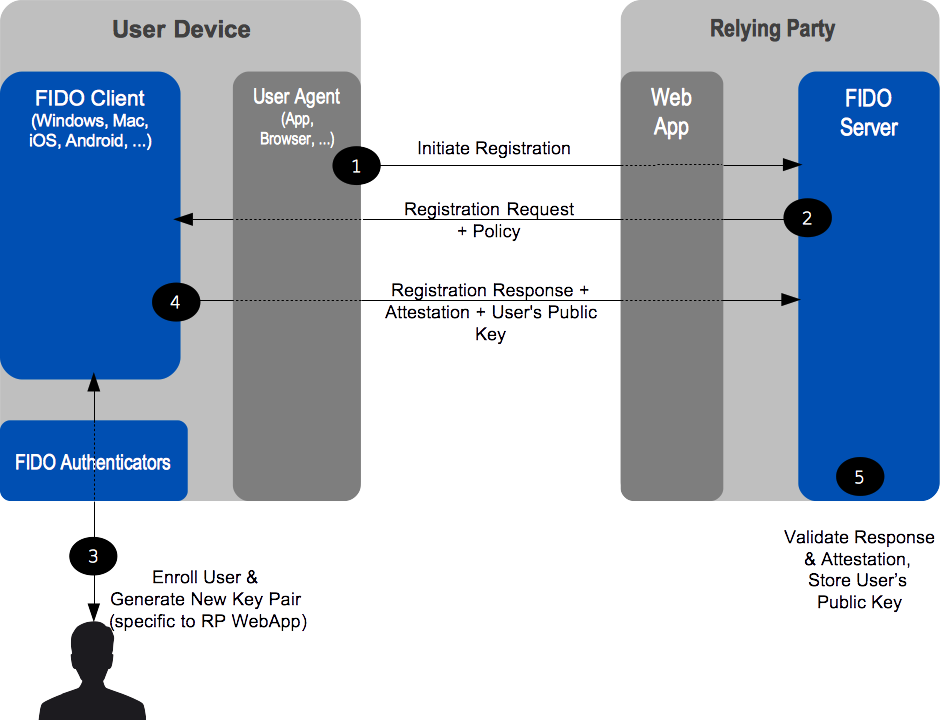 Fig. 2 Registration Message Flow
3.3 Authentication
Following registration, the FIDO UAF Authenticator will be subsequently employed whenever the user authenticates with the website (and the authenticator is present). The website can implement various fallback strategies for those occasions when the FIDO Authenticator is not present. These might range from allowing conventional login with diminished privileges to disallowing login.
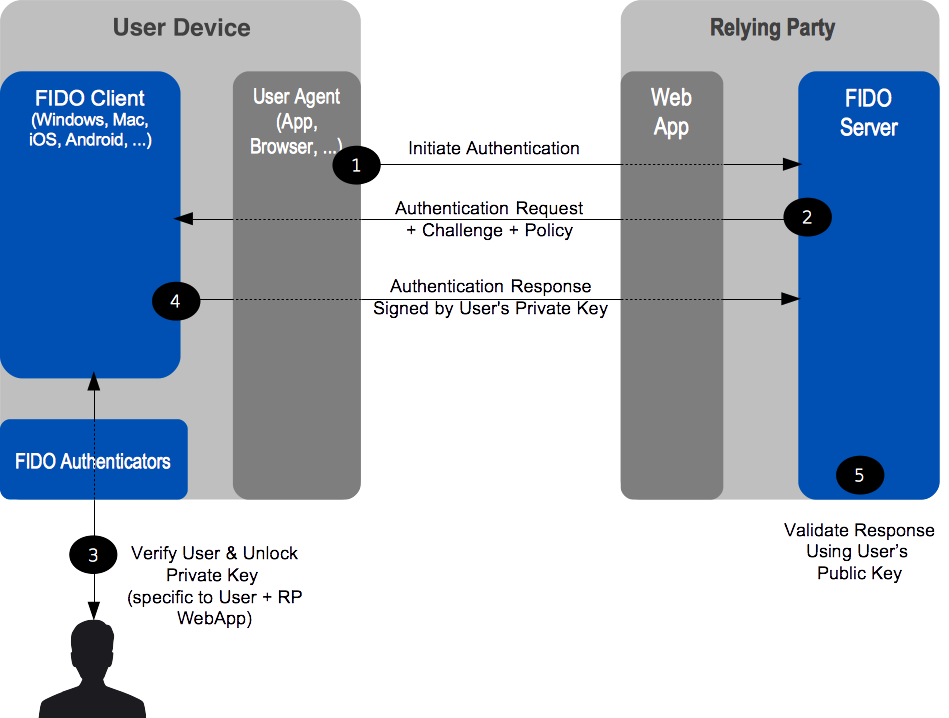 Fig. 3 Authentication Message Flow
This overall scenario will vary slightly depending upon the type of FIDO UAF Authenticator being employed. Some authenticators may sample biometric data such as a face image, fingerprint, or voice print. Others will require a PIN or local authenticator-specific passphrase entry. Still others may simply be a hardware bearer authenticator. Note that it is permissible for a FIDO Client to interact with external services as part of the authentication of the user to the authenticator as long as the FIDO Privacy Principles are adhered to.
3.4 Step-up Authentication
Step-up authentication is an embellishment to the basic website login use case. Often, online services and websites allow unauthenticated, and/or only nominally authenticated use — for informational browsing, for example. However, once users request more valuable interactions, such as entering a members-only area, the website may request further higher-assurance authentication. This could proceed in several steps if the user then wishes to purchase something, with higher-assurance steps with increasing transaction value.
FIDO UAF will smoothly facilitate this interaction style since the website will be able to discover which FIDO UAF Authenticators are available on FIDO-wielding users’ systems, and select incorporation of the appropriate one(s) in any particular authentication interaction. Thus online services and websites will be able to dynamically tailor initial, as well as step-up authentication interactions according to what the user is able to wield and the needed inputs to website’s risk analysis engine given the interaction the user has requested.
3.5 Transaction Confirmation
There are various innovative use cases possible given FIDO UAF-enabled Relying Parties with end-users wielding FIDO UAF Authenticators. Website login and step-up authentication are relatively simple examples. A somewhat more advanced use case is secure transaction processing.
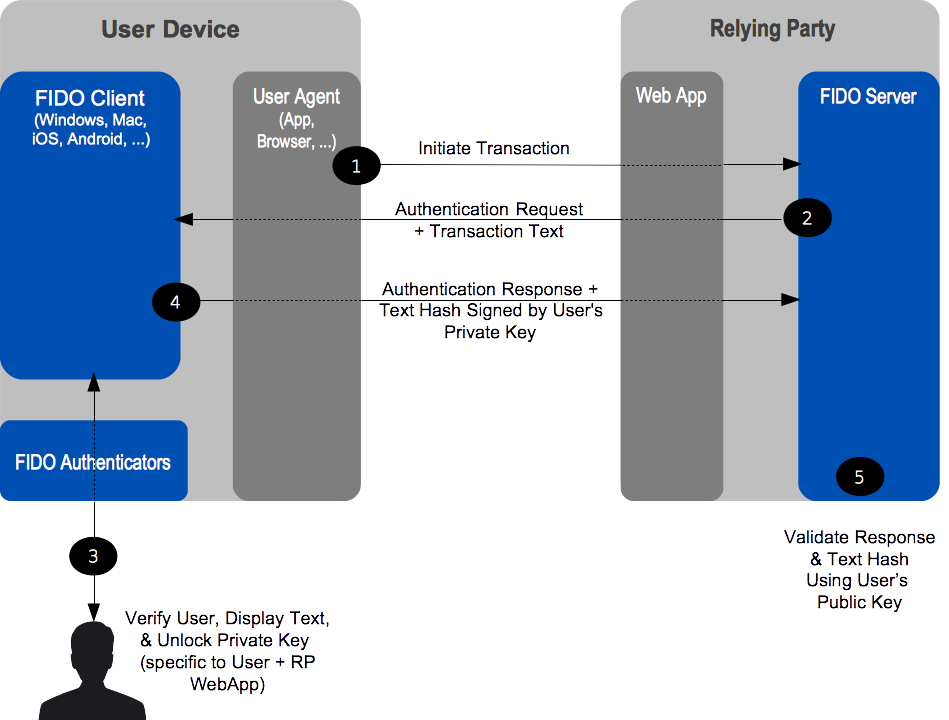 Fig. 4 Confirmation Message Flow
Imagine a situation in which a Relying Party wants the end-user to confirm a transaction (e.g. financial operation, privileged operation, etc) so that any tampering of a transaction message during its route to the end device display and back can be detected. FIDO architecture has a concept of «secure transaction» which provides this capability. Basically if a FIDO UAF Authenticator has a transaction confirmation display capability, FIDO UAF architecture makes sure that the system supports What You See is What You Sign mode (WYSIWYS). A number of different use cases can derive from this capability — mainly related to authorization of transactions (send money, perform a context specific privileged action, confirmation of email/address, etc).
3.6 Authenticator Deregistration
There are some situations where a Relying Party may need to remove the UAF credentials associated with a specific user account in FIDO Authenticator. For example, the user’s account is cancelled or deleted, the user’s FIDO Authenticator is lost or stolen, etc. In these situations, the RP may request the FIDO Authenticator to delete authentication keys that are bound to user account.
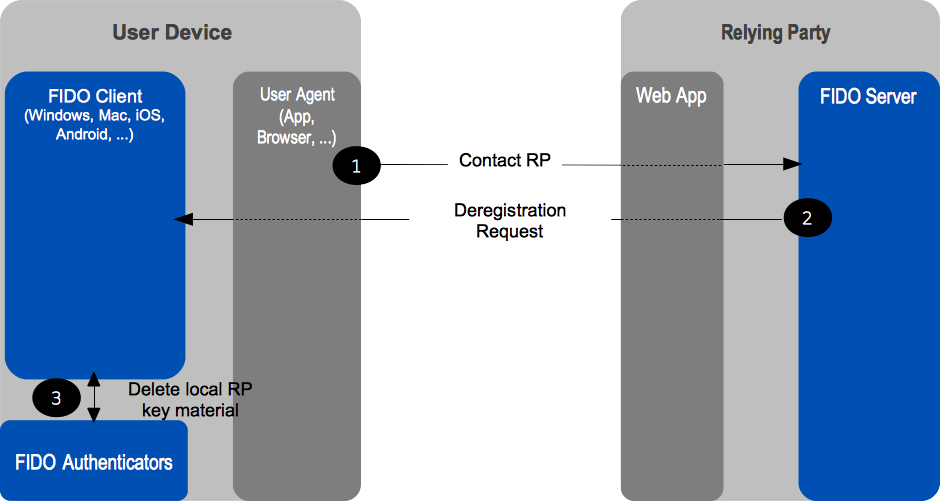 Fig. 5 Deregistration Message Flow
3.7 Adoption of New Types of FIDO UAF Authenticators
Authenticators will evolve and new types are expected to appear in the future. Their adoption on the part of both users and Relying Parties is facilitated by the FIDO architecture. In order to support a new FIDO UAF Authenticator type, Relying Parties need only to add a new entry to their configuration describing the new authenticator, along with its FIDO Attestation Certificate. Afterwards, end users will be able to use the new FIDO UAF Authenticator type with those Relying Parties.
4. Privacy Considerations
This section is non-normative.
User privacy is fundamental to FIDO and is supported in UAF by design. Some of the key privacy-aware design elements are summarized here:
- A UAF device does not have a global identifier visible across relying parties and does not have a global identifier within a particular relying party. If for example, a person looses their UAF device, someone finding it cannot “point it at a relying party” and discover if the original user had any accounts with that relying party. Similarly, if two users share a UAF device and each has registered their account with the same relying party with this device, the relying party will not be able to discern that the two accounts share a device, based on the UAF protocol alone.
- The UAF protocol generates unique asymmetric cryptographic key pairs on a per-device, per-user account, and per-relying party basis. Cryptographic keys used with different relying parties will not allow any one party to link all the actions to the same user, hence the unlinkability property of UAF.
- The UAF protocol operations require minimal personal data collection: at most they incorporate a user’s relying party username. This personal data is only used for FIDO purposes, for example to perform user registration, user verification, or authorization. This personal data does not leave the user’s computing environment and is only persisted locally when necessary.
- In UAF, user verification is performed locally. The UAF protocol does not convey biometric data to relying parties, nor does it require the storage of such data at relying parties.
- Users explicitly approve the use of a UAF device with a specific relying party. Unique cryptographic keys are generated and bound to a relying party during registration only after the user’s consent.
- UAF authenticators can only be identified by their attestation certificates on a production batch-level or on manufacturer- and device model-level. They cannot be identified individually. The UAF specifications require implementers to ship UAF authenticators with the same attestation certificate and private key in batches of 100,000 or more in order to provide unlinkability.
5. Relationship to Other Technologies
This section is non-normative.
OpenID, SAML, and OAuth
FIDO protocols (both UAF and U2F) complement Federated Identity Management (FIM) frameworks, such as OpenID and SAML, as well as web authorization protocols, such as OAuth. FIM Relying Parties can leverage an initial authentication event at an identity provider (IdP). However, OpenID and SAML do not define specific mechanisms for direct user authentication at the IdP.
When an IdP is integrated with a FIDO-enabled authentication service, it can subsequently leverage the attributes of the strong authentication with its Relying Parties. The following diagram illustrates this relationship. FIDO-based authentication (1) would logically occur first, and the FIM protocols would then leverage that authentication event into single sign-on events between the identity provider and its federated Relying Parties (2). 2
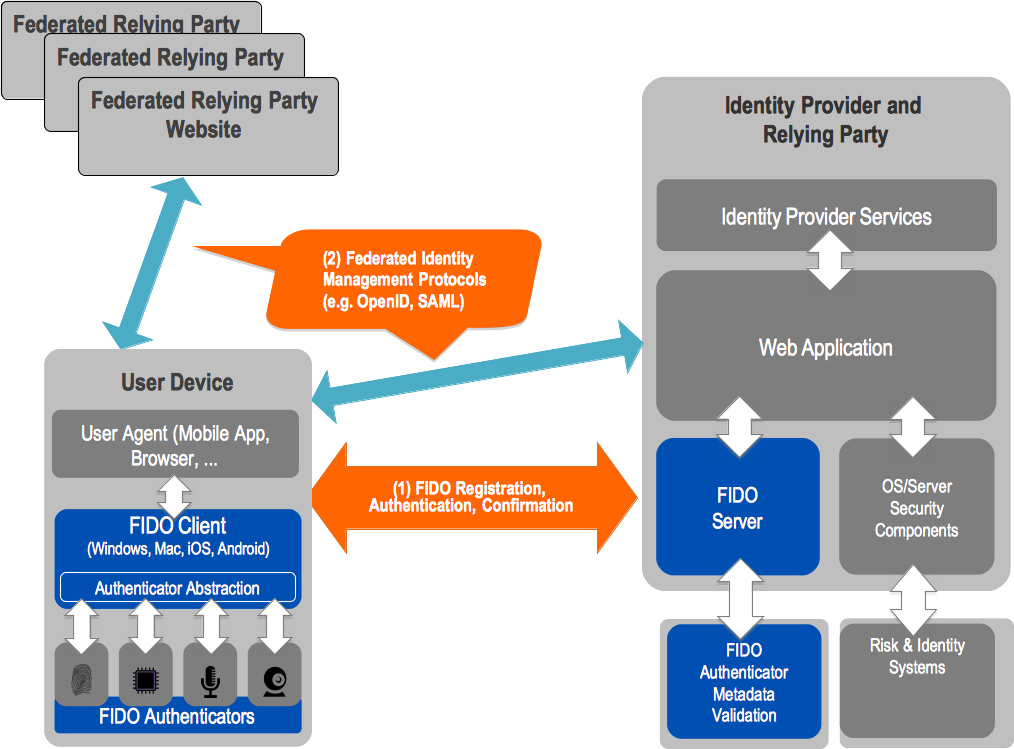 Fig. 6 FIDO UAF & Federated Identity Frameworks
6. OATH, TCG, PKCS#11, and ISO 24727
These are either initiatives (OATH, Trusted Computing Group (TCG)), or industry standards (PKCS#11, ISO 24727). They all share an underlying focus on hardware authenticators.
PKCS#11 and ISO 24727 define smart-card-based authenticator abstractions.
TCG produces specifications for the Trusted Platform Module, as well as networked trusted computing.
OATH, the «Initiative for Open AuTHentication», focuses on defining symmetric key provisioning protocols and authentication algorithms for hardware One-Time Password (OTP) authenticators.
The FIDO framework shares several core notions with the foregoing efforts, such as an authentication abstraction interface, authenticator attestation, key provisioning, and authentication algorithms. FIDO’s work will leverage and extend some of these specifications.
Specifically, FIDO will complement them by addressing:
- Authenticator discovery
- User experience
- Harmonization of various authenticator types, such as biometric, OTP, simple presence, smart card, TPM, etc.
7. Table of Figures
- Fig. 1 FIDO UAF High-Level Architecture
- Fig. 2 Registration Message Flow
- Fig. 3 Authentication Message Flow
- Fig. 5 Deregistration Message Flow
- Fig. 6 FIDO UAF & Federated Identity Frameworks
2. FIM protocols typically convey IdP <-> RP interactions through the browser via HTTP redirects and POSTs.↩
Стандарт беспарольной аутентификации FIDO

Рекомендуем почитать:

Xakep #292. Flipper Zero
В феврале прошлого года сформировался альянс FIDO (Fast IDentity Online) — консорциум технологических компаний, которые собирались создать новый протокол беспарольной онлайновой аутентификации. Не прошло и двух лет, как утверждён первый черновик стандарта.
В консорциум FIDO изначально вошли Agnitio, Infineon Technologies, Lenovo, Nok Nok Solutions, PayPal и Validity. Среди этих компаний известными можно назвать разве что Lenovo, PayPal и Infineon. Казалось бы, что за смешной альянс? Но позже к ним присоединились Microsoft, Google, Mastercard, Visa, Samsung и другие авторитеты. Все они договорились выпускать продукты, совместимые с новым стандартом.

С точки зрения стандартизации, FIDO полностью совместим со многими другими методами аутентификации, такими как модули Trusted Platform (TPM), токены USB Security, Near Field Communication (NFC), одноразовые паролями (OTP) и т.д. Все эти технологии можно использовать для замены обычному текстовому паролю по протоколу FIDO.
Два утверждённых варианта FIDO предусматривают аутентификацию без пароля (UAF) или двухфакторную аутентификацию (U2F).
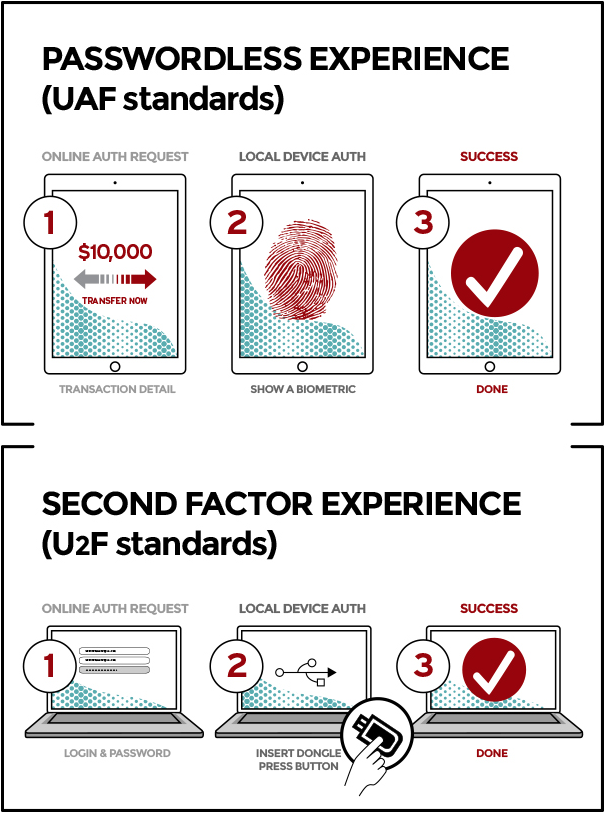
В первом случае авторизация пользователя происходит по протоколу Universal Authentication Framework (UAF), когда пользователь регистрирует своё устройство в сервисе, используя различные способы аутентификации, в том числе биометрические.
Во втором случае действует протокол Universal Second Factor (U2F), когда сервис добавляет к действующей парольной системе дополнительный фактор аутентификации, например, пинкод.
Особенность FIDO является то, что система может осуществлять аутентификацию на основе сверки оборудования. Уникальные цифровые идентификаторы аппаратного обеспечения, установленного у пользователя, тоже могут служить аутентификатором. Если пользователь разрешит, то идентификатор оборудования будет автоматически использоваться вместо стандартного текстового пароля.
fido uaf client что это за программа на андроид
FIDO UAF Client и FIDO UAF ASM — что это за программы на Андроид?
 Всем хеллоу Сегодня мы будем разбираться сразу с двумя похожими программами — FIDO UAF Client и FIDO UAF ASM, вы их можете встретить на Андроиде, например после обновления прошивки. И как положено непонятным прогам — они могут кушать батарею, нагружать тело, и при это для чего они нужны, какую работу выполняют — неизвестно
Начал искать. На форуме 4PDA один юзер пишет, что он у себя заморозил работу многих приложений, в списке есть в том числе и FIDO UAF Client и FIDO UAF ASM. Для заморозки/отключения он использовал приложение Package Disabler (после установки значок приложение будет называться вроде Super Lock Package).
FIDO UAF Client имеет идентификатор com.huawei.fido.uafclient, а FIDO UAF ASM — com.huawei.hwasm, и вот на другом сайте читаю что приложения необходимы для многофакторной аутентификации на сайтах.
То есть как я понимаю эти приложения могут принимать участие в.. авторизации на сайтах? Пока точно неизвестно
А вот собственно и два этих приложения:

В FIDO UAF есть слово UAF, узнал, что это означает Universal Authentication Framework — некий универсальный аутентификационный фреймворк для биометрической аутентификации.
Один человек написал — FIDO UAF Client это клиент протокола FIDO. Тогда возможно второе приложение ASM — это уже относится к аутентификации? У вас на телефоне нет случайно.. датчика отпечатки пальцев там? Или датчика сетчатки глаза.. просто сейчас такие новые технологии..
Можно ли отключить эти приложения?
Еще один человек написал что он эти два приложения удалил и после смартфон работает нормально без приколов:

А вот ребята пример того как FIDO UAF ASM может прилично кушать батарею телефона:

Хотите верьте, хотите нет, но на форуме 4PDA я снова нашел инфу о том что FIDO UAF Client и FIDO UAF ASM можно вручную удалить без последствий.
Итоговые мысли
В общем ребята. Информации мало. Кое-что удалось найти, и кажется что.. в итоге можно предположить что это за приложения.
Еще вы можете в телефоне найти такое как U2F (Universal 2nd Factor) — это какой-то открытый бездрайверный протокол для двухфакторной аутентификации.
Ссылки по теме, если хотите углубиться в это все дело, более детальнее разобраться.. у меня уже просто нет сил, но если у вас есть желание, то пожалуйста:
На этом все господа. Надеюсь мне удалось оказать информационную помощь А теперь прощайте
[Советы] «Липосакция» Android + MIUI 10 или отключаем ненужное
Рад всех приветствовать!
Хотел рассказать о своём опыте облегчения жизни устройству, заключающееся в отключении мне не нужных приложений, сервисов и т. п.
Возможно, кому–либо это поможет.Пост постараюсь поддерживать в актуальном состоянии. С задержкой от «нововведения» минимум на сутки, так как надо сначала самому оценить влияние любого, вновь отключаемого приложения, а уж потом писать.
Правда, приходится не забывать запускать его каждый раз при перезапуске аппарата, так как с редактированием init.qcom.rc и (или) default.prop у меня лёгкая проблема в виде бутлупа ��
А дальше итерационно…
В Titanium Backup приложение морозится, удаляются его данные. Перезагрузка в TWRP, Очистка → Выборочная очистка → Dalvik/ART cache + cache → перезагрузка в ОС, ожидание, Titanium Backup, …На следующей странице (оглавление вверху) что было заморожено с пояснениями по поводу приложений (что знал и удалось найти в сети). Удалил без сожаления facebook, MGRSVendorApp, PartnerNetflix…
Установщик пакетов из GApps’ов ( com.google.android.packageinstaller ) удалять нельзя! Морозить тоже. Будет лёгкий кирпичик. Скорее всего, возврат /data/system/packages.xml проблему решит, но не факт.
На текущий момент мой R5A жив-здоров и за весь день (05:00 ÷ 21:00) съедает 20 ÷ 25 процентов заряда (по данным BetterBatteryStats до 1,6%/час), и это за рабочий день, когда звонки, СМС и почта + нет WiFi, LTE не работает и сидишь на 3G. Сейчас суббота, за 16 часов при подключенном WiFi расход 10 (десять) процентов батареи. Как по мне вполне хороший результат. Некоторые приложения ругаются на то, что им нужны google play services (штатный ассистент, музыка, Авито, Вайбер), но при этом вполне себе работают и не докучают вылетами. На четвёртой странице скриншоты… Они местами длинные очень И на экране компа смотрятся непривычно.
Чтобы на 10.1.1.0.NCKMIFI нормально работал TitaniumBackup до первого использования стоит поставить busybox. До этого я голову себе сломал, пытаясь понять почему же не все версии запускаются (особенно новые).
NB! После проведённых манипуляций аппарат до заводских настроек не возвращается. Только полная перепрошивка. Связано это с ГАппсами, насколько я смог понять.
«The Compatibility Test Suite (CTS) is a free, commercial-grade test suite, available for download. The CTS represents the «mechanism» of compatibility.
The CTS runs on a desktop machine and executes test cases directly on attached devices or an emulator. The CTS is a set of unit tests designed to be integrated into the daily workflow (such as via a continuous build system) of the engineers building a device. Its intent is to reveal incompatibilities early on, and ensure that the software remains compatible throughout the development process.»
«CTS uses these apps to test privileges and permissions. To pass the tests, you must preload the apps into the appropriate directories on the system image without re-signing them.»
Что такое двухфакторная аутентификация и протокол FIDO U2F
Авторизуйтесь
Что такое двухфакторная аутентификация и протокол FIDO U2F
Миллионы логинов и паролей к почтовым и различным социальным сервисам появляются в открытом доступе чуть ли не каждый месяц. Это лучше любого эксперта по информационной безопасности свидетельствует нам о том, что пароль, даже сложный, уже не является актуальным средством защиты.
Меняются предпочтения пользователей в выборе того или иного сервиса. Если раньше выбор падал на наиболее удобный вариант, то теперь — на максимально защищённый.
Для обеспечения безопасности изобрели мультифакторную аутентификацию (MFA) и ее упрощенный вариант – двухфакторную (2FA): первый рубеж защиты – логин и пароль, т.е. то, что знает и помнит пользователь, а второй – это то, что есть только у этого пользователя: SMS, Email, one-time password (OTP/TOTP/HOTP) приложения, криптографические токены, биометрические данные. Наиболее дешёвые и удобные способы — приложение и SMS. Вводим логин и пароль на сайте, после чего получаем на мобильный телефон SMS с кодом. Вводим код, и у нас есть доступ к данным.
Мир 2FA сегодня
С момента появления 2FA прошло уже достаточно много времени, большинство крупных интернет-сервисов широко ее используют. 2FA «шагнула» в финтех: невозможно уже себе представить онлайн платежи без подтверждений и авторизации, например, через SMS.
И, как ни странно, при таком широком распространении 2FA у пользователей до сих пор крадут и компрометируют учетные записи. Попробуем разобраться в недостатках методов 2FA и их уязвимостях.
Сегодняшние 2FA-решения не в состоянии надежно защитить пользователя, зачастую сложны в применении, дороги и не универсальны.
FIDO U2F
В 2007 году PayPal попыталась внедрить 2FA с отправкой OTP через SMS. Несмотря на то, что на тот момент этот способ был прогрессивным и достаточно безопасным, темпы его внедрения были катастрофично низки. Большинство пользователей просто проигнорировало возможность увеличить безопасность своих данных.
Исследуя возможности по внедрению биометрических технологий, PayPal совместно с Validity Sensors, первыми озвучили мысль о том, что пора создать отраслевой стандарт, который бы поддерживал все аппаратные средства аутентификации. В 2013 году был основан FIDO (Fast IDentity Online) — альянс, ставящий себе задачей именно создание такого стандарта. Множество крупных компаний, таких как Google, ARM, Bank of America, Master Card, Visa, Microsoft, Samsung, LG, Dell и RSA стали его членами.
На данный момент, основные цели, которые FIDO ставит перед собой — это простые в использовании, безопасные, приватные и стандартизированные решения.
Результатом деятельности FIDO пока стали два стандарта: U2F (Universal Second Factor) и UAF (Universal Authentication Framework для биометрической аутентификации).
Что из себя представляет U2F?
U2F — это открытый, бездрайверный протокол, изначально разрабатываемый компаниями Google и Yubico и использующий для двухфакторной аутентификации специальные USB, NFC, Bluetooth LE устройства или SIM-карту (спецификации еще в разработке), которые хранят ключи и самостоятельно выполняют криптографические операции.
На данный момент поддержка U2F реализована в браузерах Chrome и Edge, а также в OS Windows 10.
Протокол основан на challenge-response аутентификации с помощью электронной цифровой подписи.
Со стороны пользователя
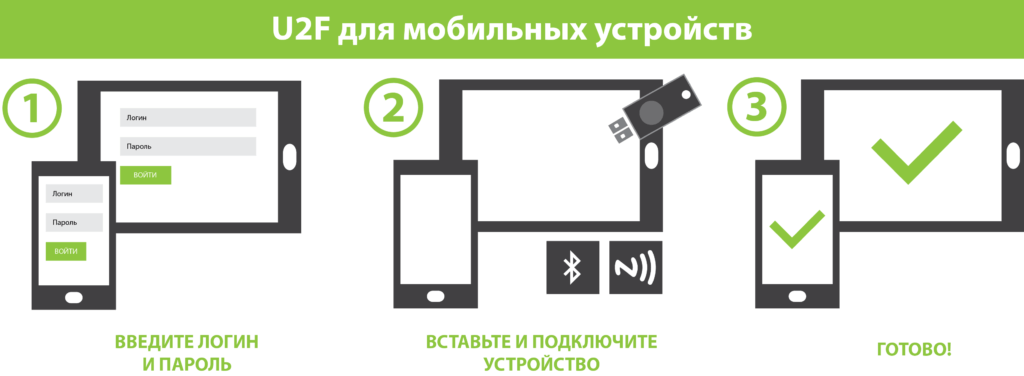
С точки зрения пользователя работа с протоколом достаточно тривиальна. Пользователь вводит логин и пароль, вставляет в компьютер USB (или использует Bluetooth или NFC) U2F устройство (нажимает на нем кнопку, вводит пин-код, проходит биометрическую проверку или не делает ничего) и успешно проходит аутентификацию.
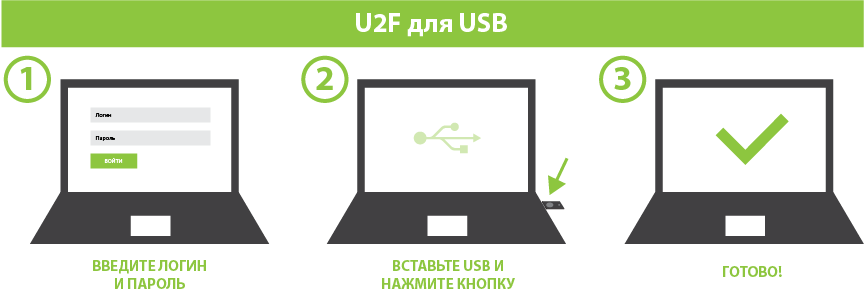
Углубление в протокол U2F
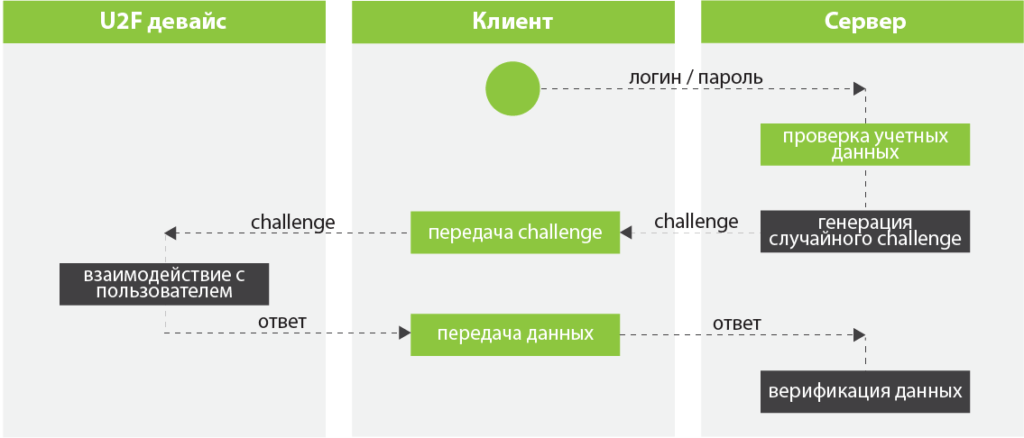
Взаимодействие с U2F-клиентом (например, браузером или Windows 10) проходит следующим образом:
Рассмотрим работу протокола подробнее.
Пользователь вводит логин и пароль, сервер проверяет учетные данные и, если они верны, генерирует случайный challenge и отправляет его клиентскому ПО, которое, в свою очередь, передает его U2F-устройству. U2F-устройство ожидает участия пользователя для подтверждения дальнейших операций (как говорилось выше, например, нажатия кнопки на устройстве) и затем, возвращает клиентскому ПО подписанный challenge, который передается дальше на сервер для сверки подписи.
Для защиты от фишинга клиентское ПО добавляет к challenge origin URL, TLS channel ID перед отправкой U2F устройству, а сервер, после получения подписи, сверяет полученные данные.
Чтобы не подписывать все подряд одной парой ключей (что, естественно приведет от компрометации одного аккаунта какого-либо сервиса до компрометации сразу всех аккаунтов, использующих данное U2F-устройство), при регистрации сервер передает вместе с challenge параметры application ID и random seed, на основе которых U2F-устройство и генерирует уникальную пару Registering Dependent Keys. Причем ее способ генерации не описан в протоколе и полностью отдан на усмотрение изготовителя устройства.
За счет того, что пара ключей уникальна для каждой регистрации, становится возможным использовать совместно одно U2F-устройство для множества аккаунтов.
Для того, чтобы защитить U2F-устройство от клонирования, стандарт предусматривает в нем встроенный счетчик. Каждая подпись и регистрация увеличивает состояние счетчика на единицу. Состояние счетчика подписывается и возвращается зависимой стороне вместе с response. Если U2F-устройство будет клонировано, то состояние счетчика клонированного устройства будет меньше, чем состояние счетчика оригинального устройства, что вызовет ошибку во время верификации.
Для того, чтобы избежать небезопасных реализаций, каждое U2F-устройство имеет встроенный сертификат, гарантирующий клиентскому ПО и серверу, что оно является аппаратным и сертифицировано альянсом FIDO.
В ситуации, когда пользователь находится вдали от своего устройства, вредоносное программное обеспечение может попытаться атаковать устройство. Для защиты от этого U2F-стандарт требует, чтобы все операции подписания challenge активировались пользователем. Т.е. пользователь обязан подтвердить свое решение на двухфакторную аутентификацию. Как уже говорилось выше, это может быть простое нажатие на кнопку, ввод пин-кода, снятие отпечатка пальца или что-то другое.
ЗаключениеU2F — это хорошо продуманная, сильная, открытая и стандартизированная технология. Из крупных внедрений U2F можно отметить сервисы Google, Github, Dropbox, а также государственные сайты Великобритании.
Важно помнить, что U2F, как и любая другая технология двухфакторной аутентификации, должна использоваться именно как второй фактор.
Об авторе
Максим Советкин окончил механико-математический факультет Белорусского государственного университета, работает в Itransition уже более семи лет. Сегодня он – ведущий системный инженер, отвечает за проектирование, развитие и поддержку корпоративной ИТ-инфраструктуры.
FIDO: биометрическая технология, которая защитит ваши пароли
Наиболее популярным способом обеспечить защиту профиля пользователя на сайте сегодня является двухфакторная аутентификация: вы вводите пароль, и на ваш телефон приходит смс с кодом, который нужно ввести в еще одно поле. Однако даже эта технология сегодня не считается идеальной.

На помощь приходят биометрические технологии — в частности, технология, называемая FIDO.
Как работает FIDO
Природа паролей побуждает нас быть ленивыми. Длинные, сложные пароли (самые безопасные) для нас сложнее всего создать и запомнить. Поэтому многие берут какой-то простой пароль, немного его «дорабатывают» и пользуются — это огромная проблема, потому что у хакеров давно есть списки популярных паролей. И хакеры автоматизируют атаки путем «заполнения учетных данных», пытаясь найти, что именно вы добавили к вашему «стандартному» паролю.
FIDO работает на основе распознавания лиц и отпечатков пальцев — это умеют многие современные смартфоны.
«Пароль — это то, что вы знаете. Устройство — это то, что у вас есть. Биометрия — это то, чем вы являетесь. Мы движемся к тому, что пароль всегда будет при вас — и нужда в его запоминании просто отпадет», — сказал Стивен Кокс, главный архитектор безопасности SecureAuth.
FIDO, или Fast Identity Online, стандартизирует использование аппаратных устройств (сканер отпечатков пальцев, камеры) для создания уникальной «биометрической карточки», которая и позволит пользователю регистрироваться и заходить на сайты.
Подделать отпечатки пальцев или лицо намного сложнее и дороже — так что, по мнению Эндрю Шикиара, исполнительного директора FIDO Alliance, «… в течение следующих пяти лет у каждой крупной потребительской интернет-услуги будет альтернативная регистрация без пароля».
FIDO также выгоден и компаниям, поскольку устраняет опасения по поводу утечек данных (в частности, конфиденциальной информации клиентов). Похищенные «биометрические карточки» не позволят хакерам войти в систему, потому что их надо не просто ввести, но и подтвердить.
Вот один из способов входа на основе FIDO без паролей. Вы открываете страницу входа в систему на своем ноутбуке, вводите имя пользователя, нажмите кнопку, а затем пользуетесь биометрической аутентификацией ноутбука, например, Touch ID от Apple или Windows Hello. Если ваша система не оснащена нужными устройствами, вы можете подключить по Bluetooth телефон — и точно так же использовать FIDO.
Технология готова — готовы ли мы?
Большим преимуществом этого подхода является то, что устройство безопасности FIDO (телефон, ноутбук, иной гаджет) не будут работать с фальшивыми сайтами, потому что ключи безопасности регистрируются только для сайтов-оригиналов.
«Вместо того, чтобы «грузить» пользователя проверкой сайта, мы переложили ее на систему», — отметил Марк Ришер, руководитель отдела аутентификации в Google, в своем блоге.
В компании уже более 10 000 сотрудников перешли на подобный способ, что сократило число взломов их аккаунтов практически до нуля.
Однако у некоторых экспертов есть опасения: а захотят ли люди разрешать использование своих данных? Одно дело — цифры и буквы, а другое — отпечатки пальцев и снимки лица.
«Имена пользователей и пароли по-прежнему будут наиболее распространенным вариантом. Пока есть выбор и пока популярна тема «тотального контроля» на основе биометрических данных, люди будут работать по старинке», — отмечают они.
Добавьте «Правду.Ру» в свои источники в Яндекс.Новости или News.Google, либо Яндекс.Дзен
Быстрые новости в Telegram-канале Правды.Ру. Не забудьте подписаться, чтоб быть в курсе событий.
Защитный ключ Fido на телефоне андроид: что это
Мы живем в эпоху, когда необходимо постоянно заботиться о личной безопасности. Но, а также потому, что мы живем в век цифровых технологий, в первую очередь, мы должны позаботиться о безопасности наших онлайн-данных, на нашем смартфоне, онлайн-банкинге, электронной почте и так далее. А в сегодняшней статье мы поговорим о ключе безопасности Fido, а также о двухфакторной аутентификации как более безопасном способе защиты ваших данных.
Что же такое FIDO, двухфакторная аутентификация, как это работает на устройствах
Учитывая, насколько далеко продвинулась технология, что почти каждый теперь имеет возможность носить смартфон в кармане, что сравнимо с мощными компьютерами и важными носителями данных. Теперь вы можете сделать любой смартфон своим ключом к двухфакторной аутентификации. А если вы хотите максимально обезопасить себя, то используйте его для всех своих личных онлайн аккаунтов.

Наиболее популярными и уязвимыми целями являются службы Google, которые неоднократно подвергались хакерским атакам. Но для защиты своих клиентов разработчики сделали специальные способы защиты в виде ключей за несколько шагов. И если пользователь хочет получить доступ к своим учетным записям, то ему определенно нужно пройти все эти этапы.
Конечно, вы можете использовать физический ключ, но на самом деле это приносит дополнительные неудобства. Поэтому лучшее решение — это сделать свой смартфон ключом. То есть ваш iPhone или Android будет своего рода верификатором всех попыток доступа к вашим устройствам. И вы сами подтвердите эти попытки или отвергнете их. Самым популярным ключом безопасности является FIDO. Это новый стандарт U2F Open аутентификации, разработанный специально для Android-устройств.

Для кого доступны эти возможности
Как правило, все эти меры безопасности были придуманы для наиболее уязвимых людей, а именно:
Но, все эти функции теперь доступны для всех, так что это никогда не повредит сделать ваш счет неприступной крепости.

Конечно, для того, чтобы установить все эти меры безопасности на свой смартфон — необходимо, чтобы на вашем устройстве была установлена современная операционная система, как для Android, так и для iPhone.
Как настроить
Если вы достаточно смелы, чтобы выполнить все эти шаги, то вам следует зайти в настройки телефона под защитой, в аккаунт Google, а затем в двухфакторную аутентификацию. Тогда просто добавь ключ-карту и ты можешь идти.
FIDO UAF Client и FIDO UAF ASM — что это за программы на Андроид?
Всем хеллоу Сегодня мы будем разбираться сразу с двумя похожими программами — FIDO UAF Client и FIDO UAF ASM, вы их можете встретить на Андроиде, например после обновления прошивки. И как положено непонятным прогам — они могут кушать батарею, нагружать тело, и при это для чего они нужны, какую работу выполняют — неизвестноНачал искать. На форуме 4PDA один юзер пишет, что он у себя заморозил работу многих приложений, в списке есть в том числе и FIDO UAF Client и FIDO UAF ASM. Для заморозки/отключения он использовал приложение Package Disabler (после установки значок приложение будет называться вроде Super Lock Package).
FIDO UAF Client имеет идентификатор com.huawei.fido.uafclient, а FIDO UAF ASM — com.huawei.hwasm, и вот на другом сайте читаю что приложения необходимы для многофакторной аутентификации на сайтах.
То есть как я понимаю эти приложения могут принимать участие в.. авторизации на сайтах? Пока точно неизвестно
А вот собственно и два этих приложения:
В FIDO UAF есть слово UAF, узнал, что это означает Universal Authentication Framework — некий универсальный аутентификационный фреймворк для биометрической аутентификации.
Один человек написал — FIDO UAF Client это клиент протокола FIDO. Тогда возможно второе приложение ASM — это уже относится к аутентификации? У вас на телефоне нет случайно.. датчика отпечатки пальцев там? Или датчика сетчатки глаза.. просто сейчас такие новые технологии..
Можно ли отключить эти приложения?
Еще один человек написал что он эти два приложения удалил и после смартфон работает нормально без приколов:
А вот ребята пример того как FIDO UAF ASM может прилично кушать батарею телефона:
Хотите верьте, хотите нет, но на форуме 4PDA я снова нашел инфу о том что FIDO UAF Client и FIDO UAF ASM можно вручную удалить без последствий.
Итоговые мысли
В общем ребята. Информации мало. Кое-что удалось найти, и кажется что.. в итоге можно предположить что это за приложения.
В общем смотрите:
- Предположительно что FIDO UAF Client это клиент FIDO (Fast IDentity Online). Что такое FIDO сложно понять, это вроде какой-то альянс, который создан для решения проблем поддержки строгой аутентификации в интернете
- FIDO UAF ASM относится напрямую к аутентификации, возможно это какой-то модуль или плагин.
- Отключить эти два приложения можно, но если вы знаете как — сделайте перед этим что-то вроде бэкапа Андроида.
- Я не советую сразу бежать и удалять приложение. Сперва его попробуйте отключить. Не получается? Тогда заморозьте. И если уж вообще никак — то удаляйте, но делайте это на свой страх и риск. Для отключения, заморозки и удаления я советую использовать Titanium Backup.
- В интернете пишут что приложения можно отключить также при помощи Package Disabler.
Еще вы можете в телефоне найти такое как U2F (Universal 2nd Factor) — это какой-то открытый бездрайверный протокол для двухфакторной аутентификации.
Ссылки по теме, если хотите углубиться в это все дело, более детальнее разобраться.. у меня уже просто нет сил, но если у вас есть желание, то пожалуйста:
На этом все господа. Надеюсь мне удалось оказать информационную помощь А теперь прощайте