CSS Border

CSS border property is used to set the border of an HTML element.
The border property is shorthand for three sub-properties that define the style, color, and width of a border.
border-width ��
Sets the thickness of the border. Defaults to medium if absent.
OR
border-style ��♀️
Sets the style of the border. Defaults to none if absent.
color ��
Sets the color of the border. Defaults to currentcolor if absent.
CSS Individual Borders
The border sub-properties and property can also be applied to an individual side of a web element.
border-inline ✣
This maps to a physical border style depending on the element’s writing mode, directionality, and text orientation
border-inline-start-style/border-inline-end-style ✣
The border-inline-start-style CSS property defines the style of the logical inline start/end border of an element, which maps to a physical border style depending on the element's writing mode, directionality, and text orientation.
border-block ▀
The border-block-end CSS property is a shorthand property for setting the individual logical block-end border property values in a single place in the style sheet.
border-image ��
The border-image CSS property draws an image around a given element. It replaces the element’s regular border.
- border-image-outset
- border-image-repeat
- border-image-slice
- border-image-source
- border-image-width
1️. border-image-outset
The border-image-outset CSS property sets the distance by which an element's border image is set out from its border box.
The distance of the border image from the element’s outside edge. Up to four values may be specified.
The parts of the border image that are rendered outside the element’s border box with border-image-outset do not trigger overflow scrollbars and don't capture mouse events.
The border-image-outset property may be specified as one, two, three, or four values.
Each value is a length/number. Negative values are invalid and will cause the border-image-outset declaration to be ignored.
2️. border-image-repeat
The border-image-repeat CSS property defines how the edge regions of a source image are adjusted to fit the dimensions of an element’s border image.
stretch
The source image’s edge regions are stretched to fill the gap between each border.
repeat
The source image’s edge regions are tiled (repeated) to fill the gap between each border. Tiles may be clipped to achieve the proper fit.
round
The source image’s edge regions are tiled (repeated) to fill the gap between each border. Tiles may be stretched to achieve the proper fit.
space
The source image’s edge regions are tiled (repeated) to fill the gap between each border. Extra space will be distributed in between tiles to achieve the proper fit.
3️. border-image-slice
The border-image-slice CSS property divides the image specified by border-image-source into regions. These regions form the components of an element’s border image.
The slicing process creates nine regions in total: four corners, four edges, and a middle region. Four slice lines, set a given distance from their respective sides, control the size of the regions.
- Zones 1–4 are corner regions. Each one is used a single time to form the corners of the final border image.
- Zones 5–8 are edge regions. These are repeated, scaled, or otherwise modified in the final border image to match the dimensions of the element.
- Zone 9 is the middle region. It is discarded by default, but is used like a background image if the keyword fill is set.
The border-image-repeat, border-image-width, and border-image-outset properties determine how these regions are used to form the final border image.
4️. border-image-source
The border-image-source CSS property sets the source image used to create an element’s border image.
5️. border-image-width
The border-image-width CSS property sets the width of an element’s border image.
Created few border & border-image example, Checkout the link in @codepen:
Все о свойстве border
Все знакомы с css параметром border, но есть ли вещи, которые мы не знаем о нем?
Основы
Всем знакомо такое использование:
Это однопиксельная сплошная рамка. Немного меняем синтаксис:
Например у параметра border-width есть три параметра: thin, medium, thick: 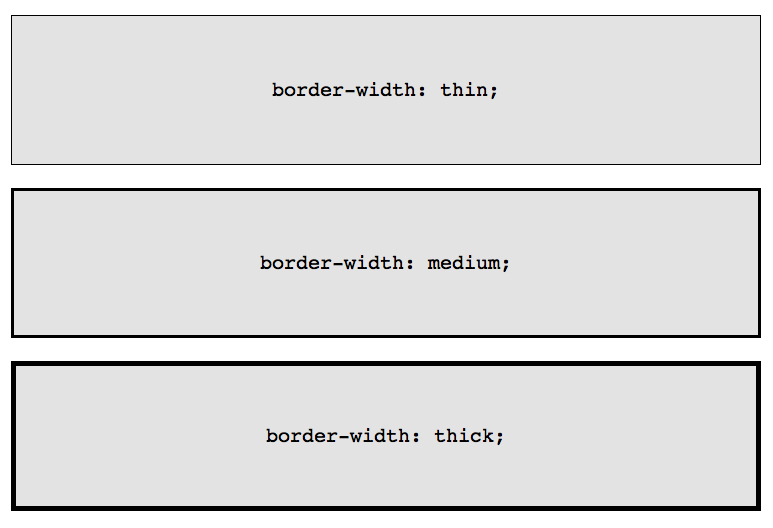
Если необходимо менять цвет границы при наведении на объект:
Но так это реализовать проще и правильнее:
Border-Radius
border-radius — это новый параметр CSS3 для отображения закругленных углов, который корректно работает во всех современных браузерах, за исключением Internet Explorer 8 (и более старых версий). 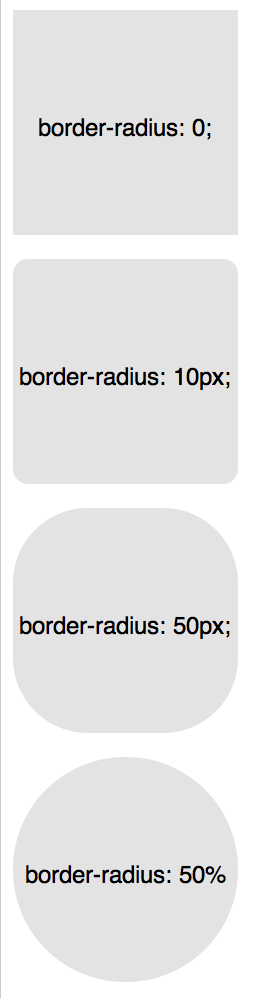
Для каждого угла можно назначить свое закругление:
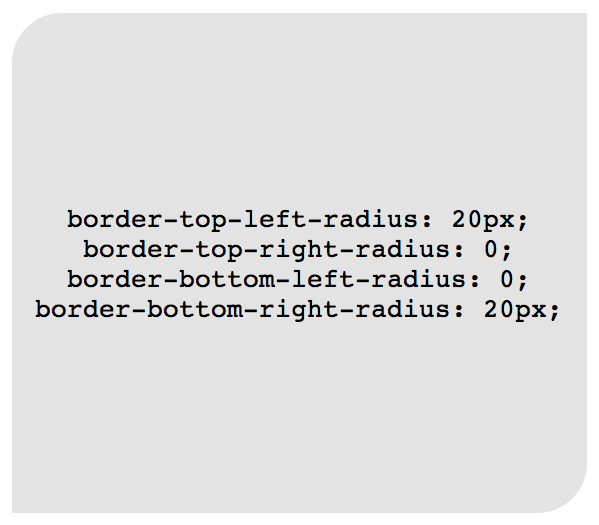
В приведенном примере необязательно назначать «0» border-top-right-radius и border-bottom-left-radius, если они не наследуют значения, которые должны быть изменены.
Всю конструкцию можно сжать в одну строку:
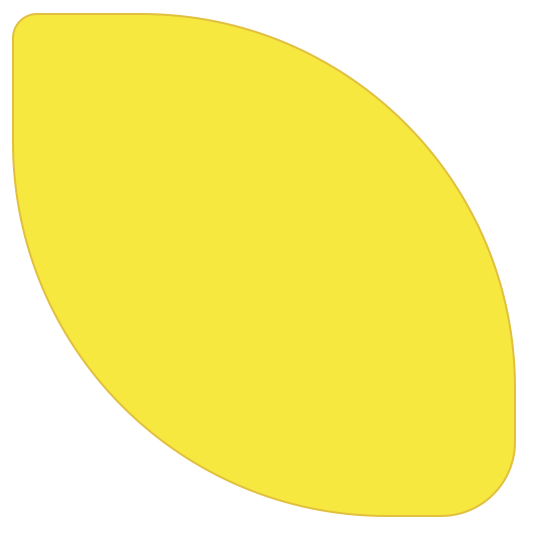
А вот как можно нарисовать лимон средствами CSS:
Здесь описаны самые простые и популярные примеры применения параметра border. Перейдем к более сложным.
Несколько границ
Border-Style
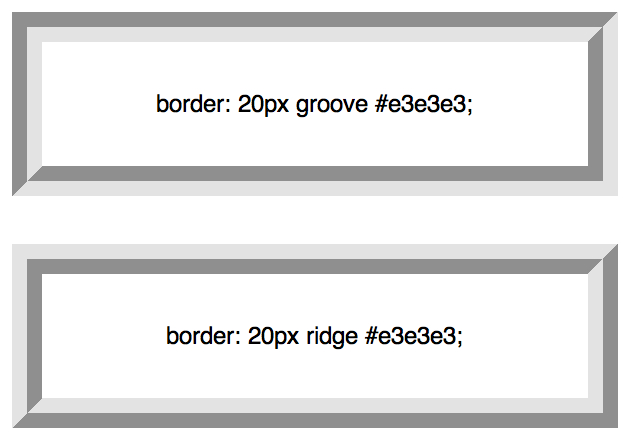
solid, dashed, and dotted — самые популярные значения параметра border-style, но давайте рассмотрим другие, например, groove and ridge.
Или более подробно:
Outline
Самый популярный способ создания двойной границы — это параметр outline:

Этот способ отлично работает, но ограничен созданием двойной рамки. Если вам необходимо отобразить несколько границ элемента, то необходимо использовать другую технику.
Псевдоэлементы
Можно использовать такую конструкцию:
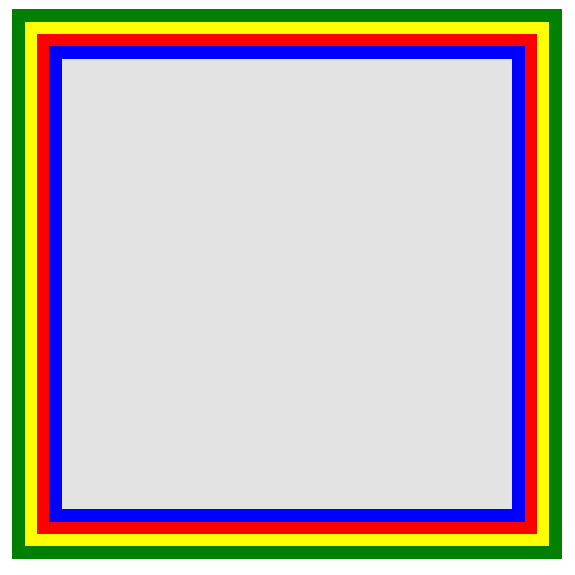
Возможно это не самое элегантное решение, однако оно работает
Box-Shadow
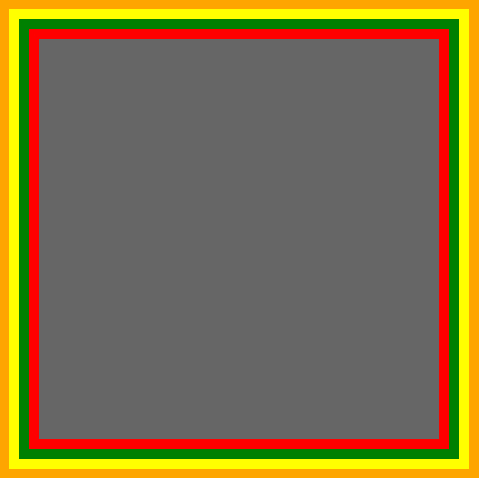
Еще один способ, с применением теней:
Изменение углов
К параметру border-radius можно применять два значения, используя «/», например:
Это то же самое, что:
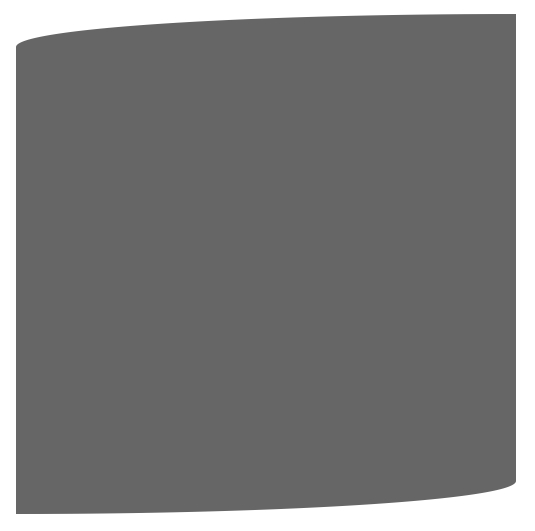
Эта техничка бывает полезна, если необходимо имитировать искривление, а не закругление. Например, так можно получить эффект скрученной бумаги:
CSS фигуры
В следующих примерах предполагается такая разметка:
И такой базовый css:
Наиболее частым примером использования CSS фигур является отображение стрелок. Чтобы понять, как это работает, необходимо разобраться с использованием отдельного border-color для каждой стороны и установкой значения «0» для width и height:
Или то же самое:
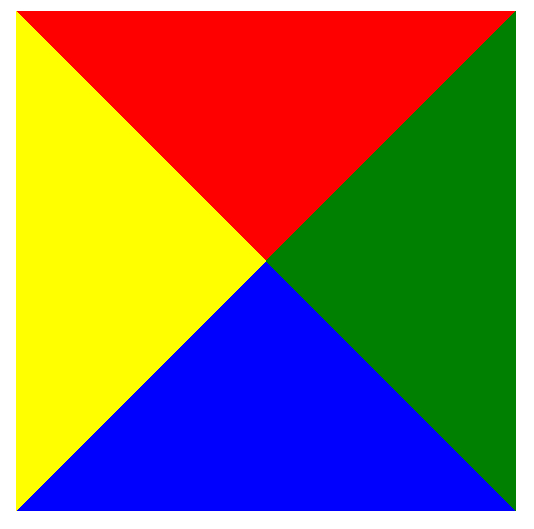
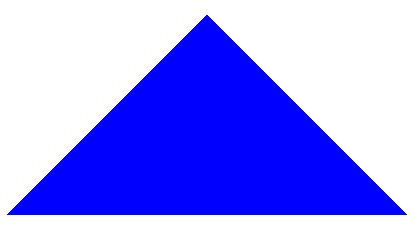
А теперь оставляем только синий треугольник:
Создание Speech Bubble
Наша базовая разметка:
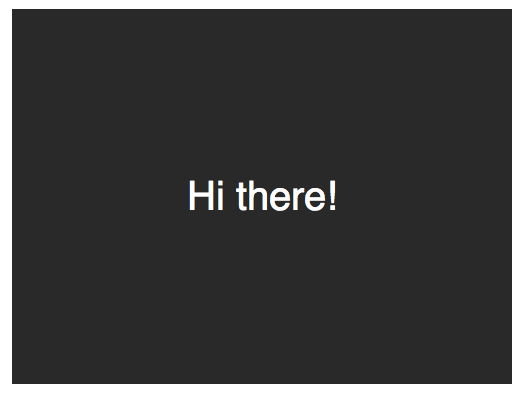
Теперь нужно расположить стрелку-треугольник в нужном месте. Вот наш цветной квадратик:
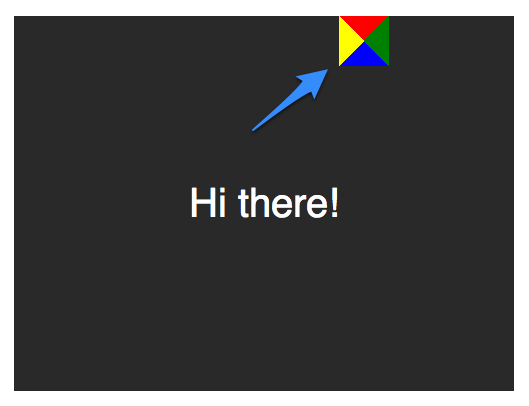
Оставляем только четверть квадратика:
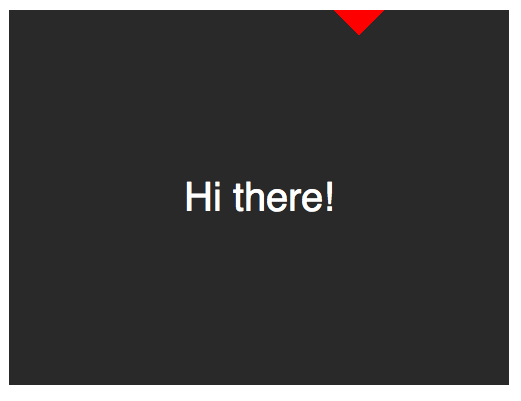
Теперь перемещаем ниже и закрашиваем:
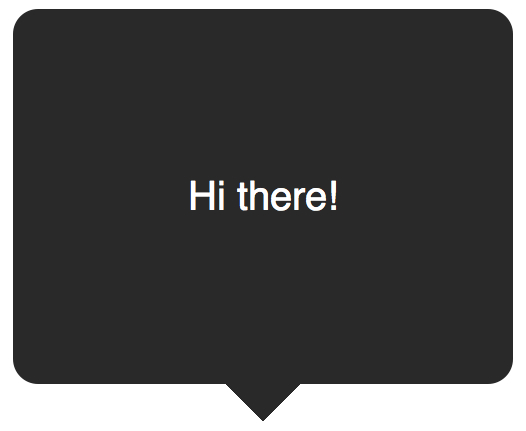
Примеры применения:
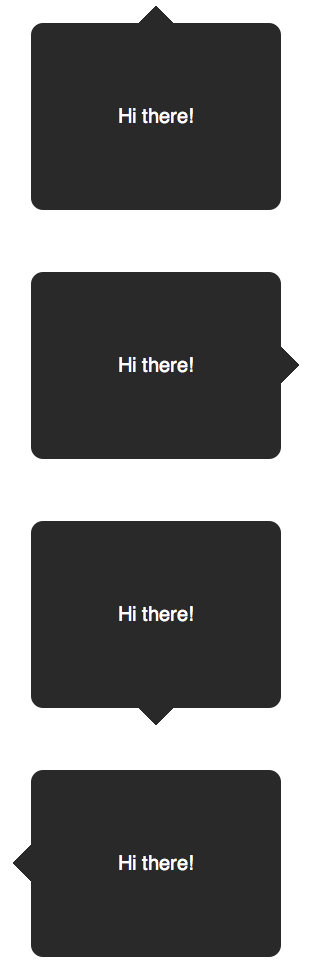
Вертикальное центрирование текста
минус использования line-height при вертикальном центрировании в ограничении текста одной строкой. Для решения этой проблемы, можно применить display: table к нашему Speech Bubble и display: table-cell к тексту:
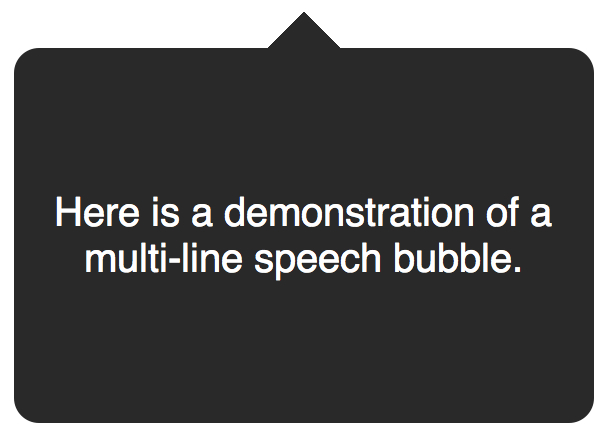
Еще один пример нестандартного использования границ:
Border edge line в чем разница
Это однопиксельная сплошная рамка. Немного меняем синтаксис:
Например у параметра border-width есть три параметра: thin, medium, thick: 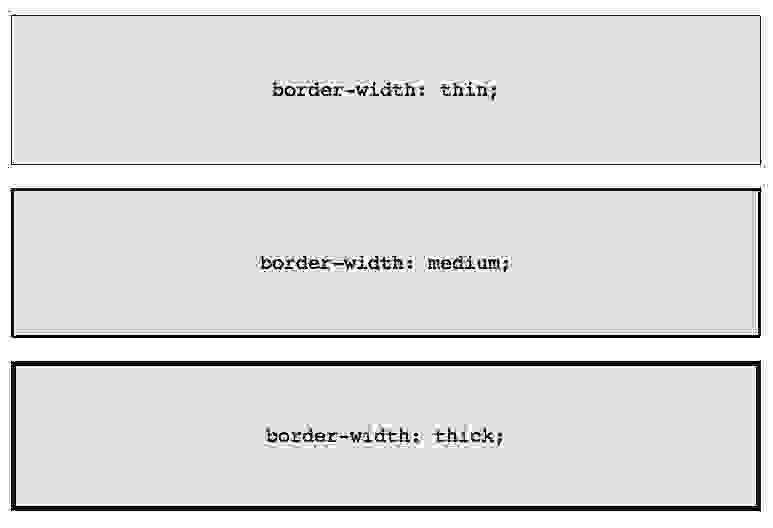
Если необходимо менять цвет границы при наведении на объект:
Но так это реализовать проще и правильнее:
Border-Radius
border-radius — это новый параметр CSS3 для отображения закругленных углов, который корректно работает во всех современных браузерах, за исключением Internet Explorer 8 (и более старых версий). 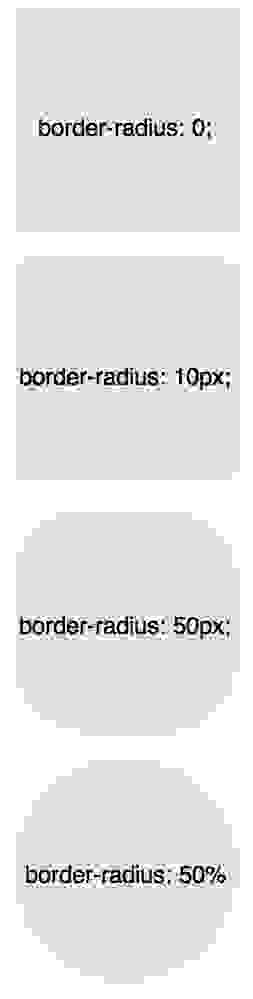
Для каждого угла можно назначить свое закругление:

В приведенном примере необязательно назначать «0» border-top-right-radius и border-bottom-left-radius, если они не наследуют значения, которые должны быть изменены.
Всю конструкцию можно сжать в одну строку:
А вот как можно нарисовать лимон средствами CSS:

Здесь описаны самые простые и популярные примеры применения параметра border. Перейдем к более сложным.
Несколько границ
Border-Style
solid, dashed, and dotted — самые популярные значения параметра border-style, но давайте рассмотрим другие, например, groove and ridge.
Или более подробно:

Outline
Самый популярный способ создания двойной границы — это параметр outline:

Этот способ отлично работает, но ограничен созданием двойной рамки. Если вам необходимо отобразить несколько границ элемента, то необходимо использовать другую технику.
Псевдоэлементы
Можно использовать такую конструкцию:

Возможно это не самое элегантное решение, однако оно работает
Box-Shadow
Еще один способ, с применением теней:

Изменение углов
К параметру border-radius можно применять два значения, используя «/», например:
Это то же самое, что:
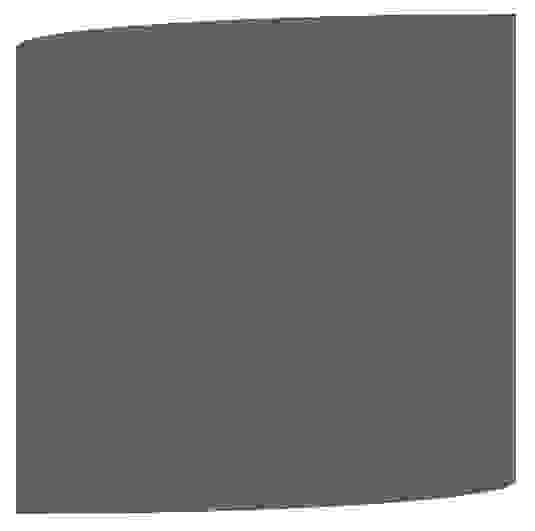
Эта техничка бывает полезна, если необходимо имитировать искривление, а не закругление. Например, так можно получить эффект скрученной бумаги:
CSS фигуры
В следующих примерах предполагается такая разметка:
И такой базовый css:
Наиболее частым примером использования CSS фигур является отображение стрелок. Чтобы понять, как это работает, необходимо разобраться с использованием отдельного border-color для каждой стороны и установкой значения «0» для width и height:

А теперь оставляем только синий треугольник:

Создание Speech Bubble
Наша базовая разметка:

Теперь нужно расположить стрелку-треугольник в нужном месте. Вот наш цветной квадратик:

Оставляем только четверть квадратика:

Теперь перемещаем ниже и закрашиваем:
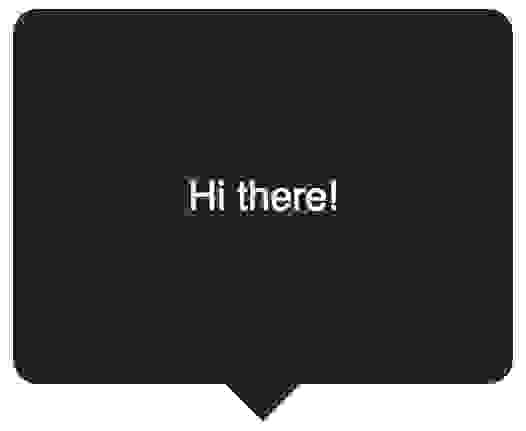
Примеры применения:

Вертикальное центрирование текста
минус использования line-height при вертикальном центрировании в ограничении текста одной строкой. Для решения этой проблемы, можно применить display: table к нашему Speech Bubble и display: table-cell к тексту:

Еще один пример нестандартного использования границ:
Border edge line в чем разница


Border is used more often for the boundaries between countries or cities, like «The border between the United States and Canada. «
Edge is used more often for physical things, like «The edge of the table» or «The edge of the cliff.»
Awesome avatar, btw. Slowdive is one of my favorite bands ever.

No difference except colloquial usages
Border is used more often for the boundaries between countries or cities, like «The border between the United States and Canada. «
Edge is used more often for physical things, like «The edge of the table» or «The edge of the cliff.»
Awesome avatar, btw. Slowdive is one of my favorite bands ever.

Символ показывает уровень знания интересующего вас языка и вашу подготовку. Выбирая ваш уровень знания языка, вы говорите пользователям как им нужно писать, чтобы вы могли их понять.
Мне трудно понимать даже короткие ответы на данном языке.
Могу задавать простые вопросы и понимаю простые ответы.
Могу формулировать все виды общих вопросов. Понимаю ответы средней длины и сложности.
Понимаю ответы любой длины и сложности.


Решайте свои проблемы проще в приложении!
CSS-свойство border
Свойство border позволяет определять стиль, ширину и цвет границ рамки CSS :

Свойство border-style
Свойство border-style определяет тип отображения границы.
Это свойство принимает следующие значения:
Свойство border-style может принимать от одного до четырех значений ( для верхней, правой, нижней и левой границ ).
Примечание: ни одно из представленных далее CSS-свойств для оформления границ не будет работать до тех пор, пока border-style не установлено.
Свойство border-width
Свойство border-width может иметь от одного до четырех значений ( для верхней, правой, нижней и левой рамки CSS ).
Свойство border-color
Свойство border-color используется для указания цвета четырех границ.
Цвет можно установить с помощью:
Свойство border-color может иметь от одного до четырех значений ( для верхней, правой, нижней и левой границ ).
Если значение border-color не установлено, то наследуется цвет элемента.
Border: отдельная стилизация границ
Приведенный выше пример даст тот же результат, что и:
Если у свойства border-style четыре значения:
• border-style: dotted solid double dashed;
o верхняя граница будет точечной.
o правая граница будет сплошной.
o нижняя CSS двойная рамка.
o левая граница будет в штрих.
Если у свойства border-style три значения:
• border-style: dotted solid double;
o верхняя граница будет точечной.
o правая и левая границы будут сплошными.
o нижняя граница будет двойной.
Если у свойства border-style два значения:
• border-style: dotted solid;
o верхняя и нижняя CSS рамки вокруг изображения будут точечными.
o правая и левая границы будут сплошными.
Если у свойства border-style одно значение:
• border-style: dotted;
o все четыре границы будут точечными.
Короткое свойство border
Чтобы сократить объем кода, значение для каждой отдельной границы можно указывать одним свойством:
Также можно выставлять свойства какой-то конкретной границы с одной из сторон:
Свойство border-radius используется для создания закругленных углов у CSS рамки вокруг текста или другого элемента.

Примечание: свойство border-radius не поддерживается в IE 8 и более ранних версиях.
Все свойства границ в CSS
Дайте знать, что вы думаете по этой теме статьи в комментариях. За комментарии, дизлайки, лайки, подписки, отклики огромное вам спасибо!
Edge vs. Border

The boundary line of a surface.
The outer edge of something.
‘the borders of the garden’;
(geometry) A one-dimensional face of a polytope. In particular, the joining line between two vertices of a polygon; the place where two faces of a polyhedron meet.
A decorative strip around the edge of something.
‘There’s a nice frilly border around the picture frame.’; ‘a solid border around a table of figures’;
‘I have the edge on him.’;
A strip of ground in which ornamental plants are grown.
The thin cutting side of the blade of an instrument, such as an ax, knife, sword, or scythe; that which cuts as an edge does, or wounds deeply, etc.
The line or frontier area separating political or geographical regions.
‘The border between Canada and USA is the longest in the world.’;
A sharp terminating border; a margin; a brink; an extreme verge.
‘The cup is right on the edge of the table.’; ‘He is standing on the edge of a precipice.’;
(British) Short form of border morris or border dancing; a vigorous style of traditional English dance originating from villages along the border between England and Wales, performed by a team of dancers usually with their faces disguised with black makeup.
Sharpness; readiness or fitness to cut; keenness; intenseness of desire.
(transitive) To put a border on something.
The border or part adjacent to the line of division; the beginning or early part (of a period of time)
‘in the edge of evening’;
(transitive) To form a border around; to bound.
(cricket) A shot where the ball comes off the edge of the bat, often unintentionally.
(transitive) To lie on, or adjacent to, a border of.
‘Denmark borders Germany to the south.’;
(graph theory) A connected pair of vertices in a graph.
(intransitive) To touch at a border (with on or upon).
‘Connecticut borders on Massachusetts.’;
In male masturbation, a level of sexual arousal that is maintained just short of reaching the point of inevitability, or climax; see also edging.
(intransitive) To approach; to come near to; to verge (with on or upon).
(transitive) To move an object slowly and carefully in a particular direction.
‘He edged the book across the table.’;
The outer part or edge of anything, as of a garment, a garden, etc.; margin; verge; brink.
‘Upon the borders of these solitudes.’; ‘In the borders of death.’;
(intransitive) To move slowly and carefully in a particular direction.
‘He edged away from her.’;
A boundary; a frontier of a state or of the settled part of a country; a frontier district.
(usually in the form ‘just edge’) To win by a small margin.
A strip or stripe arranged along or near the edge of something, as an ornament or finish.
To hit the ball with an edge of the bat, causing a fine deflection.
A narrow flower bed.
(transitive) To trim the margin of a lawn where the grass meets the sidewalk, usually with an electric or gas-powered lawn edger.
(transitive) To furnish with an edge; to construct an edging.
To approach; to come near to; to verge.
‘Wit which borders upon profaneness deserves to be branded as folly.’;
To furnish with an edge, as a tool or weapon; to sharpen.
To make a border for; to furnish with a border, as for ornament; as, to border a garment or a garden.
(figurative) To make sharp or keen; to incite; to exasperate; to goad; to urge or egg on.
To be, or to have, contiguous to; to touch, or be touched, as by a border; to be, or to have, near the limits or boundary; as, the region borders a forest, or is bordered on the north by a forest.
To delay one’s orgasm so as to remain almost at the point of orgasm.
To confine within bounds; to limit.
‘That nature, which contemns its origin,Can not be bordered certain in itself.’;
The thin cutting side of the blade of an instrument; as, the edge of an ax, knife, sword, or scythe.
‘He which hath the sharp sword with two edges.’; ‘Slander,Whose edge is sharper than the sword.’;
a line that indicates a boundary
Any sharp terminating border; a margin; a brink; extreme verge; as, the edge of a table, a precipice.
‘Upon the edge of yonder coppice.’; ‘In worst extremes, and on the perilous edgeOf battle.’; ‘Pursue even to the very edge of destruction.’;
the boundary line or the area immediately inside the boundary
Sharpness; readiness or fitness to cut; keenness; intenseness of desire.
‘The full edge of our indignation.’; ‘Death and persecution lose all the ill that they can have, if we do not set an edge upon them by our fears and by our vices.’;
the boundary of a surface
The border or part adjacent to the line of division; the beginning or early part; as, in the edge of evening.
a decorative recessed or relieved surface on an edge
To furnish with an edge as a tool or weapon; to sharpen.
‘To edge her champion’s sword.’;
a strip forming the outer edge of something;
‘the rug had a wide blue border’;
To shape or dress the edge of, as with a tool.
extend on all sides of simultaneously; encircle;
‘The forest surrounds my property’;
To furnish with a fringe or border; as, to edge a dress; to edge a garden with box.
‘Hills whose tops were edged with groves.’;
form the boundary of; be contiguous to
To make sharp or keen, figuratively; to incite; to exasperate; to goad; to urge or egg on.
‘By such reasonings, the simple were blinded, and the malicious edged.’;
enclose in or as if in a frame;
To move by little and little or cautiously, as by pressing forward edgewise; as, edging their chairs forwards.
provide with a border or edge;
‘edge the tablecloth with embroidery’;
To move sideways; to move gradually; as, edge along this way.
lie adjacent to another or share a boundary;
‘Canada adjoins the U.S.’; ‘England marches with Scotland’;
To sail close to the wind.
‘I must edge up on a point of wind.’;
Borders are geographic boundaries, imposed either by geographic features such as oceans, or by arbitrary groupings of political entities such as governments, sovereign states, federated states, and other subnational entities. Borders are established through warfare, colonization, or simple symbiotic agreements between the political entities that reside in those areas; the creation of these agreements is called boundary delimitation.
the boundary of a surface
a sharp side formed by the intersection of two surfaces of an object;
‘he rounded the edges of the box’;
a line determining the limits of an area
the attribute of urgency;
‘his voice had an edge to it’;
a slight competitive advantage;
‘he had an edge on the competition’;
a strip near the boundary of an object;
‘he jotted a note on the margin of the page’;
advance slowly, as if by inches;
‘He edged towards the car’;
provide with a border or edge;
‘edge the tablecloth with embroidery’;
lie adjacent to another or share a boundary;
‘Canada adjoins the U.S.’; ‘England marches with Scotland’;
provide with an edge;
the outside limit of an object, area, or surface
‘she perched on the edge of a desk’; ‘a willow tree at the water’s edge’;
an area next to a steep drop
the point immediately before something unpleasant or momentous occurs
‘the economy was teetering on the edge of recession’;
the sharpened side of the blade of a cutting implement or weapon
‘a knife with a razor-sharp edge’;
the line along which two surfaces of a solid meet.
an intense, sharp, or striking quality
‘a flamenco singer brings a primitive edge to the music’; ‘there was an edge of menace in his voice’;
a quality or factor which gives superiority over close rivals
‘his cars have the edge over his rivals’’;
provide with a border or edge
‘the pool is edged with paving’;
move or cause to move gradually or furtively in a particular direction
‘Hazel quietly edged him away from the others’; ‘she tried to edge away from him’;
give an intense or sharp quality to
‘the bitterness that edged her voice’;
strike (the ball) with the edge of the bat; strike a ball delivered by (the bowler) with the edge of the bat
‘Haynes edged to slip’; ‘he edged a ball into his pad’;
ski with one’s weight on the edges of one’s skis
‘you will be edging early, controlling a parallel turn’;
3ds Max. Часть 5. Основы полигонального моделирования: разбираемся с инструментами
Рассказываем, какие есть инструменты в 3ds Max и как с ними работать.
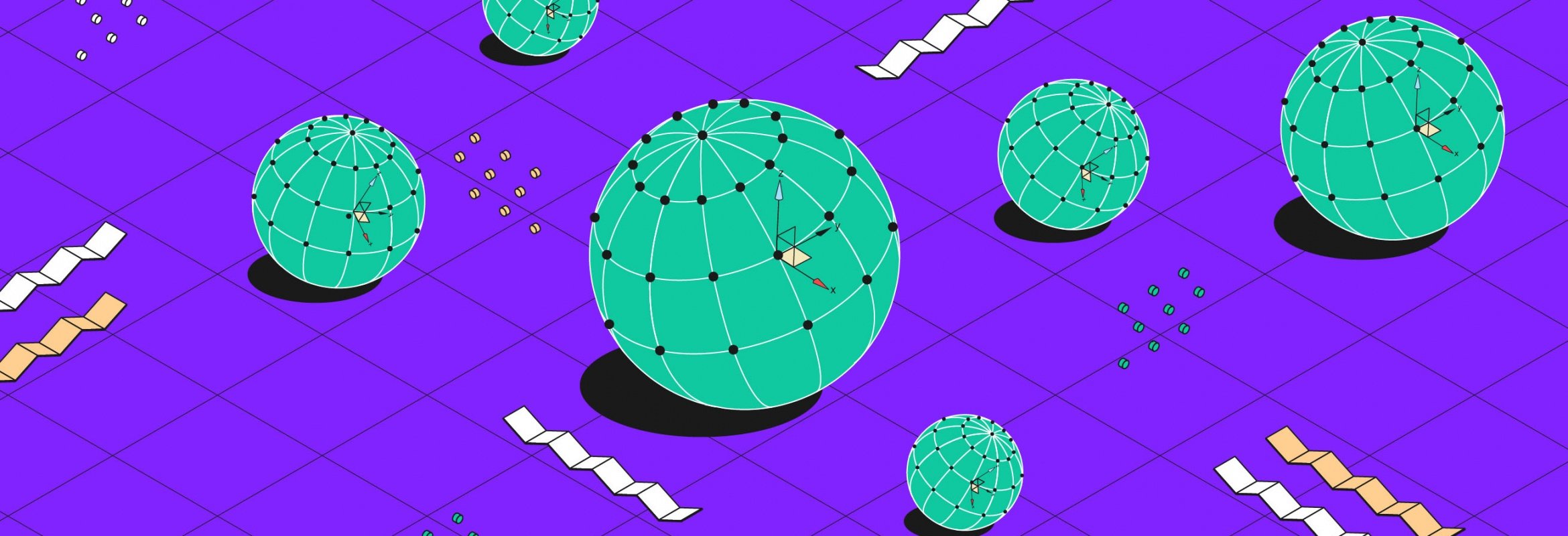
В предыдущей статье мы рассмотрели уровень подобъектов редактируемых полигонов Editable Poly; теперь разберёмся, как эти подобъекты можно настраивать и какие для этого есть инструменты.

Автор статей по дизайну. В веб-дизайн пришел в 2013 году, осознанно начал заниматься с 2015 года. Параллельно освоил верстку. Время от времени публикую переводы на хабре.
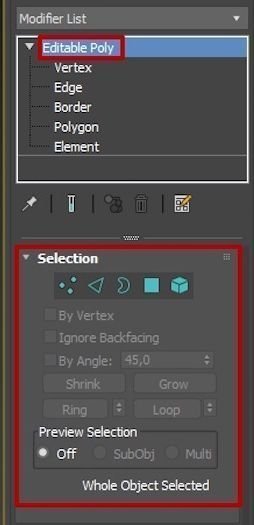
Инструменты в свитке Selection
Начнём со свитка Selection. В зависимости от выбранного подобъекта активизируются или замораживаются разные параметры. Когда не выбран ни один подобъект, все параметры деактивированы.
By Vertex (По вершине)
Флажок By Vertex понадобится, чтобы выделить рёбра и полигоны, которые имеют сопряжение с выбранной вершиной.
Для демонстрации я создал сферу с большим количеством рёбер и полигонов, конвертировав её в Editable Poly.
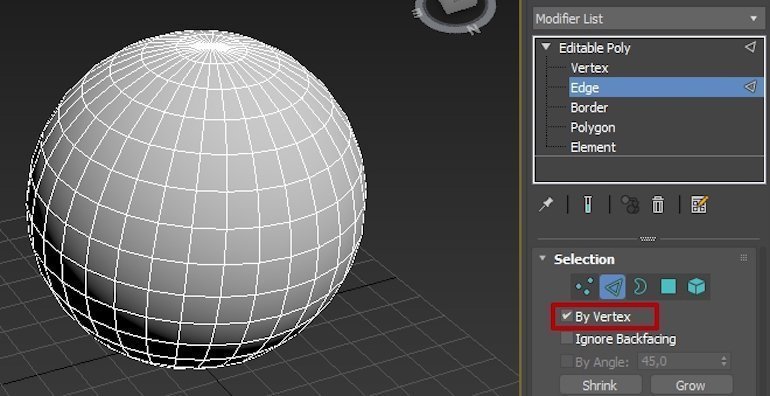
Выберите подобъект Edge и на сфере нажмите на любую вершину. То же самое сделайте для подобъекта Polygon.
Ignore Backfacing
(Игнорировать тыльную сторону)
Теперь выберите подобъект Polygon и попробуйте выделить максимальное количество полигонов. Для этого щёлкните мышью рядом с объектом и протяните рамку выделения через весь объект, вот так:
Выделились не только те полигоны, которые находились в зоне видимости, но и с обратной стороны. Чтобы этого избежать, существует функция Ignore Backfacing (Игнорировать тыльную сторону).
Поставьте флажок напротив пункта Ignore Backfacing, выделите полигоны ещё раз. Теперь выделились только те полигоны, которые были в зоне видимости.
Активированная кнопка Grow позволяет выделять полигоны вокруг выделенных. Чтобы был виден результат, выделите нужные полигоны и нажмите Grow; нажимайте на эту кнопку до тех пор, пока не достигнете нужного эффекта.
Кнопка Grow также работает с вершинами и рёбрами.
Shrink
Shrink действует аналогично Grow, но в обратном порядке: при клике на него количество выделенных полигонов сжимается.
Ring (Кольцо) и Loop (Петля)
Рассмотрим очень важные кнопки Ring (кольцо) и Loop (петля).
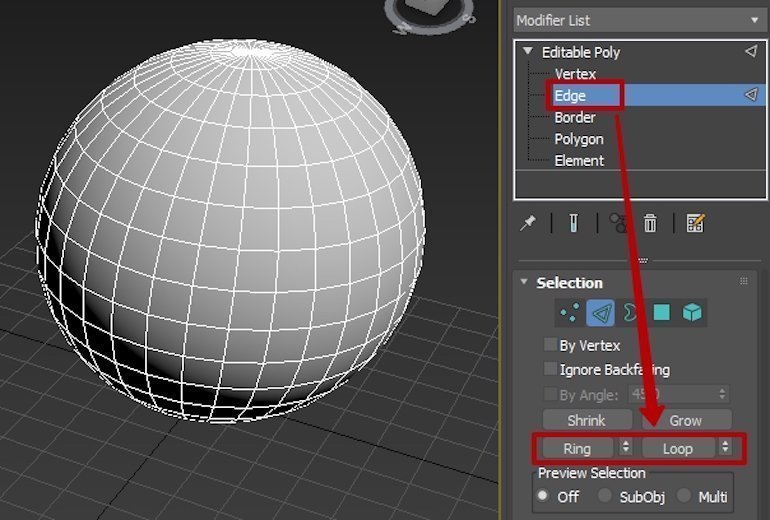
Инструмент Ring работает исключительно с рёбрами и выделяет все рёбра, которые параллельны выбранному.
Инструмент Loop по цепочке выделяет соседние рёбра.
Комбинированное использование Ring и Loop.
Мы будем часто обращаться к свитку Selection во время моделирования.
Разберёмся с инструментами в свитках Edit Vertices, Edit Edges, Edit Borders, Edit Polygons. Каждый из них активен для своего подобъекта: например, для подобъекта Polygon появится свиток Edit Polygons.
Инструменты в свитке Edit Vertices (Редактирование вершин)
Вернитесь к своему объекту, мы начнём с редактирования вершин.
Выберите подобъект Vertex любым удобным для вас способом — я пользуюсь горячими клавишами, в данном случае 1 — и перейдите к свитку Edit Vertices.
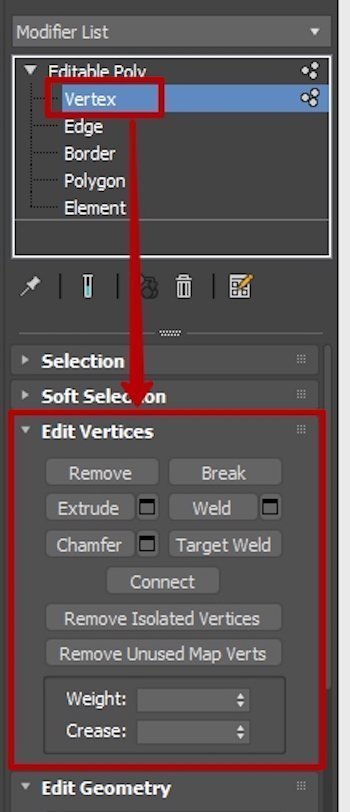
Remove (Удалить)
Функция работает просто: выделяете вершину и нажимаете кнопку Remove. Удалится вершина и прилегающие рёбра, но если вы удалите вершину, нажав на клавиатуре Del, то удалятся и полигоны — получится отверстие.
Break (Ломать)
Эта функция разъединяет вершины и тем самым помогает сделать разрыв в нужном месте.
Weld (Объединить)
Если вы случайно нажали на Break, разъединили точки, а обнаружили это, когда откатиться к прежнему состоянию уже невозможно, выделите все проблемные вершины и примените Weld.
Weld используется очень часто. Работает ещё так:
Extrude (Выдавить)
Extrude выдавливает вершину. На сфере, если выделить все вершины, будет смотреться довольно забавно.
Значения Extrude можно выставлять как положительные, так и отрицательные: первые выдавливают, вторые вдавливают.
Target Weld (Целевое объединение)
Target Weld позволяет сваривать две соседние вершины на расстоянии.
Chamfer (Фаска)
Chamfer создаёт фаску по вершине. Для демонстрации фаски я вернул старый добрый box: на сфере фаска будет не такой явной, нужен угол.
Connect (Соединить)
Connect добавляет дополнительные рёбра по двум выбранным вершинам.
Мы рассмотрели основные функции свитка Edit Vertices. Переходим к подобъекту Edge и его свитку Edit Edges.
Инструменты в свитке Edit Edges (Редактирование ребер)
Выберите подобъект Edge вашего объекта — нажмите клавишу 2 на клавиатуре.
Я опять вернулся к боксу, чтобы показать инструменты более наглядно.
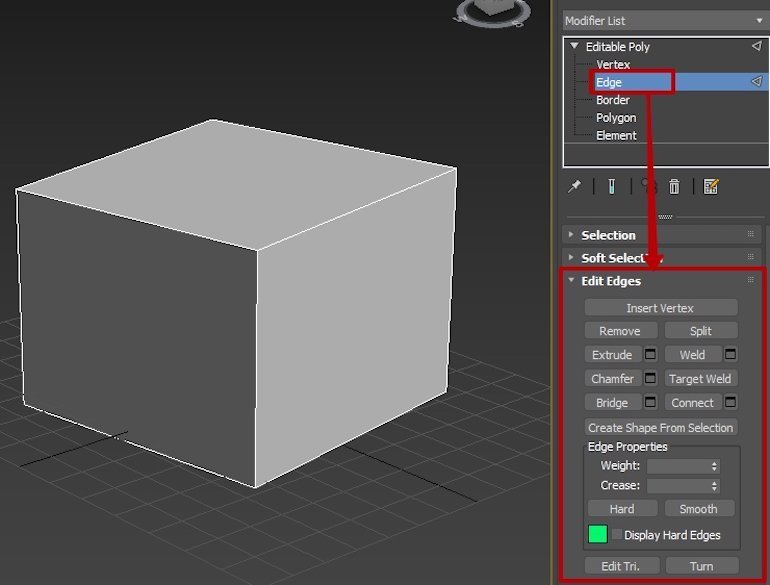
На Remove останавливаться не буду: как и в предыдущем случае, он удаляет выделенный элемент, в данном случае — ребро.
Split (Разъединить)
Split нужен, чтобы отделить фрагмент объекта по рёбрам. Работает с двумя и более рёбрами.
Выделите любое ребро и потяните в сторону. Получится так:
Полигоны неотрывно следуют за ребром, увеличиваясь или уменьшаясь в размере.
Теперь давайте отделим ближайший к нам полигон от объекта. Выделите четыре ребра — периметр полигона, который нужно отделить, — и нажмите кнопку Split.
Таким образом можно отделять нужный фрагмент от объекта. Давайте попробуем отделить более сложный фрагмент — для этого я создал бокс с большим количеством рёбер и полигонов.
Extrude (Выдавить)
Extrude работает так же, как и с вершинами, только в этом случае выдавливаются рёбра.
Weld (Объединить)
Weld объединяет два ребра на определённом расстоянии, которое можно задавать в процессе.
Есть нюанс: просто так объединить два любых ребра не получится — нужно, чтобы между рёбрами было пространство. То есть нельзя объединить два ребра полигона на замкнутом объекте, например кубе.
Давайте применим уже знакомый инструмент Split для отделения одного полигона и уменьшим его, чтобы между рёбрами объекта и рёбрами полигона появилось пространство. Выделите полигон и нажмите клавишу R на клавиатуре, чтобы активировать инструмент масштабирования для уменьшения полигона. Зажмите клавишу мыши и с зажатой клавишей Ctrl потяните за внутренний треугольник иконки масштабирования вниз — полигон уменьшится.
В итоге получилась усечённая пирамида, лежащая на боку. Target Weld же позволил вернуться к изначальному объекту — боксу.
Chamfer (Фаска)
Chamfer формирует фаску по ребру. У фаски достаточно много настраиваемых параметров: размер, выбор вида, настройка количества промежуточных рёбер для создания скругления и так далее. Выделите ребро и нажмите на кнопку Settings справа от Chamfer.
Connect (Соединить)
Сначала рассмотрим этот инструмент, потому что он пригодится при подготовке площадки для демонстрации следующего — Bridge.
Connect нужен для того, чтобы добавлять промежуточные рёбра на полигонах. По умолчанию добавляется одно ребро чётко посередине выбранных рёбер. Можно добавить от одного ребра до того количества, которое вам будет необходимо.
Теперь удалим верхние полигоны — и плацдарм для Bridge будет готов. Перейдите на подобъект полигонов и удалите три верхних полигона, которые находятся посередине.
Bridge (Мост)
Bridge — инструмент, который помогает создать полигон между двух рёбер.
Сделать это можно двумя способами:
1. Выделите два параллельных друг другу ребра и нажмите кнопку Bridge.
2. Нажмите на кнопку Bridge, затем щёлкните мышью на нужном ребре, переместите курсор к противоположному ребру и щёлкните мышью ещё раз. После создания полигона нажмите на кнопку Bridge, чтобы деактивировать его, — в противном случае вы можете пользоваться им, пока он остаётся активным.
С основными функциями свитка Edit Edges разобрались, переходим к подобъекту Border и свитку Edit Borders.
Инструменты в свитке Edit Borders (Редактирование границ)
Напомню, что Border невозможно выделить на замкнутом объекте, поэтому выделите любой полигон на сфере или несколько полигонов и удалите их. Перейдите на подобъект Border (клавиша 3 на клавиатуре) и выделите его на объекте.
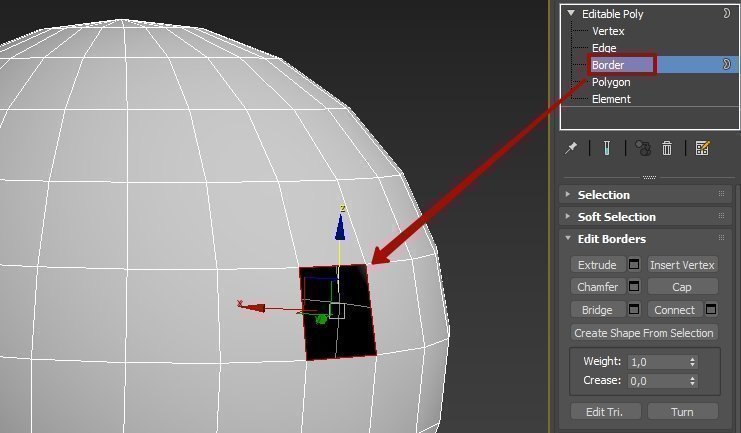
Основная особенность редактирования границ — это возможность закрывать отверстие полигоном с помощью инструмента Cap (Крышка).
Cap (Крышка)
Cap возвращает на место удалённый полигон. Выделите Border и нажмите кнопку Cap на командной панели в свитке Edit Borders.
Extrude (Выдавить)
Удалите полигон ещё раз, нам опять понадобится бордер. Выделите подобъект Border и нажмите Settings рядом с кнопкой Extrude. Там всё интуитивно понятно, всего два параметра.
Я вас не зря познакомил сначала с инструментом Cap, выдавив бордер, — теперь вы знаете, как избавиться от отверстия.
Chamfer у бордера не особо примечателен — это просто фаска по периметру. А вот Bridge довольно интересен.
Bridge (Мост)
Представим ситуацию: в сфере нет двух полигонов друг напротив друга. Если у вас они всё ещё есть, то удалите.
Теперь выделите бордеры удалённых полигонов и нажмите Bridge.
Получится вот такой тоннель:
Бордеры могут выглядеть и вот так:
Это были основные функции свитка Edit Borders. Переходим к полигонам, Edit Polygons.
Инструменты в свитке Edit Polygons (Редактирование полигонов)
Сначала выберите подобъект Edge, затем выделите любое ребро и нажмите кнопку Ring свитка Selection командной панели. Это нужно для того, чтобы быстро выделить нужные полигоны.
Теперь выберите подобъект Polygon (клавиша 4 на клавиатуре). Выделятся все полигоны, которые принадлежат выделенным рёбрам.
Extrude (Выдавить)
У Extrude достаточно простые и незамысловатые параметры:
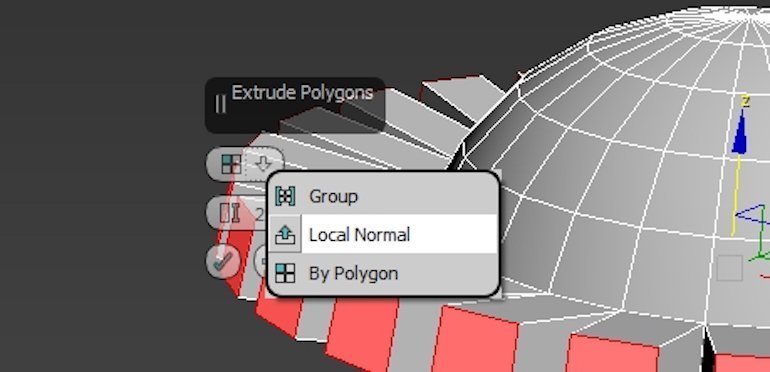
Верхний параметр отвечает за тип выдавливания, нижний — за высоту.
Outline (Контур)
Outline увеличивает или уменьшает выделенный полигон или группу полигонов.
Вот так совершенно неожиданно получился абажур.
Bevel (Скос)
Этот инструмент очень похож на Chamfer, но имеет особенности в настройках.
Также как и в Chamfer, вы можете выбрать тип выдавливания и высоту, но Bevel отличается тем, что здесь можно настраивать скос, то есть задать размер полигона.
Inset (Вкладка)
Inset позволяет уменьшить площадь полигона без деформации основной сетки объекта, создавая поддерживающие рёбра.
Bridge (Мост)
Bridge работает как и с бордерами, но прокидывает тоннель между полигонами.
Flip (Разворот)
Это функция разворота или переворота полигона, выворачивание его наизнанку. После применения инструмента Flip визуально особо ничего не поменяется, за исключением того, что полигоны приобретут более тёмный оттенок.
Чтобы увидеть результат работы инструмента Flip, нужно в Object Properties выставить флажок напротив пункта Backface Cull (показать обратную сторону).
Border edge line в чем разница

English_club_with_Lisa запись закреплена
 a border — граница
They crossed the border without a valid passport. — Они пересекли границу без действительного паспорта.
an edge — край
Linda walked to the edge of the forest. — Линда подошла к опушке леса.
a line — линия (часть разметки на поле)
The driver raced towards the finishing line. — Водитель помчался к линии финиша.
Border edge line в чем разница
Completing the CAPTCHA proves you are a human and gives you temporary access to the web property.
What can I do to prevent this in the future?
If you are on a personal connection, like at home, you can run an anti-virus scan on your device to make sure it is not infected with malware.
If you are at an office or shared network, you can ask the network administrator to run a scan across the network looking for misconfigured or infected devices.
Cloudflare Ray ID: 71af3efb8c3890a9 • Your IP : 82.102.23.104 • Performance & security by Cloudflare
different between borderline vs edge
From Middle English egge, from Old English e??, from Proto-West Germanic *aggju, from Proto-Germanic *agj? (compare Dutch egge, German Ecke, Swedish egg, Norwegian egg), from Proto-Indo-European *h?e?- ( “ sharp ” ) (compare Welsh hogi ( “ to sharpen, hone ” ) , Latin aci?s ( “ sharp ” ) , acus ( “ needle ” ) , Latvian ašs, ass ( “ sharp ” ) , Ancient Greek . ( akís , “ needle ” ) , . ( akm? , “ point ” ) , and Persian ??? ( ?s , “ grinding stone ” ) ).
Pronunciation
- IPA (key) : /?d?/
- Hyphenation: edge
- Rhymes: -?d?
edge (plural edges)
- The boundary line of a surface.
- ( geometry ) A one-dimensional face of a polytope. In particular, the joining line between two vertices of a polygon; the place where two faces of a polyhedron meet.
- An advantage.
- 2017 August 25, Euan McKirdy et al, «Arrest warrant to be issued for former Thai PM Yingluck Shinawatra», in edition.cnn.com, CNN: Thitinan said Yingluck’s decision to skip the verdict hearing will have «emboldened» the military government. «They would not have wanted to put her in jail, in this scenario, (but her not showing up today) puts her on the back foot and gives them an edge.»
- ( also figuratively ) The thin cutting side of the blade of an instrument, such as an ax, knife, sword, or scythe; that which cuts as an edge does, or wounds deeply, etc.
- c.1611, William Shakespeare, Cymbeline, Act 3, Scene 4, 1818, The Dramatic Works of William Shakespeare, Volume 6, C. Whittingham, London, page 49: No, ’tis slander; / Whose edge is sharper than the sword;
- 1833, Adam Clarke (editor), Revelations, II, 12, The New Testament, page 929: And to the angel of the church in Pergamos write; These things saith he which hath the sharp sword with two edges:
- A sharp terminating border; a margin; a brink; an extreme verge.
- 1598, William Shakespeare, Love’s Labour’s Lost, Act 4, Scene 1, 1830, George Steevens (editor), The Dramatic Works of William Shakspeare, Volume 1, page 166: Here by, upon the edge of yonder coppice; / A stand, where you may make the fairest shoot.
- 1667, John Milton, Paradise Lost, 1824, Edwartd Hawkins (editor), The Poetical Works of John Milton, Volume 1, page 32: In worst extremes, and on the perilous edge / Of battle when it rag’d, in all assaults
- 1820, Sir W. Scott, Ivanhoe, 1833, The Complete Works of Sir Walter Scott, Volume 3, page 9: they never wanted the pretext, and seldom the will, to harass and pursue, even to the very edge of destruction, any of their less powerful neighbours
- Sharpness; readiness or fitness to cut; keenness; intenseness of desire.
- a.1667, Jeremy Taylor, Sermon X: The Faith and Patience of the Saints, Part 2, The Whole Sermons of Jeremy Taylor, 1841, page 69: Death and persecution lose all the ill that they can have, if we do not set an edge upon them by our fears and by our vices.
- 1820, Sir W. Scott, Ivanhoe, 1827, page 175: we are to turn the full edge of our indignation upon the accursed instrument, which had so well nigh occasioned his utter falling away.
- The border or part adjacent to the line of division; the beginning or early part (of a period of time) in the edge of evening
- 1670, John Milton, The History of Britain, The Prose Works of John Milton, published 1853, Volume V, page 203 supposing that the new general, unacquainted with his army, and on the edge of winter, would not hastily oppose them.
- ( cricket ) A shot where the ball comes off the edge of the bat, often unintentionally.
- 2004 March 29, R. Bharat Rao Short report: Ind-Pak T1D2 Session 1 in rec.sports.cricket, Usenet Finally another edge for 4, this time dropped by the keeper
- ( graph theory ) A connected pair of vertices in a graph.
- In human sexuality, a level of sexual arousal that is maintained just short of reaching the point of inevitability, or climax; see also edging.
Synonyms
- ( advantage ) : advantage , gain
- ( sharp terminating border ) : brink , boundary , lip , margin , rim
- ( in graph theory ) : line
Hyponyms
Derived terms
Translations
References
- edge on Wikipedia. Wikipedia
See also
- Mathworld article on the edges of polygons
- Mathworld article on the edges of polyhedra
edge (third-person singular simple present edges, present participle edging, simple past and past participle edged)
border
The boundary between our farms followed the line of the river — Граница между нашими фермами шла вдоль реки.
border towns (zone) — пограничные города (-ая зона);
to live not far from the border — жить недалеко от границы;
a strongly guarded border — хорошо охраняемая граница;
border incedents — пограничные инциденты.
English-Russian word troubles . 2014 .
Полезное
Смотреть что такое «border» в других словарях:
border — [ bɔrde ] v. tr. <conjug. : 1> • 1170; de bord 1 ♦ S étendre le long du bord, occuper le bord de (qqch.). Un fossé borde la route. ⇒ longer. « Des ormeaux qui bordent le chemin » (A. Chénier). Route bordée d arbres. Des yeux bordés de khôl … Encyclopédie Universelle
border — BORDER. v. a. Garnir l extrémité de quelque chose, comme d une jupe, d un manteau, etc. en y cousant un ruban, un galon, un morceau d étoffe, etc. Border un manteau, le border d hermine. Border un chapeau d un galon d or. f♛/b] Il se dit aussi De … Dictionnaire de l’Académie Française 1798
Border — Bor der, n. [OE. bordure, F. bordure, fr. border to border, fr. bord a border; of German origin; cf. MHG. borte border, trimming, G. borte trimming, ribbon; akin to E. board in sense 8. See , n., and cf. .] 1. The outer part or… … The Collaborative International Dictionary of English
border — [bôr′dər] n. [ME & OFr bordure < border, to border < Frank * bord, margin: see BOARD] 1. an edge or a part near an edge; margin; side 2. a dividing line between two countries, states, etc. or the land along it; frontier 3. a narrow strip,… … English World dictionary
Border — steht für: Border (Film), 1997, indischer Spielfilms von Jyoti Prakash Dutta Ortschaften Border (Idaho) Border (Minnesota) Border (Wyoming) Border ist der Familienname folgender Personen: Allan Border (* 1955), australischer Cricketspieler … Deutsch Wikipedia
Border — Bor der, v. t. 1. To make a border for; to furnish with a border, as for ornament; as, to border a garment or a garden. [1913 Webster] 2. To be, or to have, contiguous to; to touch, or be touched, as by a border; to be, or to have, near the… … The Collaborative International Dictionary of English
border — n Border, margin, verge, edge, rim, brim, brink mean the line or relatively narrow space which marks the limit or outermost bound of something. A border is the part of a surface which is just within its boundary line
border — [n1] outermost edge, margin bound, boundary, bounds, brim, brink, circumference, confine, end, extremity, fringe, hem, limit, line, lip, outskirt, perimeter, periphery, rim, selvage, skirt, trim, trimming, verge; concepts 484,827 Ant. center,… … New thesaurus
border — et couvrir le bord, Praetexere. Border d argent quelque vaisseau, Circumcludere vas argento ab labris. Border de pierres, Lapidibus statuminare … Thresor de la langue françoyse
border — ► NOUN 1) a boundary between two countries or other areas. 2) a decorative band around the edge of something. 3) a strip of ground along the edge of a lawn for planting flowers or shrubs. ► VERB 1) form a border around or along. 2) (of a country… … English terms dictionary
border — I noun ambit, borderland, boundary, bounds, brim, brink, circumference, circumjacence, confine, contiguity, edge, edging, end, enframement, extremity, flange, frame, fringe, frontier, hem, ledge, limit, line of demarcation, marge, margin, outline … Law dictionary
Border edge line в чем разница
The Language Level symbol shows a user's proficiency in the languages they're interested in. Setting your Language Level helps other users provide you with answers that aren't too complex or too simple.
Has difficulty understanding even short answers in this language.
Can ask simple questions and can understand simple answers.
Can ask all types of general questions and can understand longer answers.
Can understand long, complex answers.
Show your appreciation in a way that likes and stamps can’t.
By sending a gift to someone, they will be more likely to answer your questions again!

If you post a question after sending a gift to someone, your question will be displayed in a special section on that person’s feed.