Что за папка WpSystem в Windows

Некоторые пользователи Windows 11 или Windows 10 могут обнаружить папку WpSystem в корне одного из локальных дисков на своем компьютере, которая в некоторых случаях может значительное место, и задаться вопросом: а что это за папка?
В этой статье о назначении папки WpSystem, а также кратко о папках WindowsApps и WUDownloadCache в Windows, стоит ли о них переживать и можно ли их удалить.
WpSystem и другие папки приложений Microsoft Store
Приложения, скачиваемые из Microsoft Store, обычно хранятся в скрытой папке WindowsApps на системном диске в папке Program Files, либо, если вы настраивали другое место сохранения новых приложений в «Параметры» — «Хранилище» — «Дополнительные параметры хранилища», на выбранном вами диске для сохранения новых приложений.

Однако некоторые устанавливаемые приложения (обычно сравнительно старые) создают дополнительные папки, а именно — WpSystem и WUDownloadCache:
- Папка WpSystem содержит файлы UWP приложений и для некоторых из них объем может быть значителен: например, игры Microsoft, такие как Halo или Microsoft Flight Simulator могут хранить свои данные в этой папке.
- WUDownloadCache содержит кэш, используемый при скачивании приложений из Microsoft Store.
Таким образом, переживать о том, что WpSystem — какая-то сомнительная папка не следует. Если вы её видите на диске, отличающемся от C:, это означает, что вы настроили сохранение новых приложений на другом диске и установили какое-то приложение, создающее эту папку.

Можно ли удалить папку WpSystem
Как было отмечено, папка WpSystem содержит файлы приложений из Microsoft Store. Да, её можно удалить, при этом использующие её приложения перестанут работать, поэтому их лучше удалить заранее стандартными средствами удаления приложений Windows.
Сама папка будет защищена от удаления и при её простом удалении средствами Windows вы увидите сообщение сначала о том, что требуются права администратора, а затем — о необходимости запросить разрешение от «Система» на изменение этой папки.
Вам потребуется стать владельцем папки и получить права на полный доступ к ней и её содержимому, процесс подробно описан в инструкции: Запросите разрешение от СИСТЕМА при удалении папки или файла — решение проблемы, или, более простой метод — вы можете добавить пункт Стать владельцем в контекстное меню папок и файлом.
What Is WpSystem Folder? Should You Remove It from Your Windows?
Some Windows 11/10 users report that they see a folder called WpSystem on their PCs but they didn’t create it. What is the WpSystem folder? Can you delete it? How to delete it. This post tells you all information.
In Windows 11/10, apps downloaded from the Microsoft Store are stored in the WindowsApps folder. This folder is located on the C drive and is hidden by default. But you can see it by enabling the Show hidden files and folders feature in File Explorer. You can find the WindowsApps folder in the following location:
C:/Program Files/WindowsApps
To save space on your C drive, Windows 11/10 provides an option to change the default save location for Microsoft Store apps. By changing the default location, you can install Windows applications to another partition, external drive, and external storage device.
When you change the installation location of a Microsoft Store application, Windows creates a WindowsApps folder on that drive. In addition to the WindowsApps folder, three other folders are automatically created in the same drive, namely:
- WpSystem
- WUDownloadCache
- Program Files
What Is WpSystem Folder
The WpSystem and WUDownloadCache folders are created when certain apps from the Microsoft Store are installed. According to users, some of these apps are the VLC app, the Halo app, the Halo 5: Forge game, and more. Some users have also confirmed that after installing some specific games via Xbox, the WpSystem folder Game Pass is created on their hard drives.
Can You Delete the WpSystem Folder
Can you delete the WpSystem folder? If the folder already exists on the PC and the application has stored files there, it should not be deleted. If you delete it under this situation, the application may crash or stop responding.
According to reports, many users who deleted the folder faced serious issues and ended up having to reinstall affected apps from scratch. This is especially true for apps that don’t have a built-in file repair option to recover deleted files.
The only time you can delete this folder is after uninstalling the applications that store data in it, or their effective function is no longer important.
How to Delete the WpSystem Folder
Some users receive the “you require permission from the system to make changes to this file” error message when trying to delete the WpSystem folder. How to delete the WpSystem folder on Windows 11/10? Follow the guide below:
Step 1:Go to File Explorer and find the WpSystem folder. Then, right-click it to select Properties.
Step 2: Go to the Security tab and click Advanced.
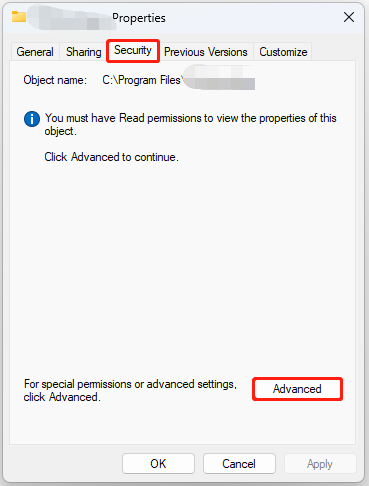
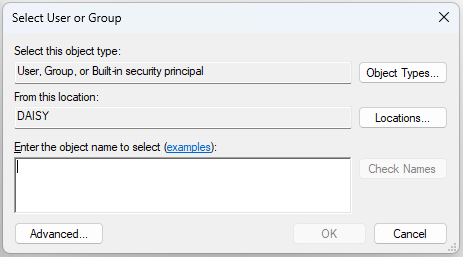
Step 3: Click Change. Enter the user name for the active profile in the text field, click Check Names, and OK.
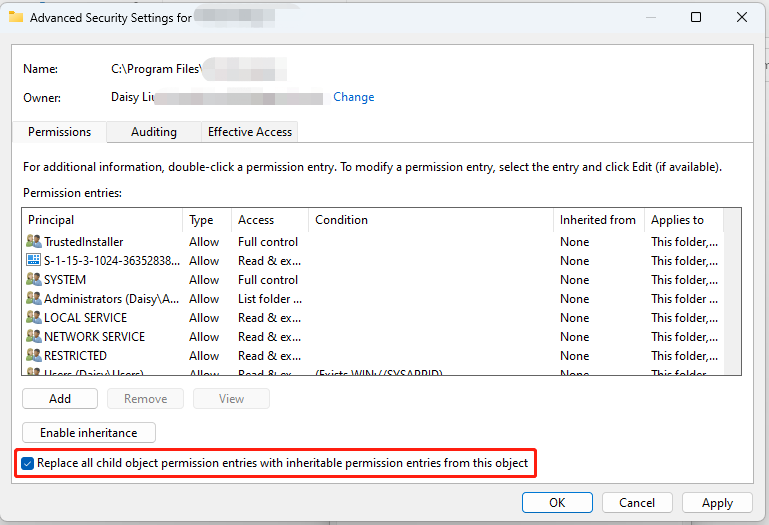
Step 4: Check the Replace owner on subcontainers and objects box and the Replace all child object permission entries with inheritable permission entries from this object box. Then, click OK to save the changes.
Step 5: Click Yes in the confirmation prompt. Then, you can right-click the WpSystem folder to delete it.
This post introduces how to fix the “Windows 11 cannot access shared folder” error. You can refer to this post to get more details.
Final Words
Now, you have known what the WpSystem folder is and if you can delete it. If you want to delete it, you had better make a backup for it. Then, you can delete it with the above steps.
About The Author
Having been an editor at MiniTool since graduating college as an English major, Daisy specializes in writing about data backups, disk cloning, and file syncing as well as general computer knowledge and issues. In her free time, Daisy enjoys running and going with friends to the amusement park.
What Is Wpsystem Folder Is It Safe To Delete It
What is WpSystem folder? Is it safe to delete?#
In Windows 11/10, the apps that you download from Microsoft Store are stored in the WindowsApps folder. This folder is located in the C drive and is hidden by default. But you can view it by enabling the Show hidden files and folders feature in the File Explorer. You can find the WindowsApps folder at the following location: C:/Program Files/WindowsApps To save space on the C drive, Windows 11/10 has an option to change the default save location for Microsoft Store apps. By changing the default location, you can install Windows apps to another partition, external drive, and external storage device. When you change the install location for Microsoft Store apps, Windows will create the WindowsApps folder in that drive. Along with the WindowsApps folder, three more folders are also created automatically in the same drive, namely:
The WpSystem and WUDownloadCache folders are created on the installation of some specific apps from the Microsoft Store. According to the users, some of these apps are the VLC app, Halo app, Halo 5: Forge game, etc. Some users have also confirmed that the WpSystem folder was created on their hard drives after the installation of some specific games via the Xbox Game Pass. One of these games is Microsoft Flight Simulator. To test this, I have changed the installation location of Microsoft Store apps to my disk partition G and then installed some apps from Microsoft Store. I did not find the WpSystem and WUDownloadCache folders on my G drive until I installed the VLC app from Microsoft Store.
Can I delete WpSystem folder?#
From the above discussion, it is clear that the WpSystem folder is created to store the data of some specific Microsoft Store apps. Therefore, deleting this folder can cause the apps like Halo, VLC, Microsoft Flight Simulator, etc., to malfunction or crash. Therefore, you cannot delete this folder until you have the apps installed on your computer, the data of which is stored in the WpSystem folder. Some users have tried to delete the WpSystem folder but received the following message: If you receive this error message while deleting the WpSystem folder from your hard drive, you can try the following solutions.
1] Take ownership of the WpSystem folder#
By default, your SYSTEM is the owner of the WpSystem folder. You can view this by opening the WpSystem folder’s properties. The steps to do this are as follows:
From the above error message, it is clear that you need permission from SYSTEM to delete the folder or to modify it. Hence, the problem is occurring due to permission issues. To solve this problem, take ownership of the WpSystem folder and then see if the issue persists. After taking ownership of the folder, you should be able to delete it. If you still experience the same issue, try the next solution. Read: What is the Panther folder?
2] Boot your computer in Safe mode#
Some of you might have come across a situation where you are not able to delete a file or folder simply by pressing the Delete key. In this case, you can try different methods to delete such types of undeletable or locked files and folders, like:
What is WpSystem on flash drive?#
The folder WpSystem is created when you install some particular apps from the Microsoft Store. According to some users, these apps are Microsoft Flight Simulator, VLC app, Halo, etc. The WpSystem folder contains the data of Microsoft Store apps. Therefore, if you delete this folder, the apps that use this folder will crash or not work properly. Read: What is the AppData folder?
What happens if you delete a folder?#
Deleting a folder also deletes all the content inside it. If you delete a folder that stores the crucial data of apps or software, like executable files, DLL files, etc., you will not be able to use those apps or software. You may also experience permission issues while deleting some files or folders. In such a case, taking ownership of those files or folders will help. Hope this helps. Read next: Files and folders suddenly disappeared in Windows.
Что такое папка WpSystem? Безопасно ли его удалять?
При удалении некоторых файлов с жесткого диска некоторые пользователи обнаружили папку с именем WpSystem. По их словам, они не создавали эту папку на своих жестких дисках. Большинство из них нашли эту папку на диске, отличном от диска C. Если вам интересно, что это за папка, то в этом посте мы объясним, что такое папка WpSystem и безопасно ли удалять эту папку.
Что такое папка WpSystem? Безопасно ли удалять?
В Windows 11/10 приложения, загружаемые из Microsoft Store, хранятся в папке WindowsApps. Эта папка находится на диске C и по умолчанию скрыта. Но вы можете просмотреть его, включив функцию «Показать скрытые файлы и папки» в проводнике.
Вы можете найти папку WindowsApps в следующем месте:
Чтобы сэкономить место на диске C, в Windows 11/10 есть возможность изменить место сохранения по умолчанию для приложений Microsoft Store. Изменив расположение по умолчанию, вы можете устанавливать приложения Windows в другой раздел, на внешний диск и внешнее запоминающее устройство.
При изменении места установки приложений Microsoft Store Windows создаст папку WindowsApps. на этом диске. Наряду с папкой WindowsApps на том же диске автоматически создаются еще три папки, а именно:
Папки WpSystem и WUDownloadCache создаются при установке определенных приложений из Microsoft Store. По словам пользователей, некоторые из этих приложений — это приложение VLC, приложение Halo, игра Halo 5: Forge и т. д. Некоторые пользователи также подтвердили, что папка WpSystem была создана на их жестких дисках после установки некоторых конкретных игр через Xbox. Игровой пропуск. Одной из таких игр является Microsoft Flight Simulator.
Чтобы проверить это, я изменил место установки приложений Microsoft Store на раздел G моего диска, а затем установил некоторые приложения из Microsoft Store. Я не нашел папки WpSystem и WUDownloadCache на своем диске G, пока не установил приложение VLC из Microsoft Store.
Можно ли удалить папку WpSystem?
Из приведенного выше обсуждения следует, что ясно, что папка WpSystem создана для хранения данных некоторых конкретных приложений Microsoft Store. Таким образом, удаление этой папки может привести к тому, что такие приложения, как Halo, VLC, Microsoft Flight Simulator и т. д., будут не работать или давать сбой. Поэтому вы не можете удалить эту папку, пока на вашем компьютере не будут установлены приложения, данные которых хранятся в папке WpSystem.
Некоторые пользователи пытались удалить папку WpSystem, но получили следующее сообщение:
Для внесения изменений в этот файл требуется разрешение от СИСТЕМЫ
Если вы получаете это сообщение об ошибке при удалении папки WpSystem с жесткого диска, вы можете попробуйте следующие решения.
Стать владельцем папки WpSystemЗагрузите компьютер в безопасном режиме
1] Станьте владельцем папки WpSystem
По умолчанию ваша СИСТЕМА является владельцем папки WpSystem. Вы можете просмотреть это, открыв свойства папки WpSystem. Шаги для этого следующие:
Щелкните правой кнопкой мыши папку WpSystem. Выберите Свойства из контекстного меню правой кнопки мыши. Выберите вкладку Безопасность в окне Свойства WpSystem. Нажмите Дополнительно. Откроются Дополнительные параметры безопасности для WpSystem, где можно увидеть владельца папки.
Из приведенного выше сообщения об ошибке становится ясно, что для удаления папки или изменить его. Следовательно, проблема возникает из-за проблем с разрешениями. Чтобы решить эту проблему, станьте владельцем папки WpSystem и посмотрите, сохраняется ли проблема.
После того, как вы станете владельцем папки, вы сможете удалить ее. Если у вас по-прежнему возникает та же проблема, попробуйте следующее решение.
2] Загрузите компьютер в безопасном режиме
Некоторые из вас могли столкнуться с ситуацией, когда вы не можете удалить файл или папку, просто нажав клавишу Удалить. В этом случае вы можете попробовать различные методы удаления таких типов неудаляемых или заблокированных файлов и папок, например:
Запустите сканирование CHKDSK.Удалите файл или папку с помощью CMD или PowerShell.Удалите файл или папку, загрузившись ваш компьютер в безопасном режиме. Используйте программу File Deleter для удаления таких типов файлов и папок.
Что такое WpSystem на флэш-накопителе?
Папка WpSystem создается при установке определенных приложений из Microsoft Магазин. По мнению некоторых пользователей, это приложения Microsoft Flight Simulator, VLC, Halo и т. д. Папка WpSystem содержит данные приложений Microsoft Store. Поэтому, если вы удалите эту папку, приложения, использующие эту папку, будут аварийно завершены или работать неправильно.
Что произойдет, если вы удалите папку?
Удаление папки также приведет к удалению всех содержимое внутри него. Если вы удалите папку, в которой хранятся важные данные приложений или программного обеспечения, такие как исполняемые файлы, файлы DLL и т. д., вы не сможете использовать эти приложения или программное обеспечение. У вас также могут возникнуть проблемы с разрешениями при удалении некоторых файлов или папок. В таком случае поможет получение права собственности на эти файлы или папки.