Software » Codec Identify » Codec Tweak Tool 6.7.0
Codec Tweak Tool is a free utility able to detect and remove broken references to codecs and filters. Scan the registry to detect and remove broken references to codecs and filters, Generate a detailed log of all installed codecs and filters, Enable/disable over 190 codecs and filters (if they are installed).
6.7.0 (August 3, 2023)
Download
Download old versions
Software License
Freeware (Free download and usage!)
Supported operating systems
More information and other downloads
Version history / Release notes / Changelog / What’s New
All features
Codec Tweak Tool
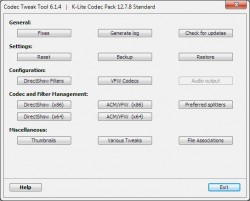
This tool is a Swiss army knife for managing codecs and codec settings. Below is a short overview of the functionality that this tool has to offer. Detailed help is available for each individual function. If any of the information below is unclear or insufficient, then please let us know.
The first two fixes detect broken VFW/ACM codecs and DirectShow filters. This will perform a scan of the Windows Registry looking for invalid references to codecs and filters. Such invalid references are Registry keys that for example point to non-existing files. Those keys can for example get left behind when a codec is not properly uninstalled. The Codec Tweak Tool can remove the invalid references.
The third fix will re-register the base DirectShow filters of Windows. This is helpful if they somehow got removed.
The fourth fix is one for a specific sound related problem. If certain Registry keys are missing, sound will not work in most programs. This fix will restore those required Registry keys. This fix is only available when this specific problem is detected. Sound problems can have many different causes. If you are experiencing a sound problem that affects multiple programs, then the first thing you should try is to re-install your sound driver. That often fixes sound related problems.
This allows you to generate a very detailed list of all installed codecs installed on your computer. It can also include useful information about your system. All this information can be very useful for problem solving purposes.
Resets settings to recommended default values for many popular codecs and DirectShow filters.
This creates a backup of your current settings. The settings will be saved in a folder of your choosing and consists of one or more files. You can restore those settings at any time using this tool.
Settings from the following items (if installed) are included in the backup:
Media Player Classic, ffdshow, LAV Filters, Haali Media Splitter, AC3Filter, DirectVobSub, madVR, Xvid, x264VFW, huffyuv, CoreAVC, CoreVorbis, CoreAAC, MONOGRAM AAC decoder, Gabest MPEG-2 decoder, DScaler5, VP7, and more.
This replaces your current settings with the settings from a previously created backup.
DirectShow Filter Configuration
This allows you to access the configuration interfaces of several popular DirectShow filters.
VFW Codec Configuration
This allows you to access the configuration interfaces of a few commonly used VFW codecs.
This allows you to configure audio output settings for several popular audio decoders.
DirectShow Filter Management
This allows you to enable and disable DirectShow filters. This can for example be useful for testing purposes, or simply to disable redundant filters, or to switch between two similar filters.
Other filter managers are usually only capable of disabling filters. This tool also allows enabling filters because it remembers which filters you have previously disabled. It also gives more fine-grained control over a few multi-purpose filters, such as Haali Media Splitter, allowing to also disable it partially.
This page does not show every single filter installed on your system. It only shows ones that it has been programmed to detect. Currently that includes more than 200 commonly used filters. If there are any additional ones that you would like to see added to this list, just let us know.
Some filters from the pack may be listed as disabled. This is normal. Not everything is enabled by default. Do not blindly enable everything, unless you have a good reason for doing so.
ACM/VFW Codec Management
This allows you to enable and disable ACM and VFW codecs.
This page does not show every single codec installed on your system. It only shows ones that it has been programmed to detect. Currently that includes more than 50 commonly used codecs. If there are any additional ones that you would like to see added to this list, just let us know.
This allows setting specific source filters (a.k.a. splitters) as preferred for specific file extensions. This is particularly useful if you have multiple source filters installed for handling a certain container format.
The choice «System default» means that no specific source filter is forced as preferred. In this case your player will use the source filter that has the highest merit, which often is one of the filters that could also be chosen as preferred. System default therefore does not necessarily mean a standard filter that comes with Windows.
An important note for Windows 7 users: these settings only apply to players that use the DirectShow framework. Windows 7 contains a new playback framework called «Media Foundation» that is used by the Microsoft players (WMP and Media Center) for playback of certain files types, such as MP4, MOV, and M2TS. The Win7DSFilterTweaker tool has tweaks for disabling Media Foundation in case you prefer to use DirectShow.
Here you can enable and disable thumbnail generation in Windows Explorer for various video file extensions.
There also is an «Options» button which gives access to a few options and tweaks specific to thumbnails. For example a way to clear the thumbnail cache. Also some tweaks for thumbnail appearance.
Several configuration options for a few DirectShow filters that don’t have an easily accessible interface for those options. This button is disabled when none of the available tweaks is relevant for your system.
This allows you to enable and disable a few DirectX Media Objects. DMO are similar to DirectShow filters.
This functionality is only available on Windows XP.
Available command-line parameters
To remove broken codecs and filters use:
codectweaktool.exe /fixes /silent
(Administrator privileges are required)
To reset settings to defaults use:
codectweaktool.exe /resetsettings /silent
Sections/Browse similar tools
Codec/Video Identifiers
Guides and How to’s
Codec Tweak Tool video tutorials
Acronyms / Also Known As
Notify me when software updated or report software
Certain videos suddenly refused to play, ran this tool, fixed it in seconds. If only every tool was this effective.
My video and music stopped working on my computer after a GoPro Studio crash. I get the error 0xc00d36b4 anytime I try to play music or video. I downloaded VLC media player and it plays videos just fine. Since there are no instructions with this software that explain how to really use it, I have been unable to fix the problem. I tried using fixes but that didn’t work. I tried generating a log, but the information provided is light on explanation. I am assuming if a file format has a 1 after it, it is on, and if it’s a 0, it is off. But I could be wrong, and there is no explanation as to how to correct that. Still stuck.
Codec Tweak Tool 6.4.0 has now dropped Windows XP support.
Therefore the last version to work on Windows XP is 6.3.9.
This fixed Video Media Player problems (bad artifacts) with Ati HD 2400 mobile display card (LG R200 laptop)
Explanation:
NEW SOFTWARE = New tool since your last visit
NEW VERSION = New version since your last visit
NEW REVIEW = New review since your last visit
NEW VERSION = New version
Latest version
Version number / Beta version number / Update version number and when it whas released.
K-Lite Codec Tweak Tool 6.3.1
Plain text
Текстовая версия страницы без форматирования (plain-text) пригоден для печати на принтере.
HTML
Готовый текстовый файл с HTML разметкой пригоден для публикации на других сайтах.
BB Code
Готовый текстовый файл с разметкой BB Code пригоден для публикации на форумах.
K-Lite Codec Tweak Tool создана для управления установленными кодеками в системе. Данная программа распознаёт большинство кодеков и умеет с ними работать. Программа способна удалять записи из реестра и все настройки определённых кодеков. Это может быть полезно, когда при воспроизведении какого-либо файла возникают проблемы. Также может изменить настройки какого-либо кодека, если возникает в этом необходимость. Кроме того, программа K-Lite Codec Tweak Tool не оставляет следов в системе и вообще работает без установки. Следует заметить, что данная программа нужна достаточно нечасто. Чаще всего её приходится использовать, когда кодеки различных производителей конфликтуют между собой. Программа позволяет просканировать вашу систему и вывести полный отчёт о том, какие кодеки установлены в вашей системе. Внимание! Программа K-Lite Codec Tweak Tool может использоваться только опытными пользователями, которые осознают, какие настройки того или иного кодека они меняют. В противном случае возможен вариант, когда придётся переустанавливать все кодеки.
K-Lite Codec Tweak Tool что это за программа и нужна ли она?
 Всем привет K-Lite Codec Tweak Tool это небольшая утилита которая позволяет настроить кодеки и фильтры, которые у вас установлены в винде. То есть эта утилита для продвинутых юзеров, которые шарят во всяких кодеках и фильтрах
Также утилита поможет исправить некоторые косяки в реестре, которые могут появится при установке некоторых кодеков. А это уже полезная фишка!
Откуда вообще берется эта утилита? Обычно она идет вместе с кодек паком K-Lite Codec Pack, вот у себя я ее тоже обнаружил, вот она в меню Пуск:

Утилита устанавливается вот в эту папку:
C:\Program Files (x86)\K-Lite Codec Pack\Tools
То есть тут это идет как дополнительные утилиты K-Lite Codec Pack. В данной папке есть еще и другие утилиты:

Это точно для продвинутых юзеров. Потом, когда я запустил CodecTweakTool.exe, то у меня появилось вот такое окно:

Как видите тут есть много кнопок, как я понимаю, то чтобы исправить ошибки нужно нажать кнопку Fixes, чтобы сбить настройки нажать нужно Reset, ну и так далее, вроде бы все понятно..
Вот я нажал на Fixes, мне показалось потом вот что:

В этом окне я вот выбрал все галочки, ну то есть все отметил, нажал кнопку Apply & Close и оно там что-то делалось, а потом снова показалось главное окно Codec Tweak Tool.
Кнопка Backup это чтобы сделать бэкап, вы ее нажимаете и программа предложит вам где именно сохранить бэкап настроек.
Короче я так посмотрел и думаю что это нужная утилита, что-то мне кажется что она реально может помочь если у вас появились какие-то косяки из-за кодеков. Тем более, что она идет уже в комплекте с K-Lite Codec Pack, видимо не просто так
Хотя с другой стороны.. Можно кодеками и не пользоваться, хотя я вот пользовался раньше. Для меня была установка кодеков обязательной. Но потом я познакомился с плеером VLC, а потом с KMPlayer.. Ну и я понял, что кодеки совсем не обязательно устанавливать, в этих плеерах они уже вшиты, что очень здорово
Как удалить Codec Tweak Tool? Я не знаю зачем вам это нужно, но на всякий случай я покажу как это сделать. В удалении нет ничего сложного, так как это просто файл, ну то есть небольшая программка в виде одного исполняемого файла. Сперва открываете Пуск, там в меню нажимаете по K-Lite Codec Tweak Tool правой кнопкой и выбираете открыть расположение:

Откроется папка, где будет выделен файл CodecTweakTool.exe, вот по нему нажимаем правой кнопкой и выбираем Удалить:

Потом будет такое сообщение, тут нажимаем Да:

Ну вот и все, теперь закрываем папку и только в меню Пуск можно еще удалить ярлык, который как бы уже ненужным стал. Нажимаем по нему правой кнопкой и выбираем Удалить:

Но это я вам так просо написал, чтобы вы знали. Удалять эту утилиту я не советую, она не висит в памяти, и при работе вообще не грузит процессор. Но вот может вам помочь когда появятся косяки из-за кодеков… Или будут проблемы с воспроизведением, это ведь тоже зависит от кодеков. Ну конечно я имею ввиду если вы используете обычный плеер, в котором нет кодеков. Ну а так я советую посмотреть в сторону KMPlayer или Daum PotPlayer…
Еще вот что вам напишу. В чем смысл кодеков, какой от них плюс? Так вот, лично мое мнение, что после установки пака кодеков K-Lite Codec Pack , то при использовании того плеера что идет в комплекте, процессор при просмотре фильма нагружается меньше. Это вот мне так кажется, у меня фильмы вроде бы как-то легко играются и открываются, ну может это мне только кажется!
На этом все, надеюсь что вам все было понятно и данная инфа была вам полезной. Удачи вам в жизни
что такое codec tweak tool,и стоит ли ее установить?
Если ты не знаеш для чего те эта программа и не ставь её.
K-Lite Codec Tweak Tool — программа позволяет настраивать и в полной мере контролировать поведение установленных в системе кодеков и всевозможных фильтров (более 200).
Умеет сканировать реестр с целью выявления и последующего исправления ошибок, которые могут возникнуть при использовании одновременно нескольких кодеков, работающих с одним и тем же форматом. Генерирует детализированный отчет с полным перечнем установленных кодеков и фильтров. Позволяет «вернуться» к рекомендуемым настройкам ffdshow, DivX, Xvid, AC3Filter, DirectVobSub и
Лучше установи K-Lite Codec Pack
K-Lite Codec Pack — универсальный сборник, который пригодится всем, кто смотрит фильмы в форматах DivX/XviD. В состав сборника вошло множество различных кодеков, фильтров DirectShow и различных вспомогательных инструментов.