Какой браузер выбрать — Google Chrome или Опера
Борьба за внимание пользователя среди браузеров идёт достаточно давно. До сих пор не утихают споры о том, какому из них стоит отдать своё предпочтение. Чаще всего под сравнение попадают такие популярные браузеры, как Google Chrome и Opera. На первый взгляд, особой разницы между ними нет. Однако если углубиться в эту тему и последовательно рассмотреть каждый элемент программы, то различия станут очевидными. Отталкиваясь от них, попробуем установить, что лучше: Опера или Хром, и насколько сильна разница между ними.
Сравнение браузеров
Посмотрим, какие функции способен выполнять каждый из них, кто реже тормозит, и какие возможности способен предоставить пользователю. Для разных людей важны разные аспекты: кому-то больше важен функционал, кому-то – скорость работы, а кому-то – интерфейс. Поэтому разберем каждый элемент отдельно и максимально подробно.
Интерфейс
Начнём с того, что сразу бросается в глаза – внешнее оформление браузеров. Разумеется, интерфейс обоих полностью русифицирован. А в Хром еще и встроен автоматический переводчик.
В Опере сразу доступен выбор между светлой и темной темой, а в Хроме темную тему нужно устанавливать дополнительно. Другая важная особенность Оперы – боковая панель с кнопками быстрого доступа к мессенджерам.
В числе интегрированных в Оперу мессенджеров:
- WhatsApp;
- Instagram;
- Twitter;
- Facebook Messenger;
- Telegram;
- ВКонтакте.
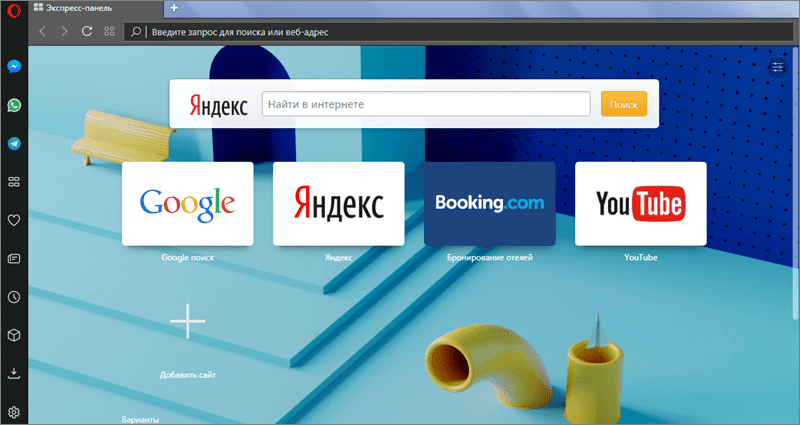
Интерфейс браузера Опера
Другое преимущество Оперы – экспресс-панель, в которую можно добавлять неограниченное количество сайтов для быстрого доступа. И у каждого из них будет полноценная картинка-превью, по которой можно понять, что это за сайт. У Хрома, в свою очередь, есть только подобие экспресс-панели на 10 ярлыков, с фавиконами вместо превью. А полноценную панель в Chrome надо ставить отдельно в виде расширения.
Основные возможности
Теперь перейдём к их основным функциям. Казалось бы, тут-то какие различия – Опера и Хром работают на одном движке под названием Chromium. Это означает, что набор их возможностей должен быть одинаковым. Однако отличия есть.
Базовыми особенностями Хрома являются:
- Приложение для работы с Гугл-документами.
- Возможность синхронизации данных браузера.
- Встроенный магазин с расширениями, где пользователь может приобрести все недостающие функции.
В Опере пользователь сразу имеет доступ к:
- Блокировке рекламы.
- Возможности быстро сделать снимок любой части страницы (при помощи значка с фотоаппаратом или сочетания клавиш Shift + Ctrl + 5).
- VPN (с недавних пор недоступно в России).
В Опере можно настроить свои горячие клавиши и жесты мыши. В Хроме свои шорткаты назначать нельзя.
Уникальный функционал
В Chrome мы сразу получаем доступ ко всем сервисам Google (Gmail, Гугл Диск, Youtube, удаленный рабочий стол Chrome и др.) через специальную кнопку «Сервисы». Мы можем работать в «Документах» и «Презентациях» под аккаунтом, которым мы залогинены в браузере.
В Опере у нас есть просмотр видео в отдельном окне и умное выделение текста с приделанным к нему конвертером единиц (валют, температур, часовых поясов).
Скорость работы
Сказать, что быстрее: Гугл Хром или Опера – достаточно сложно. Особенно если сравнивать их работу на сильных устройствах. Там разница незаметна, даже если на компьютере открыто сразу много вкладок. Гораздо интереснее обстоит дело со слабыми девайсами.
Хром обычно показывает более высокую скорость работы, чем та же Опера. Но это до тех пор, пока не открыто сразу несколько вкладок на слабеньком устройстве. При таком раскладе Гугл может начать тормозить из-за большего потребления памяти.
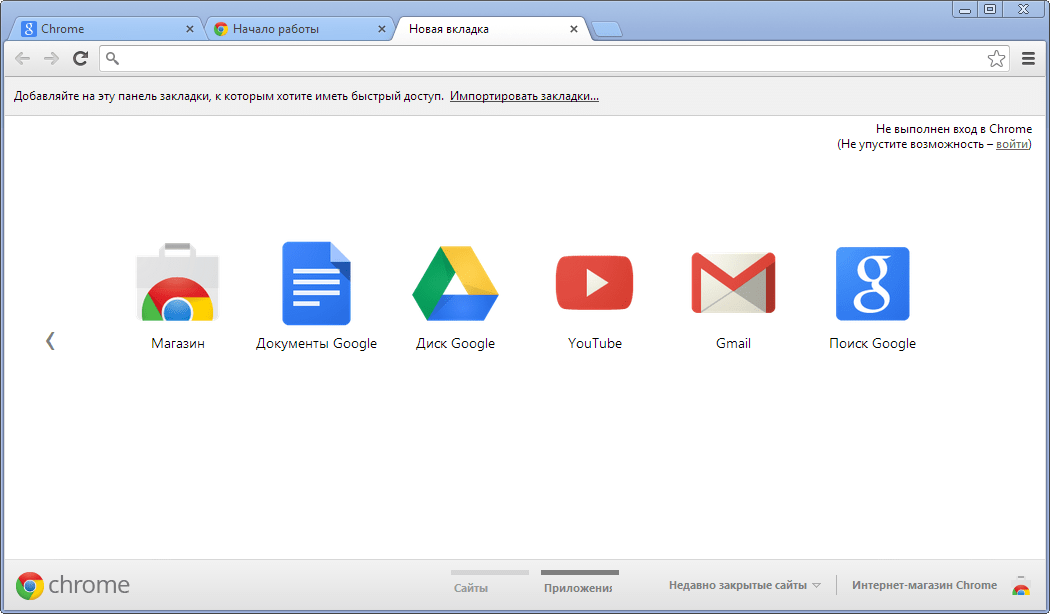
Интерфейс браузера Гугл Хром
Персонализация
Так, Опера может показывать вам персонализированные новости. Эта система самостоятельно подбирает для вас топ, состоящий из 50 новостей из различных сфер жизни: спорта, искусства и т.д. Выбираются и группируются новости в соответствии с вашим местоположением и языком. Но ничто не мешает пользователю самостоятельно настраивать ленту, внося в неё свои источники через «Персонализированные новости», в разделе «Мои источники».
Гугл может похвастаться тем, что на одном устройстве можно завести сразу несколько индивидуальных профилей, к примеру, для каждого члена семьи. Добавлять их очень удобно – через значок персональной записи и кнопку «Добавить». Создастся новый профиль со своим оформлением, закладками. И перемещаться между ними легко – так же нажатием на иконку учётной записи.
Затраты заряда аккумулятора
Тут можно лишь отметить встроенную в Оперу функцию экономии заряда. Если её активировать, то пользователю представится возможность работать с этим браузером где-то на 50% дольше, чем с Хромом.
Встроенный VPN
В Опере есть встроенный VPN, он не позволяет выбирать страну, но он бесплатный. Однако с 17 июня 2021 года по требованию Роскомнадзора Opera сделала эту функцию недоступной на территории РФ.
У Гугл Хрома нет встроенного VPN, но его можно подключить через расширения.
Расширения
Для обоих браузеров существует несметное количество расширений, добавляющих самые разные функции: управление мультимедиа, работа с текстами и видео и т.д.
Ознакомиться с ними можно в магазине аддонов Opera: https://addons.opera.com/ru/extensions/?hl=ru
Не стоит пугаться слова «магазин» – большинство дополнений бесплатны.
Безопасность и конфиденциальность
Хром ответственно подходит к страницам, которые может посетить пользователь, перенося все подозрительные страницы в чёрный список. Что уберегает устройства от всевозможных вирусов и взломов. Также в Гугле есть функция проверки паролей на предмет утечки.
Эта функция не работает непрерывно – запускать проверку необходимо в настройках: chrome://settings/passwords – кнопка «Проверить пароли». После этого браузер начнёт проверять контрольные суммы пароля в базе данных хешей украденных паролей. Если совпадения обнаружатся, система пришлёт предупреждение своему владельцу с рекомендацией сменить пароль на более надёжный.
Однако Опера тоже не отстаёт. И персональные данные бережёт как надо. При желании пользователь может либо ограничить информацию, которую способен отображать браузер, либо вовсе отключить передачу данных. Приватный просмотр стирает всю историю действий пользователя после закрытия всех приватных окон. Также Опера оснащена значками безопасности (в виде закрытого замочка), который свидетельствует о безопасности посещаемой страницы.
А самое главное – в Опере есть встроенная защита от криптомайнинга.
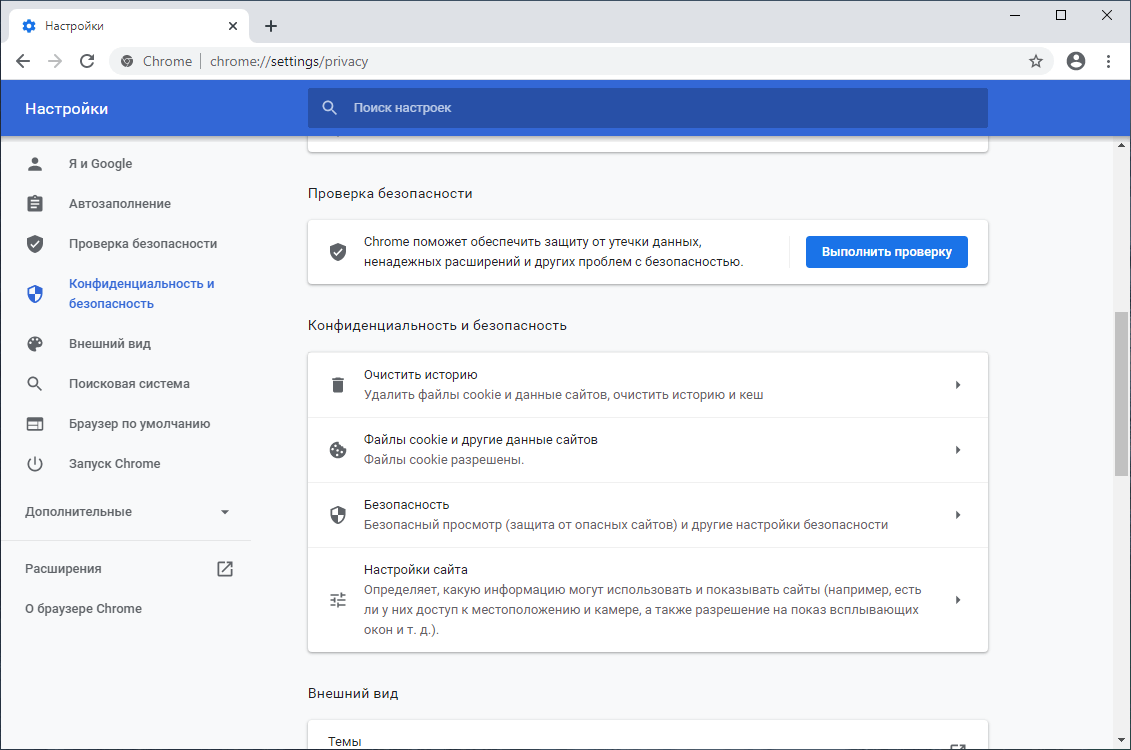
Настройки конфиденциальности в Google Chrome
Синхронизация
Здесь различий между Оперой и Хромом особых нет. Они одинаково хорошо синхронизируют данные на всех устройствах.
Для синхронизации вкладок, закладок и паролей в Опере, необходимо:
- Войти в свою учётную запись (или создайте её). Для этого нажмите на иконку персональной записи (в виде человечка). Либо через «Настройки» перейдите к пункту «Браузер» в раздел «Синхронизации».
- Включите синхронизацию. После этого всё, что вы делаете на одном устройстве, будет синхронизироваться с другими гаджетами.
- Чтобы завершить синхронизацию действий, просто выйдете из учётной записи.
В Гугле процесс синхронизации заключается в следующем:
- Войдите в свою учётную запись (или создайте её). Кнопка входа в аккаунт есть в правом верхнем углу главной страницы браузера.
- Включите синхронизацию. После этого все закладки, вкладки и остальное будет синхронизироваться с остальными устройствами.
- Чтобы отключить синхронизацию достаточно в вашем аккаунте нажать «Отключить».
Какой браузер лучше по итогу?
Теперь можно подвести заключение тому, какой браузер лучше – Опера или Гугл Хром. По сумме всех перечисленных пунктов выходит, что Гугл и Опера практически равны.
В Опере есть множество полезных встроенных функций (скриншоты, блокировка рекламы, мессенджеры), которые также можно подключить при помощи расширений в Хроме.
В целом, Google Chrome проще в использовании и немного опережает Оперу по скорости своей работы.
Opera браузер для Windows
Получите быстрый, безопасный и простой в использовании браузер Opera.
Загрузить все браузеры Opera
Opera браузер для Windows
Opera браузер для Mac
Opera браузер для Linux
Opera браузер для Chromebook
 У вас нет Google Play?
Загрузите приложение здесь Это безопасная загрузка
с opera.com
Браузер Opera для Android
У вас нет Google Play?
Загрузите приложение здесь Это безопасная загрузка
с opera.com 
Opera vs Chrome in 2023: Web Browser Features, Performance & Security Compared
Opera has always kept a firm grasp on a niche part of the web browser market. Even when the younger Google Chrome took over the global browser market share, Opera held on to its loyal fanbase and didn’t stop innovating. We’ll see which of these two browsers is better in our Opera vs Chrome review.
Opera launched in 1995, and it gained a following for its built-in email client and for continuing to develop other unique features. Google Chrome overshadowed Opera after it came to prominence in 2008, but Opera adapted to Google’s ways and held onto its small but loyal user base. Find out which is the better web browser in our Opera vs Chrome comparison.
Key Takeaways:
- Opera is designed to reduce the need for extensions by including a wide range of built-in functions.
- Google Chrome’s Safe Browsing offers more complete protection against phishing and malware than the Phishtank and Yandex databases.
- Opera was acquired by the Chinese security company Qihoo 360 in 2016. This change in ownership opens the possibility for surveillance by the Chinese government.
Opera has naturally come to closely resemble Google’s browser since it started to use the Chromium browser engine. Nevertheless, the developers’ creativity continues to separate Opera from its more prominent competitor, even though its email client is gone. It’s these differences that will be our focus for this comparison article.
For an individual review of these popular web browsers, check out our full Google Chrome review and our Opera review.
Rewrote the comparison, with new features and performance results.
- Does Opera Perform Better Than Chrome?
Opera is slower than Chrome and less resource-efficient.
Opera’s safe browsing databases are less comprehensive than Chrome’s Google Safe Browsing database. While Opera is still a safe browser, Chrome is more secure overall.
Privacy is Opera’s most significant shortcoming. It collects a lot of data that is shared with third parties, and its acquisition by a Chinese tech company raises questions of government surveillance.
Opera vs Chrome: Rounds & Criteria
The five most important aspects of a good web browser are features, ease of use, performance, security and privacy. Opera and Chrome will face off in five rounds focusing on each of these categories and we will award a point to the victor of each round. The first browser to win three points will be declared the winner.
1. Features
We’ll begin by looking at each browser’s tools and capabilities. Some key features include device sync, user profiles, extension libraries and other built-in functions.
Opera was built on the philosophy of making extensions unnecessary. As a result, Opera has loads of helpful features built directly into the browser so you won’t have to add many third-party extensions, if any. Even so, Opera’s basis in Chromium means it’s compatible with Google’s massive extensions library if you still need extra tools.
Google owns and operates the largest library of web browser extensions in the world (including the best browser security extensions and privacy extensions), which are available in the Chrome web store. As a vanilla browser on its own, Chrome relies on Google Chrome extensions for extra tools and lets its users choose their favorite ones for themselves.
Customization & Navigation
Opera begins on a “speed dial” page at launch, or when you open a new tab or page. This web page contains several links to popular websites like Amazon and others so you can browse the internet right away. You can customize this web page to your liking so all of your favorite web pages are at your fingertips.
The vertical sidebar is one of Opera’s most notable features. It contains built-in communications apps like Facebook Messenger and WhatsApp so you can seamlessly communicate with others without launching a separate application.
There are also several buttons for shortcuts that you can configure to lead to your favorite websites. The browser interface includes a shortcut to Opera’s device sync feature “My Flow” so you can send files between your mobile device and desktop. Opera even throws in a media player button where you can easily access Spotify or other media streaming applications.
Device Sync
Finally, Opera has good data syncing capability. It takes only a few seconds to synchronize your bookmarks, browsing history, open tabs and other data across multiple devices. The “my flow” feature is a nice bonus, as it can send encrypted data between your devices.
Google Chrome is a simple web browser without advanced built-in tools, but it has the basics. The cross-device sync is easy to set up with your Google account, and you can create separate user profiles on the same account in case you’re sharing your device with someone else. Google Translate and a built-in PDF reader are among the other helpful tools included with the browser.
Chrome and Opera both have access to extensions in the Chrome web store, but Opera has far more built-in features than Chrome. Since it’s a more versatile browser right out of the box, we’ll give the first point to Opera.
Round: Features
Point for Opera
| Visit Opera | 1 | |
| Visit Google Chrome | 0 |
2. Ease of Use
In this round, we’ll evaluate how easy it is to browse the web with each browser. Some important criteria for this category include interface design, layout and tab management.
The current iteration of Opera looks similar to Chrome as a result of the Chromium engine. Both benefit from a minimalist design that makes it easy to configure and navigate the web. The most obvious difference is Opera’s vertical sidebar to the left of the address bar, which contains an assortment of built-in communication apps, shortcuts and other handy tools, as discussed above.
There’s not much to say about Chrome’s interface since Opera and many other browsers already inherit the minimalist Chrome layout. Part of Chrome’s success lies in its simplicity, as the browser is extremely easy to use and doesn’t overload the user with an excess of visual elements.
Tab Management
Opera has the added advantage of “workspaces.” Located in the sidebar, these act as something between windows and tabs, as you can separate groups of tabs in different workspaces without opening a new window.
You can customize each workspace by assigning names to them, choose their icons, and even hide selected workspaces. This is a useful way of organizing tabs for different purposes, or just keeping your tab bar from getting too crowded.
Creating a lot of tabs in Chrome causes them to shrink instead of enabling horizontal scrolling. It can be a pain to have a lot of tabs open since they get minimized to just the favicon, but you can open a dropdown menu that shows the headings of all open tabs.
Chrome recently launched a new tab organization feature in Google Chrome Beta. This feature allows you to assign tabs to groups and distinguish them with custom colors and group names. This makes tab management far easier for those who need to have a lot of tabs open at once.
Google Chrome & Opera Mobile Apps
Chrome’s mobile variant doesn’t differ much from the desktop version, and the same is the case with Opera’s mobile apps. In addition to the standard Android version of Opera, there are two additional apps called Opera Mini and Opera Touch. The former is a minimalist version of Opera for Android designed for data saving and performance, and the latter is designed for ease of use.
By offering better tab management, workspaces and a multitude of mobile apps, Opera wins another point, putting the score at 2–0.
Round: Ease of Use
Point for Opera
| Visit Opera | 2 | |
| Visit Google Chrome | 0 |
3. Performance
According to our speed tests, Chrome is the fastest major browser on the market and leaves all other browsers in the dust. While Opera is still a fast and responsive browser in practice, it lags far behind Chrome.
We put these browsers through a series of benchmark tests to calculate their speed alongside several other browsers. The three tests we use are Speedometer, JetStream 2 and MotionMark, with Speedometer being the most important test. Check out our article on the fastest web browsers for a more detailed breakdown of our process.
Speedometer makes the browser process a series of JavaScript applications and determines how quickly they’re executed. JetStream 2 specializes in advanced and uncommon applications, and MotionMark tests the browser’s ability to render advanced visual graphics.
Speedometer
Chrome came in first place in all of our tests. Opera came in third place, while Microsoft Edge was between them in second place. Aside from Edge (check out our Microsoft Edge review), no other web browser even came close to matching Chrome’s speed.
| Browser | Runs per Minute |
|---|---|
| Chrome | 144.9 |
| Opera | 108.2 |
Jetstream 2
When processing advanced and uncommon applications, Opera came the closest to Chrome’s score. Chrome was still the fastest browser here, but Opera was still very fast.
| Browser | Runs per Minute |
|---|---|
| Chrome | 130.3 |
| Opera | 123.26 |
MotionMark
Unsurprisingly, Chrome was the fastest browser when rendering advanced visual graphics. Opera was near the lower end of the spectrum, but it was far from being the slowest. The Firefox browser, Vivaldi, Chromium, Puffin and Internet Explorer were even slower. You can read our Opera vs Firefox guide to learn how the two compare.
| Browser | Runs per Minute |
|---|---|
| Chrome | 553.4 |
| Opera | 403 |
RAM Consumption & Resource Management
Aside from speed, resource consumption is another major component of browser performance.
Chrome and its foundation, Chromium, have developed a reputation for being resource-hungry applications.
It wasn’t until an update in March 2021 that Chromium developers issued a fix preventing any one process from consuming more than 10% of the device’s total memory.
This resulted in a more RAM-efficient browser for Chrome and all browsers based on Chromium. If Chrome is running slowly, you can open the built-in task manager to check the memory consumption for each process.
We noted that Opera isn’t the most efficient browser with its resources. Fortunately, the Opera Mini browser for Android is designed for speed and memory conservation. Despite this shortcoming, Opera has the advantage of already having a wide range of advanced features already built into the browser.
Chrome doesn’t have a lot of features on its own, so adding extra features will only slow the browser down over time, especially if you have a lot of them running at once.
Opera’s feature-rich design gives it a leg up on a version of Chrome overburdened with extensions, but we still have to hand the victory to Chrome in this round. The score is at 2–1, so the winner is still up in the air.
Round: Performance
Point for Google Chrome
| Visit Opera | 2 | |
| Visit Google Chrome | 1 |
4. Security
Chrome is an excellent browser for security. The Google Safe Browsing database contains a vast collection of known malicious domains and will prevent Chrome users from visiting them. The database is regularly updated by Google to keep up with the latest cyber threats. Chrome will also warn you if you attempt to reach a website over an unsecure HTTP connection.
Google is also the fastest browser developer to issue security patches. Chrome is usually updated multiple times a week — or even multiple times a day — to fill in the browser’s security holes. Even where Google Safe Browsing falls short, the update frequency keeps all but the most determined cybercriminals away from Chrome users.
Opera’s security features are reliable as well, although they’re not as good as Chrome’s. Instead of Google Safe Browsing, it uses Phishtank to block phishing websites and Yandex for malware, which aren’t as comprehensive in their databases of malicious URLs.
The good news is that Opera updates its browser on a weekly basis, more or less at the same rate that Google updates Chrome.
Ad-Blocking & VPNs
Opera includes ad-blocking functionality, but Chrome does not. You can easily add the best ad blocker Chrome extension within a few minutes, but it’s not as good as a built-in ad blocker. It’s no surprise that Google doesn’t provide much help for ad-blocking, since it makes its money from ad revenue.
Another one of Opera’s unique features is the browser’s built-in VPN. It’s a great idea, but it only covers three broad regions — Europe, Asia and the Americas — which makes it unsuitable for circumventing geoblocking. The built-in VPN is also sourced from a VPN company with a questionable track record for privacy.
Chrome and Opera are both secure browsers, but the Google Safe Browsing database is much more comprehensive than Opera’s anti-malware and anti-phishing solutions. For that reason, we give the point to Chrome in this round, bringing the competition to an even score of 2–2.
Round: Security
Point for Google Chrome
| Visit Opera | 2 | |
| Visit Google Chrome | 2 |
5. Privacy
Browser security is mainly concerned with external threats, while privacy deals with internal threats. Browser security specifically pertains to the exposure of your personally identifying data to the browser developer, its partners and other third parties. Neither of these browsers excels on this front, so it will be a close call.
Despite the widespread adoption of Chrome and other Google products, Google is infamous for its poor privacy record. Google makes its money from creating targeted ads and uses Chrome as one of its main instruments for collecting the data of its users.
Chrome sends information about your browsing history to Google in addition to your hardware specifications, location data, personal information saved in the browser and more. In other words, Chrome collects everything it can learn about you.
Chrome and Opera both have their own private browsing modes. The private browsing window doesn’t keep Google, Opera or websites from collecting your personal information, but it’s still useful for keeping personal data off your device.
Opera Browser Ownership
Opera used to be better about privacy, but a change in ownership has thrown its privacy protections into doubt. In 2016, the Chinese company Qihoo360 bought Opera from its original developers. Given the extent of the Chinese government’s influence over tech businesses based in China, it’s difficult to know how private your data really is.
Opera’s privacy policy states that the browser collects aggregate hardware and usage data that can’t be used to identify individual users. Many of its applications are sourced from third-party developers and it’s not easy to say how much data they collect or what they do with it.
You can opt out of some data collection by configuring your privacy settings, but it’s not the most private browser out there.
If you’re looking for a privacy-focused browser, then we suggest checking out our article on Brave — but no matter how private your browser is, you still have to adopt good privacy practices. Check out our anonymous browsing guide for more information on how to protect your privacy online.
We conclude this round by giving the privacy point to Opera, thus bringing the competition to a close. It’s an extremely narrow victory in the privacy category since neither browser is very private, but Google has a longer history of proven privacy scandals.
Round: Privacy
Point for Opera
| Visit Opera | 3 | |
| Visit Google Chrome | 2 |
The Verdict
Opera emerges as the victor, but only by a very narrow margin. Both Opera and Chrome have plenty to offer, and most users’ choice for their default browser will come down to their preferences.
We recommend Opera over Chrome for its suite of advanced built-in features that reduce the need for extensions. Even though Chrome is faster, a version of Chrome with too many extensions might lag behind an extension-free installation of Opera. However, if you’re looking for the best browser for Mac, you’re better off using Chrome.
Which one do you use as your default browser? Do Opera’s advanced features make it the better browser, or do you think Chrome is the best major browser? Let us know what you think in the comments section, and as always, thank you for reading.
12 thoughts on “Opera vs Chrome in 2023: Web Browser Features, Performance & Security Compared”
tried opera and it fails to load my cameras. chrome loads my cameras so i have to stay with chrome
I find that although Opera and Chrome both use a lot of RAM, Chrome uses significantly more CPU when running. I have a lot of RAM in my machine but my CPU isn’t great, so Opera wins for me.
I have to agree with this comment. Its the same for me
I don’t know. I tried downloading opera and it is great with a system optimizer, adblocker, and VPN. but it’s search results are worse than google chrome. And google chrome also has interesting things in the website somehow. I guess both of them are good. But I guess I am kinda bored of Chrome and Opera is a little faster with the system optimizer.
Right now I’m too lazy to switch! Staying with Chrome for another year.
Opera’s HTTP warning is now hard to see. i think its from opera 68, but now instead of the planet and the words Not secure it is just a triangle with an ! in it and no words.
(delete first one as some function screved up the text)
Well lets break this into useful information. Opera browser does have a VPN integrated (so may others) but Opera has the most useful function ‘”” Save as PDF “”. Negative aspect of Opera portable is u loose valuable information cos Opera portable doesnt store passwords and logins into subdirectories of portable version. So in the case Win goes “south”, crashes u lose that information similar to having Opera installed in to OS. That happen to me and was wery negative experience.
I use Brave browser also, great, snapy, secure, does store passwords into subdiractories in portable version so no fuzz there >but lacks function save as PDF like in Opera and chrome extension for that purpose are a laugh, come not even close to Opera.
Google Chrome i dont touch it’s a spy browser developed this way. I’l try Vivaldi portable to check out if it can replace those two browsers for particular function that i use the most.
New Firefox browser also have made improvenments but lacks save as PDF like in Opera browser so not real option for me.
Don’t make me laugh, how chrome win in the sidebar. lol, hv u gone blind, and one more thing. The translator in opera extension is far more better than chrome extension, and there is no “save from internet” in chrome. And, opera supports all chrome extensions, but chrome don’t do that. and Opera even has a “FLOW” what chrome has is, a hunger for ram. And also, opera has a sidebar for youtube, is there any for chrome.
I have used Opera for my Windows PC, and also my Android phone. Its most important features for me are the built-in ad-blocker and VPN. The sidebar is not much important because I can keep my tabs for Messenger, WhatsApp, Telegram, etc. open in any other browsers. I also used Chrome for both of my devices. Chrome don’t have these features built-in. Chrome is a product of Google. So, why they would avail such a thing as ad-blocker which would block ads by Google! Then, I also used Edge on my PC. Similar to Chrome… Nothing special. Just a new browser… I have just installed Firefox on my PC to check it. The new version looks awesome. May be its performance is better than all the other browsers according to the speed tests. At last, I come to conclusion that we should not use the built-in browsers. Rather, we may install Opera, or Firefox.
I have used Opera for many years. Love the ‘save as pdf option’. I Like all of the opera browser functions. Also, i like the side bar. But one thing is annoying. Unfortunately, Opera crashes and can ‘hang’ with no way to clear it except to restart the win-10 CPU. So, what can be done each time Opera crashes? And, is there a permanent fix for this?
Opera for Android is pretty fast. You can feel it the same moment you install and run opera. I have it in my android for reading the news attached to twitter or email. I dont save my passwords or anything there because I dont trust it anyway,
For windows I do prefer firefox or brave.
I personally think Chrome takes the trophy.
Chrome’s user interface is clean, simple, and intuitive, making it easy to use even for beginners. Opera’s interface, on the other hand, can be overwhelming and cluttered at times.
Chrome offers better integration with Google’s suite of applications and services, such as Google Drive and Gmail, making it ideal for users who rely heavily on these services.
Chrome tends to load pages faster and perform better than Opera, especially when it comes to resource-intensive tasks such as video playback and gaming.
Chrome is generally more secure than Opera, with frequent security updates and built-in protections against malicious websites and phishing attempts.
Chrome’s tab management features are more advanced and user-friendly, allowing users to easily switch between tabs and organize them in various ways.
Chrome has a larger market share than Opera, which means it is more widely supported by developers and tends to have better compatibility with websites and web applications.
Finally, Chrome is backed by one of the largest tech companies in the world, Google, which ensures that it will continue to receive updates and improvements for years to come.
Opera vs. Chrome: Which is the Faster and Lighter Browser?
Opera vs. Chrome: Which is the Faster and Lighter Browser?
Opera and Chrome are two of the most popular web browsers on the market. Both browsers are fast and feature-rich, but there are some key differences between them when it comes to performance and resource usage.
In this blog post, we will compare Opera and Chrome in terms of speed, RAM usage, and CPU usage. We will also discuss some of the features that Opera has that can help you save resources and improve your browsing experience.

Opera vs. Chrome Which is the Faster and Lighter Browser in 2023
Opera vs Chrome Speed
In terms of speed, Opera and Chrome are very close. In our tests, Opera was slightly faster than Chrome when opening new tabs and loading web pages. However, the difference in speed was not significant.
RAM usage
Opera uses less RAM than Chrome. In our tests, Opera used an average of 1.68GB of RAM with 5 tabs open, while Chrome used an average of 1.95GB of RAM. This means that Opera can run faster and smoother on devices with limited resources.
CPU usage
Opera also uses less CPU resources than Chrome. In our tests, Opera used an average of 35% CPU usage with 5 tabs open, while Chrome used an average of 50% CPU usage. This means that Opera can run cooler and quieter than Chrome.
| Browser | RAM usage (GB) | CPU usage (%) |
|---|---|---|
| Opera | 1.68 | 35 |
| Chrome | 1.95 | 50 |
Features
Opera has a number of features that can help you save resources and improve your browsing experience. These features include:
- A built-in ad blocker
- A turbo mode that compresses data for faster browsing
- A battery saver mode that helps to extend your battery life
- A gaming mode that prioritizes resources for gaming
| Feature | Opera | Chrome |
|---|---|---|
| Built-in ad blocker | Yes | No |
| Turbo mode | Yes | No |
| Battery saver mode | Yes | No |
| Gaming mode | Yes | No |
| RAM usage | Less | More |
| CPU usage | Less | More |
| Customization | More | Less |
| Security | Similar | Similar |
| Privacy | Better | Worse |
Conclusion
Opera is a faster and lighter browser than Chrome. It uses less RAM and CPU resources, and it has a number of features that can help you save resources and improve your browsing experience. If you are looking for a fast and lightweight browser, then Opera is a good choice.
Opera vs Chrome Additional Information
In addition to the information that we have already discussed, here are some additional things to keep in mind when choosing between Opera and Chrome:
- Security: Both Opera and Chrome are secure browsers. However, Opera has a few additional security features, such as a built-in VPN and a password manager.
- Privacy: Opera has a reputation for being a more privacy-focused browser than Chrome. This is because Opera does not collect as much data about its users as Chrome does.
- Customization: Opera is a more customizable browser than Chrome. You can change the look and feel of Opera to match your preferences.
Final Thoughts
Opera and Chrome are both great browsers. The best browser for you will depend on your individual needs and preferences. If you are looking for a fast and lightweight browser with a number of features to help you save resources, then Opera is a good choice. If you are looking for a secure browser with a focus on privacy, then Chrome is a good choice.