Пытаюсь установить стейбл диффузион
Couldn’t launch python
exit code: 9009
stderr:
Python
Launch unsuccessful. Exiting.
Для продолжения нажмите любую клавишу . . .
Пробовал переустановить с указанием Path, не помогает. Питон 3.10.6
Нынешний юзверь настолько деградировал что не может в гугол, он бежит создавать пост, тему или ещё что чтоб за него погуглили
А то раньше то на форумах ничего не спрашивал. И вообще тут раздел "Вопросы", он для того чтобы задавать вопросы, вот автор поста и задал
Форточку открой, дышать нечем
гугл мне не помог, я уже основные методы попробовал. Это патс переписать, переустановить программу.
Как что-то плохое. Были бы они умные — мне бы пришлось на завод идти. Я, конечно, заводчан уважаю, но ну его нахуй.
тут сидят мастера нейроного дела
Попробуй эту версию установить: https://github.com/cmdr2/stable-diffusion-ui/releases (выбери файл Easy-Diffusion-Windows.exe
). В процессе установки также автоматически скачается несколько моделей, объемом где-то гигов 5. После этого на рабочем столе появится ярлык для запуска, открываться будет прямо в браузере.
По умолчанию установится модель Stable Diffusion 1.4. Но она уже устарела, поэтому следует скачать новую версию 1.5: https://huggingface.co/runwayml/stable-diffusion-v1-5/blob/main/v1-5-pruned-emaonly.ckpt («emaonly» значит, что модель подходит только для генерации картинок, но не для дальнейшего обучения), которая рисует в разы лучше. Скачанный файл v1-5-pruned-emaonly.ckpt следует класть в папку EasyDiffusion\models\stable-diffusion\.
(Также на Hugging Face можно найти модели Stable Diffusion версий 2.0 и 2.1, но это треш, не надо скачивать, рисуют ужасно. Вероятнее всего, это не более новые версии, а альтернативные ветки развития.)
Еще можно поставить OpenJourney v4: https://huggingface.co/prompthero/openjourney-v4/blob/main/openjourney-v4.ckpt (также поместить в папку EasyDiffusion\models\stable-diffusion\). OpenJourney построена на основе Stable Diffusion, таким образом, что модель была дополнительно натренирована на результатах, сгенерированных в официальной версии MidJourney. То есть получилось таким необычным образом, что основная модель вдобавок обучена на сгенерированных картинках другой, более мощной нейросети.
Спасибо, заработало. Но я почему то не могу картинку раскрасить в стиле нужного художника. Есть фон, тыкаю пресет, допустим аниме. И он вместо того, чтобы фон стал мультяшным, полностью его заменяет на аниме девочку.
То есть хочешь некую картинку оставить с теми же объектами и чертами, но перерисовать в стиле аниме? Не, точно не знаю, как такое делать. Вроде там надо одновременно и исходную картинку загружать, и текстовый формировать. Еще видел, как кто-то для этого преобразует исходную картинку (будь то набросок от руки или бестекстурные персонажи, отрендеренные в каком-нибудь "Позере") в контуры, типа оставляя от объектов лишь белые обводки на сплошном черном фоне, и потом это использует в качестве заготовки; но все равно, скорее всего, нужно дополнительно текстом прописывать. Преобразовать исходную картинку в такую черно-белую монохромную обводку можно стандартными фильтрами "Фотошопа".
Unstable diffusion internal server error что делать
Reddit and its partners use cookies and similar technologies to provide you with a better experience.
By accepting all cookies, you agree to our use of cookies to deliver and maintain our services and site, improve the quality of Reddit, personalize Reddit content and advertising, and measure the effectiveness of advertising.
By rejecting non-essential cookies, Reddit may still use certain cookies to ensure the proper functionality of our platform.
For more information, please see our Cookie Notice and our Privacy Policy .
Get the Reddit app
/r/StableDiffusion is back open after the protest of Reddit killing open API access, which will bankrupt app developers, hamper moderation, and exclude blind users from the site. More info: https://rtech.support/docs/meta/blackout.html#what-is-going-on Discord: https://discord.gg/4WbTj8YskM Check out our new Lemmy instance: https://lemmy.dbzer0.com/c/stable_diffusion
This is what the cmd gives me as an error!
Error completing request
Arguments: ('', '', 'None', 'None', 20, 6, False, False, 1, 1, 7, -1.0, -1.0, 0, 0, 0, False, 64, 64, False, False, 0.7, 0, False, None, '', False, 1, '', 4, '', True, False) <>
Traceback (most recent call last):
File "E:\stable diffusion\stable-diffusion-webui\modules\ui.py", line 136, in f
res = list(func(*args, **kwargs))
File "E:\stable diffusion\stable-diffusion-webui\webui.py", line 60, in f
res = func(*args, **kwargs)
File "E:\stable diffusion\stable-diffusion-webui\modules\txt2img.py", line 41, in txt2img
File "E:\stable diffusion\stable-diffusion-webui\modules\processing.py", line 333, in process_images
uc = prompt_parser.get_learned_conditioning(len(prompts) * [p.negative_prompt], p.steps)
File "E:\stable diffusion\stable-diffusion-webui\modules\prompt_parser.py", line 104, in get_learned_conditioning
File "E:\stable diffusion\stable-diffusion-webui\repositories\stable-diffusion\ldm\models\diffusion\ddpm.py", line 558, in get_learned_conditioning
File "E:\stable diffusion\stable-diffusion-webui\venv\lib\site-packages\torch\nn\modules\module.py", line 1130, in _call_impl
return forward_call(*input, **kwargs)
File "E:\stable diffusion\stable-diffusion-webui\modules\sd_hijack.py", line 374, in forward
File "E:\stable diffusion\stable-diffusion-webui\venv\lib\site-packages\torch\nn\modules\module.py", line 1130, in _call_impl
return forward_call(*input, **kwargs)
File "E:\stable diffusion\stable-diffusion-webui\venv\lib\site-packages\transformers\models\clip\modeling_clip.py", line 722, in forward
File "E:\stable diffusion\stable-diffusion-webui\venv\lib\site-packages\torch\nn\modules\module.py", line 1130, in _call_impl
return forward_call(*input, **kwargs)
File "E:\stable diffusion\stable-diffusion-webui\venv\lib\site-packages\transformers\models\clip\modeling_clip.py", line 643, in forward
File "E:\stable diffusion\stable-diffusion-webui\venv\lib\site-packages\torch\nn\modules\module.py", line 1130, in _call_impl
return forward_call(*input, **kwargs)
File "E:\stable diffusion\stable-diffusion-webui\venv\lib\site-packages\transformers\models\clip\modeling_clip.py", line 574, in forward
File "E:\stable diffusion\stable-diffusion-webui\venv\lib\site-packages\torch\nn\modules\module.py", line 1130, in _call_impl
return forward_call(*input, **kwargs)
File "E:\stable diffusion\stable-diffusion-webui\venv\lib\site-packages\transformers\models\clip\modeling_clip.py", line 316, in forward
File "E:\stable diffusion\stable-diffusion-webui\venv\lib\site-packages\torch\nn\modules\module.py", line 1130, in _call_impl
return forward_call(*input, **kwargs)
File "E:\stable diffusion\stable-diffusion-webui\venv\lib\site-packages\torch\nn\modules\normalization.py", line 189, in forward
File "E:\stable diffusion\stable-diffusion-webui\venv\lib\site-packages\torch\nn\functional.py", line 2503, in layer_norm
return torch.layer_norm(input, normalized_shape, weight, bias, eps, torch.backends.cudnn.enabled)
RuntimeError: "LayerNormKernelImpl" not implemented for 'Half'
How To Fix Stable Diffusion Connection Errored Out
Stable Diffusion is a fantastic AI technique for generating visuals from the text.
Anyone can create their favourite painting or illustration by providing a detailed description of the desired image.
The Stable Diffusion model is used to generate the majority of the recent AI art seen on the internet.
Because it is an open-source programme, anyone with a text prompt may quickly produce stunning art illustrations.
However, users face errors while generating and processing the Image file On Stable Diffusion.
After giving the Instruction, if you click generate, you will be prompted by the error message “Error: Connection Errored Out“.
The error occurs when the browser cannot connect with the Stable Diffusion Server.
In this article, you will understand how to fix Stable Diffusion Connection Errored Out and the reason behind it.
Why Does Stable Diffusion Connection Errored Out Error Occur?
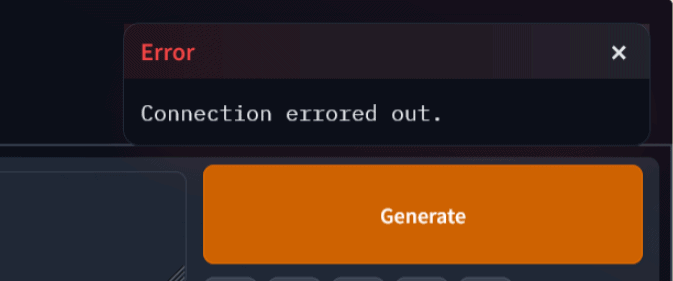
Stable Diffusion Connection Errored Out Error means, for some reason, the browser cannot communicate with the Stable Diffusion Server and complete the given request.
When the browser cannot handle the given load, it cannot create a Stable connection with the server.
The browser may be overloaded, or you are running a large-sized project in Stable Diffusion, and you will get the Connection error message every 10 or 20 minutes.
The error usually occurs when sending an image to extras and trying to scale it.
How To Fix Stable Diffusion Connection Errored Out
If you are getting the error the first time, means tab on the refresh button on your browser fixes the issue.
Tab on the Refresh button in the browser or Click Ctr+R to reload the program and leave the CMD window open.
If it doesn’t help, then follow the instructions below.
1. Remove The File Queue In The Browser
The issue does not appear locally because it is linked to the queue enabled by default when running in Spaces.
But the error occurs when you access the Stable Diffusion public URL from another PC.
Don’t upload large-size files, and remove the Queue files.
Processing and downloading the file individually will solve the Stable Diffusion Connection Errored Out Error.
2. Clear Cache Memory In The Browser
Your browser might be overloaded or not have the capacity to handle the given request.
Try clearing the Browser cache.
- Press ctrl+H from your keyboard and click on Clear browsing data.
- Delete all cached image files and search history at all times.
- Restart the browser and check if the error is gone.
If not, then follow the next step.
3. Run Stable Diffusion Program In An Alternative Browser
The issue is occurring in Firefox.
So opening the Stable Diffusion in the alternative browser will fix the issue.
Many users reported that the Chromium browser works well on Stable Diffusion.
You can give first preference to chromium for Stable Diffusion.
4. Restart The Webui File In Stable Diffusion
If the issue persists, restart the WebUI file and generate a new URL with Colab.
Another solution is to stop and restart the web UI cell in Colab, which generates a new URL.
But you lose all your work so far and must recreate from first.
5. Modify The Batch Size Of The Project File
Try to Modify the Batch setting for your file.
Setting the batch size will reduce the file Overload and help you divide the file into a small sizes, and you can process it quickly.
- Set batch size = 1, and batch count = 4
- Mark the Use_localtunnel checkbox if you are using Colab.
Now you can process the file without the Connection errored out.
6. Modify The Stable Diffusion Webui-User.BAT File
It is reported that there is a bug in the Gradio module in Stable Diffusion, and it is fixed in the latest version.
Gradio is an application that allows you to try out the demo in their browsers to communicate with your machine learning model, API, or data science workflow with others.
It just works like Apache or Flask.
With gradio, you can access the Stable Diffusion interface in the browser.
The error is related to file queuing, and Adding the following line in the Webui-User.Bat file will resolve the issue.
Relaunch your Stable Diffusion file to work without error.
The Happiest part is the error doesn’t require more technical troubleshooting steps.
Following the methods mentioned above, you can quickly fix the error Stable Diffusion Connection Errored Out without expert help.
Saved searches
Use saved searches to filter your results more quickly
You signed in with another tab or window. Reload to refresh your session. You signed out in another tab or window. Reload to refresh your session. You switched accounts on another tab or window. Reload to refresh your session.
Have a question about this project? Sign up for a free GitHub account to open an issue and contact its maintainers and the community.
By clicking “Sign up for GitHub”, you agree to our terms of service and privacy statement. We’ll occasionally send you account related emails.
Already on GitHub? Sign in to your account
[Bug]: the /queue/status api return Internal Server Error #4197
[Bug]: the /queue/status api return Internal Server Error #4197
Comments
Is there an existing issue for this?
- I have searched the existing issues and checked the recent builds/commits
What happened?
when i startup sd-webui with —api —lishen, i execute /queue/status api, then i got a «Interal Server Error» response