Reset Settings
You can reset the FL Studio settings to their default state as shown below. This action can be useful if you are experiencing problems with the set-up of FL Studio. This can include — audio drivers not behaving correctly, graphical glitches, installed components not showing or other problematic behavior of the program that seems hard to resolve. Reset settings acts by restoring all settings to their default state.
IMPORTANT: It’s a good idea to take screenshots of your Audio, General and Files settings prior to proceeding. This will help you restore your previous options after the reset.
Windows
- Automated (recommended) — Use the Diagnostics tool to Reset settings:
- Open the HELP menu and choose the Diagnostic tool.
- Close FL Studio.
- From the Diagnostic tool choose ‘Reset FL Studio settings option‘ and click ‘Start‘.
- Restore your important settings.
- ( Right-Click ) FL Studio desktop icon and select ‘Open file location‘.
- in the FL Studio installation, navigate to the following folder . \System\Tools\Diagnostics.
- Double-Click ‘fldiagnostic.exe‘ to open the Diagnostics tool. It will run some quick checks when first opened, so be patient.
- From the Diagnostic tool choose ‘Reset FL Studio settings‘ and click ‘Start‘.
- Restore your important settings.
Uninstall FL Studio on Windows
For a complete manual uninstall on Windows, follow the procedure here.
macOS
- Automated (recommended) — Use the Diagnostics tool to Reset settings:
- Open the HELP menu and choose the Diagnostic tool. It will run some quick checks when first opened, so be patient.
- Close FL Studio
- From the Diagnostic tool choose ‘Reset FL Studio settings option‘ and click ‘Start‘.
- Restore your important settings.
- Open the Finder, ( Control-Click / Right-Click / 2-Finger Click ) FL Studio in the ‘Applications‘ folder and select ‘Show package contents‘.
- Navigate to the following folder . /Contents/Resources/FL/System/Tools/Diagnostics.
- Double-Click ‘fldiagnostic.app‘ to open the Diagnostics tool. It will run some quick checks when first opened, so be patient.
- From the Diagnostic tool choose ‘Reset FL Studio settings‘ and click ‘Start‘.
- Restore your important settings.
- Close FL Studio. , if you have not already done this. Use ( Cmd + Shift + . ) to show hidden folders.
- Using Finder navigate to ‘[Macintosh HD]/Users/[user account]/Library/Preferences/Image-Line‘.
- Delete all files in the Image-Line folder.
- Launch FL Studio.
- Restore your important settings.
Uninstall FL Studio on macOS
For a complete manual uninstall on macOS, follow the procedure here.
Things to check after you reset settings
Once you run this function FL Studio will return to the default installation configuration. This means that you will lose any custom:
Как сбросить fl studio 20 до стандартных настроек
Reddit and its partners use cookies and similar technologies to provide you with a better experience.
By accepting all cookies, you agree to our use of cookies to deliver and maintain our services and site, improve the quality of Reddit, personalize Reddit content and advertising, and measure the effectiveness of advertising.
By rejecting non-essential cookies, Reddit may still use certain cookies to ensure the proper functionality of our platform.
For more information, please see our Cookie Notice and our Privacy Policy .
Fl Studio Сброс настроек
Вы можете сбросить настройки FL Studio в состояние по умолчанию, используя меню Пуск в Windows, как показано ниже. Это действие может быть полезным, если у вас возникли проблемы с настройками FL Studio. Это включает в себя — звуковой драйвер ведущие себя не правильно, графические глюки, не отображение установленных компонентов или другое проблематичное поведение программы, которое кажется трудно решимым. Сброс параметров восстанавливает все значения реестра в состояние по умолчанию.
Windows [ править ]
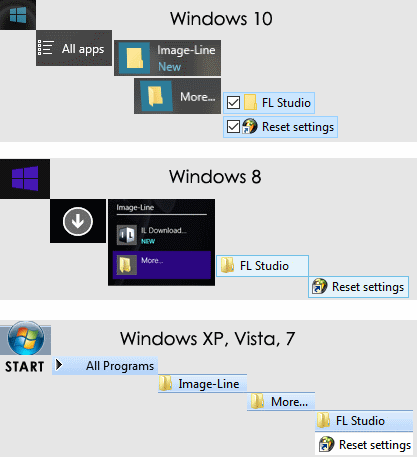
macOS [ править ]
Удаление FL Studio на macOS
Для полного удаления на macOS выполните следующие шаги.
6. Имейте в виду, где находятся ваши личные проекты и файлы! Файлы проекта и другие связанные с программой данные обычно сохраняются в User Data Folder. НЕ удаляйте эту папку.
7. Удалить приложение FL Studio (перетащите значок FL Studio из папки «Приложения» в корзину).
8. Удалите папку [Macintosh HD]/Library/Application Support/Image-Line/Shared.Места которые необходимо проверить после сброса настроек [ править ]
Как только вы запустите эту функцию FL Studio вернётся к настройкам по умолчанию. Это означает, что вы потеряете пользовательские настройки в —
Вам нужно будет вручную установить их в соответствии с предпочтительной конфигурацией.
Как сбросить Фл Студио 20-21 до стандартных настроек
Пошаговая инструкция: как сбросить fl studio до стандартных настроек
Открыть FL Studio и зайти в меню «Options» (в верхней части экрана).
Нажать на кнопку «Reset plugins database» (находится справа внизу окна).
Найти папку «FL Studio» на вашем компьютере. Обычно она находится по адресу «C:\Program Files (x86)\Image-Line\FL Studio XX». Вместо «XX» должна быть версия FL Studio, которую вы используете.
Открыть FL Studio и согласиться на создание нового проекта.
Если вам нужны стандартные настройки для плагинов, то нужно удалить все сторонние VST-инструменты, которые вы добавили в FL Studio. Для этого нужно зайти в меню «Options» — «Manage plugins» и удалить все VST-инструменты, кроме тех, которые есть в стандартной поставке FL Studio.
После этого FL Studio будет сброшена до стандартных настроек.