Как установить Android Nougat или Pie
Запуск загруженных автономных установщиков напрямую приведет к установке 32-разрядной версии BlueStacks 5 Nougat на ваш компьютер по умолчанию. Чтобы узнать, как установить 64-разрядную версию Nougat или 64-разрядную версию Pie (бета-версию) с помощью этого автономного установщика, выполните действия, описанные далее в этой статье.
ПРИМЕЧАНИЕ: Используя автономный установщик, вы можете установить BlueStacks 5 только с одной версией Android — 32-битной Nougat, 64-битной Nougat или 64-битной Pie (бета-версия). Чтобы позже создать окна для разных версий Android, используйте диспетчер нескольких окон, выполнив шаги, указанные в этой статье.
Как установить 64-разрядную версию BlueStacks 5 Nougat или 64-разрядную версию Pie (бета-версию) с помощью автономного установщика?
1. Загрузите автономный установщик для своего компьютера по одной из ссылок, указанных выше.
2. Скопируйте приведенную ниже команду в зависимости от версии Android для BlueStacks 5, которую вы хотите установить.
- Для загрузки BlueStacks 5 Nougat 64-bit:
- BlueStacks_v5.5.100.1040_x64_@Se7Apps.exe —defaultImageName Nougat64 —imageToLaunch Nougat64
- Для загрузки BlueStacks 5 Pie 64-bit (Beta):
- BlueStacks_v5.5.100.1040_x32_@Se7Apps.exe —defaultImageName Pie64 —imageToLaunch Pie64
3. Откройте папку на своем компьютере, куда вы загрузили автономный установщик на шаге 1.
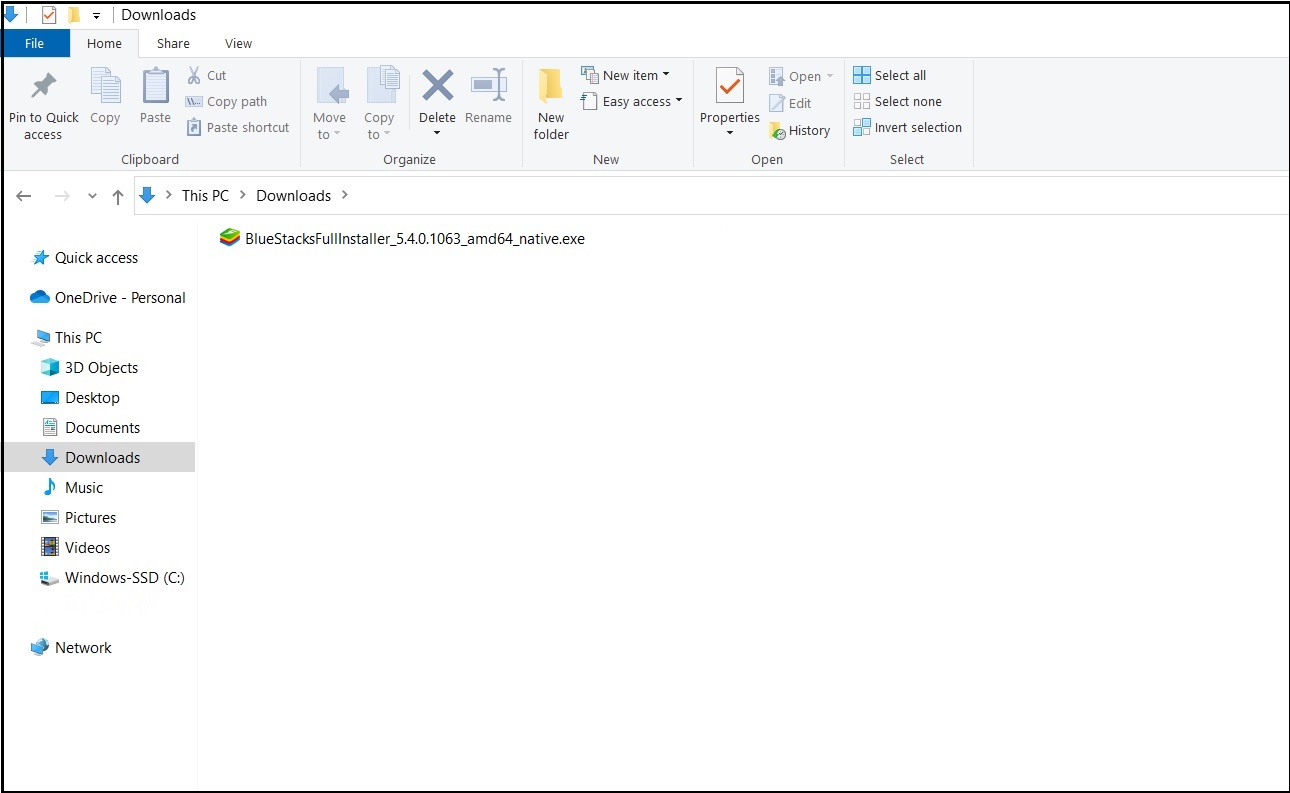 3.jpg
3.jpg
4. Нажмите на адресную строку в проводнике Windows, замените адрес папки на "CMD" и нажмите "Ввод"(Enter). Появится окно командной строки, как показано ниже.
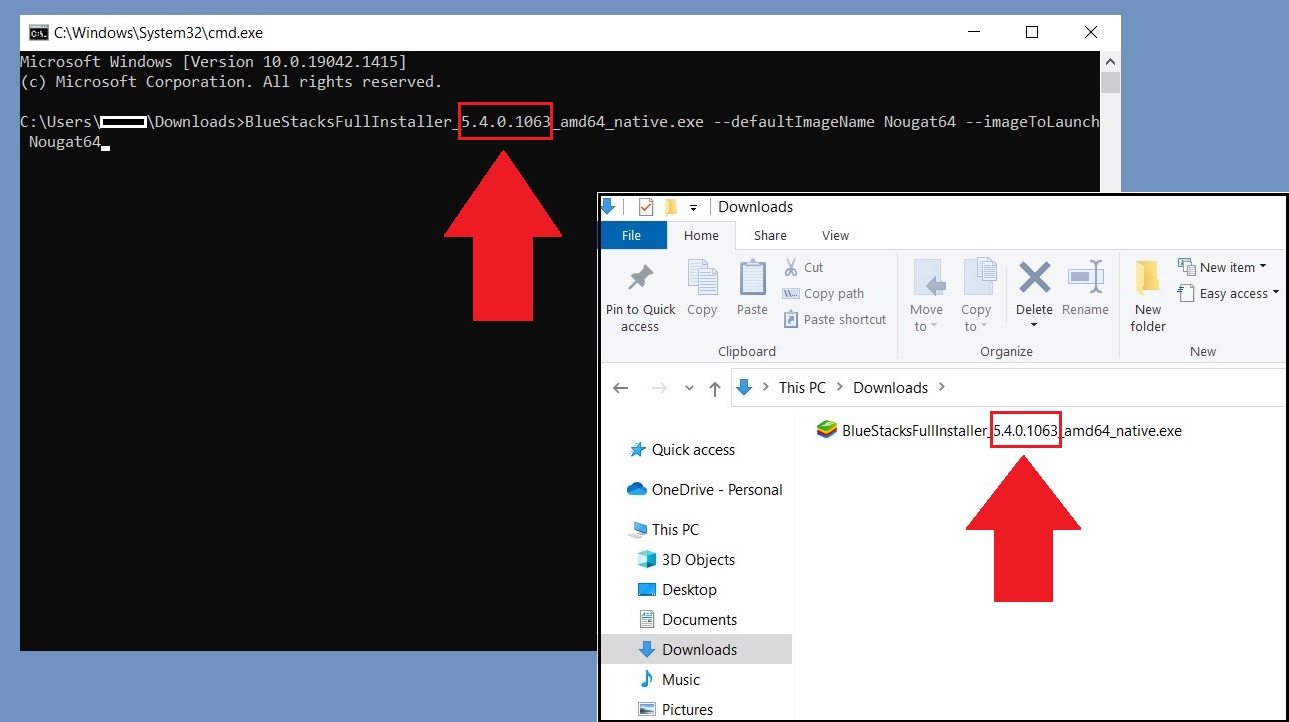
5. В окне командной строки вставьте команду, скопированную на шаге 2.
ПРИМЕЧАНИЕ: Убедитесь, что номер версии в этой команде совпадает с номером версии, указанным в имени автономного установщика, который был загружен на шаге 1. На изображении ниже выделен номер версии, и при необходимости вы можете изменить его в команде.
 3.jpg
3.jpg
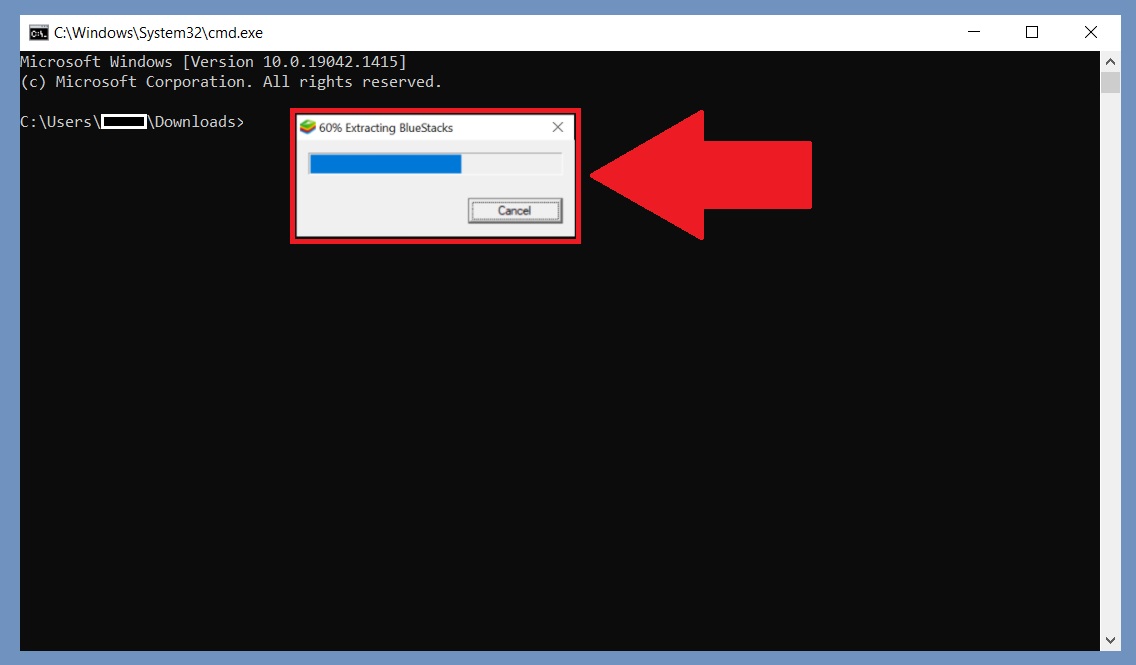
6. Убедившись, что номер версии в команде соответствует номеру версии автономного установщика, нажмите "Ввод"(Enter). Это запустит процесс установки BlueStacks 5 на ваш компьютер.
 3.jpg
3.jpg
После завершения процесса на ваш компьютер будет установлен BlueStacks 5 с нужной версией Android.
Bluestacks 5: какие версии поддерживают 32-бит и 64-бит операционные системы
Bluestacks 5 — это популярный эмулятор Андроид-приложений для компьютера. Он позволяет запускать приложения, которые были разработаны для мобильных устройств, на ПК. Люди используют Bluestacks 5 для игр, социальных сетей, мультимедийных приложений и многого другого.
Bluestacks 5 доступен в двух версиях — 32-битной и 64-битной. Какая версия нужна вам, зависит от операционной системы вашего компьютера.
32-битная версия Bluestacks 5 подходит для компьютеров с 32-битной операционной системой Windows и macOS. Она может использоваться на более старых компьютерах, имеющих ограниченные ресурсы.
64-битная версия Bluestacks 5 рекомендуется для компьютеров с 64-битной операционной системой Windows и macOS. Она использует более современные технологии и может работать более плавно на более мощных компьютерах.
Стоит отметить, что Bluestacks 5 использует технологию виртуализации для создания виртуальной машины, на которой запускаются Андроид-приложения. Поэтому, перед установкой Bluestacks 5, необходимо убедиться, что ваш компьютер поддерживает виртуализацию и она включена в настройках BIOS.
В заключение, Bluestacks 5 — это удобный и популярный способ запуска Андроид-приложений на компьютере. Выбор 32-битной или 64-битной версии зависит от операционной системы вашего компьютера. Но для использования Bluestacks 5 необходима поддержка технологии виртуализации.
Bluestacks Windows 10 64 Bit — Sugarbrands
BlueStacks 5 offline installer — BlueStacks Support.
BlueStacks 4 Download for Windows 10, 8.1, 8, 7 PC/Laptop — BlueStacks 4 has released for its users with many new features and advance improvements. Free Download BlueStacks 4 for Windows 7, 10, 8.1, 8 64 bit and 32 bit to install and play your favorite Android games on Windows PC.
How to use Pie 64-bit on BlueStacks 5.
BlueStacks 5.9.140.2001 can be downloaded from our software library for free. The actual developer of the free software is BlueStack Systems, Inc. The current installation package available for download occupies 787 KB on disk. This download was scanned by our built-in antivirus and was rated as clean. Apr 25, 2021 · Here are the steps you need to follow to download Bluestacks 5 on PC. Go to Bluestacks 5 from the official website B On the right side, you will get to see a blue colored “Download” button. Click on the download button of Bluestacks Offline Installer. Free BlueStacks App Player for PC is accepted globally because it provides the users to have an Android platform in their PC and at the same time it is of free. The tool supports on the entire Windows version (7 and 8) and that makes it more special too.For Windows: 10/8.1/8/7/Vista/XP and Server.. BlueStacks App Player 4.90.0.1046 Released: 28th Jul 2022 (a few seconds ago) BlueStacks App.
BlueStacks Download Free — Last Version — Moo Soft.
Nov 25, 2021 · BlueStacks App Player for Windows 5.3.145.1003 BlueStacks (Free) User rating Download Free Version Buy Now A free Android emulator for your PC 1/3 BlueStacks App Player for PC is a desktop emulator software that offers the possibility to play Android games on PC. Sep 30, 2022 · Download BlueStacks for Windows 10 (64/32 bit). PC/laptop. Security Status. Note Requires. NET Framework. Each software is released under license type that can be found on program pages as well as on search or category pages. Here are the most common license types. Download. Add to Basket. BlueStacks. If you want to emulate Android on your PC, there are few systems out there as robust as BlueStacks 5. The totally free emulation suite gives you the ability to access apps and games from the Google Play Store right on your Windows or macOS machine. BlueStacks currently has over 1 billion downloads, and it.
Bluestacks for pc download windows 10 64 bit.
Oct 12, 2022 · 1. Download the offline installer for your computer using one of the links given above. 2. Copy a command from below based on the Android version for BlueStacks 5 that you wish to install. To install BlueStacks 5 Nougat 64-bit. BlueStacks Download. Bluestacks App Player is a software developed by the American Technology Company, Bluestack. This tool enables one to run Android applications on a Personal Computer. Designed for use with Microsoft Windows and Apple’s macOS. It comes with basic features which are free and also pro features which require a monthly. Jun 14, 2022 · Open Bluestacks App Player on your Windows PC. Click the gear-like icon to open its Settings. Click About in the Settings window and click Check for updates. If an update for the Bluestacks application is available, you can click the Download now button to download and install it on your PC.
BlueStacks 5 — X 64-bit Download.
Download Bluestacks 3 for PC, Windows 10/7 (full 32-bit and 64-bit offline installer). After you have finished setting up your Google Account, go to the My Apps section. After you have finished the installation, you need to set up your Google Account by following the on-screen instructions. Download the setup file by going to the link mentioned. Currently, follow the below steps to complete your installation this open your article Bluestacks for Windows 10(32 bit / 64 bit ). BlueStacks 3 and BlueStacks App Player use proprietary technology to allow you to use any Android App on your PC. Download Bluestacks 3 for PC, Windows 10/7 (full 32- bit and 64-bit offline installer). Apr 25, 2021 · BlueStacks is a free Android emulator for Windows and MAC. One can download it from the official store for free. However, the official website provides the online installers that need internet connectivity to download. If you want to install BlueStacks without internet connectivity, you need to use the BlueStacks offline installer.
Bluestacks download windows 10 64 bit.
Jun 24, 2021 · Go to our website and download the BlueStacks 5 installer. Run the installer and let it work its magic. When it’s finished, BlueStacks 5 will launch automatically and you’ll be taken to the home screen once it loads. Once it installs, you can look for games on the Play Store and download them just like on your phone. How to Download BlueStacks on your PC for Free. Click the Download button on the sidebar, and the official BlueStacks website will open in a new tab. Press the Download BlueStacks button, and the setup file will instantly download to your computer. When the setup file download is complete, click on the file to open the setup wizard. Here are the steps you need to follow to download Bluestacks on PC. Go to Bluestacks official website or download it from here! On the right side, you will get to see a blue colored “Download” button. Click on the download button of Bluestacks Offline Installer. Depending on the speed of your net connection, Bluestacks starts downloading itself.
Free BlueStacks App Player for PC.
To install Bluestacks 3, your system must have a minimum of 2 GB RAM and the processor must be a Multicore processor. #3. The free space required for installing Bluestacks 3 is a minimum of 10GB. #4. It is compatible with both 32-bit operating systems and 64-bit operating systems. Recommended System Requirements to Install Bluestacks 3 1.
Bluestacks 3 for windows 10 64 bit free.Bluestacks 3 64 bit download.
Downloading BlueStacks is a quick and easy process. The only thing you will need to remember is where you’re storing the executable file once it has been downloaded. Just follow the steps below to download the program. 1 To download the BlueStacks Android emulator on Windows 10, first you need to open your favorite browser.
Download bluestacks 64 bit for free (Windows).
Sep 19, 2022 · Looking for: Bluestacks windows 10 64 bit.Bluestacks Download and Install for Windows 10/11 PC or Mac [MiniTool Tips] Click here to Download.
Download & Play Garena Free Fire MAX on PC & Mac (Emulator) — BlueStacks.
You can directly download BlueStacks 5 Nougat 64-bit on your PC by following the steps given below: 1. Click here to visit our official download page for BlueStacks 5. Next, Scroll down Click on “Download” beside “Nougat 64-bit” 2. The BlueStacks 5 Nougat 64-bit Installer will begin to download. First, you have to go to Bluestack’s official website and download the emulator. Wait for it to finish, and then run the emulator. Log in with your Google account into the emulator and wait for verification. After some time, you can click on the My Apps button and search for the app Shareme in the search box.
Download BlueStacks App Player 2.2.27.6431 for Windows.
Sep 11, 2020 · Click on the Start button > Settings > System > About. Under Device specifications > System type , see if you’re running a 32-bit or 64-bit version of Windows. Once you know your Windows version (32-bit or 64-bit), you can accordingly download and install the latest version of BlueStacks compatible with your PC. Download and install BlueStacks on your PC Complete Google sign-in to access the Play Store, or do it later Look for Garena Free Fire MAX in the search bar at the top right corner Click to install Garena Free Fire MAX from the search results Complete Google sign-in (if you skipped step 2) to install Garena Free Fire MAX.
Bluestacks windows 10 64 bit — Sugarbrands.
You can directly download BlueStacks 5 Pie 64-bit on your PC by following the steps given below: 1. Click here to visit our official download page for BlueStacks 5. Next, Scroll down Click on “Download” beside “Pie 64-bit” 2. The BlueStacks 5 Pie 64-bit installer will begin to download. Follow the steps below to update BlueStacks on your Windows PC Open the App Player, click on the gear icon on the side toolbar for Settings Click on ‘About’ on the Settings window Click on ‘Check for update’ If an update is available, you can download and install it by clicking on ‘Download now’ In case you are using a Mac, do the following. You can download BlueStacks 5 from the links on this page or from our website Download the file and complete the setup within minutes to start playing your favorite mobile games on PC. How is the Multi-instance feature better than before? There are 4 major things that have improved for Multi-instance: Faster instance creation.
Nougat 64 bit bluestacks что это
Reddit and its partners use cookies and similar technologies to provide you with a better experience.
By accepting all cookies, you agree to our use of cookies to deliver and maintain our services and site, improve the quality of Reddit, personalize Reddit content and advertising, and measure the effectiveness of advertising.
By rejecting non-essential cookies, Reddit may still use certain cookies to ensure the proper functionality of our platform.
For more information, please see our Cookie Notice and our Privacy Policy .