Murata Manufacturing On My Wi-Fi [What You Need To Know]
Feeling secure in our network is an important thing. We need to know that there are no hackers and unknown devices connected to our home network. That’s why it’s only natural that we feel unpleasant when we see an unknown device such as Murata Manufacturing .
So, if you’re reading this, you’re probably wondering “Why is Murata Manufacturing on my Wi-Fi?” This means that you’ve scanned your network and seen this label on one device. This is nothing to worry about, and we’re going to put you at ease.

What is Murata Manufacturing?
Murata Manufacturing Co., Ltd. is a company that manufactures products in the electronics industry. The company produces components for your devices, such as capacitors, sensors, filters, and components that work within high frequencies, i.e. wireless radio components.
Seeing as the company manufactures most of the components of many smart devices, it’s no wonder we might see it on our network. But, we should also be careful and try to figure out which device it is.
How to Scan LAN IP Addresses?
There are two ways we can scan our LAN (Local Area Network) to make sure it’s secure. The first way involves going through Command Prompt and entering different commands, and the second one involves using third-party software to detect the devices.
Command Prompt IP Scan
To scan your network on a Windows 10 device, you need to click on the Search box and type cmd . Click on the first result that appears and a black window will pop up. Next, we need to type ipconfig and hit Enter .
Then, some lines of text will appear with certain details about the adapters that are running on your device. After that, we need to type arp -a . Hit Enter and more lines will appear. Only, this time, you’ll see the IP addresses and the MAC (media access control) addresses of the devices connected.
Software IP Scan
You can install any third-party software that can do this for you. One of these is the Advanced IP Scanner . The fundamental difference between these two methods is that with the software, you get a clearer idea of which devices are connected.
For the Command Prompt method, you only get the IP address and the MAC addresses. But, here, you can see the addresses, if the devices are currently connected or disconnected, and the unknown devices.
What is a MAC Address?
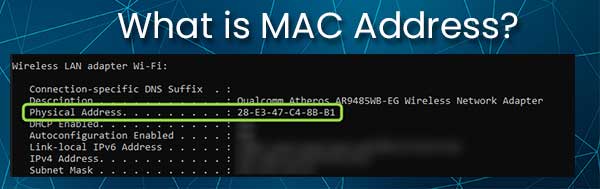
To make everything clearer, we need to understand what a MAC address is. There are two common types of addresses we come across in networking. First, we have the IP (Internet Protocol) address, and then we have the MAC address.
The IP address is the numerical address of your device on the network. It comes in handy for the router, because it’s used to direct traffic to and from your device. The MAC address is slightly different because it’s the physical address of your device.
MAC addresses are made of 6 pairs of hexadecimal digits. These addresses are physically present on our network cards, and that’s why we refer to them as physical addresses as well. They’re used in MAC filtering for advanced networks.
Murata Manufacturing Appears On Wi-Fi
When Murata Manufacturing appears on Wi-Fi, it appears next to the MAC address. You’ll probably see something along the lines of MAC Address: A8:9C:ED:5B:04:F7 , and next to it, you’ll notice (Murata Manufacturing Co.) .
The reason is quite obvious, it’s either a smart home device which has a wireless radio manufactured by the company, or it’s simply your smartphone. However, it can mean that you have an intruder on your network.
Which Device Is Murata Manufacturing?
Figuring out which device is the one that shows as Murata Manufacturing Co. is tricky. First, we need to scan our network using the mentioned two methods, and then we need to turn on the MAC filter on our router. For most routers, these are the steps:
-
settings page.
- Locate the Security section of your router.
- There will probably be an Advanced Settings tab.
- Then, find the MAC Filtering section or the Access Control menu.
- Once there, we need to Enable MAC address filtering.
- Usually, there’s an Add button that we need to click.
- After that, type in the MAC address next to Murata Manufacturing.
- Click on Block and Save . (These two can vary according to the router.)
When you finish all these steps, check to see if any of the devices that are usually connected to Wi-Fi no longer have a connection. The device that doesn’t have the connection is the Murata Manufacturing device.
Which Devices Appear as Murata Manufacturing?
The electronics industry is advancing extremely fast. The demand for components produced by this company is quite large. So, you can expect to see Murata Manufacturing on the list of your connected devices if you own smart devices from Samsung, Apple, Xiaomi, Vivo, and Oppo.
The company supplied Huawei and some Samsung smartphones with components. So, there’s a good chance that this is the device you’re looking at. More devices are coming with this particular signature. Don’t be surprised when you see it in your network scan.
Conclusion
Scanning your business’ network and your home network for unknown devices is an important routine you should implement. It gives you an overview of where the data might be going and how many devices you have.
There’s no need to ask yourself, “Why is Murata Manufacturing on my Wi-Fi?” anymore, and if you’ve identified the device, there’s nothing to worry about. However, if you’re unable to identify it, just block it and you’re safe.

Hey, I’m Jeremy Clifford. I hold a bachelor’s degree in information systems, and I’m a certified network specialist. I worked for several internet providers in LA, San Francisco, Sacramento, and Seattle over the past 21 years.
I worked as a customer service operator, field technician, network engineer, and network specialist. During my career in networking, I’ve come across numerous modems, gateways, routers, and other networking hardware. I’ve installed network equipment, fixed it, designed and administrated networks, etc.
Networking is my passion, and I’m eager to share everything I know with you. On this website, you can read my modem and router reviews, as well as various how-to guides designed to help you solve your network problems. I want to liberate you from the fear that most users feel when they have to deal with modem and router settings.
My favorite free-time activities are gaming, movie-watching, and cooking. I also enjoy fishing, although I’m not good at it. What I’m good at is annoying David when we are fishing together. Apparently, you’re not supposed to talk or laugh while fishing – it scares the fishes.
What Is Meant By Murata Manufacturing On My WiFi?
As technology has advanced at such a rapid rate in the last decade, it is becoming nearly impossible to keep a track of what’s what. There are thousands of companies building millions of new devices and gadgets.
Each one fills an apparent need that we may not have even realised we had. This can lead to some confusion at times. For example, every now and then it is totally natural to have a look at the devices connected to your Wi-Fi – only to end up not recognising at least one of them.
In most cases, people are led to assume that someone is leeching off their connection or that something else even more malicious might be afoot. This gets even more suspicious when the name of the device being picked up is a little vague.
For many of you, that’s precisely what has happened when you’ve noticed the unfamiliar ‘Murata Manufacturing’ making an appearance on your network. So, to save some confusion, we decided to explain a little about this company and what they do so that you can track which device it is. So, here’s what we’ve figured out!
What Is Meant By Murata Manufacturing On My WiFi?
A Little Bit About Murata Manufacturing
Murata Manufacturing Co, LTM. Are a brand that are involved in the manufacture of a pretty vast array of electronic devices. So, the good news is that it is a legit entity.
They are a Japanese company which aren’t all that well-known yet, despite the fact that their components can show up in all sorts of devices you wouldn’t expect them to be in. For example, when this happened to one of us recently, it turned out that the device it was related to was actually a Trane thermostat.
For the most part, their components will be found in mechanical devices, telecommunications products, and things of that nature. Within that, there are actually a huge list of bits and pieces that will bear the name Murata Manufacturing.
There are multilayer ceramic capacitors, communication modules, noise countermeasure components, sensor devices, high-frequency components, powerful batteries, and a whole host of other devices. Because of this, the company’s reach is not just limited to Japan, and their components can show up pretty much anywhere in the world.
What Should I Do About The Murata Manufacturing Device On My Wi-Fi?
We’ve already seen how this brand name is likely to show up on any network anywhere in the world. So, if you are seeing it on your system, the first thing we would advise is not to worry too much about it just yet. The chances are that it is totally harmless and nothing to do with spyware or anyone stealing your Wi-Fi.
For the more curious among you who want to engage in a little bit of detective work (it’s actually a bit of fun), here is how we would suggest you go about it. We’ve found that the easiest way to isolate the device and identify it is to block that particular device from the network.
Then, you can systematically go around your home and try to operate all of your internet-enabled gear. If any of your stuff has ceased functioning entirely, this is nearly definitely going to be the culprit and the one bearing the Murata name. More often than not, the device will be a smart home one.
How To Get Rid Of The Murata Manufacturing Notification On My WiFi
For many of you, you will now want to simply shut out the notification. The bad news is that it won’t simply disappear. So, you will need to actively do something about it, but this won’t take all that much time. All you will need to do is configure the address manually.
So, you will need to verify this Murata device with your phone’s MAC IP address as well as that of your router. This way, the device will no longer be a source of mystery to your network and trigger notifications.
Murata manufacturing co ltd что за устройство в сети
Murata Manufacturing Co., Ltd. — что за устройство в сети?
Приветствую уважаемые друзья! Поговорим про железо, а точнее про одно название устройства, которое вы можете увидеть например… при использовании вай фай роутера. Или в другом сетевом оборудовании.
Описание
Murata Manufacturing Co., Ltd. — японская компания, производит разные электронные компоненты, включая модули Bluetooth, Wi-Fi.
Устройство компании Murata Manufacturing Co., Ltd. — не является популярным типом. То есть это только встроенные решения, и думаю что не так часто можно встретить в ПК или ноутах. Например компания делает беспроводные модули к источникам питания, которые например могут использоваться в слуховом аппарате.
Кроме беспроводных модулей компания также производит монолитные керамические конденсаторы, многослойные керамические устройства, индукторы микросхемы, фильтры на ПАВ, кристаллические фильтры, ЖК-фильтры, керамические резонаторы и прочее не особо интересное обычному пользователю))
Разбираемся
- К сожалению информации о том, что это за устройство точной нет. Но выяснил, что Murata это мировой бренд электронных компонентов, которые также создают модули Блютуз, может даже и Вай Фай (информации реально просто нет).
- Что это может быть за устройство? Это вряд ли какой-то роутер или ноутбук известного производителя. Это может быть устройство умного дома, возможно кто-то сканирует вашу сеть, пытается подобрать пароль. Также некая современная бытовая техника может иметь разные беспроводные модули.
- Что в итоге делать? Самое правильное и разумное решение — подумать, какие устройства могут иметь Wi-Fi модуль в ближайшем окружении, но самое правильное решение — блокировать по маку устройство. Если он постоянно меняется, то это уже интересно, может действительно кто-то пытается подобрать пароль и меняет мак, чтобы устройство не было заблокировано.
Вот пример, который говорит что компания Murata производит беспроводные модули:

Но судя по интерфейсу модуля — он может быть установлен в каком-то специфичном оборудовании, то есть не компьютеры или ноутбуки. А например телевизор, принтер, или устройство, которое используется в промышленности.
Murata Manufacturing Co. Ltd on my Network: What is it?
Usually, when your phone connects to a Wi-Fi network, you expect your phone brand along with its model name to show on your Wi-Fi Network.
But what if you don’t see it and instead find an unknown name connected to your home Wi-Fi.
I recently connected my brand new smartphone to my Wi-Fi network, and to my surprise, I saw the device name as “Murata Manufacturing Co.Ltd” instead of the actual brand.
At first, I thought my Wi-Fi network had been compromised and decided to do some research and try to understand what really caused such a strange occurrence.
After quite a bit of research, here’s what I found about the problem.
The Murata Manufacturing Co.Ltd on your Network is very likely to be wireless module components found in your smartphone, and they are harmless.
This led to the appearance of the manufacturer’s name on my network. I further realized that it’s not a matter of concern and can be resolved by manually configuring the address on the device.
If you face a similar problem as I did, read on to understand more about this issue.
What is a Murata Manufacturing Co. Ltd Device?

Murata Manufacturing Co.Ltd is a Japanese company producing electronic devices and components used in the telecom, mechanics and electric sectors.
So any device produced by the above company is known as Murata Manufacturing Co.Ltd device.
Some of the electronic components and modules churned out by Murata Manufacturing Co.Ltd include multilayer ceramic capacitors, sensors, and timing devices, to name a few.
Why is there a Murata Manufacturing Co. Ltd on My Network?
If you see Murata Manufacturing Co.Ltd on your Wi-Fi network, it is because one of the devices such as your router, modem or Wi-Fi dongle is produced by them.
Moreover, you will also receive a notification saying, “Murata Manufacturing Co.Ltd is connected to your network”, even if you have not given any permission to connect.
This is because the Murata Manufacturing device is connected to your router through a wired internet connection that allows it to access your network.
Another reason why Murata Manufacturing Co.Ltd reconnects automatically to your network is due to your Android app trying to establish a connection between the Murata device and router.
What Devices Identify Themselves as Murata Manufacturing Co. Ltd Devices?

Murata Manufacturing produces a range of products for commercial and home use, such as capacitors, resistors, and inductors used in almost every electronic device.
But as far as home devices are concerned, you can find Murata Manufacturing in your home routers, modems, Wi-Fi dongles and your smartphones.
As mentioned earlier, any device directly connected to the internet will pop up a notification identifying itself as Murata Manufacturing Co.Ltd devices.
Should I be Worried about the Murata Manufacturing Co. Ltd Device on my Network?
Having an unknown device connected to your network can cause concern.
However, in this case, you are just seeing the name of the IP device associated with the manufacturing company, which could be your mobile phone, smart TV, router etc.
You need not worry about it, as it is not a security threat like you imagined it to be, and there are solutions to deal with such issues.
If you want to know how to access and remove Murata Manufacturing devices from your home network, then read on.
How to Access the Murata Manufacturing Co. Ltd Device on my Network?
You can access the Murata Manufacturing device by logging in to your router and making the necessary changes in the configuration.
Here are the router login instructions to access the device.
- Firstly you need to connect to the Murata router upon which you need to access the Murata router’s set up pages.
- You can establish the connection by using an ethernet cable or Wi-Fi.
- Launch the web browser and enter the router’s IP address directly into the address field.
- Murata routers’ most common IP address is 192.168.1.100, and if it doesn’t work, you need to search for the default address assigned to that specific model in use.
- Once you have access to the home page, sign in to the Murata router using your username and password.
By following the above steps, you can access the Murata device that appears on your network.
Activate your Antivirus

The most sought approach in blocking unknown devices such as Murata Manufacturing Co.Ltd is to utilize your AntiVirus.
Using an antivirus with Wi-Fi protection can help you protect against intrusion into your home Wi-Fi networks by unknown devices.
How to Remove the Murata Manufacturing Co. Ltd Device from my Network
If you are annoyed by seeing the notification message, you can easily do away with it by following the two steps.
- Firstly, you need to manually configure the address so that the manufacturing company’s name does not get broadcast on the phone device.
- The next step is to cross-check your device with your phone’s MAC IP along with the MAC address of your home network router.
- You need to ensure that this MAC IP is the one you use to access the internet service so that you don’t have to see the notification.
Block an Unknown Murata Manufacturing Co. Ltd Device on my Network

The easier option to deal with a Murata device is to block by identifying its MAC address. Here is how you block an unknown Murata device.
- Launch the browser and enter the router IP address.
- Login to the router using valid credentials.
- Look for tabs such as network or attached/connected devices, and once you find the list, you will be able to see the IP addresses and the MAC address of the listed device.
- Choose the MAC to address the device you want to block on your network and proceed accordingly.
Manage the Devices on your Network
If you have multiple devices connected to your Wi-Fi, it is high time you take control over your network.
One way of doing this is by managing the devices on your network, i.e. you get to see the devices connected along with the data usage.
There are several apps, such as Google Home, and several third-party software developed for this purpose.
Using such apps can be beneficial in keeping track of devices connected to the internet, thereby helping you identify unknown devices.
Boost your Internet Security
Apart from using antivirus to protect your home networks, you can also use much more advanced home security solutions such as the Fing app to boost your internet security.
These IoT based apps come with several features such as network scanners, syncing various network configurations, conducting internet tests etc.
This will help you monitor your network and improve security, thereby increasing overall protection to your home Wi-Fi.
Contact your ISP
Finally, if the problem persists, I strongly recommend you reach out to your ISP and seek their assistance.
With its pool of qualified technicians, your ISP can help you solve this issue and offer you professional advice in dealing with the above issue.
Final Thoughts on Murata Manufacturing Co. Ltd Devices
Though the solutions are a handful in addressing this issue, the real challenge lies in identifying the Murata device, especially if you have a smart home.
One easy way of finding the device is by Google searching the MAC address on your network.
This will give you the details of the manufacturer and the name of the device.
Another way of identifying a Murata device is by disconnecting the devices individually from your Wi-Fi network until you don’t see the notification.
You May Also Enjoy Reading:
- Honhaipr device: What is it and How to Fix
- How to Check Bluetooth Radio Status not fixed
Frequently Asked Questions
What devices does Murata Manufacturing make?
Murata Manufacturing produces components and modules that are used in electronic devices. They also produce components used in telecom, mechanics and electric sectors.
What is a Murata Manufacturing phone?
If your phone contains RF components, module products, sensors, etc., that Murata Manufacturing produces, it is called a Murata manufacturing phone.
This is because the phone, when connected to the Wi-Fi, will show the manufacturer’s name of the RF module instead of the phone brand.
Does Murata make Samsung Smartphone Components?
You can find Murata in Samsung’s suppliers list. So, yes, Murata does make components for Samsung Smartphones.
Who does Murata supply?
Murata’s two major customers are Apple Inc and Samsung Electronics Co Ltd. Murata also supply their components to Chinese smartphone makers.
What Is Meant By Murata Manufacturing On My WiFi?
As technology has advanced at such a rapid rate in the last decade, it is becoming nearly impossible to keep a track of what’s what. There are thousands of companies building millions of new devices and gadgets.
Each one fills an apparent need that we may not have even realised we had. This can lead to some confusion at times. For example, every now and then it is totally natural to have a look at the devices connected to your Wi-Fi – only to end up not recognising at least one of them.
In most cases, people are led to assume that someone is leeching off their connection or that something else even more malicious might be afoot. This gets even more suspicious when the name of the device being picked up is a little vague.
For many of you, that’s precisely what has happened when you’ve noticed the unfamiliar ‘Murata Manufacturing’ making an appearance on your network. So, to save some confusion, we decided to explain a little about this company and what they do so that you can track which device it is. So, here’s what we’ve figured out!
What Is Meant By Murata Manufacturing On My WiFi?
A Little Bit About Murata Manufacturing
Murata Manufacturing Co, LTM. Are a brand that are involved in the manufacture of a pretty vast array of electronic devices. So, the good news is that it is a legit entity.
They are a Japanese company which aren’t all that well-known yet, despite the fact that their components can show up in all sorts of devices you wouldn’t expect them to be in. For example, when this happened to one of us recently, it turned out that the device it was related to was actually a Trane thermostat.
For the most part, their components will be found in mechanical devices, telecommunications products, and things of that nature. Within that, there are actually a huge list of bits and pieces that will bear the name Murata Manufacturing.
There are multilayer ceramic capacitors, communication modules, noise countermeasure components, sensor devices, high-frequency components, powerful batteries, and a whole host of other devices. Because of this, the company’s reach is not just limited to Japan, and their components can show up pretty much anywhere in the world.
What Should I Do About The Murata Manufacturing Device On My Wi-Fi?
We’ve already seen how this brand name is likely to show up on any network anywhere in the world. So, if you are seeing it on your system, the first thing we would advise is not to worry too much about it just yet. The chances are that it is totally harmless and nothing to do with spyware or anyone stealing your Wi-Fi.
For the more curious among you who want to engage in a little bit of detective work (it’s actually a bit of fun), here is how we would suggest you go about it. We’ve found that the easiest way to isolate the device and identify it is to block that particular device from the network.
Then, you can systematically go around your home and try to operate all of your internet-enabled gear. If any of your stuff has ceased functioning entirely, this is nearly definitely going to be the culprit and the one bearing the Murata name. More often than not, the device will be a smart home one.
How To Get Rid Of The Murata Manufacturing Notification On My WiFi
For many of you, you will now want to simply shut out the notification. The bad news is that it won’t simply disappear. So, you will need to actively do something about it, but this won’t take all that much time. All you will need to do is configure the address manually.
So, you will need to verify this Murata device with your phone’s MAC IP address as well as that of your router. This way, the device will no longer be a source of mystery to your network and trigger notifications.
Murata Manufacturing On My Wi-Fi [What You Need To Know]
Feeling secure in our network is an important thing. We need to know that there are no hackers and unknown devices connected to our home network. That’s why it’s only natural that we feel unpleasant when we see an unknown device such as Murata Manufacturing .
So, if you’re reading this, you’re probably wondering “Why is Murata Manufacturing on my Wi-Fi?” This means that you’ve scanned your network and seen this label on one device. This is nothing to worry about, and we’re going to put you at ease.
What is Murata Manufacturing?
Murata Manufacturing Co., Ltd. is a company that manufactures products in the electronics industry. The company produces components for your devices, such as capacitors, sensors, filters, and components that work within high frequencies, i.e. wireless radio components.
Seeing as the company manufactures most of the components of many smart devices, it’s no wonder we might see it on our network. But, we should also be careful and try to figure out which device it is.
How to Scan LAN IP Addresses?
There are two ways we can scan our LAN (Local Area Network) to make sure it’s secure. The first way involves going through Command Prompt and entering different commands, and the second one involves using third-party software to detect the devices.
Command Prompt IP Scan
To scan your network on a Windows 10 device, you need to click on the Search box and type cmd . Click on the first result that appears and a black window will pop up. Next, we need to type ipconfig and hit Enter .
Then, some lines of text will appear with certain details about the adapters that are running on your device. After that, we need to type arp -a . Hit Enter and more lines will appear. Only, this time, you’ll see the IP addresses and the MAC (media access control) addresses of the devices connected.
Software IP Scan
You can install any third-party software that can do this for you. One of these is the Advanced IP Scanner . The fundamental difference between these two methods is that with the software, you get a clearer idea of which devices are connected.
For the Command Prompt method, you only get the IP address and the MAC addresses. But, here, you can see the addresses, if the devices are currently connected or disconnected, and the unknown devices.
What is a MAC Address?
To make everything clearer, we need to understand what a MAC address is. There are two common types of addresses we come across in networking. First, we have the IP (Internet Protocol) address, and then we have the MAC address.
The IP address is the numerical address of your device on the network. It comes in handy for the router, because it’s used to direct traffic to and from your device. The MAC address is slightly different because it’s the physical address of your device.
MAC addresses are made of 6 pairs of hexadecimal digits. These addresses are physically present on our network cards, and that’s why we refer to them as physical addresses as well. They’re used in MAC filtering for advanced networks.
Murata Manufacturing Appears On Wi-Fi
When Murata Manufacturing appears on Wi-Fi, it appears next to the MAC address. You’ll probably see something along the lines of MAC Address: A8:9C:ED:5B:04:F7 , and next to it, you’ll notice (Murata Manufacturing Co.) .
The reason is quite obvious, it’s either a smart home device which has a wireless radio manufactured by the company, or it’s simply your smartphone. However, it can mean that you have an intruder on your network.
Which Device Is Murata Manufacturing?
Figuring out which device is the one that shows as Murata Manufacturing Co. is tricky. First, we need to scan our network using the mentioned two methods, and then we need to turn on the MAC filter on our router. For most routers, these are the steps:
-
settings page.
- Locate the Security section of your router.
- There will probably be an Advanced Settings tab.
- Then, find the MAC Filtering section or the Access Control menu.
- Once there, we need to Enable MAC address filtering.
- Usually, there’s an Add button that we need to click.
- After that, type in the MAC address next to Murata Manufacturing.
- Click on Block and Save . (These two can vary according to the router.)
When you finish all these steps, check to see if any of the devices that are usually connected to Wi-Fi no longer have a connection. The device that doesn’t have the connection is the Murata Manufacturing device.
Which Devices Appear as Murata Manufacturing?
The electronics industry is advancing extremely fast. The demand for components produced by this company is quite large. So, you can expect to see Murata Manufacturing on the list of your connected devices if you own smart devices from Samsung, Apple, Xiaomi, Vivo, and Oppo.
The company supplied Huawei and some Samsung smartphones with components. So, there’s a good chance that this is the device you’re looking at. More devices are coming with this particular signature. Don’t be surprised when you see it in your network scan.
Conclusion
Scanning your business’ network and your home network for unknown devices is an important routine you should implement. It gives you an overview of where the data might be going and how many devices you have.
There’s no need to ask yourself, “Why is Murata Manufacturing on my Wi-Fi?” anymore, and if you’ve identified the device, there’s nothing to worry about. However, if you’re unable to identify it, just block it and you’re safe.
Hey, I’m Jeremy Clifford. I hold a bachelor’s degree in information systems, and I’m a certified network specialist. I worked for several internet providers in LA, San Francisco, Sacramento, and Seattle over the past 21 years.
I worked as a customer service operator, field technician, network engineer, and network specialist. During my career in networking, I’ve come across numerous modems, gateways, routers, and other networking hardware. I’ve installed network equipment, fixed it, designed and administrated networks, etc.
Networking is my passion, and I’m eager to share everything I know with you. On this website, you can read my modem and router reviews, as well as various how-to guides designed to help you solve your network problems. I want to liberate you from the fear that most users feel when they have to deal with modem and router settings.
My favorite free-time activities are gaming, movie-watching, and cooking. I also enjoy fishing, although I’m not good at it. What I’m good at is annoying David when we are fishing together. Apparently, you’re not supposed to talk or laugh while fishing – it scares the fishes.
Murata manufacturing co ltd что это: Murata Manufacturing Co., Ltd. — что за устройство в сети?
Murata Manufacturing Co., Ltd. — что за устройство в сети?
Приветствую уважаемые друзья! Поговорим про железо, а точнее про одно название устройства, которое вы можете увидеть например… при использовании вай фай роутера. Или в другом сетевом оборудовании.
Описание
Murata Manufacturing Co., Ltd. — японская компания, производит разные электронные компоненты, включая модули Bluetooth, Wi-Fi.
Устройство компании Murata Manufacturing Co., Ltd. — не является популярным типом. То есть это только встроенные решения, и думаю что не так часто можно встретить в ПК или ноутах. Например компания делает беспроводные модули к источникам питания, которые например могут использоваться в слуховом аппарате.
Кроме беспроводных модулей компания также производит монолитные керамические конденсаторы, многослойные керамические устройства, индукторы микросхемы, фильтры на ПАВ, кристаллические фильтры, ЖК-фильтры, керамические резонаторы и прочее не особо интересное обычному пользователю))
Разбираемся
- К сожалению информации о том, что это за устройство точной нет. Но выяснил, что Murata это мировой бренд электронных компонентов, которые также создают модули Блютуз, может даже и Вай Фай (информации реально просто нет).
- Что это может быть за устройство? Это вряд ли какой-то роутер или ноутбук известного производителя. Это может быть устройство умного дома, возможно кто-то сканирует вашу сеть, пытается подобрать пароль. Также некая современная бытовая техника может иметь разные беспроводные модули.
- Что в итоге делать? Самое правильное и разумное решение — подумать, какие устройства могут иметь Wi-Fi модуль в ближайшем окружении, но самое правильное решение — блокировать по маку устройство. Если он постоянно меняется, то это уже интересно, может действительно кто-то пытается подобрать пароль и меняет мак, чтобы устройство не было заблокировано.
Вот пример, который говорит что компания Murata производит беспроводные модули:
Но судя по интерфейсу модуля — он может быть установлен в каком-то специфичном оборудовании, то есть не компьютеры или ноутбуки.  А например телевизор, принтер, или устройство, которое используется в промышленности.
Заключение
- Murata Manufacturing Co., Ltd. — это скорее всего специфическое устройство, например девайс умного дома, встроенный модуль в телевизоре, промышленном оборудовании. К сожалению точной информации нет.
Удачи и добра, до новых встреч друзья!
На главную! 15.08.2021
Ctrl+C Ctrl+V – что это значит? (контрл+ц контрл+в)
Grizzly папка – что это?
Mb3install – что за папка?
PORT. IN на музыкальном центре – что это?
Windows10UpgraderApp – что это?
scoped_dir – что это за папка?
Windows10Upgrade – можно ли удалить?
im_temp – что за папка?
Рынок Murata в России – Component market of Russia
Murata Manufacturing Co., Ltd. — японский производитель электронных компонентов, базирующийся в Нагаокакио, Киото. Murata Manufacturing в основном производит керамические пассивные электронные компоненты, в первую очередь конденсаторы, и занимает значительную долю мирового рынка керамических фильтров, высокочастотных деталей и датчиков.
Как распределяются продажи по группам товаров, показано на Рисунке 1. Данные официальные, взяты с сайта компании.
Интересную статистику дают нам исторические показатели компании.
Доля керамических конденсаторов в продажах компании увеличилась с 33% до 38%, а в денежном выражении в 3 раза. А вот доля пьезоэлементов уменьшилась с 15% до 8%, в денежном выражении рост составил всего 50%. Доля Китая в продажах компании выросла с 41% до 58%.
Данные импорта в Россию по годам отражены в Таблице 1.
| Год | итог, FOB, usd |
| 2017 | 10 045 126 |
| 2018 | 18 044 242 |
| 2019 | 15 066 082 |
| 2020 | 12 337 937 |
В 2018 г. возник дефицит керамических конденсаторов Murata Manufacturing, что привело к высоким темпам роста цен и увеличению складских запасов. Впрочем, даже рассматривая максимальную цифру продаж бренда в России, равную 18 млн, на фоне общих продаж Murata в 14 млрд, доля нашей страны настолько незначительна, что укладывается в статистическую погрешность и попадает в колонку прочие страны. 
Если вы обратитесь к статье в журнале «КиТ» № 12 от 2008 г., то узнаете, что прежний представитель Murata не опровергла цифру в 1% продаж бренда в России от мировых. Косвенно это означает, что доля компании в России сильно сократилась. В статье была озвучена цель компании по продажам – 15 млн долларов.
Структура импорта бренда в Россию, смотрите Таблицу 2.
Таблица 2. Импорт в Россию в 2020 г. по бренду Murata и по группам компонентов
| Тип | сумма |
| Конденсаторы керамические | 6243375 |
| Катушки индуктивности и дроссели | 2437742 |
| Преобразователи | 1653237 |
| Другие | 1152135 |
| КРИСТАЛЛЫ ПЬЕЗОЭЛЕКТРИЧЕСКИЕ СОБРАННЫЕ | 371826 |
| 11858314 |
Внимательный читатель заметил разницу между итогом Таблицы 2 и Таблицей 1. Я не занимаюсь подгоном цифр и всегда стараюсь показать реальную статистику.  Полная цифра импорта, на самом деле, дает представление о рынке разве что глобальным производителям. Моя внутренняя задача – оценка конкурентного рынка, а не всего в целом, поэтому мои цифры могут отличаться от тех, которые предоставляются компаниями, анализирующими рынок без ограничений. Таблица 1 содержит все варианты импорта, в которых Murata выступает изготовителем. Довольно распространена практика, когда один производитель изготавливает для другого производителя. В данном случае убрана часть данных, которые мне показались лишними. Так, производителем указан Murata, но бренд, хоть и известный, но другой. Дальнейший анализ будет осуществляться по Таблице 2.

Позволю себе удалить поставки для этих компаний, чтобы получить более чистый результат. Они не являются конкурентной средой для местных региональных поставщиков, это глобальные прямые поставки.
Дальнейший анализ будет проводиться исходя из этой цифры.
Согласно годовому отчету, в 2020 г. продажи многослойных керамических конденсаторов Murata выросли на 12%. В следующем году компания планирует повторить результат. Такие показатели вызваны ростом продаж смартфонов и автомобильной электроники, в связи с увеличением количества устройств, переходом на 5G и дальнейшей электрификацией.
В России продажи керамических конденсаторов Murata снижаются, несмотря на положительные отзывы потребителей о бренде. Два агрессивных игрока «SAMSUNG» и «YAGEO» потеснили Murata в России. В 2019 г. бренд Murata уверенно удерживал первое место по керамическим конденсаторам в денежном выражении, но в штуках уже наблюдался паритет с конкурентами. Отмечу, что ещё 5 лет назад Murata по доходам превосходил их в 2 раза. Тем не менее, Россия никак не влияет на ситуацию по продажам в целом.
Недавно президент Murata Норио Накадзима сказал в интервью Nikkan Kogyo Shimbun, что, по крайней мере, в следующие 3 года ожидаются темпы роста общего рынка MLCC на уровне выше 10%, и Murata продолжит наращивать производство для удовлетворения спроса.  Норио Накадзима сказал, что сейчас из-за глобальной нехватки полупроводников многие клиенты значительно увеличивают уровень запасов MLCC. Ожидается, что цена MLCC может снизиться после того, как рыночные запасы будут достаточными во второй половине года.
Последний раз компания занималась поглощением в 2014 г. Это важно для анализа импорта и позволяет утверждать, что вся продукция бренда поставлялась в 2020 г. именно под маркой Murata, так как прошел внушительный срок в 6 лет.
Российским дистрибьютором бренда Murata, представленным на официальном сайте компании, является только компания Симметрон.
Более 100 импортеров ввезли в Россию продукцию бренда Murata на сумму от 10 000 долларов, я разделю их на 2 группы. В Таблице 3 будут представлены только ТОП-25 найденных мной поставщиков, а в Таблице 4 – лишь производители. В обоих случаях данные достоверны, рассматриваются исключительно подобранные мной поставщики и производители с сайтами, если они есть. Контрактные производители и транспортные компании представлены в отдельной таблице.
Таблица 3. ТОП-25 импортеров-поставщиков Murata в России в 2020 г.
Таблица 4. ТОП-25 импортеров-производителей Murata в России в 2020 г.
В Таблице 5 представлены все остальные импортеры, не попавшие в Таблицы 3 и 4.
| Тип | Сумма |
| Таможенный брокер, контрактное производство, IT-Дистрибьютор, . | 882274 |
| Остальные <10000 | 590166 |
| итого | 1472440 |
Большая часть импорта из 10,8 млн долларов (не менее 65%) осуществляется посредниками. Примечательно то, что на первом месте списка посредников не единственный региональный российский дистрибьютор Murata – компания Симметрон. Допускаю, что какой-либо таможенный брокер или отдельно взятое юридическое лицо ввозит для них продукцию, но проверить эту информацию невозможно. Если вы обладаете информацией по этому поводу, прошу написать для корректировки цифр. По официальным данным, Симметрон ввозит в Россию всего 13% от всего импорта Murata. Для единственного местного дистрибьютора это крайне низкий показатель. При этом Симметрон лидирует только в поставках преобразователей, а в импорте конденсаторов и катушек его доля существенно меньше.  Меня это не удивляет, был опыт общения с менеджерами этой компании по ряду вопросов, и сложилось впечатление, что у Симметрон особая индивидуальная бизнес-модель, имеющая свои достоинства и недостатки.
Глобальные дистрибьюторы отправляют в Россию примерно половину от импорта. Могу предположить, что одной из главных проблем компании Симметрон является разница в ценообразовании, которую он не может компенсировать, так как его модель не позволяет покупать Murata у других. Получается, что доля импорта не дистрибьюторских поставок по Murata составляет примерно 30-35%. Какой следует вывод?
Симметрон, развивая продажи Murata, сознательно не пользуется благами своего труда, либо сам бренд не позволяет ему этого. Я думаю, вероятнее второй вариант. С другой стороны, я уверен, что совет директоров Murata оценивает продажи по России не отдельно, а в колонке прочие по региону EMEA.
Возможно, дополнительной скрытой причиной такой низкой доли импорта является то, что Симметрон ещё и дистрибьютор компании Epcos – старого конкурента Murata.  Её продажи почти в 2 раза превышают продажи Murata в России.
Подписывайтесь, возможно, моя следующая статья будет о Epcos.
К сожалению, мой запрос, о комментарии, в компания Симметрон остался без ответа.
ГЛАВНАЯ | Мурата Производство Co., Ltd.
Поиск по ключевому слову
Введите для поиска
Новости о продуктах
Статьи
Узнайте, как технология Murata способствовала развитию электронной промышленности.