Как изменить поиск по умолчанию в Google Chrome

По умолчанию в Google Chrome используется поиск Google, однако может быть так, что пользователь предпочитает использовать Яндекс, DuckDuckGo или другую поисковую систему, а иногда случается, что поиск в браузере меняется на неудобный для вас какими-то сторонними программами и требуется вернуть параметры по умолчанию.
В этой инструкции подробно о том, как поменять поиск по умолчанию в Google Chrome для Windows, Android и iPhone. Внимание: если после проделанных вами изменений поиск снова изменяется, рекомендую проверить компьютер на наличие вредоносных программ.
Изменение поисковой системы Google Chrome в Windows 10, 8.1 и Windows 7
Для того, чтобы поменять поиск Google Chrome на компьютере или ноутбуке, выполните следующие простые шаги:
- Откройте меню браузера, нажав по кнопке с тремя точками справа вверху. Выберите пункт «Настройки».

- В настройках найдите раздел «Поисковая система».
- Здесь, в пункте «Поисковая система, используемая по умолчанию», вы можете выбрать Google, Яндекс, Mail.ru, Bing или DuckDuckGo. Если нужный вам поиск не отображается в списке, используйте 4-й пункт, либо вручную зайдите на нужный вам поиск, однократно используйте его, а затем повторите шаги 1-3 (обычно после этого нужный поисковый сервис появляется в списке).

- Если требуется добавить другую поисковую систему, используйте пункт «Управление поисковыми системами» и укажите адрес сайта требуемой поисковой системы.

Обратите внимание, что сделанные изменения влияют только на поиск в адресной строке Google Chrome.
Если вам требуется, чтобы в новой вкладке браузера или при его запуске открывался сайт какого-либо поисковика, сделать это можно в Настройки — раздел «Запуск Chrome» — Заданные страницы и указать нужную страницу, которую требуется открывать при запуске.
Изменение поиска в Chrome на Android
Процесс лишь незначительно отличается в браузере на смартфонах или планшетах Android:
- На новой вкладке Google Chrome нажмите по кнопке меню справа вверху и перейдите в «Настройки».

- В разделе «Основные» выберите пункт «Поисковая система».

- Выберите предпочитаемую вами поисковую систему.

Настройка поисковой системы Google Chrome на iPhone
На iPhone порядок действий будет таким:
- Откройте новую вкладку в Google Chrome, нажмите по кнопке меню справа внизу и выберите пункт «Настройки».

- Откройте пункт «Поисковая система» и выберите нужную вам поисковую систему из доступных: Яндекс, Mail.ru, Bing, DuckDuckGo или используемый по умолчанию Google.

Видео инструкция
Если остаются вопросы на рассмотренную тему — задавайте их в комментариях.
А вдруг и это будет интересно:
14.10.2022 в 20:47
А как добавить Яндекс в 2022 году в хром на Андроиде, если его в настройках нет?
Изменение поисковой системы по умолчанию в Microsoft Edge
Использование Bing в качестве стандартной поисковой системы обеспечивает расширенные возможности поиска в новый Microsoft Edge , в том числе прямые ссылки на приложения Windows, соответствующие предложения от организации, если вы вошли с помощью рабочей или учебной учетной записи, и мгновенные ответы на вопросы о Windows. Тем не менее, вы можете изменить поисковую систему по умолчанию на любой веб-сайт, использующий технологию OpenSearch.
Как изменить поисковую систему по умолчанию в Microsoft Edge
Выполните поиск в адресной строке, используя поисковую систему, которую вы хотите назначить по умолчанию.
Выберите Параметры и другое > Параметры .

Выберите Конфиденциальность, поиск и службы.

Прокрутите страницу вниз до раздела Службы и выберите Адресная строка и поиск.
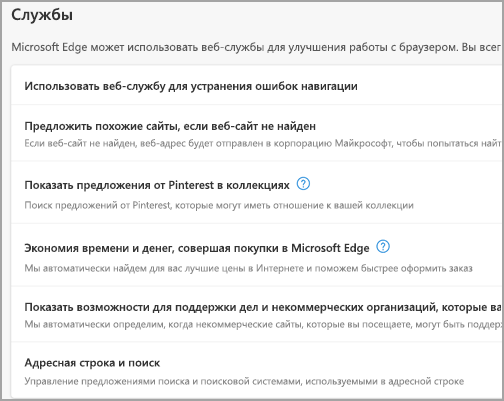
Выберите предпочтительную поисковую системув меню Поисковая система, используемая в адресной строке.
Чтобы добавить другую поисковую систему, выполните поиск в адресной строке, используя эту поисковую систему (или веб-сайт, на котором поддерживается поиск, например вики-сайт). Перейдите в раздел Параметры и другое > Параметры > Конфиденциальность, поиск и службы > Адресная строка и поиск. Система или веб-сайт, которые использовались для поиска, теперь будет выводиться в списке доступных для выбора вариантов.
Simple Replace Bing Search With Google With New Information

Click the “change search provider” button. To get results from google each time you search, you can make google your default search engine.
Simple Replace Bing Search With Google With New Information, Here are the steps to eliminate thre temporary files: Now, scroll down to search engine section in settings.

How to switch to Google Search instead of Microsoft Edge’s default Bing From gizmoir.com
This run command would navigate you to this path: Scroll down to the appearance section in settings. Internet explorer 8 & higher. I’ve been a mac user for 30 years and had so little trouble from viruses that maybe i’ve been a bit too casual about it.
How to switch to Google Search instead of Microsoft Edge’s default Bing You’ll see a list of available search providers.
Bing seems to have disappeared. Select the search engine used. Bing has suddenly replaced google. Scroll down to search engine.
alt=»Tech articles How to Change the Default Browser from Bing to Google?» width=»100%» />Source: i-techgeeks.com
Click ‘dropdown arrow’ next to “search engine used in the address bar.’. One really doesn’t offer a great deal over the other: If ‘show home button’ is on and bing web address is listed as the home button then delete it. How to remove bing search from your chrome browser? Tech articles How to Change the Default Browser from Bing to Google?.

Source: faqforge.com
Scroll down in the advanced settings panel and you’ll see the “address bar search” setting. Click ‘dropdown arrow’ next to “search engine used in the address bar.’. Open the run command window. Internet explorer 8 & higher. Change Microsoft Edge Search from Bing to Google.
This run command would navigate you to this path: Change your default search engine to google click the details » button, and then check both boxes next to use as default search engine and use as speed dial search engine. Type %temp% and hit the enter key. To get results from google each time you search, you can make google your default search engine. How To Change From Bing To Goole How to change search engine in.

Source: malwaretips.com
Now, every time you use the. Bing is the default search engine in microsoft edge for windows 10. I think you mean “bing” to replace google, but it’s the same idea. One really doesn’t offer a great deal over the other: How to change your search engine from to Google Search.
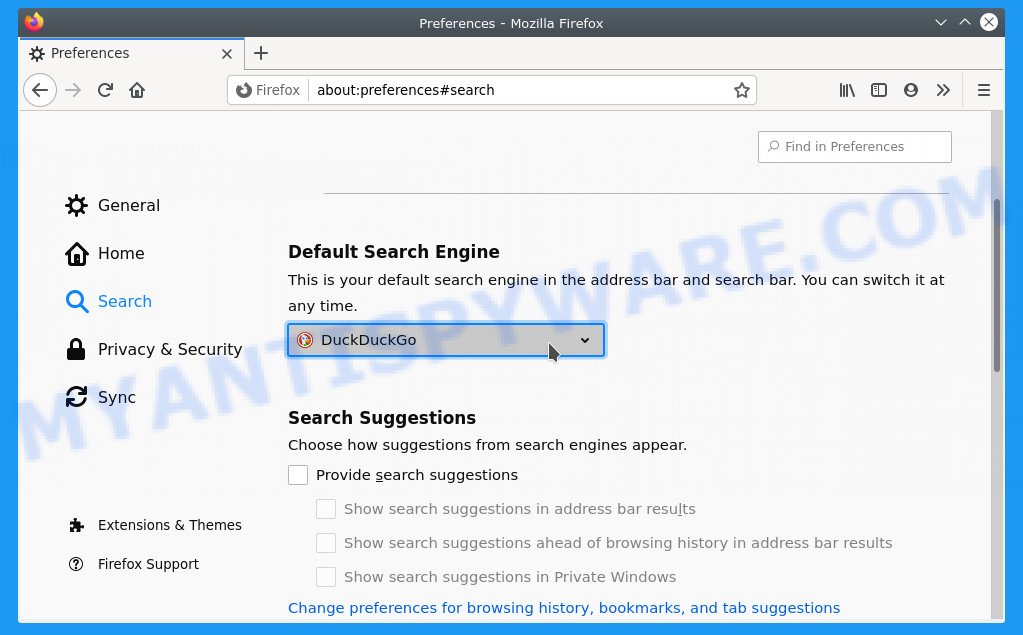
Source: myantispyware.com
If ‘show home button’ is on and bing web address is listed as the home button then delete it. Open the run command window. Scroll down to the appearance section in settings. Go to settings > search engine. How to get rid of Google Automatically Switches To Bing.
Google recommends using chrome for. Bing is the default search engine in microsoft edge for windows 10. Now tap default apps, and scroll down to the browser you want to set as your default, google chrome, say. Start searching right from your address bar today. How To Change From Bing To Goole / Microsoft Forcing Search Engine.

Source: youtube.com
If your browser isn’t listed below, check its help resources for info about changing search settings. To remove bing from the internet explorer (ie) web browser, in ie: One really doesn’t offer a great deal over the other: Scroll down to search engine. How to change my search engine from bing to google in microsoft edge.

Source: liberiangeek.net
Select all files and folders of this folder and delete them. Both bing and google are good search engines. Type %temp% and hit the enter key. Select the search engine you want to use and click or tap “set as default”. Change Explorer Search Provider From Bing To Google in Windows.
To change default search provider, i would suggest you to try the steps. This run command would navigate you to this path: Both bing and google are good search engines. Click ‘dropdown arrow’ next to “search engine used in the address bar.’. How to change your default search engine in Google Chrome, and switch.
Source: pcworld.idg.com.au
Google recommends using chrome for. Click google search set as default. Scroll down to the appearance section in settings. How to remove bing search from your chrome browser? The 4 reasons I switched from Google to Bing PC World Australia.

Source: voyager8.blogspot.com
Bing has suddenly replaced google. Go to settings > search engine. You’ll see a list of available search providers. To get results from google each time you search, you can make google your default search engine. How to change the default search engine in Microsoft Edge web browser.

Source: mikemunter.com
You’ll see a list of available search providers. To get results from google each time you search, you can make google your default search engine. Click the “change search provider” button. If ‘show home button’ is on and bing web address is listed as the home button then delete it. How To Change “Search From” Location in Google, Bing.

Source: windowscentral.com
Here are the steps to eliminate thre temporary files: Go to settings > search engine. How to remove bing search from your chrome browser? There aren’t many options, but google search is available. How to change to Bing search in Google Chrome Windows Central.
Click on the three dots on the menu bar. One really doesn’t offer a great deal over the other: In this tutorial, i show you how to fix google chrome default search engine changing to bing search. Select the desired search provider. How to change your default search engine in Google Chrome, and switch.

Source: youtube.com
Start searching right from your address bar today. Click ‘dropdown arrow’ next to “search engine used in the address bar.’. Click the “change search provider” button. Bing has suddenly replaced google. Change Search From Bing to Google or Yahoo or DuckDuckGo In Edge YouTube.

Source: windowscentral.com
Click google search set as default. Both bing and google are good search engines. Type %temp% and hit the enter key. Start searching right from your address bar today. How to change to Bing search in Google Chrome Windows Central.

Source: youtube.com
Select the desired search provider. Select all files and folders of this folder and delete them. In this tutorial, i show you how to fix google chrome default search engine changing to bing search. Here are the steps to eliminate thre temporary files: How to Change Default Search Engine from Bing to Google in Address Bar.

Source: youtube.com
Select the desired search provider. This run command would navigate you to this path: Go to settings > search engine. To remove bing from the internet explorer (ie) web browser, in ie: Windows 10 Change Default search to Google from Bing in Edge Browser.

Source: howtogeek.com
How to remove bing search from your chrome browser? To change default search provider, i would suggest you to try the steps. Click ‘settings’ from the menu. Bing seems to have disappeared. How to Change Microsoft Edge to Search Google Instead of Bing.

Source: i-techgeeks.com
Now, every time you use the. If ‘show home button’ is on and bing web address is listed as the home button then delete it. How to remove bing search from your chrome browser? Open settings, and over on the left tap apps. Tech articles How to Change the Default Browser from Bing to Google?.
Source: gizmoir.com
Select the search engine you want to use and click or tap “set as default”. Bing has suddenly replaced google. How to remove bing search from your chrome browser? Click ‘settings’ from the menu. How to switch to Google Search instead of Microsoft Edge’s default Bing.
Source: faqforge.com
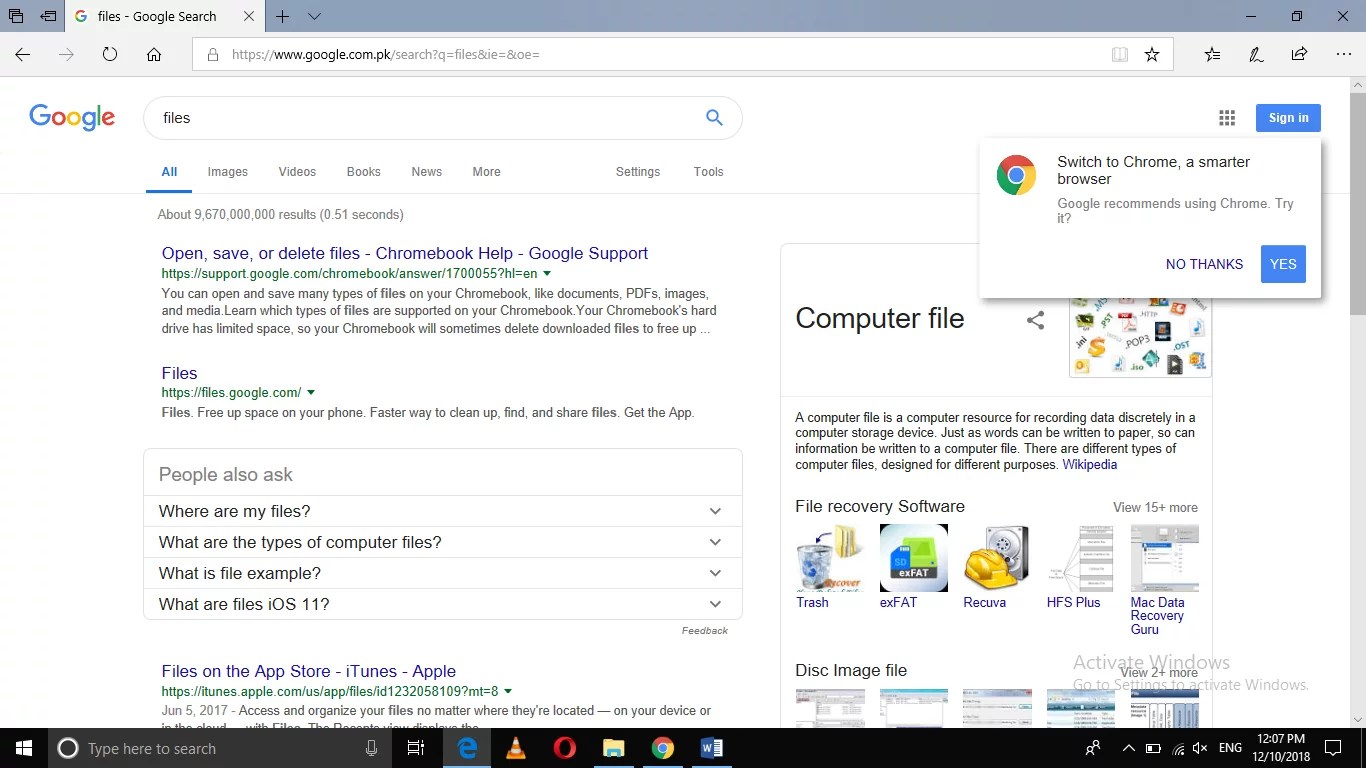
Click google search set as default. Click the “change search provider” button. Click on the three dots on the menu bar. Type %temp% and hit the enter key. Change Microsoft Edge Search from Bing to Google.

Source: nextofwindows.com
They keep modifying their algorithms to outdo each other, but they’re always close. Select the search engine you want to use and click or tap “set as default”. If ‘show home button’ is on and bing web address is listed as the home button then delete it. So, have also installed some malware. How To Change Microsoft Edge Default Search From Bing to Google.

Source: youtube.com
C:\users\ [username]\appdata\local\temp, that is, the temp folder. There aren’t many options, but google search is available. Start searching right from your address bar today. They keep modifying their algorithms to outdo each other, but they’re always close. Windows 10 Change default search engine from Bing to Google. YouTube.

Source: pcworld.idg.com.au
To change default search provider, i would suggest you to try the steps. One really doesn’t offer a great deal over the other: Scroll down in the advanced settings panel and you’ll see the “address bar search” setting. Bing has suddenly replaced google. The 4 reasons I switched from Google to Bing Microsoft, microsoft.
Scroll Down To The Appearance Section In Settings.
Bing seems to have disappeared. Click ‘settings’ from the menu. Bing is the default search engine in microsoft edge for windows 10. Type %temp% and hit the enter key.
C:\Users\ [Username]\Appdata\Local\Temp, That Is, The Temp Folder.
Under search in address bar with, click change. Click ‘dropdown arrow’ next to “search engine used in the address bar.’. Select the search engine you want to use and click or tap “set as default”. Bing has suddenly replaced google.
In This Tutorial, I Show You How To Fix Google Chrome Default Search Engine Changing To Bing Search.
Google recommends using chrome for. Click on the three dots on the menu bar. Scroll down in the advanced settings panel and you’ll see the “address bar search” setting. If your browser isn’t listed below, check its help resources for info about changing search settings.
Now, Scroll Down To Search Engine Section In Settings.
Click the “change search provider” button. Go to settings > search engine. To change default search provider, i would suggest you to try the steps. Select the search engine used.
Как заменить Bing на Google в Windows 10?
Потому в Windows 10, как уже известно, к поисковику Bing, который там используется по умолчанию, «привязано» много чего. По примеру своих основных конкурентов — Apple и Google — новую операционку Microsoft фактически подарила (куда ж деваться?) тем своим юзерам, которые раньше пользовались версиями Windows 7 и Windows 8.1.
А поскольку «конь дареный», то комплектовал его разработчик, руководствуясь прежде всего собственными бизнес-интересами и «раскручивая» собственные сервисы.
Потому в Windows 10 Bing везде: через Bing работает новый поиск, которая появился в Панели задач, через Bing обрабатываются команды для Cortana и пр.
В общем, убрать Bing из Windows 10 полностью никак не получится (у обычного юзера, так точно), однако в Microsoft Edge — штатном браузере Windows 10 — поисковую систему заменить все же можно, при необходимости, конечно.
Итак, чтобы в Windows 10 заменить Bing на Google (или другой поисковик), делаем следующее:
- жмем кнопку Windows на клавиатуре (или кнопку Windows на панели задач, или кнопку Windows на экране) и запускаем приложение Microsoft Edge (это если оно не «висит» отдельной плиткой на Стартовом экране), либо кликаем «Все приложения» и находим Edge в списке установленных программ;
- запустив Microsoft Edge, жмем иконку с тремя точками, расположенную в правом верхнем углу экрана и заходим в «Настройки«;
- прокручиваем меню настроек вниз и заходим в «Дополнительные параметры» (кнопка «Посмотреть дополнительные параметры»);
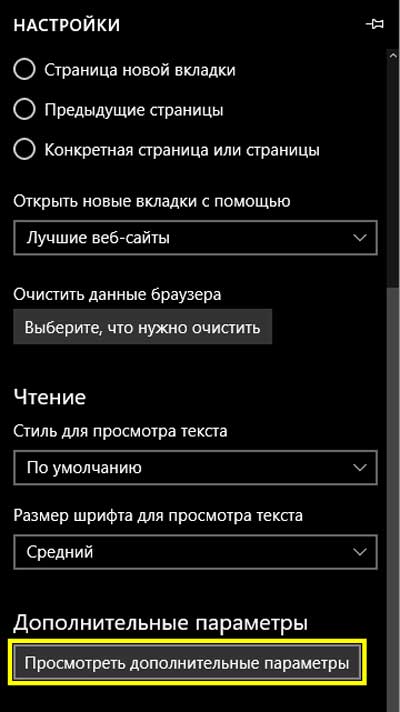
- в «Доп. параметрах» снова крутим меню вниз до вкладки «Поиск в адресной строке с помощью«, кликаем по надписи «Bing («www.bing.com»)«, выбираем нужный вариант Googleв списке (или набираем в строке «<Добавить новый>«) и подтверждаем выбор нажатием на кнопку «Использовать по умолчанию«.

Теперь Edge в вашей Windows 10 искать все будет через Google, а не через Bing, как раньше. Таким же образом, в Edge можно прописать и другой поисковик, но только из тех, которые Edge поддерживают.
Однако этим допускаемая Microsoft самодеятельность юзеров в плане замены поисковиков и заканчивается. Cortana и поиск в Windows 10 (а не в Edge), к примеру, в любом случае работают только через Bing, и тут, что называется, без вариантов.
Правда, если Bing в самой Windows 10 вам вдруг нравиться перестанет, можно вообще убрать поисковую строку (кликаем по ней ПКМ или тапаем и удерживаем нажатие до появления меню, в которой надо нажать «Скрыть»). Но способов отключить Cortana от Bing еще не придумали… Пока.