Acronis Scheduler Helper — что это за программа в автозагрузке? (schedhlp.exe)
 Запись принадлежит программе Acronis True Image, которая необходима для резервного копирования и восстановления данных.
Также при помощи Acronis True Image можно создать образ диска.
Работает под процессом schedhlp.exe, который запускается из этой папки:
C:\Program Files\Common Files\Acronis\Schedule2
Если запускается из папки Windows или из System32, то это может быть вирус (троян, майнер) — стоит проверить ПК антивирусными утилитами, советую три лучших — Dr.Web CureIt, AdwCleaner и HitmanPro (первая против опасных вирусов, вторые две против рекламного/шпионского ПО).
Acronis Scheduler Helper — для чего нужно?
Итак, мы собственно выяснили что Acronis Scheduler Helper это от программы Acronis True Image, но зачем нужно? Учитывая название, можно предположить такие варианты:
- Проверка обновлений ПО, также может быть функция показа уведомления о новой версии.
- Создание автоматического бэкапа, если он был запланирован ранее в программе.
- Отображение иконки в трее, нажав правой кнопкой по которой вы получите доступ к основным функциям ПО.
- Процесс проверяет лицензию программы, не используете ли вы например взломанную версию.
Вообще слово Scheduler означает планировщик, а слово Helper — помощник.
Можно ли отключить?
Я видел сообщения от пользователей, что они отключали и проблем не было.
В любом случае отключить я думаю можно, а вот удалять — не стоит.
Если после отключения будут проблемы, то поставите галочку обратно.
Чтобы открыть автозагрузку:
- Зажимаем клавиши Win + R, отобразится окно Выполнить — копируете и вставляете msconfig > ОК.
- Отобразится окошко Конфигурация системы, нажимаем на вкладку Автозагрузка. PS: если у вас Windows 10, то будет ссылка на диспетчер задач, в котором автоматически отроется вкладка Автозагрузка.
- Будут показаны записи программ, которые запускаются автоматически вместе с Windows.
- Для отключения записи — просто снимите галочку и нажмите Применить. Или, если Windows 10 — нажмите правой кнопкой по записи > Отключить.
А вот если захотите удалить запись, то перед этим лучше создать точку восстановления. Но удалить запись просто так не получится — нужно использовать софт AnVir Task Manager.
Вообще после установки софта Acronis у вас в диспетчере может быть несколько процессов висеть:
 Конечно они не особо грузят ПК, но точно не ускорят.
Заключение
- Acronis Scheduler Helper — запись от софта Acronis True Image, который нужен для резервного копирования и восстановления данных.
- Если вы не пользуетесь этой программой, то из автозагрузки можно убрать. Хотя пользователи пишут что даже если пользуетесь — все равно можно убрать, при необходимости нужный компонент запустится сам (и при этом возможно снова включит себя в автозагрузке).
- Если желаете удалить запись, то сперва лучше создать точку восстановления. Удалить можно при помощи AnVir Task Manager, но кажется еще в CCleaner есть такая функция в разделе автозагрузки.
Надеюсь кому-то информация была полезной, удачи и добра, до новых встреч друзья!
What does the schedhlp.exe file do?
The schedhlp.exe process is also known as Acronis Scheduler Helper or, as the case may be, Acronis Scheduler Service Helper and is a part of Acronis True Image (Version 2014, 2018) or, as the case may be, Acronis�True�Image�Home (Version 2011). This software is produced by Acronis (www.acronis.com). An obsolete or defective version of schedhlp.exe can cause problems for your computer that can range from slowness to error messages such as these:
- Acronis Scheduler Helper has stopped working. Windows is checking for a solution to the problem. (Windows 10, 8, 7)
- Acronis Scheduler Helper has stopped working. A problem caused the program to stop working correctly. Windows will close the program and notify you if a solution is available. (Windows 10, 8, 7)
- schedhlp.exe has encountered a problem and needs to close.
- Access violation at address FFFFFFFF in module schedhlp.exe. Read of address 00000000.
Free PC Check
Scan your computer today at no charge with the Windows Repair Tool. This tool helps repair Windows and helps it run faster.
More information about Outbyte and Unistall. Please review Outbyte EULA and Privacy Policy. Outbyte scanner and repair are free. An advanced version must be purchased.
What you should know about schedhlp.exe Acronis Scheduler Helper
schedhlp.exe is not part of Windows, but it is important nonetheless. Schedhlp.exe is found in a subdirectory of «C:\Program Files\Public Documents». Frequently occurring are file sizes such as 518,424 bytes (16% of all these files), 390,720 bytes as well as 9 other variants .
This process does not have a visible window, and does not appear on the taskbar. The schedhlp file is not part of the Windows operating system. The original file has been signed by a trusted signature authority. This lets you check your copy to see if it is a counterfeit. The original file is digitally signed. Check your file. You may uninstall the related program using Windows Control Panel. Schedhlp.exe is capable of make itself undetectable by other programs. For this reason, 20% of all experts consider this file to be a possible threat. The probability that it can cause harm is high.
If you see this file on your hard drive or in Windows Task Manager, please make sure that it is not a malicious variant. It’s a fact that many trojans try to cloak their true identity by calling themselves schedhlp.exe. With the above information or by using tools like Security Task Manager you can determine if, in your case, the file is an undesirable variant.
What do other computer users say about schedhlp?
| part of Acronis True Image Corporate Workstation (backup program) delphidoc |
| Acronis True Image Backup Programm |
| Part of the acronis true image service. David |
| Acronis True Image Scheduler Igor |
| One of Three background and Optional Monitors for Acronis True Image, Can safely be removed to free resources. Ben |
Summary: 13 users judge schedhlp.exe to be an essential file that should not be touched. For this reason, 2 users have already deleted schedhlp.exe. source: file.net
How to uninstall Acronis True Image or Acronis�True�Image�Home
To remove Acronis Scheduler Helper from your computer, please follow the manual instructions below or use an automatic uninstaller product.
- Click the Windows Start Button. You find it in the lower left corner of the taskbar.
- Type the word uninstall.
- Click Add or remove programs.
- Now locate Acronis True Image or Acronis�True�Image�Home in the list of displayed applications.
- Click the program, and then click Uninstall.


How to tell if schedhlp.exe (Acronis Scheduler Helper) was uninstalled cleanly
After uninstalling, restart your computer. Then start Windows Explorer and see if there is still a folder with the name of the software under C:\Program Files. Be sure to check the Registry as well for remnants of Acronis Scheduler Helper. To do this, start «Regedit», then look under «HKEY_LOCAL_MACHINE» > «Software» for Acronis Scheduler Helper or the name of the producer. Always keep in mind that only a computer professional should ever directly delete entries in the Windows Registry.
What to do if a program does not uninstall
The easiest way to remove any kind of software cleanly and accurately is to use an uninstaller tool. Because the uninstaller automatically creates a backup, there is no risk of anything going wrong.
Что такое schedhlp.exe?
Подлинный файл schedhlp.exe является одним из компонентов программного обеспечения Acronis True Image, разработанного Acronis .
Schedhlp.exe — это исполняемый файл, принадлежащий Acronis True Image, программе резервного копирования и создания образа диска, разработанной для Microsoft Windows и Mac OS. Этот процесс запускает планировщик, который периодически выполняет резервное копирование системы и другие задачи. Это не критичный компонент Windows, и его следует удалить, если известно, что оно вызывает проблемы. Acronis True Image может создать резервную копию образа всей системы, включая операционную систему, системные настройки, учетные записи пользователей, приложения, файлы и т. Д. перемещаться между разными компьютерами независимо от марки или модели, и даже может быть загружен в облако для доступа из любого места в любое время.
Acronis International GmbH — швейцарская компания, которая разрабатывает решения для защиты данных. Компания в основном обслуживает малые и средние организации и разрабатывает программное обеспечение для резервного копирования, аварийного восстановления, доступа к данным и безопасного обмена файлами. Acronis была основана в 2003 году и в настоящее время со штаб-квартирой в Шаффхаузене, Швейцария.
Чтобы восстановить поврежденную систему, вам необходимо Скачать PC Repair & Optimizer Tool
SchedHlp расшифровывается как Acronis Schedler.
Расширение .exe для имени файла указывает на файл exe cutable. В некоторых случаях исполняемые файлы могут нанести вред вашему компьютеру. Поэтому, пожалуйста, прочитайте ниже, чтобы решить для себя, является ли schedhlp.exe на вашем компьютере трояном, который вы должны удалить, или это файл, принадлежащий операционной системе Windows или доверенному приложению.
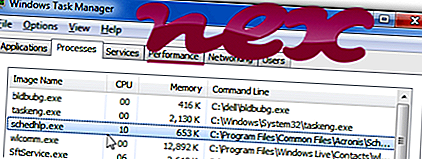
Процесс Schedhlp.exe в диспетчере задач Windows
Процесс, известный как Acronis Scheduler Helper или Acronis Scheduler Service Helper, принадлежит программному обеспечению Acronis Scheduler Helper или Acronis True Image (версия 2014, 2018) или Acronis True Image WD Edition или True Image WD Edition от Acronis (www.acronis.com) или Acronis. International GmbH.
Описание: Schedhlp.exe не является необходимым для ОС Windows и вызывает относительно немного проблем. Файл schedhlp.exe находится в подпапке «C: \ Program Files \ Common Files» (обычно это C: \ Program Files (x86) \ Common Files \ Acronis \ Schedule2 \ ). Известные размеры файлов в Windows 10/8/7 / XP составляют 140 568 байт (9% всех случаев), 585 296 байт и еще 42 варианта.
Это не системный файл Windows. Schedhlp.exe Программа не видна. Вы можете удалить эту программу в панели управления. Файл имеет цифровую подпись. Файл представляет собой подписанный файл Verisign. Schedhlp.exe способен спрятать себя и мониторить приложения. Поэтому технический рейтинг надежности 20% опасности. Однако вы также должны прочитать отзывы пользователей.
Удаление этого варианта: Если у вас возникли проблемы с schedhlp.exe, вы можете сделать следующее:
1) удалить программу с помощью панели управления ⇒ удалить программу ⇒ Acronis True Image Home или Acronis True Image
2) обратиться за помощью в службу поддержки.
Внешняя информация от Пола Коллинза:
- «Сервис Acronis Scheduler2» может запускаться при запуске. Часть Acronis True Image — программное обеспечение для резервного копирования. Взаимодействует с сервисом schedul2.exe для правильного выполнения задач резервного копирования / восстановления. Требуется, если вы хотите использовать TrueImage для выполнения каких-либо реальных задач резервного копирования / восстановления, а не если вы хотите только исследовать / монтировать образы
Важно: некоторые вредоносные программы маскируют себя как schedhlp.exe, особенно если они находятся в папке C: \ Windows или C: \ Windows \ System32. Таким образом, вы должны проверить файл schedhlp.exe на вашем ПК, чтобы убедиться, что это угроза. Мы рекомендуем Security Task Manager для проверки безопасности вашего компьютера. Это был один из лучших вариантов загрузки The Washington Post и PC World .
Аккуратный и опрятный компьютер — это главное требование для избежания проблем с schedhlp. Это означает запуск сканирования на наличие вредоносных программ, очистку жесткого диска с использованием 1 cleanmgr и 2 sfc / scannow, 3 удаления ненужных программ, проверку наличия программ автозапуска (с использованием 4 msconfig) и включение автоматического обновления Windows 5. Всегда не забывайте выполнять периодическое резервное копирование или, по крайней мере, устанавливать точки восстановления.
Если вы столкнулись с реальной проблемой, попробуйте вспомнить последнее, что вы сделали, или последнее, что вы установили до того, как проблема появилась впервые. Используйте команду 6 resmon, чтобы определить процессы, которые вызывают вашу проблему. Даже для серьезных проблем, вместо переустановки Windows, лучше восстановить вашу установку или, для Windows 8 и более поздних версий, выполнить команду 7 DISM.exe / Online / Cleanup-image / Restorehealth. Это позволяет восстанавливать операционную систему без потери данных.
Security Task Manager показывает все запущенные сервисы Windows, включая внедренные скрытые приложения (например, мониторинг клавиатуры или браузера, авто вход). Уникальный рейтинг риска безопасности указывает на вероятность того, что процесс является потенциальным шпионским ПО, вредоносным ПО или трояном. B Malwarebytes Anti-Malware обнаруживает и удаляет спящие шпионские, рекламные программы, трояны, клавиатурные шпионы, вредоносные программы и трекеры с вашего жесткого диска.
microsoft.msn.news.exe watadminsvc.exe vds.exe schedhlp.exe adskscsrv.exe gdfirewalltray.exe searchprotectservice.exe admunch.exe asfsipc.dll securedeletebackground.exe wddriveservice.exe wddriveservice.exe
Мы рекомендуем использовать этот инструмент для решения ошибок на вашем ПК. Эта программа исправляет распространенные ошибки компьютера, защищает вас от потери файлов, вредоносных программ, сбоев оборудования и оптимизирует ваш компьютер для максимальной производительности. Вы можете быстро исправить проблемы с вашим ПК и предотвратить появление других ошибок с этим программным обеспечением.
2.Нажмите «Начать сканирование», чтобы найти проблемы реестра Windows, которые могут вызывать проблемы с ПК.
3.Нажмите «Восстановить все», чтобы исправить все проблемы.
What is schedul2.exe?
The genuine file is a software component of Acronis True Image by Acronis .
Schedul2.exe is an executable file that belongs to Acronis True Image, a backup and disk imaging utility program designed for Microsoft Windows and Mac OS. This process runs the scheduler that runs the system backup and other tasks on a periodic basis. This is not a critical Windows component and should be removed if known to cause problems.
Acronis True Image can make an image backup of the entire system, including the operating system, system settings, user accounts, applications, files, etc. This image can be moved across different computers regardless of the make or model, and can even be uploaded to the cloud to be accessed from anywhere at anytime.
Acronis International GmbH is a Swiss company that develops data protection solutions. The company primarily caters to small and medium-sized organizations and develops software for backup, disaster recovery, data access, and secure file sharing. Acronis was founded in 2003 and is currently headquartered in Schaffhausen, Switzerland.
The .exe extension on a filename indicates an exe cutable file. Executable files may, in some cases, harm your computer. Therefore, please read below to decide for yourself whether the schedul2.exe on your computer is a Trojan that you should remove, or whether it is a file belonging to the Windows operating system or to a trusted application.
Schedul2.exe file information

Schedul2.exe process in Windows Task Manager
Description: Schedul2.exe is not essential for the Windows OS and causes relatively few problems. Schedul2.exe is located in a subfolder of «C:\Program Files\Common Files»—usually C:\Program Files (x86)\Common Files\Acronis\Schedule2\ or C:\Program Files (x86)\Common Files\Seagate\Schedule2\. Known file sizes on Windows 10/11/7 are 1,263,424 bytes (2% of all occurrences), 155,648 bytes and 77 more variants .
It is a background process, and the service name is AcrSch2Svc. The service provides scheduling for Acronis components’ tasks.
The program has no visible window. The file is not a Windows core file. The software can be uninstalled in the Control Panel. The file is digitally signed. The file is a Verisign signed file. Schedul2.exe is able to monitor applications and hide itself. Therefore the technical security rating is 18% dangerous; but you should also compare this rating with the user reviews.
Important: Some malware camouflages itself as schedul2.exe, particularly when located in the C:\Windows or C:\Windows\System32 folder. Therefore, you should check the schedul2.exe process on your PC to see if it is a threat. We recommend Security Task Manager for verifying your computer’s security. This was one of the Top Download Picks of The Washington Post and PC World.
Score
User Comments
Summary: Average user rating of schedul2.exe: based on 20 votes with 4 user comments. 17 users think schedul2.exe is essential for Windows or an installed application. 2 users think it’s probably harmless. One user thinks schedul2.exe is dangerous and recommends removing it.
Best practices for resolving schedul2 issues
A clean and tidy computer is the key requirement for avoiding problems with schedul2. This means running a scan for malware, cleaning your hard drive using 1 cleanmgr and 2 sfc /scannow, 3 uninstalling programs that you no longer need, checking for Autostart programs (using 4 msconfig) and enabling Windows’ 5 Automatic Update. Always remember to perform periodic backups, or at least to set restore points.
Should you experience an actual problem, try to recall the last thing you did, or the last thing you installed before the problem appeared for the first time. Use the 6 resmon command to identify the processes that are causing your problem. Even for serious problems, rather than reinstalling Windows, you are better off repairing of your installation or, for Windows 8 and later versions, executing the 7 DISM.exe /Online /Cleanup-image /Restorehealth command. This allows you to repair the operating system without losing data.
To help you analyze the schedul2.exe process on your computer, the following programs have proven to be helpful: A Security Task Manager displays all running Windows tasks, including embedded hidden processes, such as keyboard and browser monitoring or Autostart entries. A unique security risk rating indicates the likelihood of the process being potential spyware, malware or a Trojan. B Malwarebytes Anti-Malware detects and removes sleeping spyware, adware, Trojans, keyloggers, malware and trackers from your hard drive.