How kafka stores data

The basic storage unit of kafka is partition. We can define, where kafka will store these partitions by setting logs.dirs param. Let’s see how partitions are allocated between brokers.
A good partition allocation
Let’s suppose we have 5 partitions under a topic and we want to keep replication factor of 3 and we have 5 brokers. In this scenario a good allocation will look like:
— Replicas should be allocated evenly among all brokers. So all brokers should get 3 replicas each.
— Make sure that each replica of a partition is on different broker. So in our example if leader replica of partition 1 is on broker 1 then rest of the replicas should not be on same broker (other replicas on broker 2 and 3). Otherwise we can’t leverage the benefits of replication and it can lead us to an unreliable system.
— If we have information of racks, then all replicas of a partition should not be stored in the brokers which are on the same rack. Otherwise if that particular rack is down then, we can face the unavailability situation…
Check out the allocation in diagram: [PL -> Partition leader, PR -> Partition replica]
Now we know about the partition allocation, let’s look at, how directories are decided for new partitions. It is quite simple, we just look at all the directories and check out the directory with the least amount of partitions and add new partition in that directory. By this we maintain the balance of partitions in all directories.
File management in kafka
Kafka is not a permanent data store solution. You can set the maximum time of data retention in kafka also you can define maximum amount of data stored in kafka. And after one of the limits exceeds, kafka will start purging old messages systematically.
Kafka stores partition in segments so that finding some message and deleting them is easy. By default size of a segment is 1 GB. Once a segment is full, new messages produced by producers will be written in new segment. As kafka delete a complete segment, it’ll never delete active segment (in which data is being written currently).
Kafka stores compressed(if applied) messages in file with offsets. By doing this we enable kafka to use zero-copy optimisation (CPU do not copy message from one place to another).
If a producer is sending all messages in batch in compressed format, then kafka will add a wrapper message over that batch, which gives a better performance over the network and disk.
Compaction in kafka
There are times when we just want to store current states of application on kafka, in this case we don’t care about old states and these can be deleted in compaction. For this kafka can set the retention policy to compact. But for compaction, we need to have key value pairs as we care about latest value for a particular key and having a null key will not work.
Notice here 0–6 part is clean and after compaction message 4 and 5 are deleted. And from 7 to 15 are unclean / dirty.
So once compaction is enabled, broker will start a compaction manager thread and some worker threads. Each of these worker threads choose the partition which has highest dirty to clean ratio at that time. It’ll start compaction by maintaining an in memory offset map. Once this offset map is ready, it’ll start reading all messages. If it reads one message and map does not contain the key of that message, it means we got a new message and it’ll store this message. If it read a message and key is already there in offset map, then it’ll remove message if value doesn’t match map’s value as we have a new message for that key in partition. After all of this process we just have messages with one key and swap the segment with compacted one.
When compaction happens?
Kafka start compaction once it has 50% of dirty records. Compaction just like delete will not take place on active segment. We don’t want to have compaction too often as it impacts the performance. Also we don’t want to leave too many dirty records behind…
I hope this helps understanding how kafka stores data and perform compaction on that. Thanks & cheers
Deep Dive Into Apache Kafka | Storage Internals
In my previous post, we discussed about how different Kafka components work together through a hands on. But if you are looking for in depth understanding of Kafka, knowledge about its storage is very important. So, what do I mean by storage? Well, when I was doing a hands on in my previous post, I was curious to find out how Kafka stores & retrieves messages of a topic. So in this blog post, I tried to the explain the storage internals of Apache Kafka in a simple and practical way.
At the end of this blog post, you will have a good understanding of storage architecture of Apache Kafka. In addition to this, there are a few pointers around how to tune Kafka storage based on your requirements. Without further ado, lets get started.
Note : Before you start reading this post, I would strongly recommend you read & try the hands on in my previous post.
Storage Configuration
If you had a chance to try the hands on in my previous post, you will notice that the brokers were started using configuration files namely broker-0.properties & broker-1.properties . These configuration files contain important parameters that control different components of our Kafka cluster. You can find the complete list of the broker parameters in the Kafka’s official documentation. For now, let us try to look at the most important parameters defined in these configuration files.
| Parameter | Description | broker-0 | broker-1 |
|---|---|---|---|
| broker.id | A unique identifier for each broker | 0 | 1 |
| port | Broker runs on this port | 9092 | 9093 |
| zookeeper.connect | IP and port of running zookeeper instance | localhost:2181 | localhost:2181 |
| log.dirs | Directory where the messages of a topic are stored | /tmp/logs/kafka-logs/broker-0 | /tmp/logs/kafka-logs/broker-1 |
Among these parameters, our focus in this post will be mainly on the log.dirs parameter. The log.dirs parameter indicates the location of the folder/directory within a broker where the topic messages are stored. This directory has a well defined structure which captures the storage architecture of Kafka.
Generating Data
Before we look at the log directory, we should setup a working Kafka cluster & generate data. The code used in this blog post is available in this repository. Make sure that you clone this repository in your working environment before you proceed further. To make the cluster setup easy, I wrote a bash script setup.sh with all the required commands. Navigate to the hands-on directory & execute the setup as shown below.
This should do the cluster setup. To generate data, I have written another bash script produce.sh which writes data from the cars.txt to cars topic. Now execute the command given below.
This might take a few seconds to complete. After successful execution of the above command, there should be enough data stored in the Kafka cluster for us to proceed further. Let’s now go through the directory structure of broker-0 and practically see how Kafka manages data internally.
The Log directory
From the configuration of broker-0 we know that the data of cars-0 (0th partition of topic cars ) is stored at /tmp/logs/kafka-logs/broker-0/cars-0 . So lets simply execute the ls command to see whats in there.
This commands results in the following output
We can see a list of files grouped by name with each group having a .log , .index & .timeindex files. These file groups capture the storage internals of a topic’s partition. Let us now dig into the details of this directory structure.
Log Segment
According to the Kafka architecture, topics are divided into partitions which are stored in brokers. This might lead us to think that partition is the standard unit of a topic storage in Kafka. But however, this doesn’t seem to be true. Partitions are further divided into smaller elements called segments which store the topic data.
Each of one of the above groups of files in the log directory represents a segment . The suffix(0 & 35) in the segment’s file name, indicates the base offset (offset of the first messsage) of the segment. For example,
But, you might wonder, when and how does Kafka know that it has to create a new segment. For this, Kafka relies on a broker property named log.segment.bytes which indicates the maximum size(in bytes) of a segment in the cluster. This size can also be configured at the topic level using segment.bytes property.
Whenever messages are written to a partition, Kafka writes these messages to a segment until its size(in bytes) reaches the limit specified by log.segment.bytes / segment.bytes . Once this limit is reached, Kafka creates a new segment within the partition & starts writing messages to the new segment.
Within each segment, there are three files with the following extensions — .log , .index & .timeindex . If you try to open and read these files, you will find that the content in these files is not readable. To get a practical understanding, lets go through each one of these files separately and explore their contents.
‘.log’ file
As the name suggests, every message written to a segment is logged in its .log file. Let’s try to read the contents of a .log file, using the command below
This commands results in an output shown below
Before we understand the result, I should mention that producer batches the messages before it writes to the partition to improve throughput. This is evident from the above result, where we can see messages grouped together in the .log file. For the ease of understanding, the first batch of messages in the above .log file can be represented as follows
- baseOffset : Offset of first message in the batch
- lastOffset : Offset of last message in the batch
- count : Number of messages in the batch
- position : Position of the batch in the file
- CreatedTime :Created time of last message in the batch
- size : Size of the batch(in bytes)
- Messages : List of messages(& its details) in the batch
Thus all the messages along with their details are stored in the .log file.
‘.index’ file
Before we start discussing about the .index file, lets take a small detour to understand the need for .index file. As we know, every consumer has an associated numeric offset for each of its partition(s). This offset indicates the offset of the last processed message of a partition. Since the consumers process messages continuously, extracting a message given an offset should be a very frequent operation.
Lets say the consumer needs to find a message with offset k in a partiton. This should involve two steps
From our previous discussion on segments, we know that the file name’s suffix indicates the base offset(= offset of the first message) in that segment. Given this information, by doing a simple binary search on the files names within the partition, we can quickly figure out the segment which contains the message for the given offset k. So, Step 1 is sorted.
Now that we have the segment which contains the message, how do we extract that message with offset k?
From the previous section, we know that every message along with its offset is being stored in the .log file. One possible(& naive) way to implement this would be to iterate over the contents of the .log file and extract out the message with offset k. But this is not efficient as the size of the .log file may grow over time, and processing the entire file would be difficult. So how do you think Kafka handles this?
This is where the index file (.index) comes into picture. The index file stores a mapping of relative offset(4 bytes) to a numeric value(4 bytes). This numeric value indicates the position in the .log file where the message with offset = (base offset + relative offset) is located. Let us check out the contents of the .index file by using the command below.
This commands results in an output shown below
The result indicates that the message with offset 20 ( = 0 + 20) is located at position 346 in 00000000000000000000.log file. Similarily the message with offset 34 ( = 0 + 34) is located at position 692.
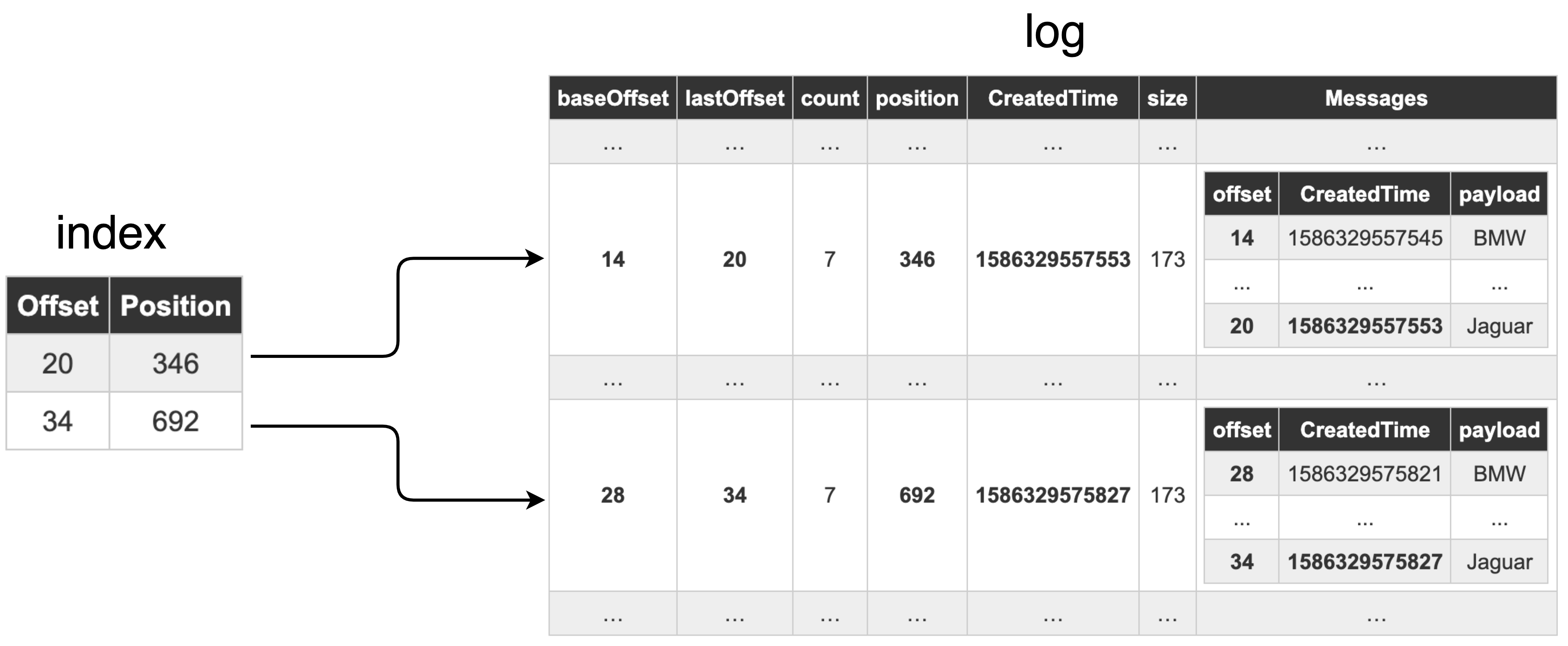
Given such a mapping, we can easily extract a message within a segment for offset k. Therefore, Step 2 is also sorted. Thus, the .index file & .log file together, provide an efficient way to extract messages given an offset.
But wait, does Kafka store this mapping for every single offset? No. From the above result we can see the mapping only for offsets 20 and 34. Having that said, how does Kafka know when to add a entry in the index file? Kafka uses a broker property named log.index.interval.bytes . This property indicates how frequently (after how many bytes) an index entry would be added. This can also be configured at the topic level using the property index.interval.bytes . By tuning this property, we can control the number of entries in the .index file. Try to play around with this property and see for yourself how the entries in the .index file change.
‘.timeindex’ file
From the previous section we know that .index file contains a mapping of message offsets and their positions. In a similar fashion, the .timeindex file contains the mapping between the message timestamp and its offset (T, offset). The timestamp here refers to the created time of the message. A time index entry (T, offset) indicates that in a given segment, all the messages whose created time > T have their offset > offset. This mapping primarily used to search offsets by timestamp. You can find more details about .timeindex file here. Let us try to checkout the contents of the .timeindex file in our working example by using the following command.
This commands results in an output shown below
We can clearly see the mapping between timestamp(Unix time) and the offsets.
The above mentioned result can be translated as follows
- Messages with 1586329557553 <= created time < 1586329575827, have 20 ( = 0 + 20) <= offset < 34 ( = 0 + 34).
- Messages with created time >= 1586329575827, have their offset >= 34 ( = 0 + 34).
You will notice that these offsets are exactly the same offsets seen in the .index file(discussed in the previous section). This is because, Kafka uses the same property( log.index.interval.bytes / index.interval.bytes ) used for .index file, to decide when to add an entry in .timeindex file.
Conclusion
Let’s quickly summarize our learnings from this post
- log.dirs indicates the directory where Kafka stores topic data.
- Partitions are divided into segments.
- log.segment.bytes / segment.bytes indicates the maximum size(in bytes) of a segment.
- .log file contains details of all the messages.
- .index file contains the mapping of message offset to its position in .log file.
- Kafka uses .index & .log file to quickly extract the message for a given offset.
- .timeindex file contains the mapping of timestamp to message offset.
- .timeindex is used to search messages by timestamp.
- log.index.interval.bytes / index.interval.bytes indicates the memory size(in bytes) after which an entry in .index / .timeindex file is added.
After reading this post, we realise that Kafka’s storage is very well structured and distributed. This structure makes it easy to store & retrieve data efficiently. Additionally, you should now have an idea about how to tune Kafka’s storage properties based on your requirements. Hope this post gave you a practical understanding of how Kafka stores and manages data internally. Please do share your feedback in the comments section below. Stay Tuned & Happy coding !!
Как, где и когда Apache Kafka записывает данные
«Не бойтесь файловой системы!» — так начинается раздел о персистентности в официальной документации Kafka.

Процесс персистенции Kafka
Наиболее эффективным способом использования вращающихся дисков является линейная запись, потому что она довольно быстрая и имеет высокую пропускную способность благодаря предсказуемому поведению и сильной оптимизации со стороны ОС.
Это звучит странно, но последовательный доступ к диску может быть быстрее, чем случайный доступ к памяти!
Твердотельные диски, в свою очередь, имеют гораздо более высокую скорость случайного чтения и записи по сравнению с жесткими дисками и могут использоваться еще более эффективно.
Большинство современных операционных систем широко используют память для дискового кэширования.
Например, страничный кэш или дисковый кэш в Linux — это механизм, ускоряющий доступ к файлам на энергонезависимых носителях.
- Linux хранит данные в свободных областях памяти и использует их в качестве кэша, а все чтения и записи на диск проходят через этот канал.
- Подход страничного кэша в Linux называется кэшем с обратной записью. Если данные записываются, то сначала они записываются в страничный кэш и помечаются как грязные.
- Грязные страницы означают, что эти данные сохраняются в страничном кэше, но также должны быть сохранены на базовом устройстве хранения.
- Грязные страницы периодически переносятся в хранилище. Таким образом, негрязные страницы имеют идентичные копии в базовом хранилище, а грязные — нет.
- Файловые блоки записываются в страничные кэши не только при записи, но и при чтении файлов.
- Если вы попытаетесь прочитать файл дважды, выполняя одно чтение за другим, то второе чтение должно быть намного быстрее, поскольку оно читается непосредственно из страничного кэша и не требует дискового ввода-вывода.
Apache Kafka выигрывает от Page Cache, поскольку его можно рассматривать как реализацию кэша в памяти «free-to-use», предоставляемую операционной системой, которая без особых усилий позволяет использовать все преимущества кэширования при нулевых затратах.
Но было бы неправильно сказать, что Kafka вообще не полагается на файловую систему.
На данный момент эта ситуация может показаться запутанной, поскольку мы не можем точно определить, когда Kafka сохраняет данные на диски.
Если вы помните параметр producer.acks, то, вероятно, вы знакомы с политикой подтверждения в Kafka. Брокер вернет ack производителю после того, как необходимое количество реплик сохранит это изменение.
Но поскольку мы уже знакомы со страничным кэшем, означает ли это, что изменение будет записано в память и может подвергнуться риску потери?
Эти предположения, по крайней мере, частично справедливы. Так, если все реплики одновременно выйдут из строя, то даже при использовании acks=all вы все равно можете потерять обновление, поскольку кэш страниц не успеет перенести изменения в базовое хранилище.
Кластер Kafka может допустить отказ N-1 узлов. Это означает, что хотя бы одна реплика из списка синхронизированных реплик должна остаться в живых.
Сценарий, когда все реплики выйдут из строя в один и тот же момент и не успеют выполнить свои IO, кажется очень маловероятным.
Пришло время сделать выводы.
Kafka в значительной степени полагается на персистентность, предоставляемую операционными системами.
Большинство из них способны использовать так называемые страничные кэши, действующие как кэши с обратной записью. Эта оптимизация дает Kafka удобное и быстрое кэширование в памяти бесплатно.
Когда обновление записывается на узел Kafka, в большинстве случаев это означает, что изменение записано в страничный кэш, но, возможно, еще не записано в базовое хранилище.
Это делает Kafka еще быстрее, поскольку при записи не используется синхронный ввод-вывод, но, с другой стороны, несколько снижает отказоустойчивость.
Практический взгляд на хранение в Kafka

Kafka повсюду. Где есть микросервисы и распределенные вычисления, а они сейчас популярны, там почти наверняка есть и Kafka. В статье я попытаюсь объяснить, как в Kafka работает механизм хранения.
Я, конечно, постарался не усложнять, но копать будем глубоко, поэтому какое-то базовое представление о Kafka не помешает. Иначе не все будет понятно. В общем, продолжайте читать на свой страх и риск.
Обычно считается, что Kafka — это распределенная и реплицированная очередь сообщений. С технической точки зрения все верно, но термин очередь сообщений не все понимают одинаково. Я предпочитаю другое определение: распределенный и реплицированный журнал коммитов. Эта формулировка кажется более точной, ведь мы все прекрасно знаем, как журналы записываются на диск. Просто в этом случае на диск попадают сообщения, отправленные в Kafka.

Применительно к хранению в Kafka используется два термина: партиции и топики. Партиции — это единицы хранения сообщений, а топики — что-то вроде контейнеров, в которых эти партиции находятся.
С основной теорией мы определились, давайте перейдем к практике.
Я создам в Kafka топик с тремя партициями. Если хотите повторять за мной, вот как выглядит команда для локальной настройки Kafka в Windows.
В каталоге журналов Kafka создано три каталога:
Мы создали в топике три партиции, и у каждой — свой каталог в файловой системе. Еще тут есть несколько файлов (index, log и т д.), но о них чуть позже.
Обратите внимание, что в Kafka топик — это логическое объединение, а партиция — фактическая единица хранения. То, что физически хранится на диске. Как устроены партиции?
Партиции
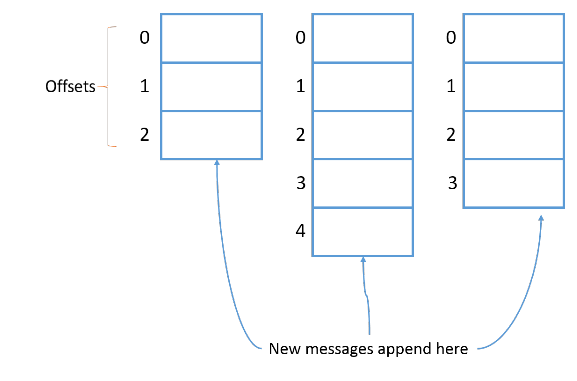
В теории партиция — это неизменяемая коллекция (или последовательность) сообщений. Мы можем добавлять сообщения в партицию, но не можем удалять. И под «мы» я подразумеваю продюсеров в Kafka. Продюсер не может удалять сообщения из топика.
Сейчас мы отправим в топик пару сообщений, но сначала обратите внимание на размер файлов в папках партиций.
Как видите, файлы index вместе весят 20 МБ, а файл log совершенно пустой. В папках freblogg-1 и freblogg-2 то же самое.
Давайте отправим сообщения через console producer и посмотрим, что будет:
Я отправил два сообщения — сначала ввел стандартное «Hello World», а потом нажал на Enter, и это второе сообщение. Еще раз посмотрим на размеры файлов:
Два сообщения заняли две партиции, и файлы log в них теперь имеют размер. Это потому, что сообщения в партиции хранятся в файле xxxx.log. Давайте заглянем в файл log и убедимся, что сообщение и правда там.
Файлы с форматом log не очень удобно читать, но мы все же видим в конце «Hello World», то есть файл обновился, когда мы отправили сообщение в топик. Второе сообщение мы отправили в другую партицию.
Обратите внимание, что первое сообщение попало в третью партицию (freblogg-2), а второе — во вторую (freblogg-1). Для первого сообщения Kafka выбирает партицию произвольно, а следующие просто распределяет по кругу (round-robin). Если мы отправим третье сообщение, Kafka запишет его во freblogg-0 и дальше будет придерживаться этого порядка. Мы можем и сами выбирать партицию, указав ключ. Kafka хранит все сообщения с одним ключом в одной и той же партиции.
Каждому новому сообщению в партиции присваивается Id на 1 больше предыдущего. Этот Id еще называют смещением (offset). У первого сообщения смещение 0, у второго — 1 и т. д., каждое следующее всегда на 1 больше предыдущего.
<Небольшое отступление>
Давайте используем инструмент Kafka, чтобы понять, что это за странные символы в файле log. Нам они кажутся бессмысленными, но для Kafka это метаданные каждого сообщения в очереди. Выполним команду:
(Я удалил из выходных данных кое-что лишнее.)
Здесь мы видим смещение, время создания, размер ключа и значения, а еще само сообщение (payload).
</Небольшое отступление>
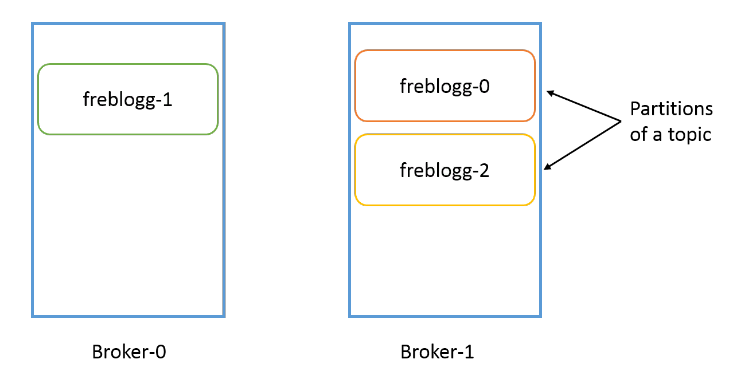
Надо понимать, что партиция привязана к брокеру. Если у нас, допустим, три брокера, а папка freblogg-0 существует в broker-1, в других брокерах ее не будет. У одного топика могут быть партиции в нескольких брокерах, но одна партиция всегда существует в одном брокере Kafka (если установлен коэффициент репликации по умолчанию 1, но об этом чуть позже).
Сегменты
Что это за файлы index и log в каталоге партиции? Партиция, может, и единица хранения в Kafka, но не минимальная. Каждая партиция разделена на сегменты, то есть коллекции сообщений. Kafka не хранит все сообщения партиции в одном файле (как в файле лога), а разделяет их на сегменты. Это дает несколько преимуществ. (Разделяй и властвуй, как говорится.)
Главное — это упрощает стирание данных. Я уже говорил, что сами мы не можем удалить сообщение из партиции, но Kafka может это сделать на основе политики хранения для топика. Удалить сегмент проще, чем часть файла, особенно когда продюсер отправляет в него данные.
Нули (00000000000000000000) в файлах log и index в каждой папке партиции — это имя сегмента. У файла сегмента есть файлы segment.log , segment.index и segment.timeindex .
Kafka всегда записывает сообщения в файлы сегментов в рамках партиции, причем у нас всегда есть активный сегмент для записи. Когда Kafka достигает лимита по размеру сегмента, создается новый файл сегмента, который станет активным.
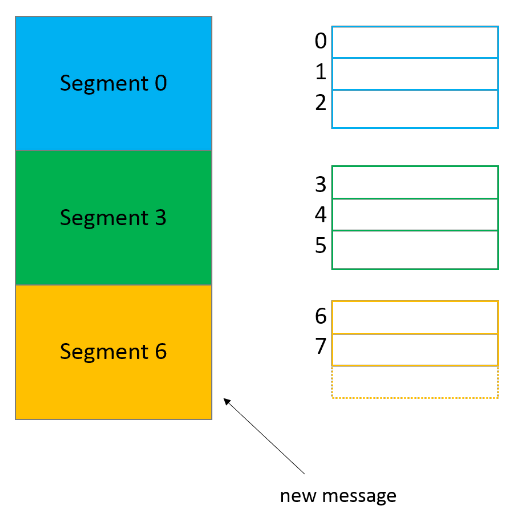
В имени каждого файла сегмента отражается смещение от первого сообщения. На картинке выше в сегменте 0 содержатся сообщения со смещением от 0 до 2, в сегменте 3 — от 3 до 5, и так далее. Последний сегмент, шестой, сейчас активен.
У нас всего по одному сегменту в каждой партиции, поэтому они называются 00000000000000000000. Раз других файлов сегментов нет, сегмент 00000000000000000000 и будет активным.
По умолчанию сегменту выдается целый гигабайт, но представим, что мы изменили параметры, и теперь в каждый сегмент помещается только три сообщения. Посмотрим, что получится.
Допустим, мы отправили в партицию freblogg-2 три сообщения, и она выглядит так:
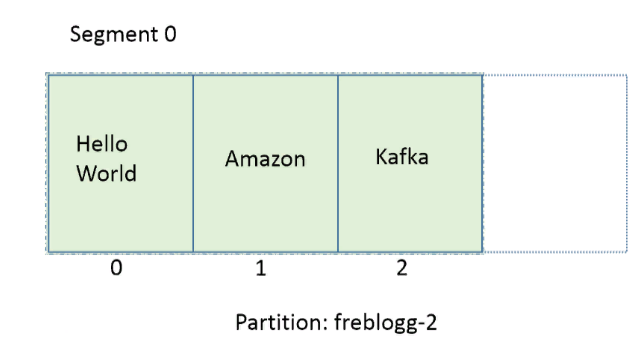
Три сообщения — это наш лимит. На следующем сообщении Kafka автоматически закроет текущий сегмент, создаст новый, сделает его активным и сохранит новое сообщение в файле log этого сегмента. (Я не показываю предыдущие нули, чтобы было проще воспринять).
Удивительное дело, но новый сегмент называется не 01. Мы видим 03.index , 03.log . Почему так?
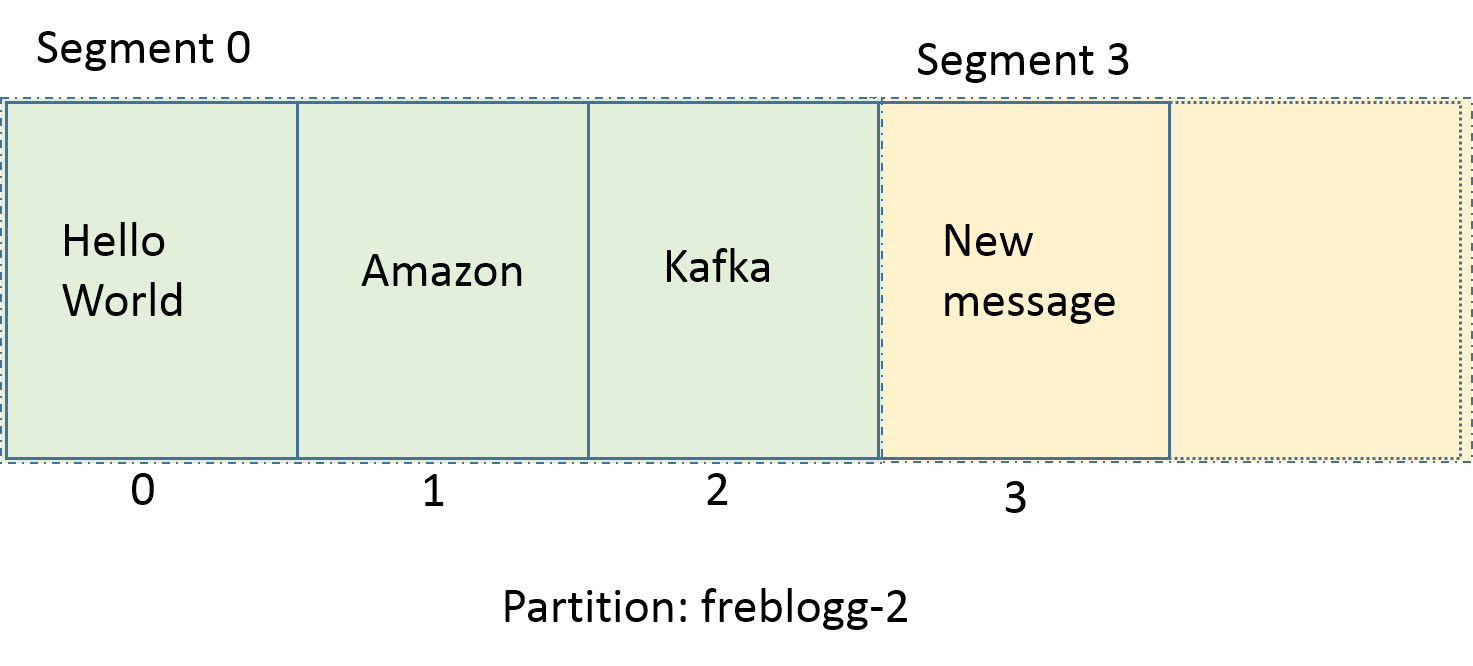
Kafka называет сегмент по имени минимального смещения в нем. Новое сообщение в партиции имеет смещение 3, поэтому Kafka так и называет новый сегмент. Раз у нас есть сегменты 00 и 03, мы можем быть уверены, что сообщения со смещениями 0, 1 и 2 и правда находятся в сегменте 00. Новые сообщения в партиции freblogg-2 со смещениями 3 ,4 и 5 будут храниться в сегменте 03.
В Kafka мы часто читаем сообщения по определенному смещению. Искать смещение в файле log затратно, особенно если файл разрастается до неприличных размеров (по умолчанию это 1 ГБ). Для этого нам и нужен файл .index . В файле index хранятся смещения и физическое расположение сообщения в файле log.
Файл index для файла log, который я приводил в кратком отступлении, будет выглядеть как-то так:
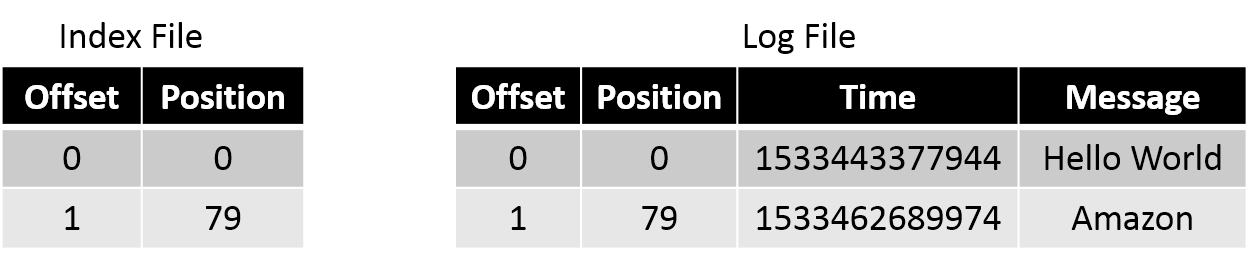
Если нужно прочитать сообщение со смещением 1, мы ищем его в файле index и видим, что его положение — 79. Переходим к положению 79 в файле log и читаем. Это довольно эффективный способ — мы быстро находим нужное смещение в уже отсортированном файле index с помощью бинарного поиска.
Параллелизм в партициях
Чтобы гарантировать порядок чтения сообщений из партиции, Kafka дает доступ к партиции только одному консюмеру (из группы консюмеров). Если партиция получает сообщения a, f и k, консюмер читает их в том же порядке: a, f и k. Это важно, ведь порядок потребления сообщений на уровне топика не гарантирован, если у вас несколько партиций.
Если консюмеров будет больше, параллелизм не увеличится. Нужно больше партиций. Чтобы два консюмера параллельно считывали данные из топика, нужно создать две партиции — по одной на каждого. Партиции в одном топике могут находиться в разных брокерах, поэтому два консюмера топика могут считывать данные из двух разных брокеров.
Топики
Наконец, переходим к топикам. Мы уже кое-что знаем о них. Главное, что нужно знать: топик — это просто логическое объединение нескольких партиций.
Топик может быть распределен по нескольким брокерам через партиции, но каждая партиция находится только в одном брокере. У каждого топика есть уникальное имя, от которого зависят имена партиций.
Репликация
Как работает репликация? Создавая топик в Kafka, мы указываем для него коэффициент репликации — replication-factor . Допустим, у нас два брокера и мы устанавливаем replication-factor 2 . Теперь Kafka попытается всегда создавать бэкап, или реплику, для каждой партиции в топике. Kafka распределяет партиции примерно так же, как HDFS распределяет блоки данных по нодам.
Допустим, для топика freblogg мы установили коэффициент репликации 2. Мы получим примерно такое распределение партиций:

Даже если реплицированная партиция находится в другом брокере, Kafka не разрешает ее читать, потому что в каждом наборе партиций есть LEADER, то есть лидер, и FOLLOWERS — ведомые, которые остаются в резерве. Ведомые периодически синхронизируются с лидером и ждут своего звездного часа. Когда лидер выйдет из строя, один из in-sync ведомых будет выбран новым лидером, и вы будете получать данные из этой партиции.
Лидер и ведомый одной партиции всегда находятся в разных брокерах. Думаю, не нужно объяснять, почему.
Мы подошли к концу этой длинной статьи. Если вы добрались до этого места — поздравляю. Теперь вы знаете почти все о хранении данных в Kafka. Давайте повторим, чтобы ничего не забыть.
Итоги
- В Kafka данные хранятся в топиках.
- Топики разделены на партиции.
- Каждая партиция разделена на сегменты.
- У каждого сегмента есть файл log, где хранится само сообщение, и файл index, где хранится позиция сообщения в файле log.
- У одного топика могут быть партиции в разных брокерах, но сама партиция всегда привязана к одному брокеру.
- Реплицированные партиции существуют пассивно. Вы обращаетесь к ним, только если сломался лидер.
От редакции:
Более подробно от работе с Apache Kafka можно узнать на курсе Слёрма. Курс сейчас в разработке, релиз 7 апреля 2021. В программе бесплатные базовые уроки, они уже доступны на Youtube и платная продвинутая часть.