What is AacKingstonDramHal_x64.exe?
ASUS Aura Creator (AAC) is a software suite that provides a range of tools for customizing and optimizing ASUS hardware components. One of the programs included in the suite is “AacKingstonDramHal_x64.exe,” which is specifically designed to manage the performance settings of the Kingston DRAM module. Its purpose is to ensure optimal performance and stability of the DRAM module.
The DRAM (Dynamic Random Access Memory) module is a critical computer memory component that stores data for rapid access by the CPU. It plays a vital role in the overall performance of a computer system by efficiently storing and retrieving data. The “AacKingstonDramHal_x64.exe” program is specifically developed to manage the settings of the Kingston DRAM module, which is a well-known and widely used brand of computer memory.
Through the optimization of DRAM module settings, the “AacKingstonDramHal_x64.exe” program can contribute to enhancing the overall performance and stability of your computer. This optimization can lead to faster load times, smoother performance, and a reduction in crashes or errors.
Is AacKingstonDramHal_x64.exe virus?
In summary, “AacKingstonDramHal_x64.exe” is a legitimate program developed by ASUS that is designed to improve the performance and stability of your computer by managing the settings of your Kingston DRAM module.
If you are experiencing high CPU usage from the “AacKingstonDramHal_x64.exe” process located in the temporary folder, the program may be encountering an error or conflict that is causing it to use excessive system resources.
Here are some steps you can take to try to resolve the issue:
- End the process: Open the Task Manager, locate the “AacKingstonDramHal_x64.exe” process, and click “End Task”. This will stop the process from running and using system resources.
- Delete the temporary file: Since the process is located in the temporary folder, there may be a corrupt or incomplete file causing the issue. Try deleting the file and restarting your computer. The program should recreate the necessary files when it runs again.
- Reinstall the program: If the issue persists, try uninstalling the “AacKingstonDramHal_x64.exe” program and then reinstalling it from a trusted source, such as the official ASUS website.
- Update drivers: Ensure that you have the latest drivers installed for your hardware components, including the Kingston DRAM module. Outdated drivers can cause compatibility issues and lead to high CPU usage.
If none of these steps resolve the issue, there may be Trojan Coinminer Virus
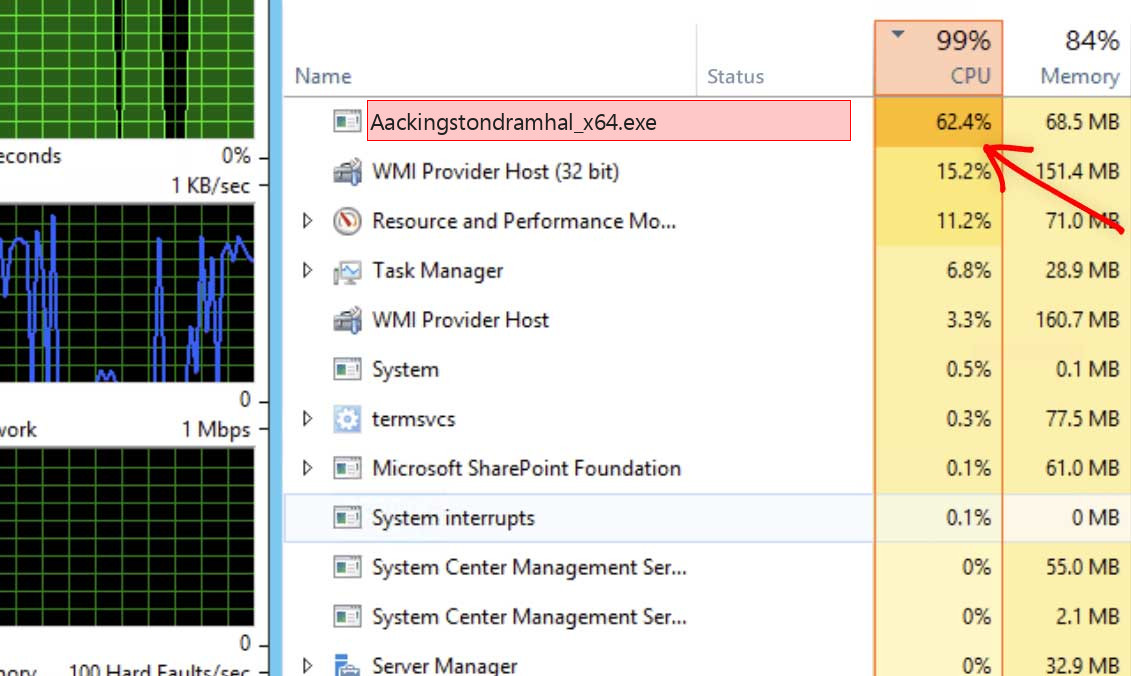
Aackingstondramhal_x64.exe – Extremely high CPU and GPU usage
Besides CPU utilization, some coin miners also use GPU power. In that instance, you will also struggle to see the mouse arrow moving – GPU is often utilized at 100%. It is not as important as the processor for system work, so Aackingstondramhal_x64.exe coin miner viruses do not waste time on trifles and utilize it all. It often may cause sad effects.
Shortly about cryptocurrency mining
Crypto mining term means the action of calculating the transaction block hash. That is a basic element of anything based on blockchain technology. Since this action takes a lot of calculations, a very powerful computer is required. The GPU is better for this purpose because they have more cores available. Cryptomining farms usually consist of tens and hundreds of GPUs to complete their task efficiently. Such computer systems are useless for “normal” gaming or web browsing. Fraudsters who make profit via this coin miner use someones’ hardware instead, even if they are used for regular activity. 1
List of the typical coin miner symptoms
How dangerous is the Aackingstondramhal_x64.exe miner?
Coin miners do not deal damage to your files. However, they do a lot of unpleasant things with the whole system
First, Aackingstondramhal_x64.exe malware makes your PC overloaded. It is unable to run your applications now, because all processor power is consumed by malware. That malware does not care for your demands. All it pays attention to is generating profits on you. Even if you are patient, and you waited until web browser is open, you will likely experience exceptionally slow efficiency. Pages will open up for years, any kind of logins will take about a minute – just a nightmare for a person who works online.
Aackingstondramhal_x64.exe Technical Summary.
| File Name | Aackingstondramhal_x64.exe |
| Type | Trojan Coin Miner |
| Detection Name | Trojan:Win32/CoinMiner |
| Distribution Method | Software bundling, Intrusive advertisement, redirects to shady sites etc. |
| Similar behavior | Ezupdt.exe, Dipawaymode.exe, Auepmaster.exe |
| Removal | Download and install GridinSoft Anti-Malware for automatic Aackingstondramhal_x64.exe removal. |
“Visible” harm is not a solitary unpleasant activity coin miners perform to your PC. Aackingstondramhal_x64.exe coin miner additionally deals damage to your OS. To carry out all malicious operations correctly, it wrecks the protection mechanisms of your system. You will likely see your Microsoft Defender disabled – malware halts it to avoid detection. If you check the HOSTS file, you will likely see a number of new notes – they are brought in by this trojan miner to connect your computer to a malicious mining network. All these adjustments are about to be reverted to the original in the process of system recovery.
Hardware effects of coin miner activity
Besides decreasing your computer’s performance, performing at peak power for long times can trigger damage to your machine and raise electricity bills. PC elements are created to easily deal with high load, but they are good with it only in cases when they are in good shape.
Compact and well-protected CPU cooling system is hard to crack. Meanwhile, GPUs have large and easy-to-access fans, which can be easily cracked if touched while spinning, for example, by the user much earlier before the virus injection. Malfunctioning cooling system, together with the very high load caused by Aackingstondramhal_x64.exe malware can easily lead to GPU failure 2 . Video cards are also tend to have very fast wearing when used for cryptocurrency mining. It is surely an unwanted case when the performance of your GPU plunges 20-30% just after several weeks of being exploited in such a way.
How did I get Aackingstondramhal_x64.exe coin miner virus?
Coin miners are spread through different ways, but their main sources are malicious banners and programs from dubious sources
Coin miners are the most prevalent malicious programs through “severe” malware. Adware often functions as a carrier for Aackingstondramhal_x64.exe malware infiltration: it shows you the banners containing a link to malware downloading. Yes, this abstract “malware” can belong to any type – an additional adware, spyware, rogue or backdoor. But the statistics say that around 30% of all malware spread with the malevolent banners are coin miners – and Aackingstondramhal_x64.exe is just with them. 3
The example of malicious banners you can see in the Internet
An additional way you could get this thing on your PC is by downloading it from the unreliable web page as a part of a program. Users that spread hacked variants of popular programs (which do not require the license key) have small chances to earn money. For this reason, there is a very big lure to add malware to the final package of the hacked app and get a coin for every installation. Before blaming these guys for hacking and also malware spreading, ask yourself – is it okay to avoid paying for the program in such a way? It is much cheaper to pay $20-$30 one time than to pay a much bigger figure for antivirus software and new parts for your computer.
How to remove the Aackingstondramhal_x64.exe miner from my PC?
The best way to get rid of this coin miner virus is to use anti-malware software
Eliminating such a virus involves using specific software. Effective security tools must have high performance at scanning and be lightweight – to make no problems with usage also on weak computers. Additionally, it is better to have on-run protection in your protection solution – to prevent the virus even before it starts. Microsoft Defender lacks these features for various factors. That’s why I’d advise you to use a third-party anti-malware program. GridinSoft Anti-Malware is an ideal choice that fits each of the specified qualities. 4
Before the malware removal, it is important to reboot your operating system into Safe Mode with Networking. Since Aackingstondramhal_x64.exe miner takes a lot of CPU capacity, it must be halted before launching the security program. Otherwise, your scan will last for years, even though the GridinSoft program is pretty lightweight.
Booting the PC into Safe Mode with Networking
Press the Start button, choose Power, and click Reboot while holding the Shift key on the keyboard.
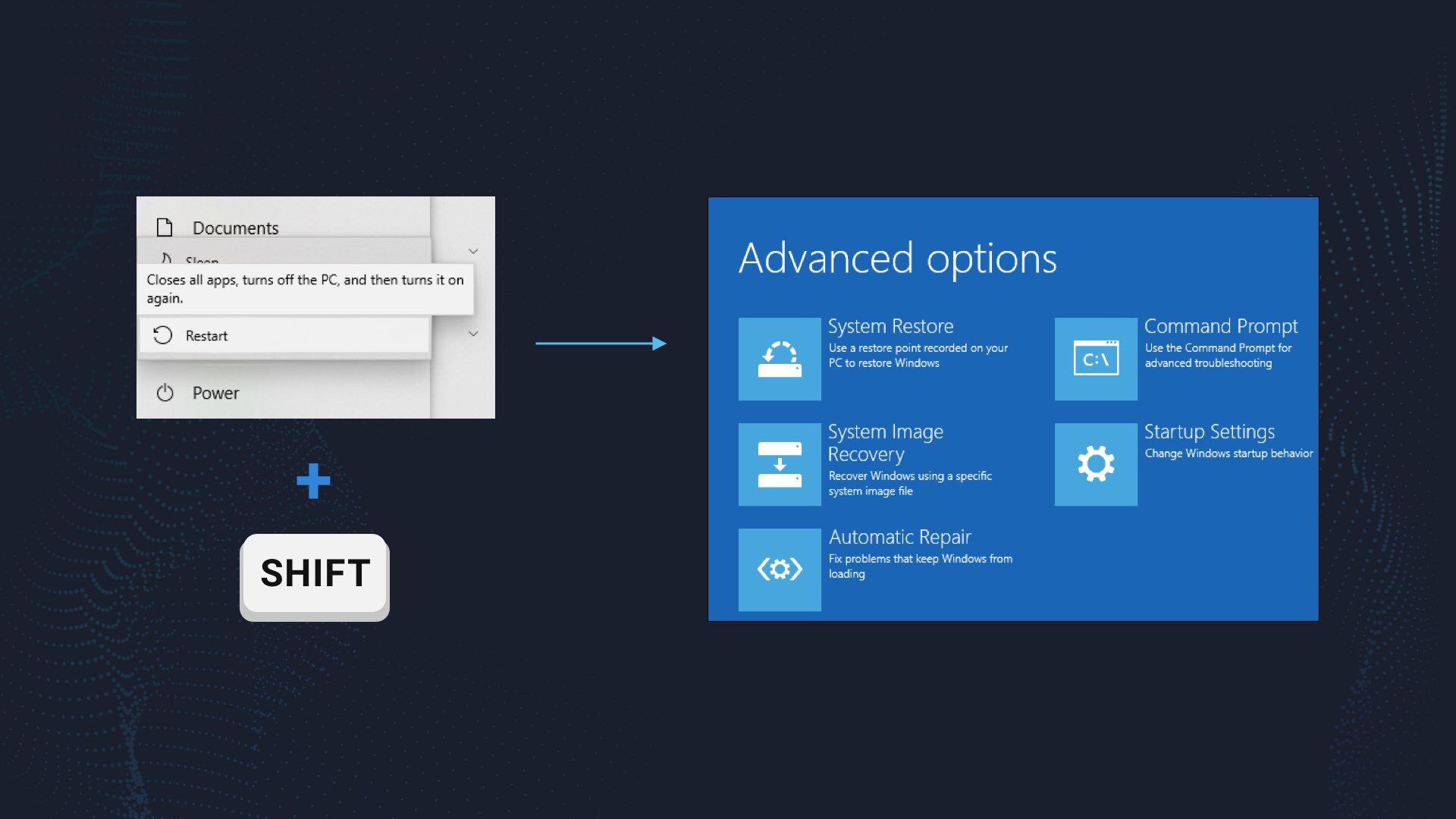
Windows will reboot into recovery mode. In that mode, choose Troubleshoot→ Startup Settings→ Safe Mode with Networking. Press the corresponding button on your keyboard to choose that option.
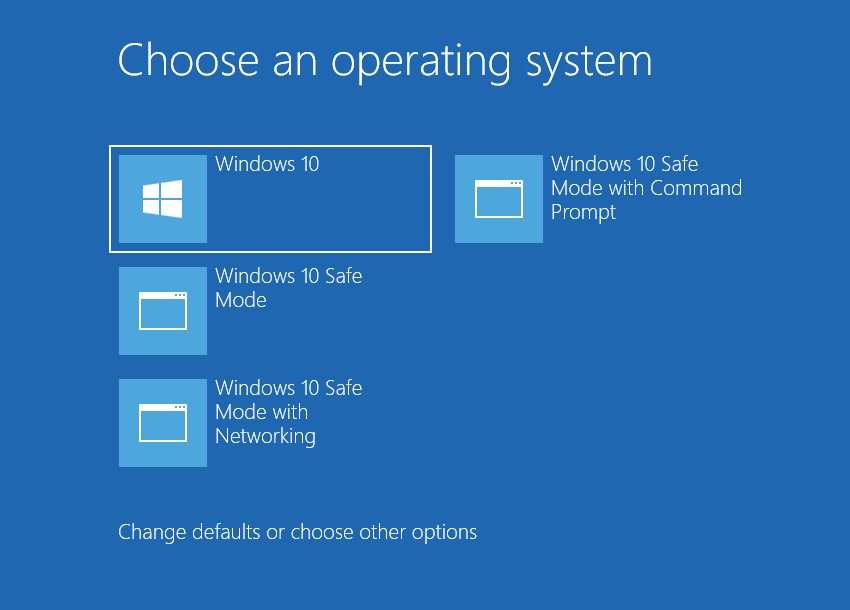
When your PC is in Safe Mode, all third-party apps, along with the majority of non-crucial Windows components, are not started with the system start. That gives you the ability to clean the PC without dealing with high CPU usage of the coin miner.
Remove Aackingstondramhal_x64.exe coin miner virus with GridinSoft Anti-Malware
Download and install GridinSoft Anti-Malware. You can use this anti-malware program for free during its 6-day trial period. In that term, all functions are available, and it takes no payments to remove malware from your system.
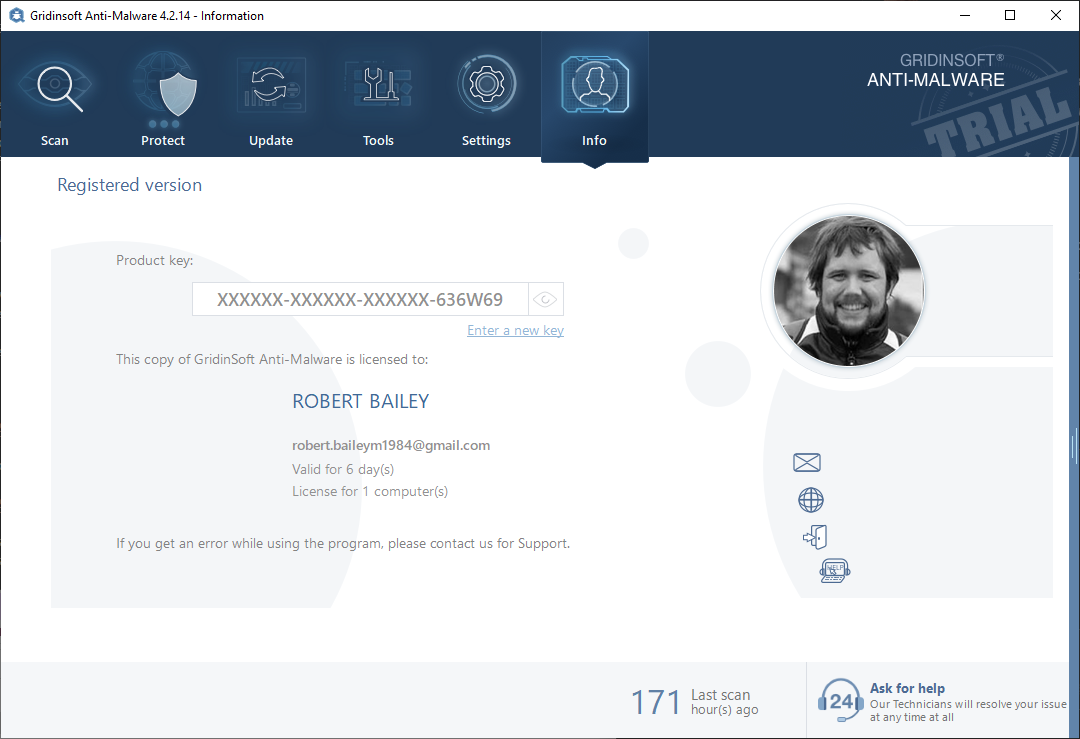
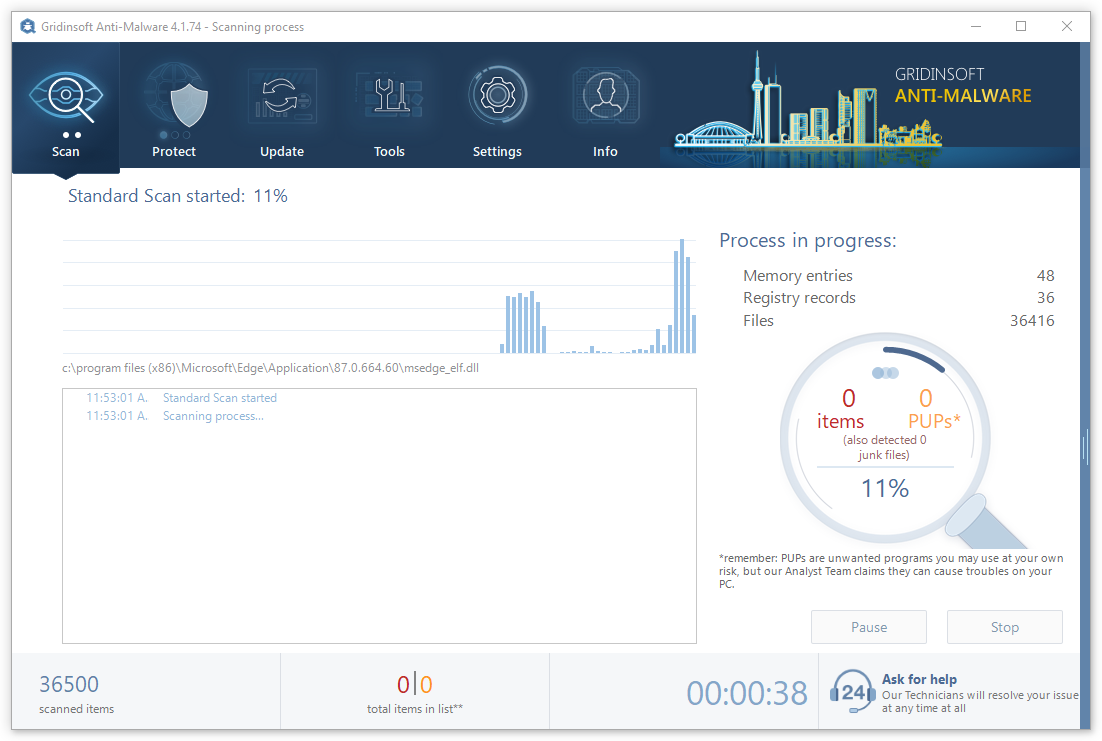
After activating your free trial, start Full scan. It may last up to 10 minutes. You may use the PC as usual.
When the scan is finished, press the Clean Now button to remove all detected elements from your system. This procedure takes less than a minute.
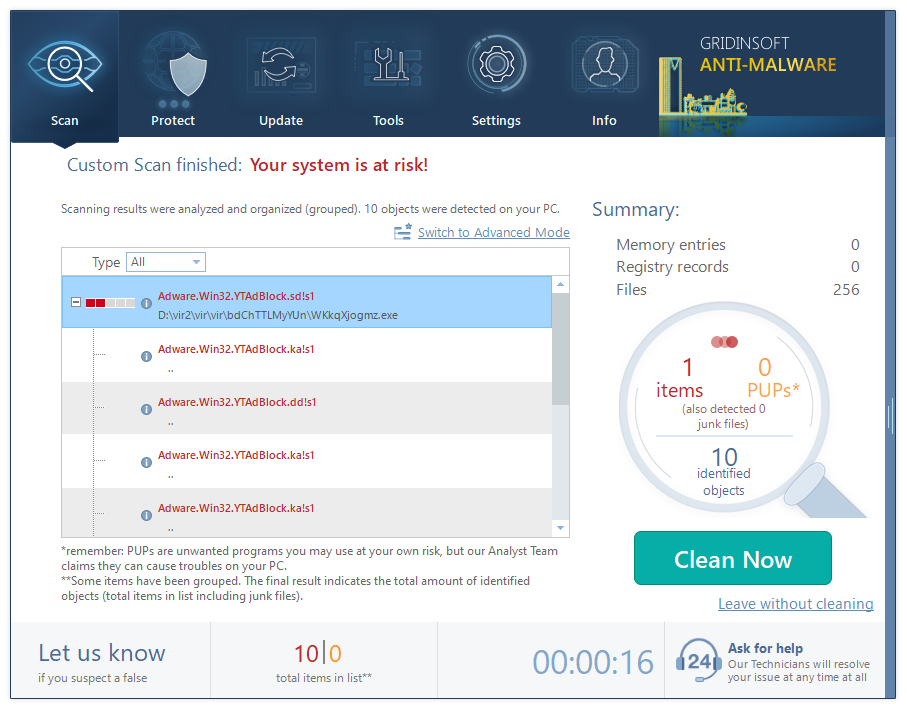
Now, you are good to go. Reboot your PC into a normal Windows mode and use just as there was nothing malicious.
Remove Aackingstondramhal_x64.exe Virus ⛏️ Trojan Coin Miner
Name: Aackingstondramhal_x64.exe
Description: «AacKingstonDramHal_x64.exe» is a legitimate program developed by ASUS that is designed to improve the performance and stability of your computer by managing the settings of your Kingston DRAM module.
What is Aac3572DramHal_x86.exe?
The .exe extension on a filename indicates an exe cutable file. Executable files may, in some cases, harm your computer. Therefore, please read below to decide for yourself whether the Aac3572DramHal_x86.exe on your computer is a Trojan that you should remove, or whether it is a file belonging to the Windows operating system or to a trusted application.
Aac3572DramHal_x86.exe file information
The process known as AAC DRAM HAL belongs to software ASUS AURA COMPONENT — DRAM HAL by ASUSTeK Computer (www.asus.com).
Description: Aac3572DramHal_x86.exe is not essential for the Windows OS and causes relatively few problems. The Aac3572DramHal_x86.exe file is located in a subfolder of «C:\Program Files» (common is C:\Program Files\ASUS\ASUS_Aac_DRAM\). Known file sizes on Windows 10/11/7 are 2,309,544 bytes (50% of all occurrences), 2,309,040 bytes or 2,308,528 bytes.
The Aac3572DramHal_x86.exe file is not a Windows core file. The Aac3572DramHal_x86.exe file is certified by a trustworthy company. The program is not visible. Aac3572DramHal_x86.exe is able to manipulate other programs. Therefore the technical security rating is 26% dangerous.
Important: Some malware camouflages itself as Aac3572DramHal_x86.exe, particularly when located in the C:\Windows or C:\Windows\System32 folder. Therefore, you should check the Aac3572DramHal_x86.exe process on your PC to see if it is a threat. We recommend Security Task Manager for verifying your computer’s security. This was one of the Top Download Picks of The Washington Post and PC World.
Score
User Comments
There are no user opinions yet. Why not be the first to write a short comment?
Best practices for resolving Aac3572DramHal_x86 issues
A clean and tidy computer is the key requirement for avoiding problems with Aac3572DramHal_x86. This means running a scan for malware, cleaning your hard drive using 1 cleanmgr and 2 sfc /scannow, 3 uninstalling programs that you no longer need, checking for Autostart programs (using 4 msconfig) and enabling Windows’ 5 Automatic Update. Always remember to perform periodic backups, or at least to set restore points.
Should you experience an actual problem, try to recall the last thing you did, or the last thing you installed before the problem appeared for the first time. Use the 6 resmon command to identify the processes that are causing your problem. Even for serious problems, rather than reinstalling Windows, you are better off repairing of your installation or, for Windows 8 and later versions, executing the 7 DISM.exe /Online /Cleanup-image /Restorehealth command. This allows you to repair the operating system without losing data.
To help you analyze the Aac3572DramHal_x86.exe process on your computer, the following programs have proven to be helpful: A Security Task Manager displays all running Windows tasks, including embedded hidden processes, such as keyboard and browser monitoring or Autostart entries. A unique security risk rating indicates the likelihood of the process being potential spyware, malware or a Trojan. B Malwarebytes Anti-Malware detects and removes sleeping spyware, adware, Trojans, keyloggers, malware and trackers from your hard drive.
Aac dram hal что это

Если я правильно понял, то:
Драйвер предоставляет некий интерфейс для доступа к железу.
HAL предоставляет унифицированный интерфейс для доступа к железу.
В случае с драйвером может понадобиться еще и программа от производителя для работы.
В случае с HAL подойдет любая программа, так как команды у HAL одинаковы для данного типа устройств.
Что такое HAL?
читай, если не лень: HAL (Hardware Abstraction Layer) уровень абстрагирования от аппаратных средств DLL, которая скрывает детали взаимодействия ОС с конкретной аппаратной платформой (кэш-память, ввод-вывод, контроллер прерываний, таймер и т. д.), что позволяет переносить её на другие машины (Первоначально HAL появился в Windows NT для поддержки процессоров PowerPC и Alpha). В частности, содержит механизм распределения задач между процессорами в симметричной многопроцессорной системе, работающей под управлением Windows NT или Windows 2000 API , hardware-independent , portability
HAL
1) hard array logic — аппаратно реализованная матричная логика
2) hardware abstraction layer — уровень аппаратных абстракций (программное обеспечение, которое позволяет высшим уровням операционной системы абстрагироваться от конкретных особенностей аппаратного обеспечения — это обеспечивает переносимость Windows NT на другие платформы)
3) house-programmed array logic — матричная логика с пользовательским программированием
Sysadminium
В этой статье рассматривается архитектура Windows в общих чертах. В следующих уроках рассмотрим каждый элемент архитектуры более подробно.
Архитектура Windows
Как вы уже знаете в операционной системе Windows есть 2 режима работы: пользовательский и режим ядра. При этом сама операционная система состоит из подсистем. В настоящее время Windows поддерживает две подсистемы: подсистему для Windows приложений и подсистему для Linux приложений. В будущем возможно появление и других подсистем, так как разработчики Mikrosoft разработали технологию, которая облегчает им добавлять различные подсистемы.
Чтобы лучше понять архитектуру Windows я подготовил такой рисунок:
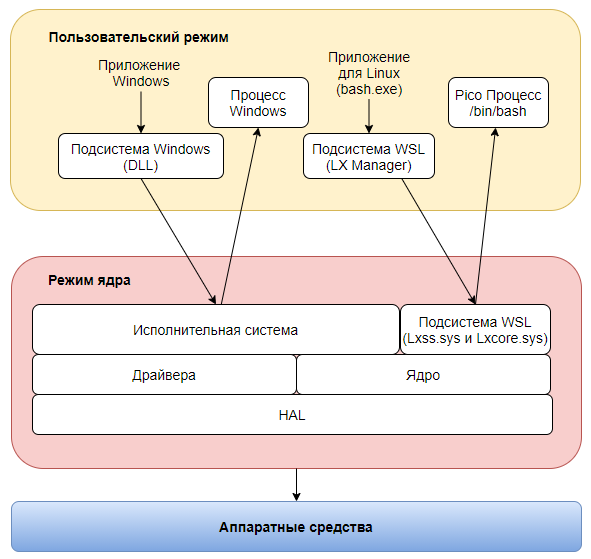
При запуске Windows приложения идет обращение к “Подсистеме Windows“, а уже от туда идет обращение к “Исполнительной системе“, которая запустит процесс для этого приложения.
Microsoft также разработали “Подсистему для Linux” (WSL). Для этого в режим ядра поместили два драйвера: Lxss.sys и Lxcore.sys. Эти драйвера эмулируют ядро Linux. А также, в пользовательском режиме работает специальный менеджер – LX Manager. Этот менеджер обрабатывает приложения для Linux.
Когда вы запускаете Linux приложение, например bash.exe, то идет обращение через LX Manager к драйверам эмулирующим ядро Linux. И уже это ядро запускает и обслуживает данный процесс.
То-есть для Windows приложений существует “Подсистема Windows” в пользовательском режиме и “Исполнительная система” в режиме ядра. А для Linux приложений существует LX Manager в пользовательском режиме и специальные драйвера в режиме ядра.
Помимо “Исполнительной системы” и драйверов эмулирующих работу ядра Linux в режиме ядра работают:
- драйвера устройств или приложений, которые являются исполняемыми файлами с расширением .sys;
- ядро операционной системы;
- HAL – прослойка между ядром (или драйверами) и оборудованием (системной платой).
В системе Windows ядро не выполняет все задачи, которые выполняются в режиме ядра. Ядру помогает “Исполнительная система“. Подробнее про неё будет написано в следующей статье. А пока посмотрим чем занимается само ядро.
Ядро состоит из набора функций Ntoskrnl.exe, которые являются фундаментальными в операционной системе. Эти функции используются компонентами исполнительной системы.
А также ядро поддерживает работу с оборудованием, например работу с прерываниями и процессором. И ещё ядро следит за синхронизацией процессоров в многопроцессорной системе.
С другим оборудованием ядро работает через HAL.
HAL – слой абстрагирования от оборудования. Он представляет собой загружаемый модуль режима ядра hal.dll, и является прослойкой между ядром и оборудованием. Под оборудованием я подразумеваю системную плату или платы расширения, а не периферию. Так драйвера принтеров работают напрямую с принтерами, а не через HAL.
Таким образом ядро и драйвера не работают напрямую с материнской платой, а вызывают функции HAL.
Для Windows x86 включена пара библиотек HAL, но загружается одна в зависимости от типа системной платы:
- halacpi.dll — платы с поддержкой acpi, но без поддержки apic;
- halmacpi.dll — платы с поддержкой acpi и apic.
Для Windows x64 существует только один образ hal:
- hal.dll — платы с поддержкой x64 всегда поддерживают acpi и apic.
Windows поддерживает расширения hal — это дополнительные библиотеки, которые могут загружаться при наличии конкретного оборудования, запрашивающего эти библиотеки. Например:
- HalExtPL080.dll — расширение для контроллера DMA PL080;
- HalExtIntcLpioDMA.dll — для некоторых платформ intel с пониженным энергопотреблением.
Создание расширений HAL требует сотрудничества с компанией MicroSoft. В связи с этим расширения снабжаются цифровой подписью.
Aac dram hal что это
The .exe extension on a filename indicates an exe cutable file. Executable files may, in some cases, harm your computer. Therefore, please read below to decide for yourself whether the AacKingstonDramHal_x86.exe on your computer is a Trojan that you should remove, or whether it is a file belonging to the Windows operating system or to a trusted application.
AacKingstonDramHal_x86.exe file information

AacKingstonDramHal_x86.exe process in Windows Task Manager
The process known as Kingston AURA DRAM Component belongs to software unknown by ASUSTeK Computer (www.asus.com).
Description: AacKingstonDramHal_x86.exe is not essential for the Windows OS and causes relatively few problems. AacKingstonDramHal_x86.exe is located in a subfolder of «C:\Program Files»—common is C:\Program Files\ASUS\KINGSTON_Aac_DRAM\. Known file sizes on Windows 10/11/7 are 497,176 bytes (50% of all occurrences), 252,824 bytes or 252,840 bytes.
The AacKingstonDramHal_x86.exe file is digitally signed. There is no file information. The file is not a Windows core file. The program is not visible. The software can be removed using the Control Panel’s Add\Remove programs applet. Therefore the technical security rating is 34% dangerous.
Important: Some malware camouflages itself as AacKingstonDramHal_x86.exe, particularly when located in the C:\Windows or C:\Windows\System32 folder. Therefore, you should check the AacKingstonDramHal_x86.exe process on your PC to see if it is a threat. We recommend Security Task Manager for verifying your computer’s security. This was one of the Top Download Picks of The Washington Post and PC World.
Score
User Comments
There are no user opinions yet. Why not be the first to write a short comment?
Best practices for resolving AacKingstonDramHal_x86 issues
A clean and tidy computer is the key requirement for avoiding problems with AacKingstonDramHal_x86. This means running a scan for malware, cleaning your hard drive using 1 cleanmgr and 2 sfc /scannow, 3 uninstalling programs that you no longer need, checking for Autostart programs (using 4 msconfig) and enabling Windows’ 5 Automatic Update. Always remember to perform periodic backups, or at least to set restore points.
Should you experience an actual problem, try to recall the last thing you did, or the last thing you installed before the problem appeared for the first time. Use the 6 resmon command to identify the processes that are causing your problem. Even for serious problems, rather than reinstalling Windows, you are better off repairing of your installation or, for Windows 8 and later versions, executing the 7 DISM.exe /Online /Cleanup-image /Restorehealth command. This allows you to repair the operating system without losing data.
To help you analyze the AacKingstonDramHal_x86.exe process on your computer, the following programs have proven to be helpful: A Security Task Manager displays all running Windows tasks, including embedded hidden processes, such as keyboard and browser monitoring or Autostart entries. A unique security risk rating indicates the likelihood of the process being potential spyware, malware or a Trojan. B Malwarebytes Anti-Malware detects and removes sleeping spyware, adware, Trojans, keyloggers, malware and trackers from your hard drive.
Что такое HAL и чем отличается от драйвера?
Если я правильно понял, то:
Драйвер предоставляет некий интерфейс для доступа к железу.
HAL предоставляет унифицированный интерфейс для доступа к железу.
В случае с драйвером может понадобиться еще и программа от производителя для работы.
В случае с HAL подойдет любая программа, так как команды у HAL одинаковы для данного типа устройств.
Уровень аппаратных абстракций
Как уже упоминалось, одним из наиболее важных элементов конструкции Windows является ее переносимость между разнообразными аппаратными платформами. Уровень аппаратных абстракций — hardware abstraction layer (HAL) является ключевой частью, обеспечивающей возможность такой переносимости.
HAL является загружаемым модулем режима ядра (Hal.dll), обеспечивающим низкоуровневый интерфейс с аппаратной платформой, на которой запущена Windows. Он скрывает подробности, зависящие от аппаратуры, такие как интерфейсы ввода-вывода, контроллеры прерываний и механизмы взаимодействия процессоров, — любые функции, имеющие как архитектурные, так и машинные зависимости.
Поэтому вместо непосредственного доступа к оборудованию, внутренние компоненты Windows, а также написанные пользователями драйверы устройств, при необходимости получения информации, зависящей от платформы, поддерживают переносимость путем вызова HAL-подпрограмм. По этой причине HAL-подпрограммы документированы в WDK. Для получения дополнительной информации о HAL и его использовании драйверами устройств нужно обратиться к WDK.
Хотя в операционную систему включено несколько HAL-модулей (см. табл), у Windows есть возможность определить во время загрузки, какой HAL-модуль должен использоваться, исключая проблемы, существовавшие в ранее выпущенных версиях Windows при попытке загрузки установки Windows на разных типах систем.
Перечень HAL-модулей для x86.
| Имя HAL-файла | Поддерживаемые системы |
|---|---|
| Halacpi.dll | Персональные компьютеры с усовершенствованным интерфейсом управления конфигурированием и энергопотреблением — Advanced Configuration and Power Interface (ACPI). Предназначается только для однопроцессорной машины без поддержки усовершенствованного программируемого контроллера прерываний — APIC (наличие любого из таких контроллеров заставит систему использовать вместо этого HAL-модуль, показанный ниже) |
| Halmacpi.dll | Персональные компьютеры с усовершенствованным программируемым контроллером прерываний — Advanced Programmable Interrupt Controller (APIC), имеющие ACPI. Наличие APIC подразумевает поддержку симметричной мультипроцессорной обработки — SMP |
ПРИМЕЧАНИЕ. На x64-машинах имеется только один HAL-образ по имени Hal.dll. Это обусловлено наличием у всех x64-машин материнских плат одинаковой конфигурации, поскольку процессы требуют поддержки ACPI и APIC. Следовательно, поддержка машин без ACPI или со стандартного программируемого контроллера прерываний — PIC, не требуется.
Эксперимент: определение запущенного HAL-модуля.
Определить, какая версия HAL-модуля запущена, можно с помощью WinDbg и открытия сеанса локальной отладки ядра. Обеспечьте путем ввода команды .reload загрузку символов, а затем наберите команду lm vm hal.
Например, следующий вывод получен на системе, запустившей ACPI HAL:
lkd> lm vm hal
start end module name
fffff800’0181b000 fffff800’01864000 hal (deferred)
Loaded symbol image file: halmacpi.dll
Image path: halmacpi.dll
Image name: halmacpi.dll
Timestamp: Mon Jul 13 21:27:36 2009 (4A5BDF08)
CheckSum: 0004BD36
ImageSize: 00049000
File version: 6.1.7600.16385
Product version: 6.1.7600.16385
File flags: 0 (Mask 3F)
File OS: 40004 NT Win32
File type: 2.0 Dll
File date: 00000000.00000000
CompanyName: Microsoft Corporation
ProductName: Microsoft® Windows® Operating System
FileVersion: 6.1.7600.16385 (win7_rtm.090713-1255)
FileDescription: Hardware Abstraction Layer DLL
LegalCopyright: © Microsoft Corporation. All rights reserved.
Эксперимент: просмотр зависимостей NTOSKRNL и HAL.
Взаимоотношения между ядром и HAL-образами можно просмотреть путем изучения их таблиц экспорта и импорта с помощью средства DependencyWalker (Depends.exe). Для изучения образа в DependencyWalker выберите пункт Open (Открыть) в меню File (Файл), чтобы открыть требуемый файл образа.
Пример вывода, который можно увидеть путем просмотра зависимостей Ntoskrnl с использованием этого средства может иметь следующий вид.
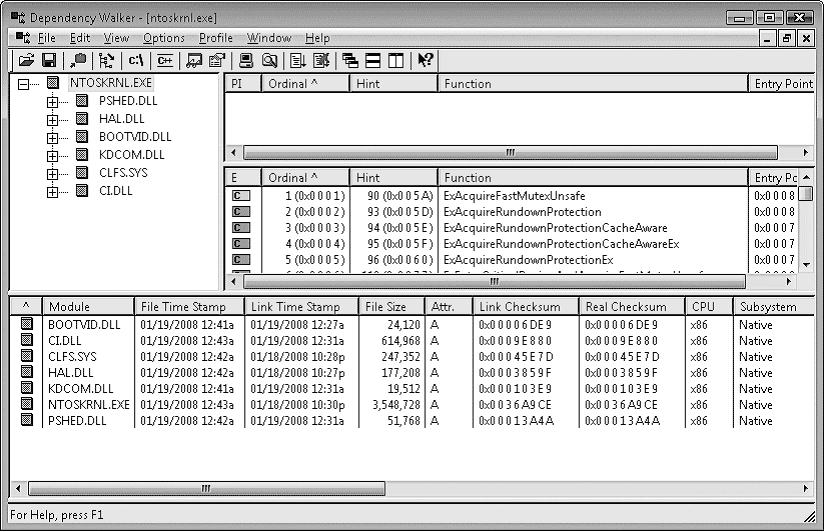
Обратите внимание на то, что Ntoskrnl связан с HAL, который, в свою очередь, связан с Ntoskrnl. (Они оба используют функции друг друга.) Ntoskrnl также связан со следующими исполняемыми файлами:
What is AacKingstonDramHal_x86.exe?
AacKingstonDramHal_x86.exe is digitally signed by ASUSTeK Computer Inc..
AacKingstonDramHal_x86.exe is usually located in the ‘C:\Program Files\ASUS\KINGSTON_Aac_DRAM\’ folder.
None of the anti-virus scanners at VirusTotal reports anything malicious about AacKingstonDramHal_x86.exe.
If you have additional information about the file, please share it with the FreeFixer users by posting a comment at the bottom of this page.
Vendor and version information [?]
AacKingstonDramHal_x86.exe does not have any version or vendor information.
Digital signatures [?]
AacKingstonDramHal_x86.exe has a valid digital signature.
| Property | Value |
|---|---|
| Signer name | ASUSTeK Computer Inc. |
| Certificate issuer name | DigiCert EV Code Signing CA (SHA2) |
| Certificate serial number | 0c64962e4467edcc1579646b7337ec8c |
VirusTotal report
None of the 67 anti-virus programs at VirusTotal detected the AacKingstonDramHal_x86.exe file.
Hashes [?]
| Property | Value |
|---|---|
| MD5 | e8501a2049ed0829a6a9c289b29bdd7e |
| SHA256 | 83e14fe1478b9407e1806dc91d26267b3f6918b6003f154ba8b92998da2b395c |
Error Messages
These are some of the error messages that can appear related to aackingstondramhal_x86.exe:
aackingstondramhal_x86.exe has encountered a problem and needs to close. We are sorry for the inconvenience.
aackingstondramhal_x86.exe — Application Error. The instruction at «0xXXXXXXXX» referenced memory at «0xXXXXXXXX». The memory could not be «read/written». Click on OK to terminate the program.
aackingstondramhal_x86.exe has stopped working.
End Program — aackingstondramhal_x86.exe. This program is not responding.
aackingstondramhal_x86.exe is not a valid Win32 application.
aackingstondramhal_x86.exe — Application Error. The application failed to initialize properly (0xXXXXXXXX). Click OK to terminate the application.
What will you do with the file?
To help other users, please let us know what you will do with the file:
What did other users do?
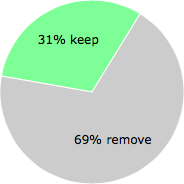
The poll result listed below shows what users chose to do with the file. 69% have voted for removal. Based on votes from 171 users.
NOTE: Please do not use this poll as the only source of input to determine what you will do with the file.
Malware or legitimate?
If you feel that you need more information to determine if your should keep this file or remove it, please read this guide.
And now some shameless self promotion ��
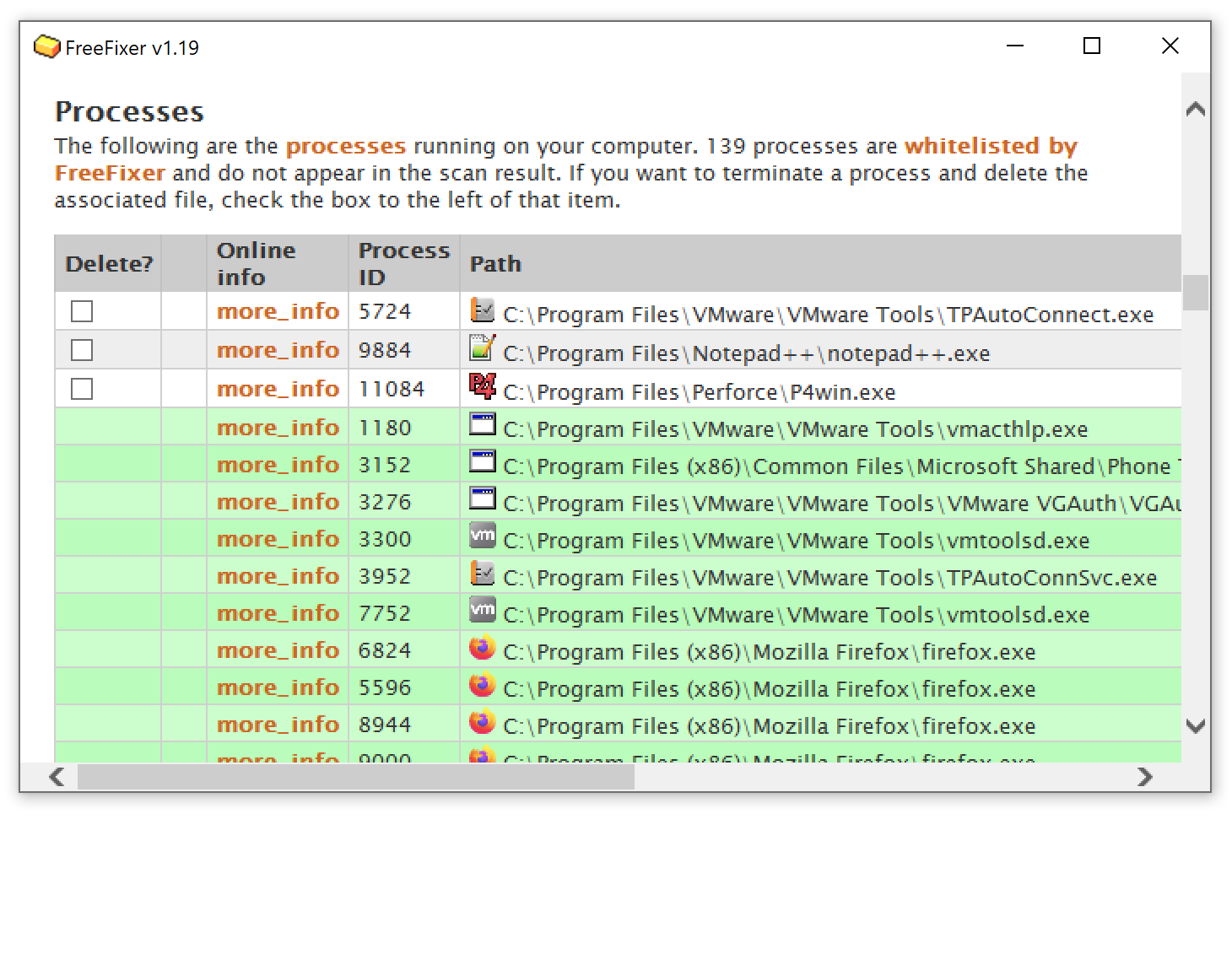
Hi, my name is Roger Karlsson. I’ve been running this website since 2006. I want to let you know about the FreeFixer program. FreeFixer is a freeware tool that analyzes your system and let you manually identify unwanted programs. Once you’ve identified some malware files, FreeFixer is pretty good at removing them. You can download FreeFixer here. It runs on Windows 2000/XP/2003/2008/2016/2019/Vista/7/8/8.1/10. Supports both 32- and 64-bit Windows.
If you have questions, feedback on FreeFixer or the freefixer.com website, need help analyzing FreeFixer’s scan result or just want to say hello, please contact me. You can find my email address at the contact page.
Comments
Please share with the other users what you think about this file. What does this file do? Is it legitimate or something that your computer is better without? Do you know how it was installed on your system? Did you install it yourself or did it come bundled with some other software? Is it running smoothly or do you get some error message? Any information that will help to document this file is welcome. Thank you for your contributions.
I’m reading all new comments so don’t hesitate to post a question about the file. If I don’t have the answer perhaps another user can help you.
PProchnow writes
What is AacKingstonDramHal_x86 (32bit) doing in MY PC’s Task Manager?
It is on my PC too.
I have yet to learn much, except
it was supposed to be harmless.
My PC was on idle and I saw this 5% jump and heard my CPU fan turn up so I looked.