Как запустить Internet Explorer на Windows 11
Пожалуй уже не секрет, что компания Microsoft еще в июне 2022 года удалила свой «основной» браузер Internet Explorer из операционной системы Windows 10, а в последнем релизе Windows 11 его и вовсе нет. Он не доступен по умолчанию, поэтому им нельзя пользоваться. Но это не совсем так. Умельцы нашли выход из ситуации, и в коде операционной системы обнаружились упоминания о классическом браузере Windows.
На самом деле в последнюю версию Windows IE не заложен, но присутствует в части движка обновленного браузера Microsoft Edge. Технически для запуска браузера нужно лишь выполнить пару действий, с которыми справится любой даже не подготовленный пользователь.
Итак, как же воскресить тотемный браузер?
В поисковой строке ищем «свойства браузера» или открываем через меню, выбираем «программы» и переходим в подпункт «надстройки».
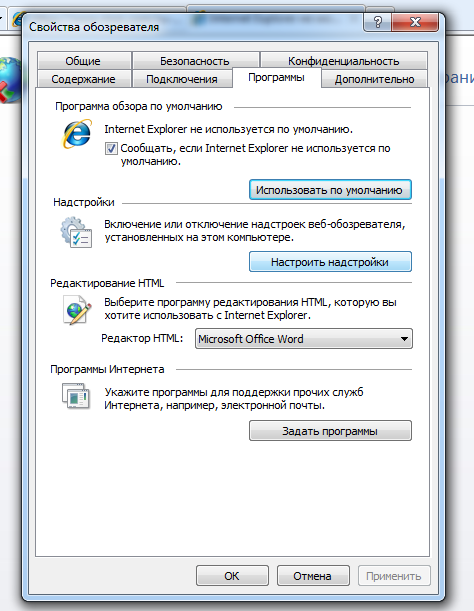
В открывшемся окне в нижней части кликаем на текст «дополнительные сведения о панелях инструментов и расширениях». После чего переходим по ссылке «узнать больше о расширениях». Данные действия приведут к автоматическому открыванию окна браузера IE с последней предустановленной версией.
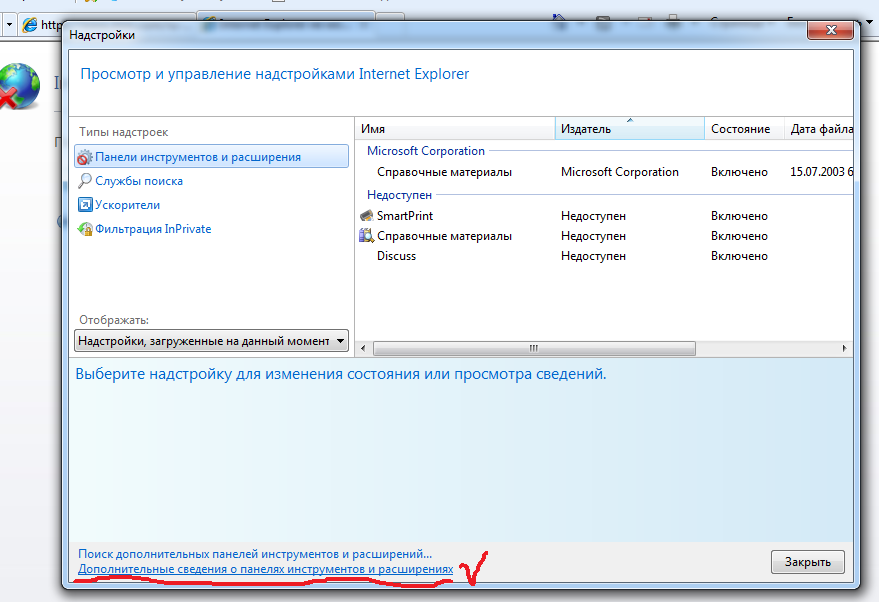
Перед этим, конечно же операционная система сообщит, что поддержка устаревшего браузера Internet Explorer окончена, но все же запустит браузер. В данный момент информации подтверждающей работу браузера в данном режиме на официальном сайте компании нет и возможно эту ошибку исправят в ближайших обновлениях операционной системы. А пока что, можно наслаждаться браузером Internet Explorer в операционных системах Windows 10 и Windows 11.
Internet Explorer удалось запустить на Windows 11 [ВИДЕО]
В июне этого года Microsoft удалила Internet Explorer из Windows 10, а в актуальной Windows 11 классический браузер недоступен по умолчанию. Но пользователь Twitter под ником XenoPanther сумел отыскать в современной ОС остатки знаменитого приложения — и опубликовал инструкцию по его «возрождению».
Технически IE в Windows 11 отсутствует — разработчики лишь сохранили часть его движка в составе Microsoft Edge. Но, как оказалось, запустить Internet Explorer 11 в последней версии ОС всё же возможно. Для этого необходимо ввести в поиске «Свойства браузера», выбрать пункт «Программы» и нажать кнопку «Надстройки».

Внизу открывшегося окна нужно кликнуть на надпись «Дополнительные сведения о панелях инструментов и расширениях». Результатом этого действия по какой-то причине становится запуск полнофункциональной версии Internet Explorer 11.

Система сразу уведомит пользователя о том, что поддержка браузера окончена, и предложит скачать последнюю версию Microsoft Edge. Находка может показаться бесполезной, но интересна с технической точки зрения. Кроме того, некоторые старые сайты по-прежнему нормально работают только в старом браузере Microsoft.
Как Вернуть Браузер Internet Explorer в Windows 11?
Internet Explorer 11 никогда не был лучшим интернет-браузером. Скорее даже наоборот — Google Chrome, Opera, Mozilla Firedox и даже Яндекс Браузер опережали его по скорости и функциональности. Однако именно Интернет Эксплорер так полюбился многим пользователям ПК именно потому, что был по умолчаию предустановлен в операционную систему Windows. Сегодня на смену ему пришел Microsoft Edge и в Windows 11 вы IE не увидите. Также невозможно скачать данный веб-браузер с официального сайта разработчика, поскольку поддержка его прекращена. Что же делать тем, кто так привык к старому доброму приложению и хотите вернуть его в операционную систему? Как установить Internet Explorer в Windows 11?
Запускаем Internet Explorer в Windows 11
На самом деле все проще, чем кажется. Действительно, браузера Internet Explorer в системе Windows 11 не видно, поскольку он скрыт от глаз пользователей. Но физически он присутсвует. И его можно вернуть на рабочий стол и пользоваться, как обычно.
Итак, в Windows 11 есть две возможности включить браузер Internet Explorer:
- Восстановить его напрямую с помощью вызова через ярлык
- Включить режим IE 11 в современном Microsoft Edge
Начнем с первого. Он может кому-то показаться сложным, но если повторять все в точности, как написано ниже, то 100% все получится очень быстро.
Internet Explorer for Windows 11: How to Install & Use it
IE Mode makes it easier for people/organizations to use one browser
- French
- English
- Italian
- Spanish
- Besides all the requirements for Windows 11, another popular app that didn’t make it to the OS is Internet Explorer.
- The Internet Explorer browser is disabled and can’t be installed at all on Windows 11.
- However, there is a workaround for using Internet Explorer on Windows 11 PCs.
- Users who still need it can enjoy an IE Mode feature, accessed through the Microsoft Edge browser.

- Optimize resource usage: Opera One uses your Ram more efficiently than Brave
- AI and User Friendly: New feature directly accessible from the sidebar
- No ads: Built-in Ad Blocker speeds up the loading of pages and protects against data-mining
- Gaming friendly: Opera GX is the first and best browser for gamers
- ⇒ Get Opera One
What surprised most users was that Microsoft revealed, after 26 long years, its intention to disable Internet Explorer in Windows 11. First, we will show you how to download and install it on this operating system.
While the browser wasn’t the most successful, if you don’t count the popular memes making the rounds over the Internet, plenty of users still expected Internet Explorer to appear in Windows 11.
Some say that they were hoping for at least an Internet Explorer 32-bit. But as the OS only runs 64-bit software, it seems this app has no place in the roster.
On that note, if you want to know more about how different Windows 11 is from Windows 10, look at our article.
Now let’s see how you can download Internet Explorer on Windows 11 and start using it as soon as possible.
Starting on June 15, 2022, the Internet Explorer browser has officially gone out of service. Thus, IE 11 will be retired for Windows 10 client SKUs, version 20H2 and later, and Windows 10 IoT, version 20H2 and later.
Please note that the products not affected by this retirement are:
– IE Mode in Edge
– IE 11 desktop on Windows 8.1
– Windows 7 (with Extended Security Updates)
– Windows Server LTSC (all versions)
– Windows Server 2022
– Windows 10 client LTSC (all versions)
– Windows 10 IoT LTSC (all versions)
Quick Tip:
An Internet Explorer update for Windows 11 will never come. Yet there are ways in which you can work around this issue.
As an alternative to this browser, you can use Opera One, a browser with a modern and friendly interface that can offer many features from pinboards, multiple workspaces, and an embedded ad-blocker to a free VPN.

Opera One
Can you get Internet Explorer on Windows 11?
Yes, you can download Internet Explorer for Windows 11 in just a couple of steps:
- Visit Internet Explorer 11’s download page and click on the Download button.
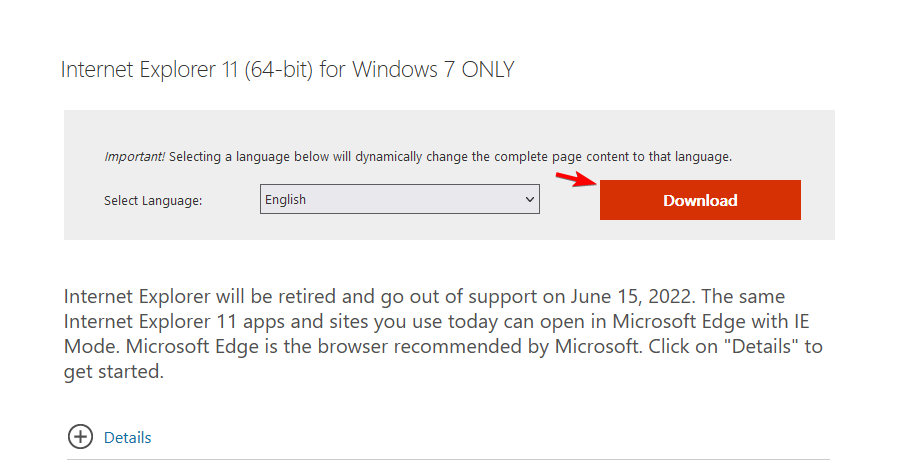
- The download process will now start automatically, and all you will have to do is wait for it to complete.
Remember that this download method might not work after officially discontinuing the software.
How do I enable Internet Explorer in Windows 11?
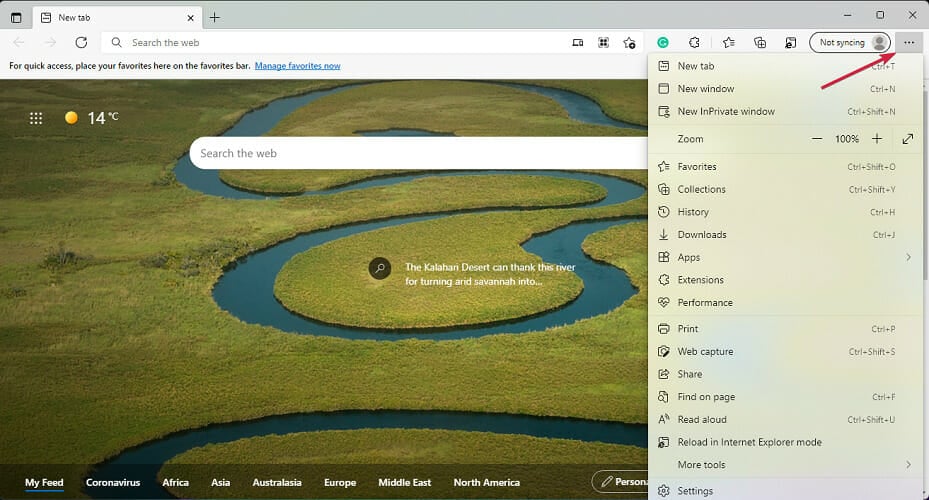
Is IE Mode better than Internet Explorer?
The primary purpose of IE Mode is to make it easier for people and organizations to use one browser. Currently, Edge is the only browser with built-in compatibility for legacy sites and apps.
IE Mode will still be able to support a lot of Internet Explorer’s functionalities. Such as all document and enterprise modes, ActiveX controls, Browser Helper Objects, Internet Explorer settings, and the F12 developer tools.
Taking this into consideration, plus the fact that Edge also provides more features on its own, the browser and its IE Mode can be considered better than Internet Explorer.
Moreover, one of the most exciting things about Edge and its IE Mode is its economic impact on organizations.
According to a study by Forrester on The Total Economic Impact™ Of Microsoft Edge, the avoided cost of legacy application modernization from using IE Mode leads to almost $1.2M in total savings.

So, maybe this change isn’t so bad after all. However, I am weighing the fact that IE Mode can still support many of Internet Explorer’s functionalities and generate savings, productivity gains, and security for organizations.
And judging from the small number of users who would still need, for some reason, to use Internet Explorer, this won’t be recorded as such a significant loss for the operating system.
Does Windows 11 not support Internet Explorer?
It’s the other way round. Internet Explorer is not compatible with Windows 11, and you can’t run it. Even searching for Internet Explorer will display Microsoft Edge as a result.
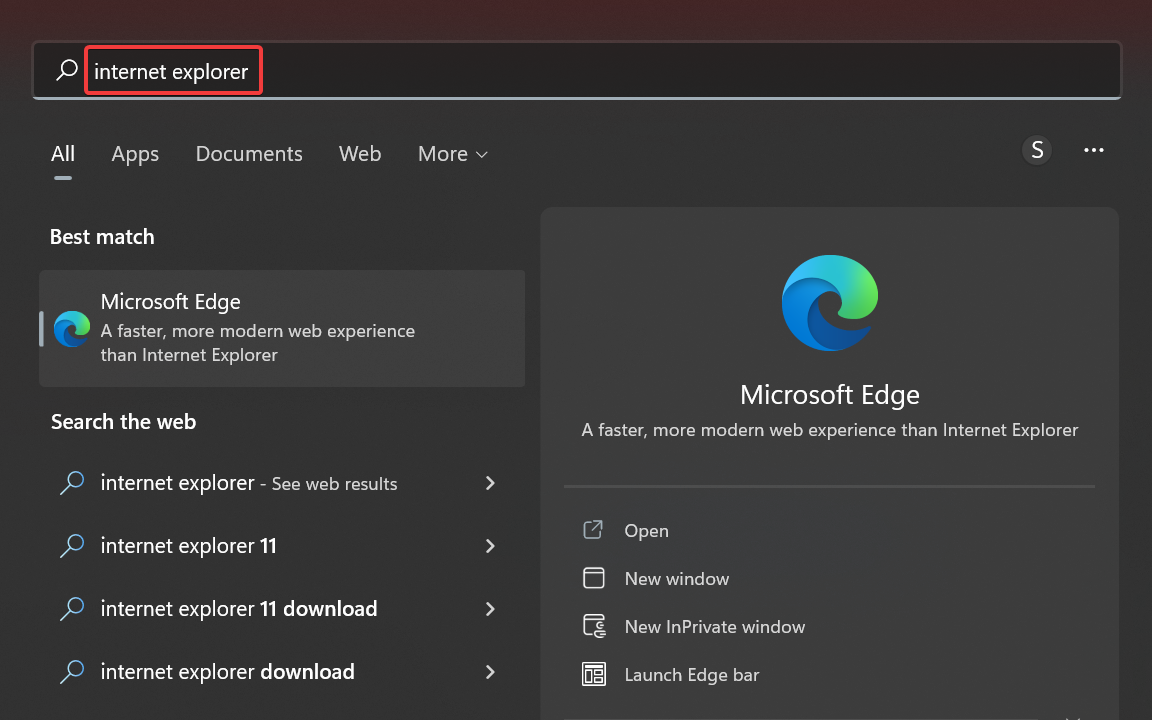
And this is because Microsoft intends to replace Internet Explorer with a new and redefined version of Edge.
Can I install Internet Explorer on Windows 11?
Firstly, we have established that installing it is pretty impossible. You can even download and install Internet Explorer 11 on Windows 11, and you will still be prompted with Microsoft Edge instead.
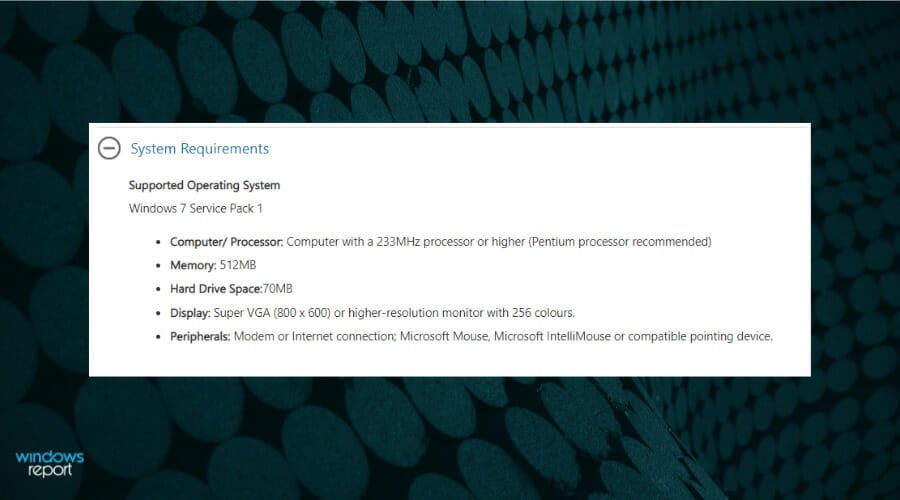
If you take a closer look at the system requirements for Internet Explorer 11, you will find that it’s only for Windows 7 PCs with Service Pack 1.
And if you still have that old OS, we can help you with a complete solution for installing Internet Explorer on Windows 7.
Many users are wondering if they can install Internet Explorer on Windows 11. While the answer is yes, the application won’t run at all, so technically, you can install it without using it.
However, there are three ways in which you can use Internet Explorer. Follow along as we will explore them after seeing why Microsoft removed it from Windows 11.
Why did Microsoft remove the ability to use Internet Explorer on Windows 11?
Microsoft warned that the Long-Term Servicing Channel (LTSC) of Windows 10 would include Internet Explorer, even though a consumer removal took place.
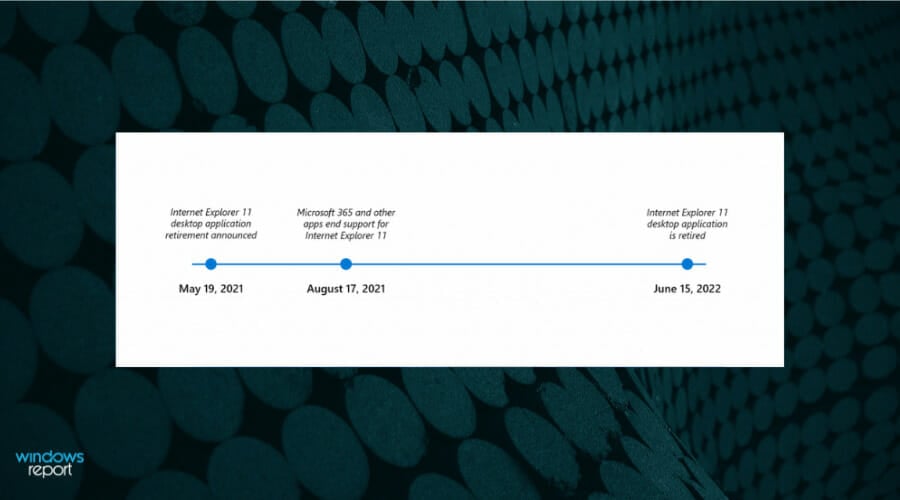
In the same blog post, Microsoft said that Internet Explorer is less secure than modern browsers. Moreover, they said that it doesn’t deliver an up-to-date browsing experience.
For these reasons, they are encouraging users to use Edge, a modern web browser based on Google’s open-source Chromium code:
Not only is Microsoft Edge a faster, more secure and more modern browsing experience than Internet Explorer, but it is also able to address a key concern: compatibility for older, legacy websites and applications.
Sean Lyndersay, Microsoft’s program manager for Edge.
On the official Windows 11 specs, Microsoft states that Internet Explorer is indeed disabled in Windows 11. As Microsoft Edge now includes the IE Mode feature.
So, Windows 11 has entirely removed this browser. And users that still use shortcuts such as iexplore are redirected to Microsoft Edge instead.
No surprise here, considering Microsoft is known for being constantly headed towards the future. Although it sometimes holds on to some of its past features and apps.
Can I run Internet Explorer on Windows 11?
Yes, you can use Internet Explorer in Windows, but you will have to install one of the older versions of the OS that the browser is compatible with. And honestly, that’s too much trouble for a browser far less secure than its replacement, Microsoft Edge.
If you still want to use Internet Explorer in Windows 10 or 11, IE Mode in Edge is the only option. And Microsoft has confirmed that it will continue to support the IE Mode functionality until 2029, and a year’s notice will be provided before discontinuing it.
That’s all for now! Internet Explorer may have been discontinued, but it’s not outright impossible to use it, as illustrated in the sections earlier.
With all this talk about Internet Explorer, don’t forget that there are a lot of other browsers out there. Check out the best browsers for Windows 11 and select one according to your needs.
If you plan to switch, check out the best extensions for Edge you need to install today.
Please share your thoughts on Microsoft discontinuing support for Internet Explorer and what you liked the most about it in the comments section below.