How to Delete Adobe Account
The primary delivery channel for Adobe services is the Adobe account. You can use your Adobe Account to install or uninstall a new program, access your favorite files on a different device, view the status of every loaded app, and much more. There are numerous justifications for canceling or deleting an Adobe account. The individual may not want to upgrade or purchase the premium apps because they have liked the free subscription. Or maybe you’re having trouble with Adobe. So, you may be an Adobe user and wondering how to delete Adobe account or how to change your Adobe account. If you are someone looking for more information related to Adobe, we are bringing you this helpful guide to resolve your queries, like how to uninstall Adobe in Windows 10 and how long does it take to delete an Adobe account.

Table of Contents
How to Delete Adobe Account
You will get to know how to delete Adobe account further in this article. Keep reading to learn more about it in detail.
Why Do You Need an Adobe Account?
A firm called Adobe is well-known for its multimedia and creativity software solutions. Acrobat Reader, Photoshop, and Adobe Creative Cloud are all well-known products. Having an Adobe account allows you to access all of the company’s online resources, including Adobe Acrobat, Photoshop, Adobe TV, user communities run by Adobe, the Adobe Store, and many more.
Can You Have Two Adobe Accounts?
Yes, you can have two Adobe accounts. If you have more than one Adobe plan linked to the same email address, Adobe will make separate profiles with separate storage for each of your plans. You can choose a profile, professional or personal, during sign-in, and then proceed to produce and save your content so that you can simply work and manage content across your corporate and personal plans. This will facilitate future secure collaboration on creative initiatives between you and your company.
How Do You Change Your Adobe Account?
If you entered an incorrect email address or if you want to use a different primary email address, you might want to change the email address linked to your Adobe account. Let’s see how to do it.
Note: If you made your Adobe account using a social account, you cannot modify the email address.
1. Visit the Adobe website and Sign in to your account.

2. Click on the profile icon from the top right corner and choose View Account.

3. Click on Change email under the current registered email address, as shown below.

4. Then, enter the new email address in the given field and click on Change.

You will receive an email from Adobe notifying you of the change.
How Do You Delete Adobe Plan?
Through your Adobe account page, you can cancel your trial or individual plan (bought through Adobe). Here is a guide on how to delete Adobe account plan in a few easy steps.
1. Navigate to the Adobe website and Sign in to your account.
2. Click on the profile icon > View Account.
3. Under Your plan section, click on Manage plan, as shown below.

4. Click on Cancel your plan from the End your service option, as highlighted.

5. On the subsequent newly opened browser page, Enter your password for the Adobe account and click on Continue.

6. Select the desired reasons for your cancellation and click on Continue.

7. Again, click on Continue from the Canceling your plan today means page.

8. Click on No thanks from the consider offers page.

9. Lastly, click on Confirm from the confirmation page of your plan cancellation.

Why Can’t You Cancel Adobe Plan?
If you are having trouble canceling your Adobe account, it may be because:
- Invalid payment method
- Outstanding balances
- Didn’t pay the cancellation fee
How to Delete Adobe Account?
Below are the steps explaining how to delete Adobe account:
Note: Create a local version or backup of your data, photographs from Adobe Stock, films, and other creations that are kept there.
1. Visit the Adobe website and Sign in to your account.
2. Click on the profile icon from the top right corner and choose View Account.
3. Click on Account and security > Privacy and personal data.

4. Click on Continue under the Delete Adobe account section.

5. Choose the desired reason for deleting the account and click on Continue.
Note: To let your account be deleted, cancel your plans if you are asked.

6. Mark the Yes, I understand checkbox and click on Confirm delete Adobe account to finalize the deletion of your account.

How Do You Remove an Adobe Account from Your Apple Account?
You can remove your Adobe account from your Apple account by signing into the account with Apple credentials on the Adobe website and deleting it from your Account section. You can read and follow the steps mentioned above to do that step by step without any hurdles.
How Long Does It Take to Delete an Adobe Account?
Deletion of an Adobe account may take up to ten working days.
Why Can’t You Delete Your Adobe Account?
Since your Adobe ID is connected to your Adobe account, it cannot be deleted. This is because only users who do not have active subscriptions may remove their accounts. You must first erase your Adobe ID before you can delete your Adobe account. Before you can erase your Adobe ID, you must also delete all of the Adobe products linked to it.
How Do You Uninstall Adobe in Windows 10?
After you know how to delete Adobe account, here is a guide on how to uninstall Adobe in Windows 10 in a few easy steps.
Step I: Uninstall Adobe CC App
1. Press the Windows + I keys to open the Settings app and click on the Apps option in the menu.

2. In the Apps & features tab, click on the Adobe CC app and click on Uninstall.

3. Click on Uninstall from the confirmation popup.
4. Click on Uninstall on the uninstallation wizard and follow the on-screen instructions to uninstall the app.
Step II: Delete Adobe Folders
The next step is to delete the Adobe folders in Windows Explorer to avoid any conflict from the directories of the reinstalled app.
1. Launch File Explorer and navigate to the Adobe folder by following the location path.
2. Right-click on the Adobe folder and click on Delete to delete the folder.

3. Also, delete the Adobe folder in the following location path.
Recommended:
We hope that you learned about how to delete Adobe account and change your Adobe account. Feel free to reach out to us with your queries and suggestions via the comments section below. Also, let us know what you want to learn about next.
How to Delete Adobe Account (5 Easy Steps to Avoid Charges)
How to Delete Adobe Account (5 Easy Steps to Avoid Charges)
We independently research, test, review, and recommend the best products—learn more about our process. If you buy something through our links, we may earn a commission.
Looking to learn how to delete Adobe account? We will show you how with 5 easy steps, along with some alternative solutions such as Adobe discounts.
With Adobe software, you can enjoy all the Creative Cloud apps free for a limited amount of time. But if you want to avoid a charge at the end of your free trial, it can be a little tricky.
Considered the industry standard for creative and design software, Adobe offers a free trial before making your purchase. But knowing which plan is the best one for you can be stressful when you’re worried about a charge on your credit card.
So, to streamline things and clear up some questions, we’ll dive into everything you need to know about deleting your Adobe account. We’ll cover its requirements, and how to make sure you don’t pay a dime, but also offer you some alternative solutions.
- Get 65% off Adobe software– Follow our Adobe Creative Cloud discount guide. — Includes royalty-free photos, illustrations and videos!
How to delete Adobe Account – What you should know
For those unaware of this requirement, if you fail to cancel your Adobe account before your trial period ends, Adobe will charge you for the regular Adobe subscription plan. Fine, if that was your intention, but troublesome if you haven’t prepared to make the payment.
So keep a close eye on your free trial timeline to make sure you don’t make any payments you haven’t planned for. With Adobe, you must delete your account or individual subscription before the trial period ends to avoid a charge to your card.
Why? If you don’t cancel your plan before the trial period ends, you enroll in a regular plan subscription by default. And based on the payment plan you opted for beforehand, you will pay anywhere from $9.99 to around $300 if you end up canceling too late!
Companies or organizations cannot delete an account, but a company member can delete their account under the company’s plan.
When should you delete your Adobe account?
Delete your Adobe account before the 7-day trial period ends. If you don’t, your account automatically rolls over into a subscription plan that you may be obligated to pay monthly for an entire year!
Can you delete your Adobe Account or cancel your subscription after your subscription begins?
Yes, you can! For 14 days after enrollment in your plan of choice, you can delete your account and even request a refund for any payment charged. However, after 14 days, you will need to pay a cancellation fee to cancel your subscription before its expiration date.
If you feel like Adobe software isn’t the right fit for you, check out our Adobe Alternatives article where we list both free and other affordable options for several Adobe software.
How to delete your Adobe Account (2023)
We have listed below 5 easy steps to cancel your Adobe account and prevent any unwanted payments:
Step 1:
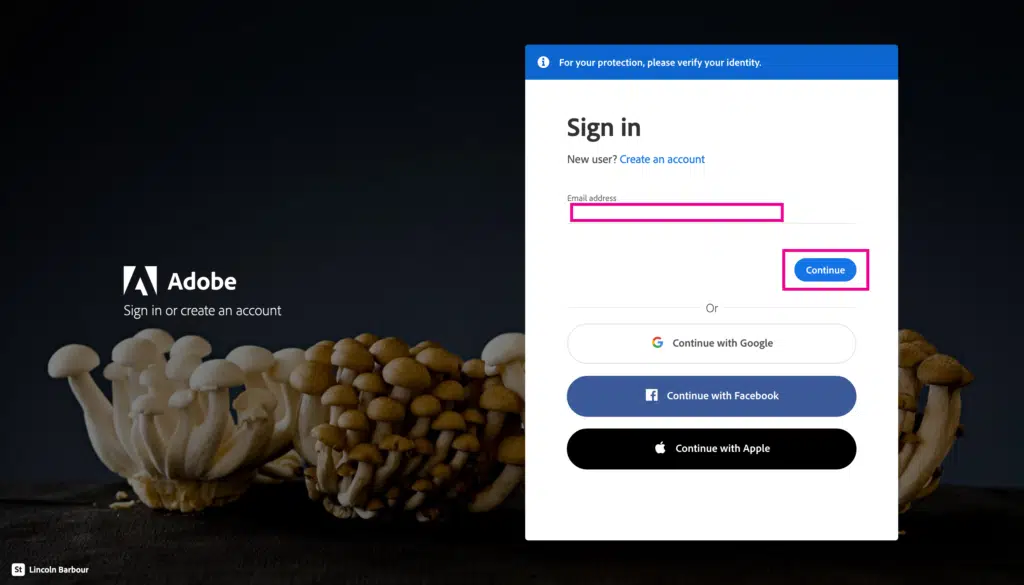
First, make sure that there aren’t any important files saved to Adobe Cloud only, and that you have backups stored locally. Then log in to your Adobe at https://account.Adobe.com/privacy.
Step 2:
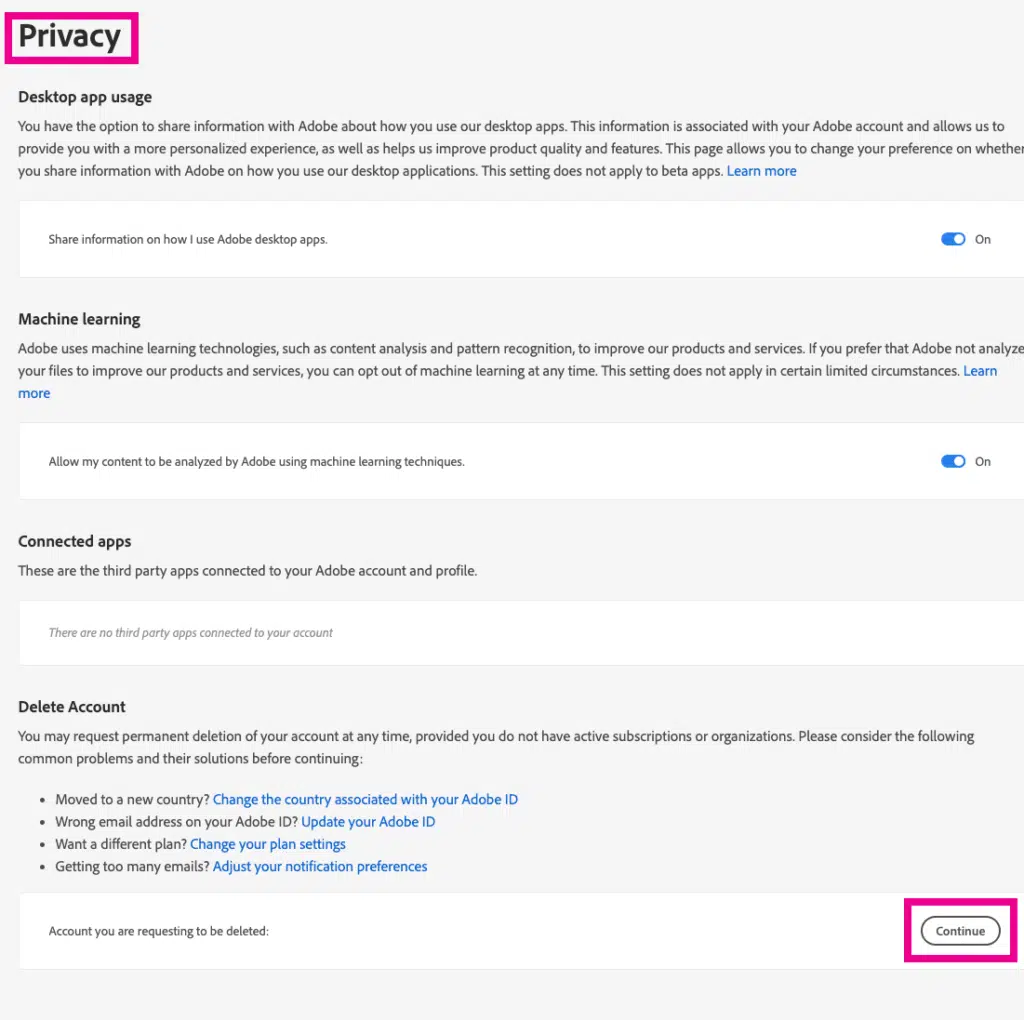
Once you’re logged into the privacy section. Scroll down and click on the delete account option and select “Continue.”
Step 3:
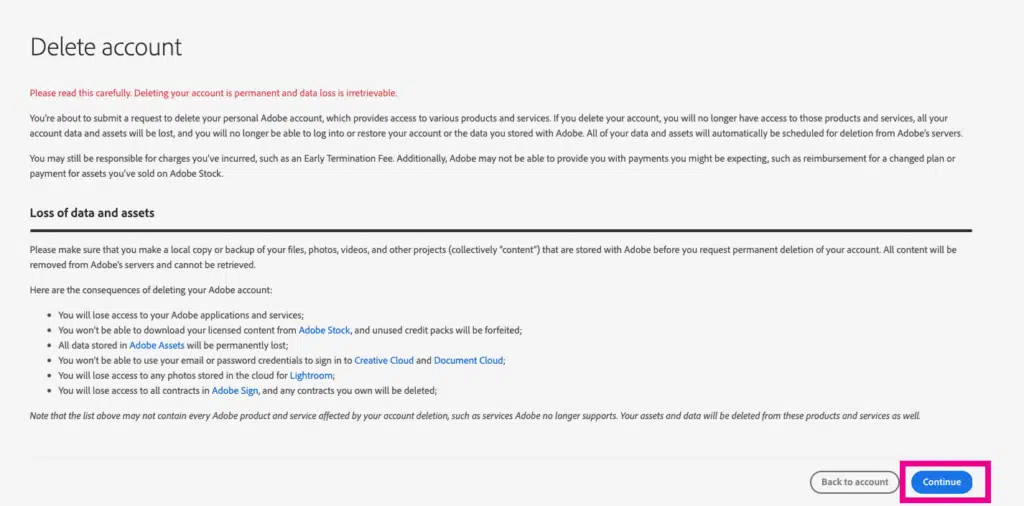
On the delete account screen, read through the text carefully to understand what it is you’re agreeing to. When you’re done and if you feel like the specifics are all fine by you, delete your account by selecting “Continue”.
Step 4:
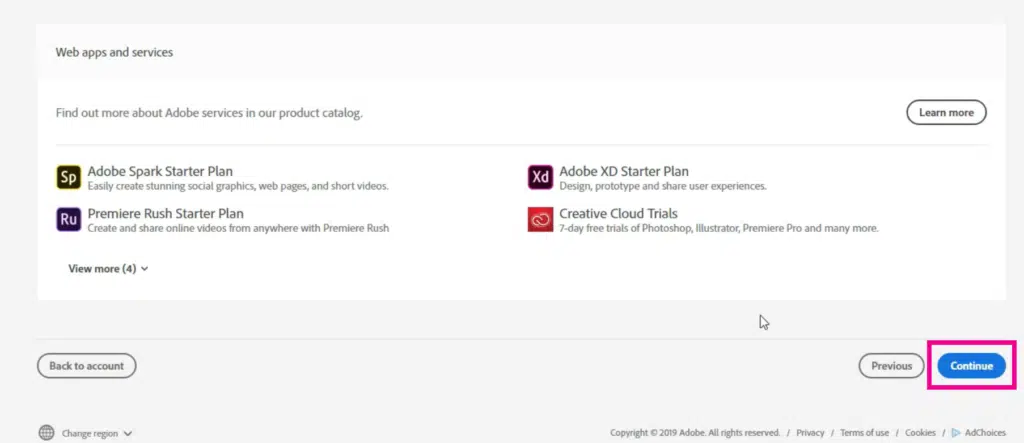
If you don’t have an ongoing plan, you can just click Continue on the next screen.
However, for both individual users or enterprise members with ongoing plans, follow the on-screen prompts. Individual users can select “Cancel plan” while enterprise members must select “Leave organization”.
Step 5:

On the final screen, there will be a message that reads “Final confirmation“, and under this, select the option that reads “Yes, I understand and want to permanently delete this Adobe account.” Then, select “Confirm delete account“, and the process will be complete.
How to pay less for Adobe Creative Cloud

If you like Adobe Creative Cloud but don’t want to pay the steep rates, take advantage of the several discount options available!
One smart way to get a huge discount would be to enroll in an Adobe certified course such as LogoCore so you can qualify for the Students and Teachers discount of over 60-70% off.
Sign up to the Adobe Certified LogoCore logo design course (just $80) to qualify you as a legitimate student.
You can then get Creative Cloud for 65% off for one year, saving you
Adobe periodically has sales that allow you to save up to 65% off on the original price. If interested, you should have a look at our Adobe Creative Cloud sales page.
Frequently Asked Questions
How do I avoid a charge for any Adobe software trial?
To avoid a charge for any Adobe software, you need to cancel your account a day before the 7-day trial period ends. If you miss this date and receive a charge for a new plan, you can still receive a refund provided you cancel within 14 days from when the subscription started.
Will I receive a refund for what Adobe charged me if I cancel my plan?
Yes, provided you are within 14 days from the day the subscription first started. If you wait until after 14 days, you won’t receive a refund. You can still cancel your plan, but there will be a cancellation fee.
Can I cancel my annual membership paid monthly?
Yes, you can! If you cancel your membership within 14 days of your date of subscription, you can cancel your plan and claim a refund. After this date, however, Adobe will require a cancellation fee of 50% of the subscription plan amount.
Can I cancel my Individual monthly membership?
Yes, you can! And provided you cancel within 14 days after the start of the subscription plan, you can claim a refund for any amount paid.
What is the Adobe cancellation fee?
The fee for canceling your Adobe plan is usually 50% of the amount you’re obligated to pay.
What is the Adobe Students and Teachers discount?
The Adobe Students and Teachers discount allows part-time or full-time students and teachers to take advantage of a 60-70% discount off the Adobe All Apps plan.
How much does the Adobe All Apps plan cost users?
The Adobe All Apps plan typically costs users $52.99/month provided they opt for the annual subscription payed monthly.
What comes with the Adobe All Apps Plan?
The Adobe All Apps plan with Adobe software like photoshop, illustrator, Premiere Pro along with 20+ other creative applications that are well suited for design and creative needs. Other than this, it also comes with over 100GB cloud storage.
How to Delete Adobe Account – Key Takeaways
If you are unfamiliar with Adobe, it can seem a challenge to delete your account. However, once you know which section to go to, everything is pretty straightforward. For newbies looking to try out Adobe getting a charge on your credit card can be bothersome. That’s why we’ve done our best to show you how to delete your Adobe account to avoid any unwanted charges.
There can be many reasons you choose to delete your Adobe account, and now you know just how to go about it.
Удаление учетной записи Adobe
Узнайте, как удалить учетную запись Adobe, чтобы навсегда удалить свой адрес электронной почты и ресурсы из наших систем.
Как удалить свою индивидуальную учетную запись Adobe
Вы можете удалить свою учетную запись, только если у вас нет активной подписки. Кроме того, если вы входите в рабочую группу или являетесь корпоративным пользователем, вам нужно выйти из всех организаций, в которых вы состояли ранее. Только тогда вы можете удалить свою учетную запись. Если вы удалите свою учетную запись, то потеряете доступ к приложениям и услугам Adobe, включая любые файлы в облаке. Удаление учетной записи необратимо, а потерянные данные невозможно вернуть.
Сделайте локальную или резервную копию ваших файлов, фотографий, видео, изображений Adobe Stock и других проектов, которые хранятся в Adobe.
Примечание. Если вы используете приложение Adobe на Apple iOS (iPhone или iPad), то можете удалить свою учетную запись Adobe непосредственно из приложения iOS. Нажмите на значок своего профиля (или откройте настройки своего приложения), а затем выберите Учетная запись > Удалить учетную запись Adobe . Затем следуйте инструкциям на экране. Вам может быть предложено зайти в App Store, чтобы отменить подписку при удалении учетной записи Adobe.
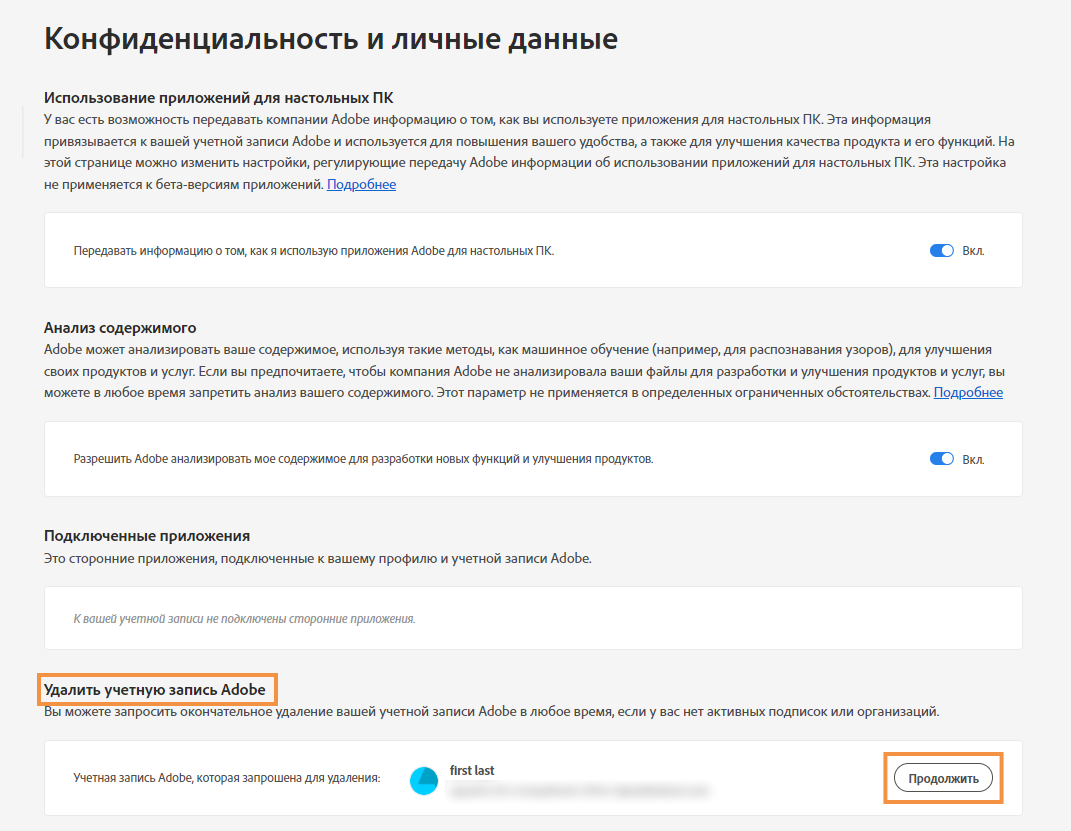
Прокрутите вниз под разделом Конфиденциальность и личные данные , чтобы Удалить учетную запись Adobe . Затем нажмите Продолжить .
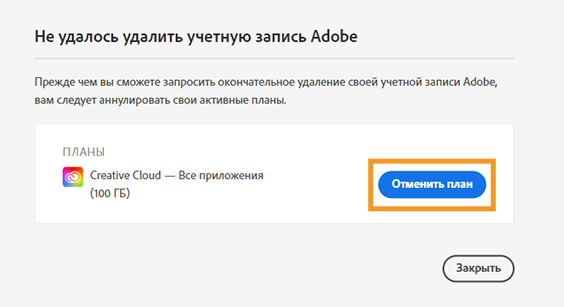
Индивидуальные пользователи Adobe: если будет предложено отменить тарифный план, следуйте инструкциям на экране.
Рабочие группы Adobe или корпоративные пользователи: если будет предложено покинуть организацию, следуйте инструкциям на экране.
NoteNote:NNN Примечание. Если вы являетесь администратором, то вам сначала необходимо передать роль, затем выйти из учетной записи, принадлежащей вашей организации.
Как удалить свой аккаунт в Adobe?
Откройте файл Acrobat Reader DC.
Выберите меню Файл > Создать список удаления файлов.
Запустите программу Adobe Cleaner Tool, чтобы удалить все файлы Adobe.
Удалите ярлык Adobe Photoshop с рабочего стола.
There are a few ways to exit an Adobe Acrobat account. One is to click on the “Sign Out” link in the upper-right corner of the window. Another is to go to the “File” menu and select “Exit.
Для удаления Adobe Creative Cloud необходимо запустить приложение «Панель управления», выбрать «Установка и уда
To unlink a card from Adobe, open the Creative Cloud app and go to the Preferences menu. In the Accounts section, select the card you want to unlink and click Deactivate.
Adobe учетная запись – это логин и пароль, которые позволяют входить в систему Adobe ID.
Удалять Adobe нет необходимости, так как он является одним из самых популярных программных продук
Запустите установку Adobe с помощью соответствующей ярлыка на рабочем столе.
Откройте редактор реестра (regedit.exe)
Найдите в реестре ключ, связанный с Adobe Acrobat.
To exit a Lightroom account, first open the program and go to the “File” menu. Select “Exit” and then confirm that you want to leave the program.
To contact Adobe support, you can visit their website at https://www.adobe.com/support/ and click on the “Get In Touch” button. You can then select your product and your issue to get started.
Зайдите на сайт Adobe через браузер и войдите с помощью своего логина и пароля.
Пользоваться фотошопом без подписки можно, но только в режиме ограниченного редактировани
Нажмите на ссылку «Отвязать карту», расположенную внизу страницы с платежной формой.