Скачивание торрент-файла без торрент-клиента
В этой статье речь пойдет о четырех кардинально разных средствах, позволяющих скачать файл торрент без использования привычных программ. Мы рекомендуем ознакомиться со всеми ними, ведь определенные методы могут показаться подходящими только в конкретных ситуациях.
Способ 1: Seedr
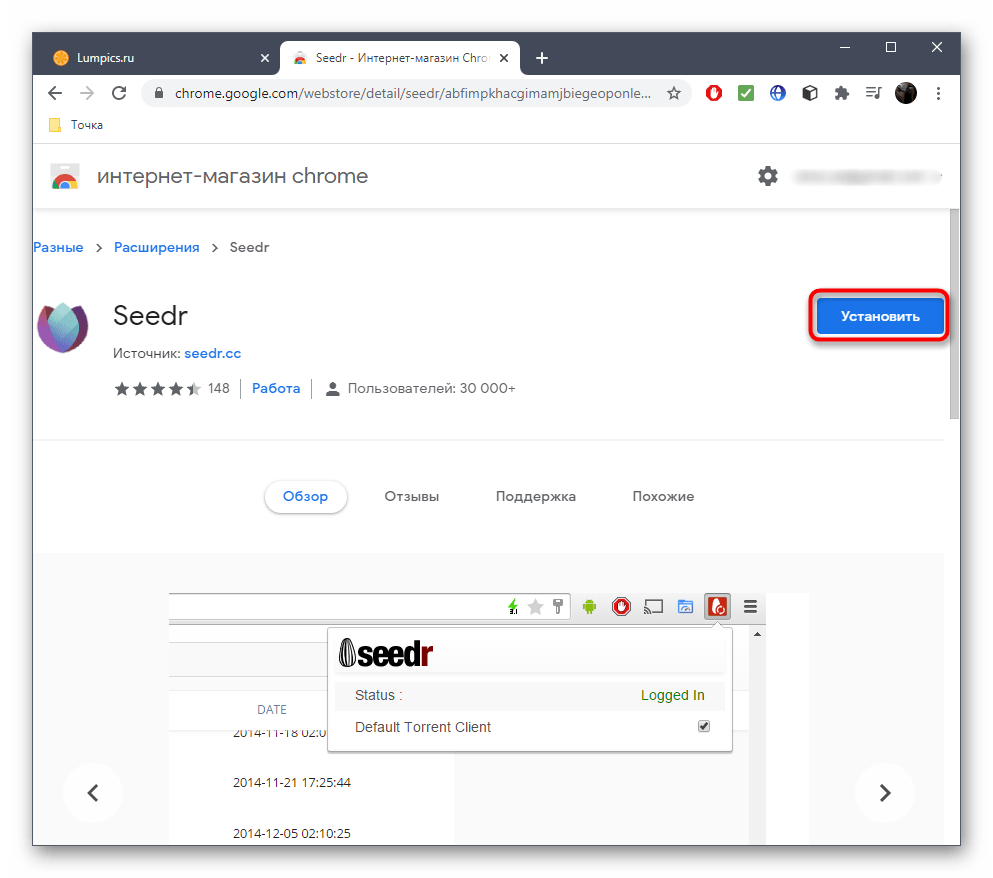
Первым на очереди будет расширение для браузера Google Chrome, которое позволяет скачивать торрент-файлы путем добавления их ссылок. Отметим, что данное решение распространяется по подписочной схеме, однако 2 гигабайта вы можете скачать бесплатно, чтобы разобраться с принципом использования этого инструмента.
- Для начала перейдите по ссылке выше и нажмите по кнопке «Установить», чтобы добавить расширение в браузер.
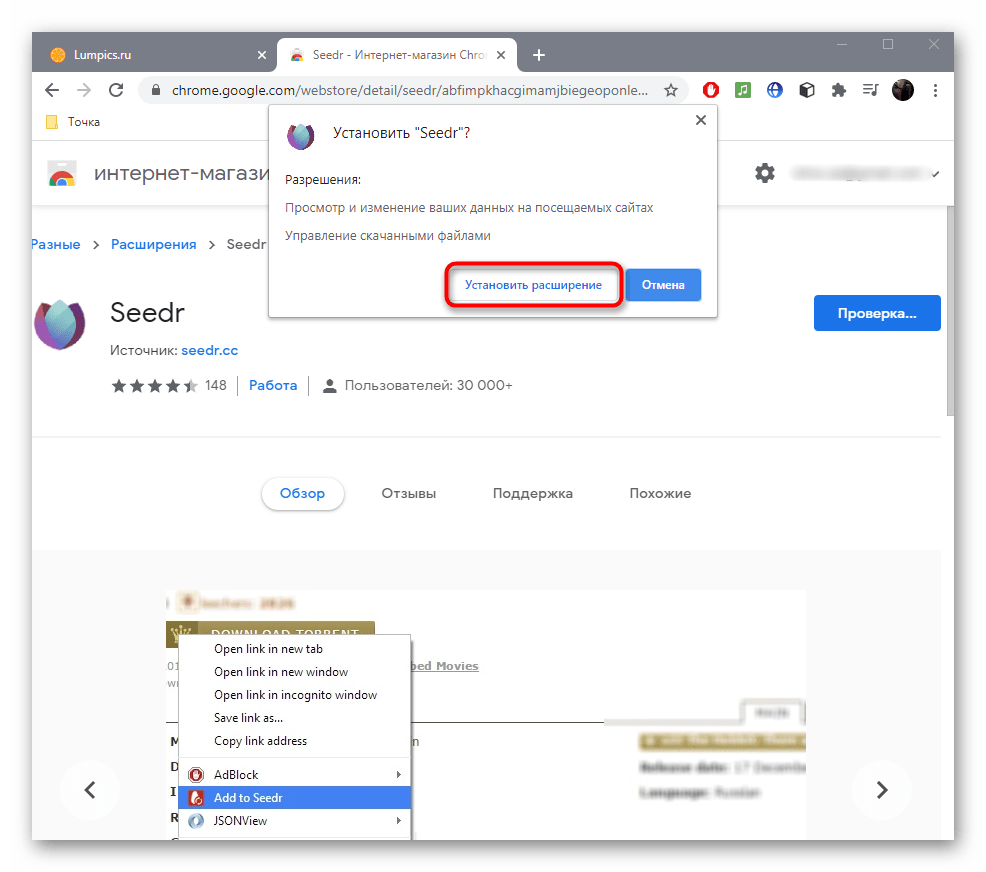
- После этого подтвердите инсталляцию в появившемся окне.
В этой же вкладке следите за тем, сколько свободных мегабайт осталось скачать. После этого решите, стоит ли приобретать полную версию, или же лучше перейти к просмотру других доступных решений, позволяющих загружать файлы торрент без программ.
Способ 2: JSTorrent Lite
JSTorrent Lite — приложение для браузера, функционирующее по принципу дополнения, однако имеющее свой графический интерфейс, открывающийся в новом окне. Иногда такое приложение оказывается более удобным, нежели обычное расширение, к тому же оно обладает рядом дополнительных функций, поэтому рекомендуем не обходить стороной и этот метод.
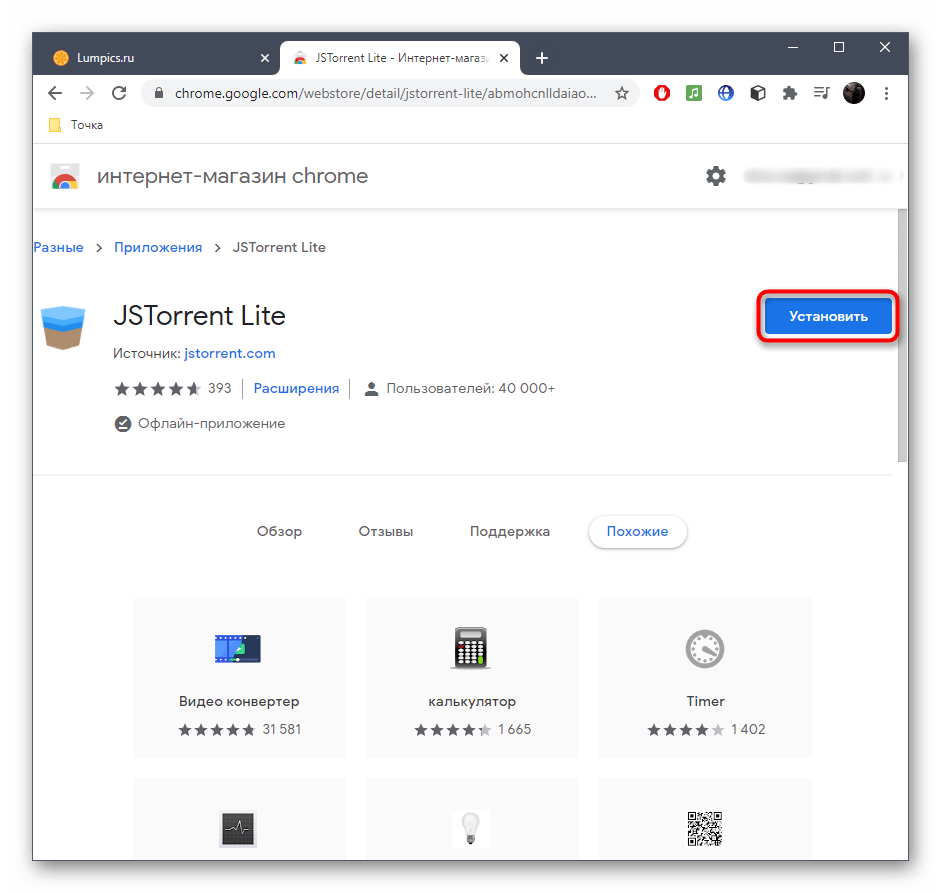
- Установите приложение JSTorrent Lite через официальный магазин веб-обозревателя.
- Вы автоматически будете перемещены на вкладку с сервисами. Можете запомнить ее адрес, включить кнопку, кликнув ПКМ по панели закладок или сохранить ссылку, чтобы быстро открывать этот раздел в дальнейшем. Отсюда запустите JSTorrent Lite.
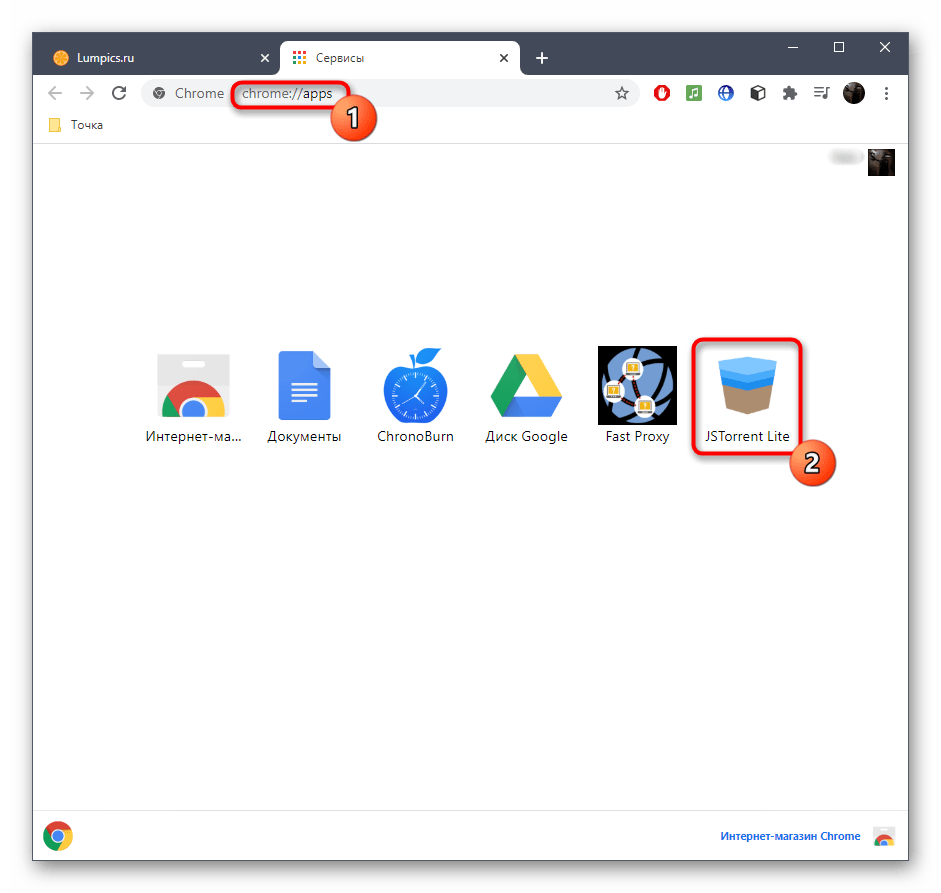
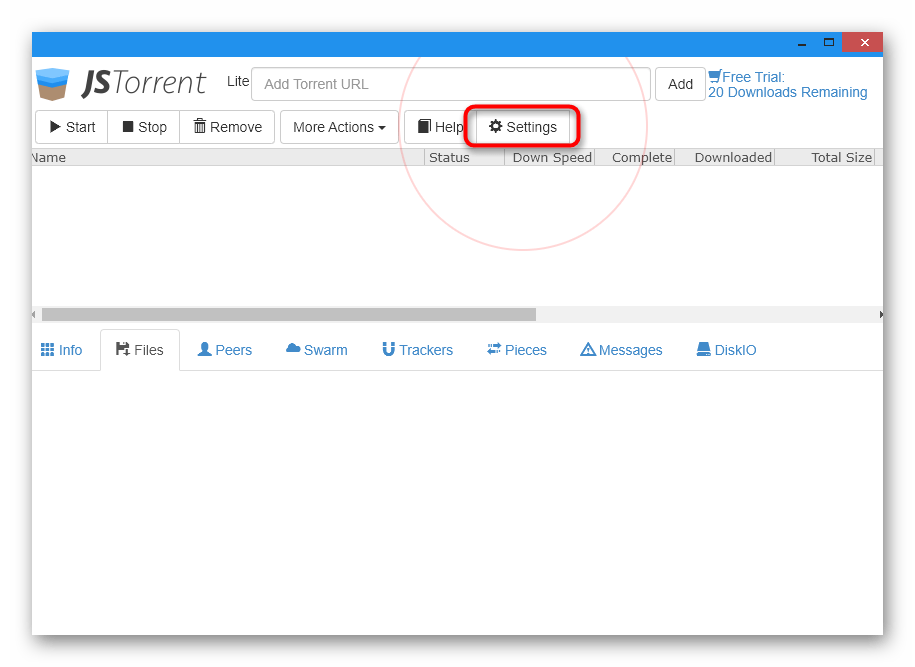
- С самого начала обязательно потребуется указать место, куда будут загружаться файлы. Для этого нажмите кнопку «Settings».
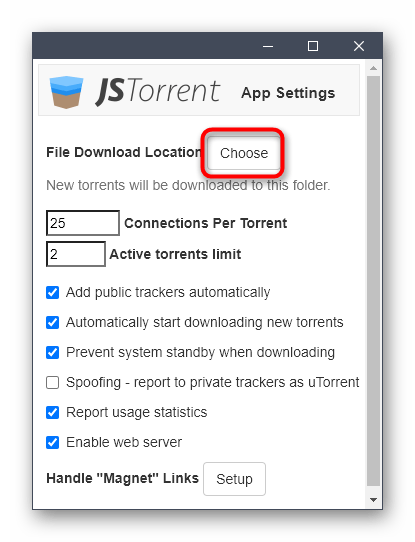
- В отдельном окне напротив первого же пункта выберите «Choose».
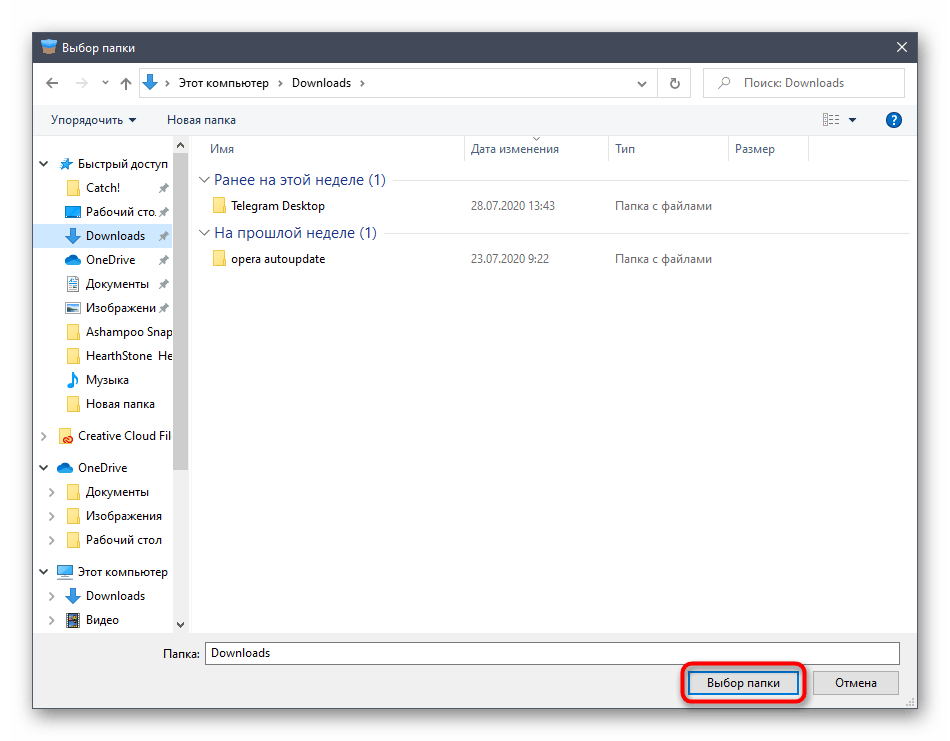
- Укажите каталог, в который хотите помещать все загружаемые файлы.
- Теперь вставьте ссылку на файл, которая была скопирована заранее, чтобы добавить его в список загрузок.
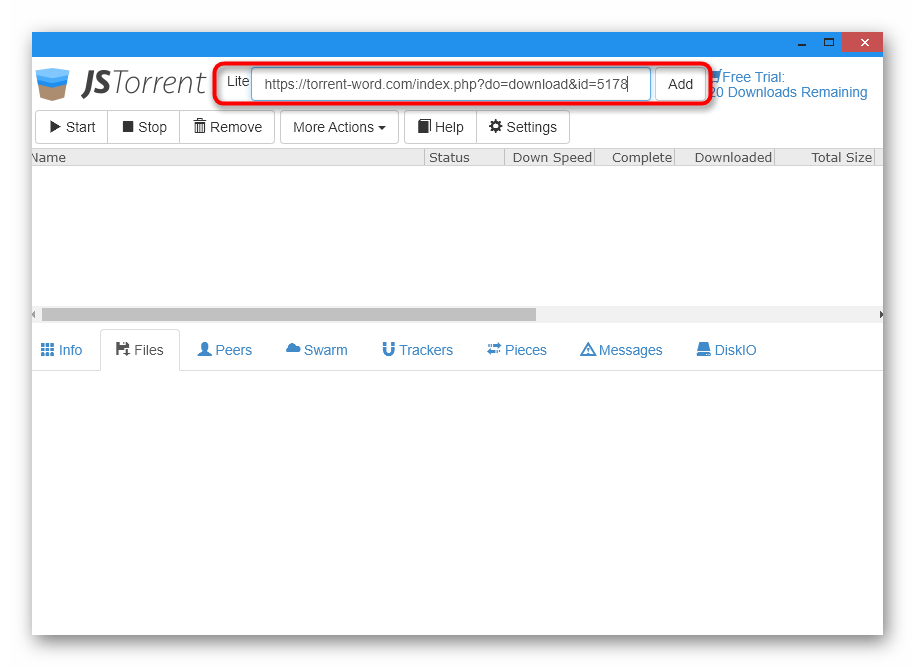
- Скачивание начнется автоматически, а за прогрессом и скоростью следите в строке.
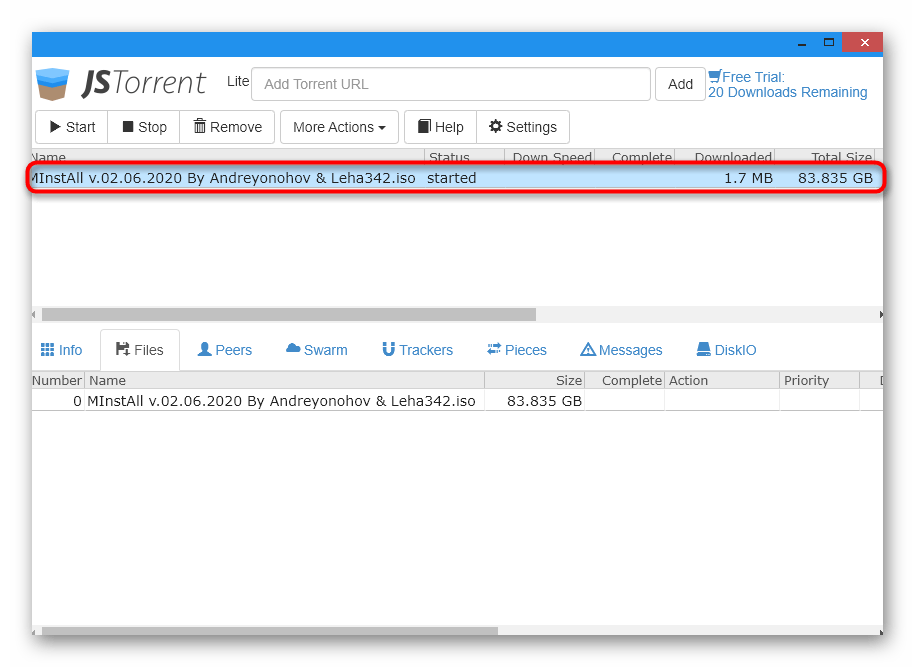
- По такому же принципу добавляйте неограниченное количество торрентов одновременно и управляйте ими при помощи панели инструментов сверху.
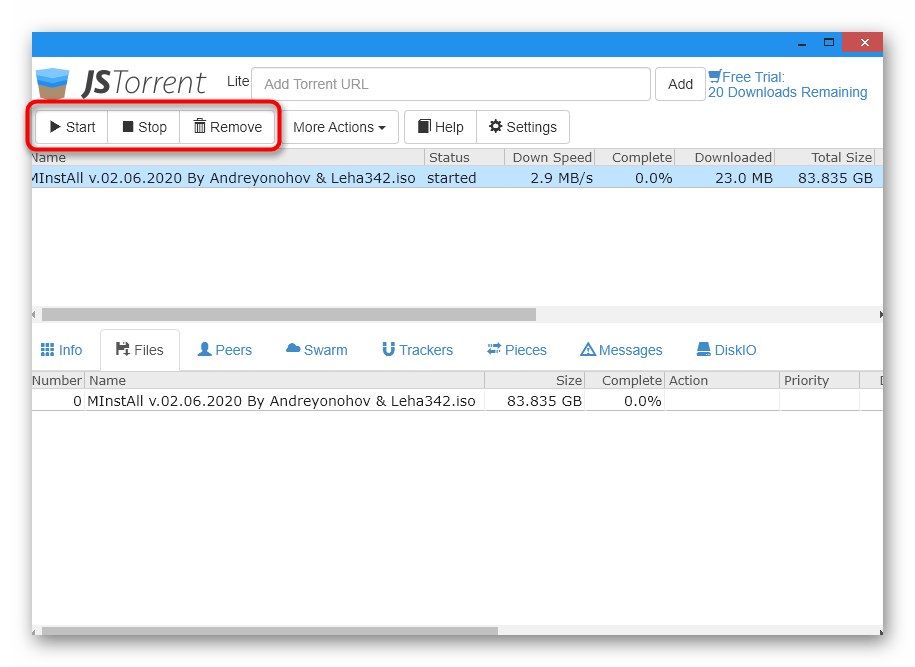
В качестве примера была приведена пробная версия JSTorrent Lite, которая позволяет загрузить только 20 торрент-файлов. Некоторым пользователям этого будет достаточно, а тем, кто хочет постоянно скачивать через это приложение, придется приобрести его полную версию в том же официальном магазине Chrome.
Способ 3: Браузер Torch
В браузере под названием Torch есть инструмент, загружающий торренты, а разработчики позволяют сразу же настроить ассоциации файлов и открывать их через свою программу. Если вы искали веб-обозреватель со встроенным средством загрузки торрентов, этот вариант точно окажется подходящим.
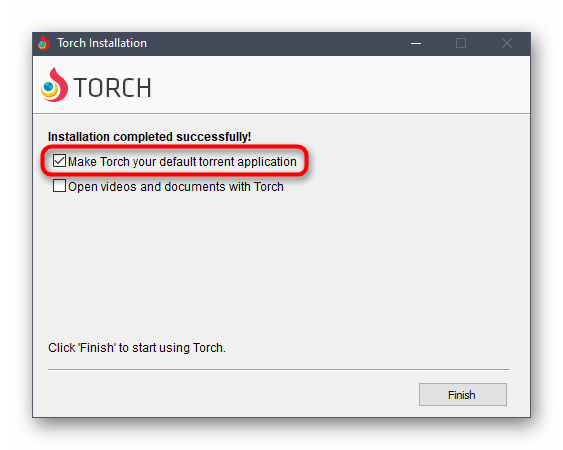
- При желании настроить автоматическую ассоциацию файлов еще на стадии инсталляции Torch отметьте маркером соответствующий пункт.
- После запуска веб-обозревателя на панели сверху потребуется включить инструмент, отвечающий за загрузку файлов.
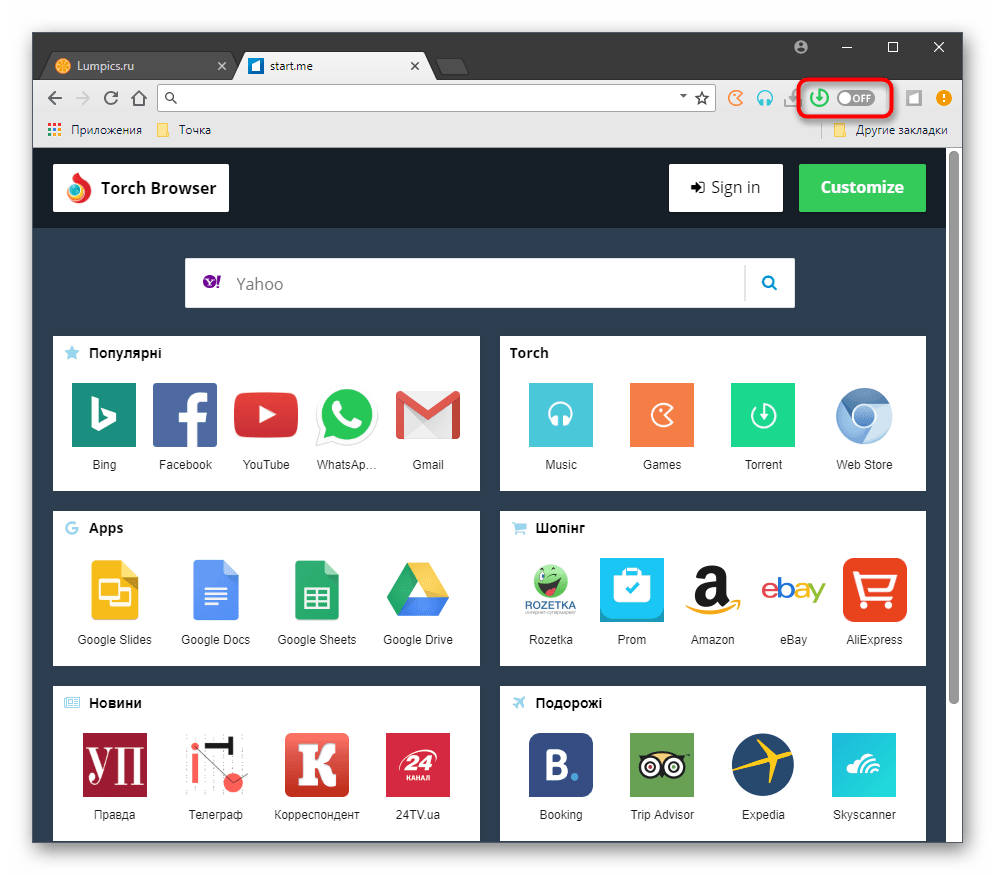
- После нажатия по его значку произойдет автоматический переход на новую вкладку с приложением. В нем вы можете искать видео или программы через встроенный поиск или добавить свой файл, нажав «Add Torrent».
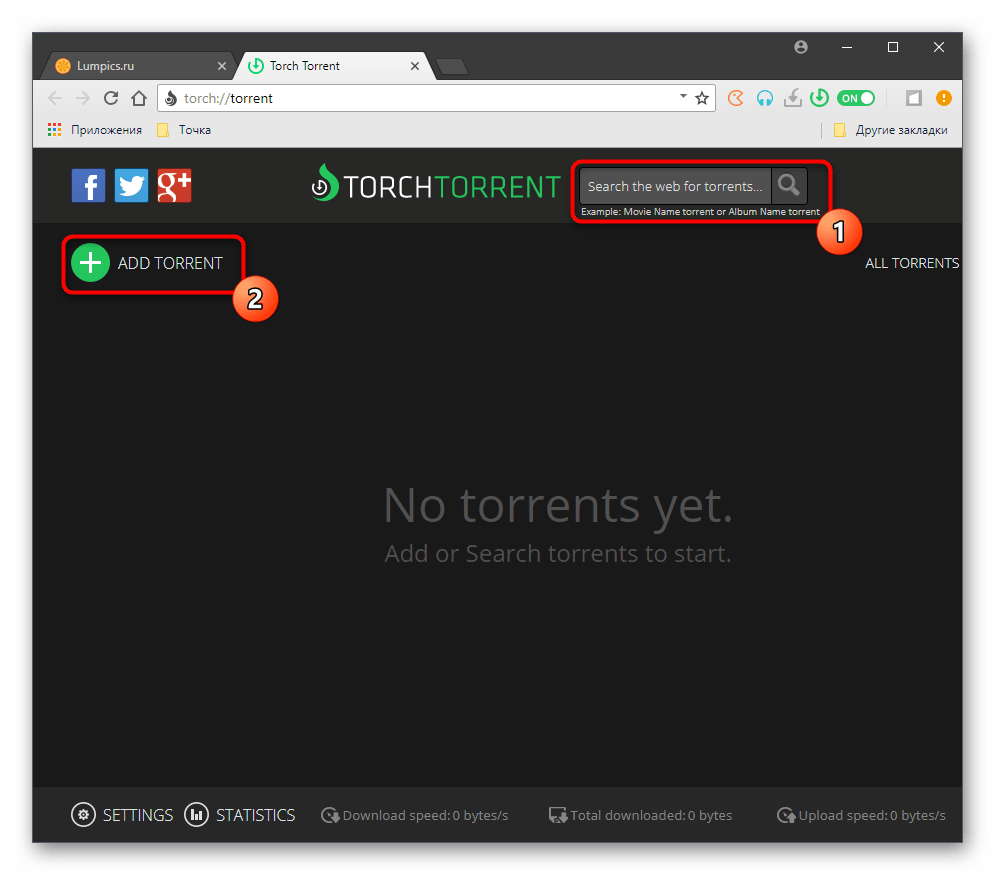
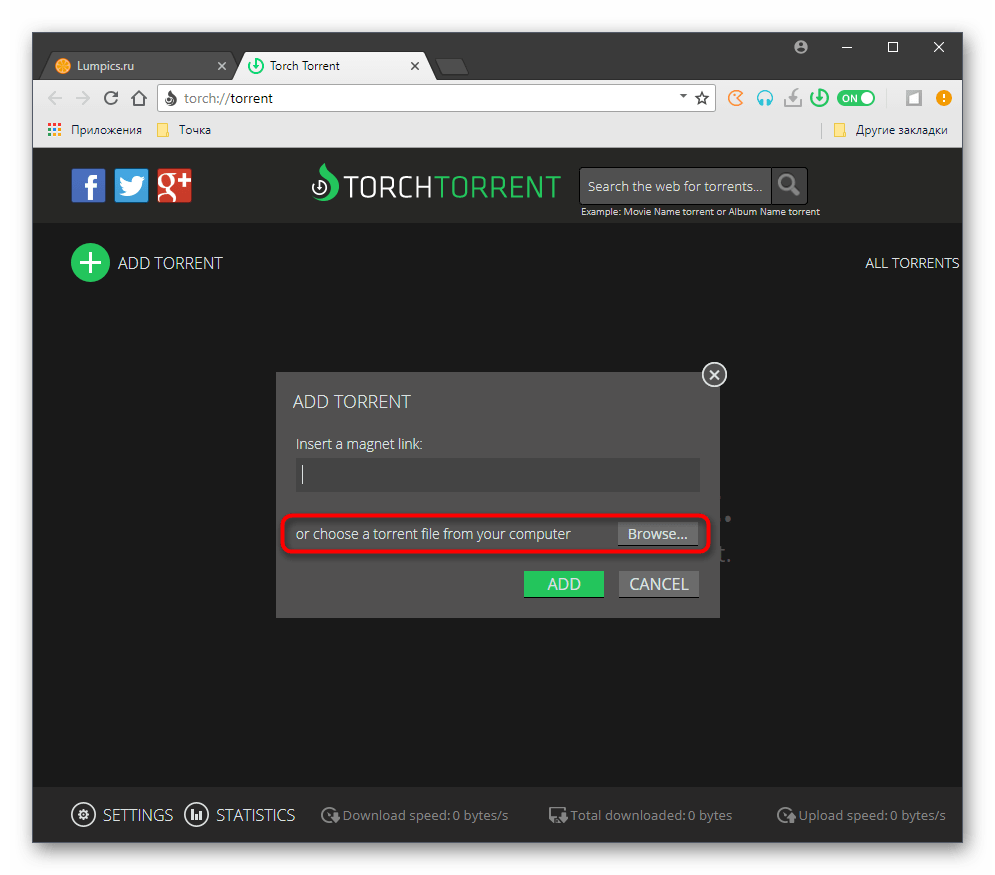
- Для загрузки вставьте ссылку или перейдите к «Проводнику», чтобы выбрать файл.
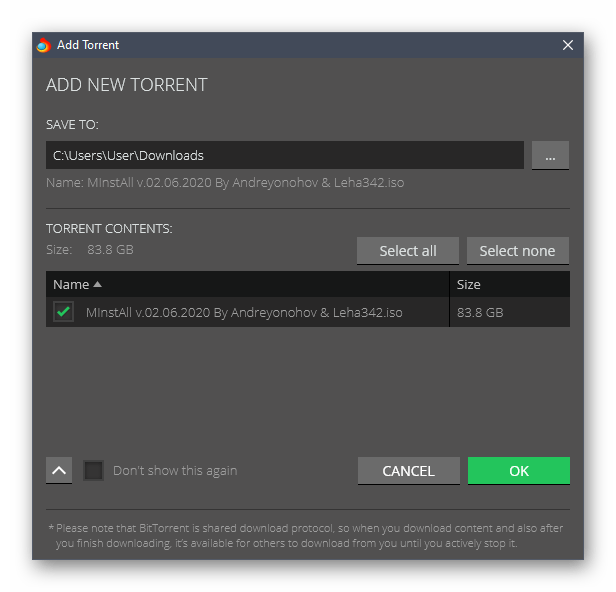
- Выберите все файлы для загрузки, а также отметьте место на жестком диске, где они должны быть сохранены.
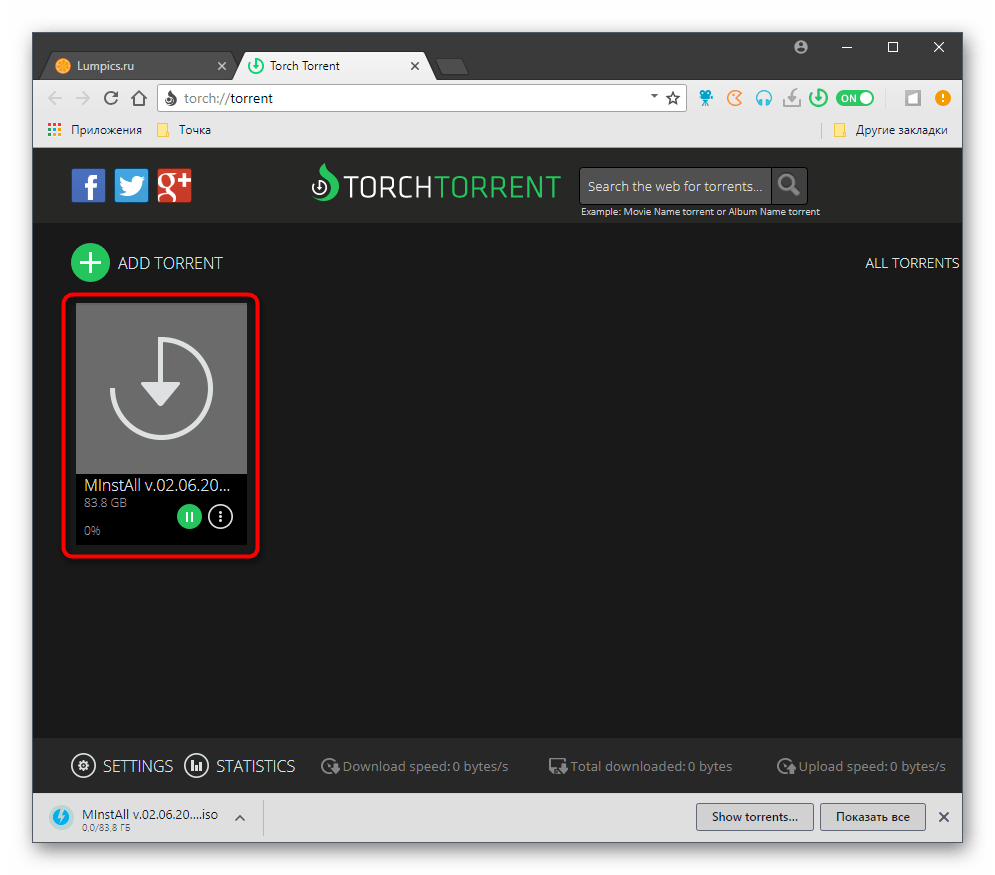
- Следите за прогрессом скачивания в этой же вкладке и добавляйте файлы для параллельной загрузки, если это требуется.
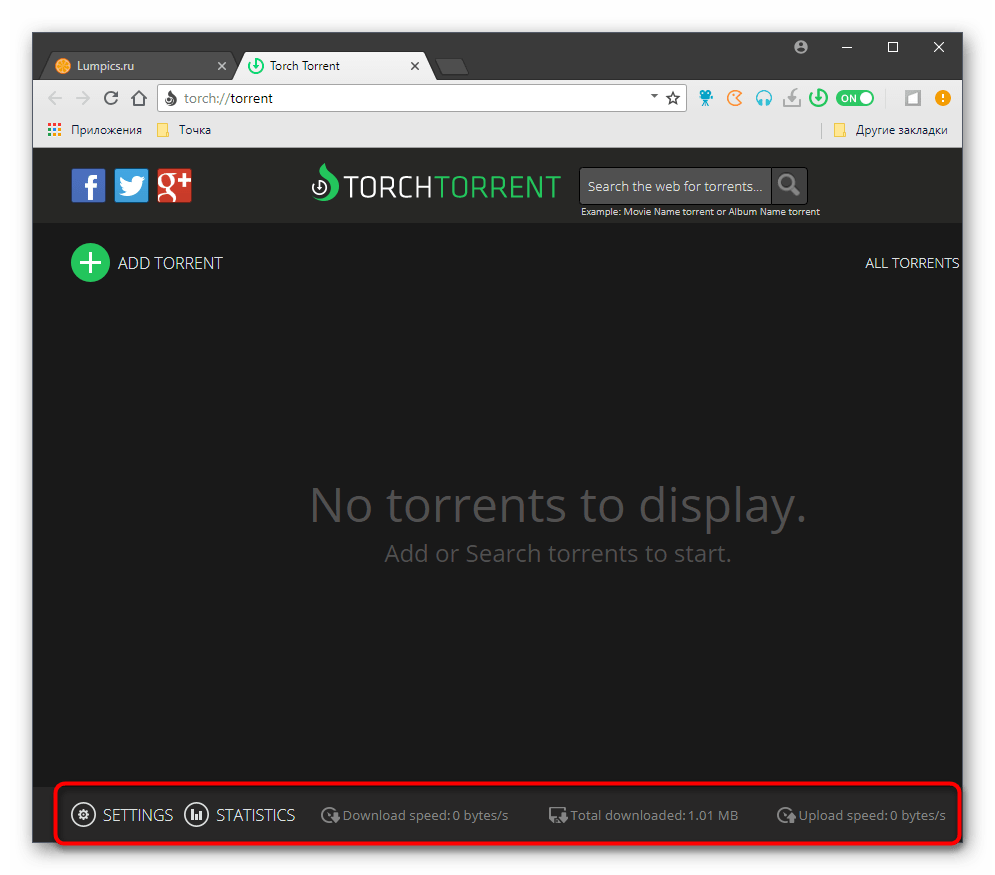
- Воспользуйтесь панелью снизу, чтобы просмотреть статистику о загрузке или перейти к настройкам данного расширения.
Способ 4: uTorrent Web
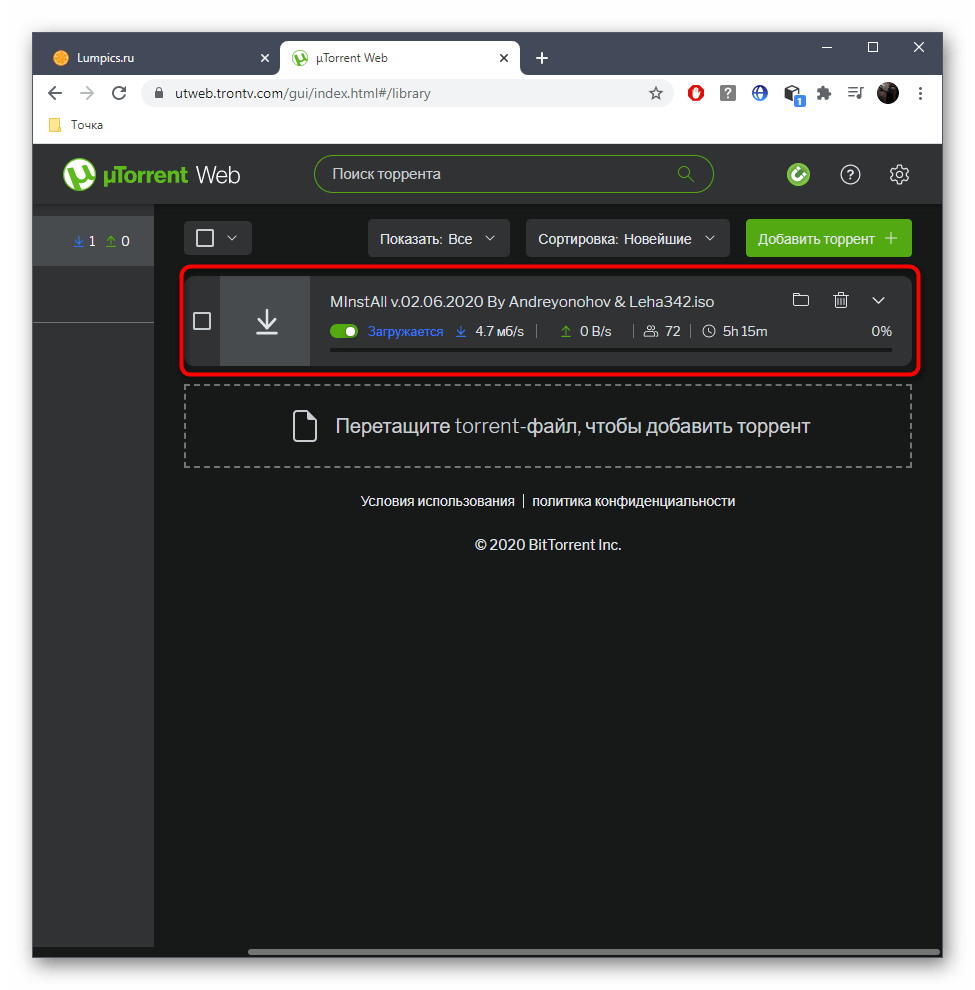
В завершение отметим инструмент от известных разработчиков, предназначенный для скачивания и запуска торрентов прямо через браузер. uTorrent Web нельзя назвать полноценным программным обеспечением, поскольку запускается он в веб-обозревателе и позволяет там управлять всеми файлами, поэтому этот вариант может оказаться полезным для некоторых пользователей.
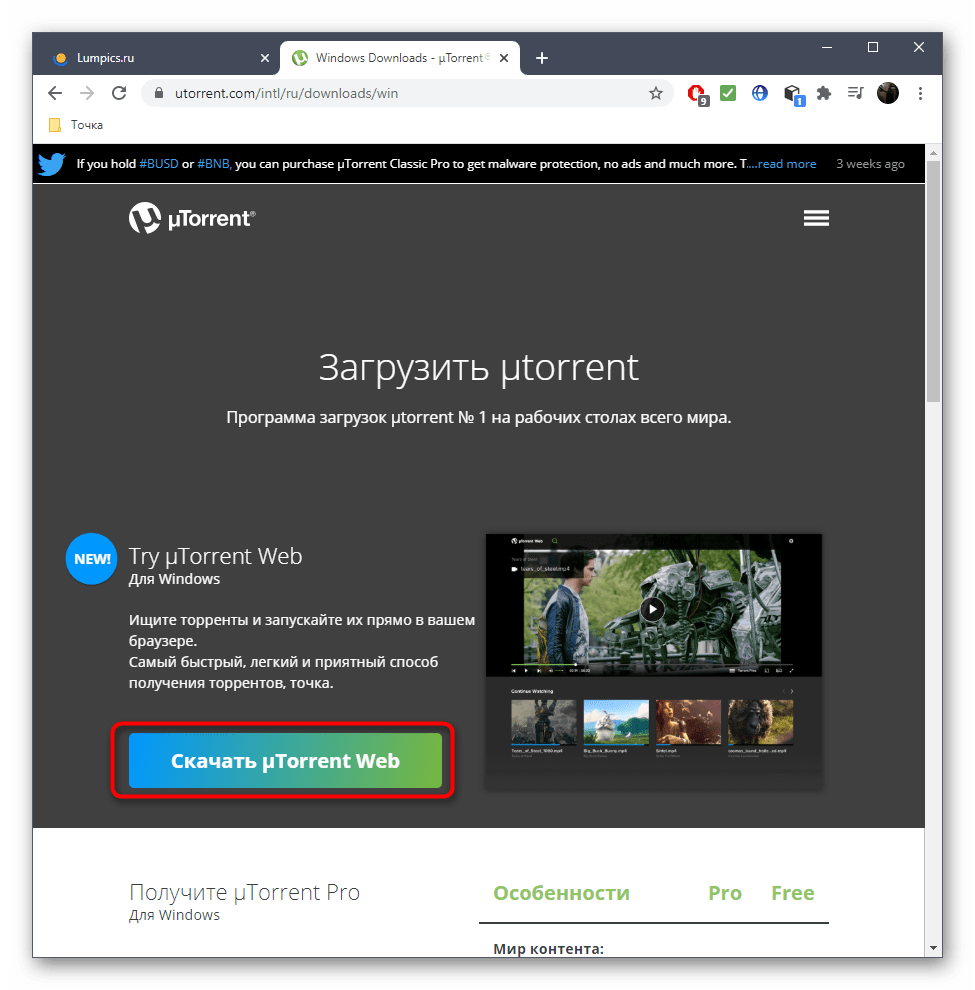
- Загружается uTorrent Web с официального сайта, перейти к которому можно по ссылке выше, а установка производится стандартным образом.
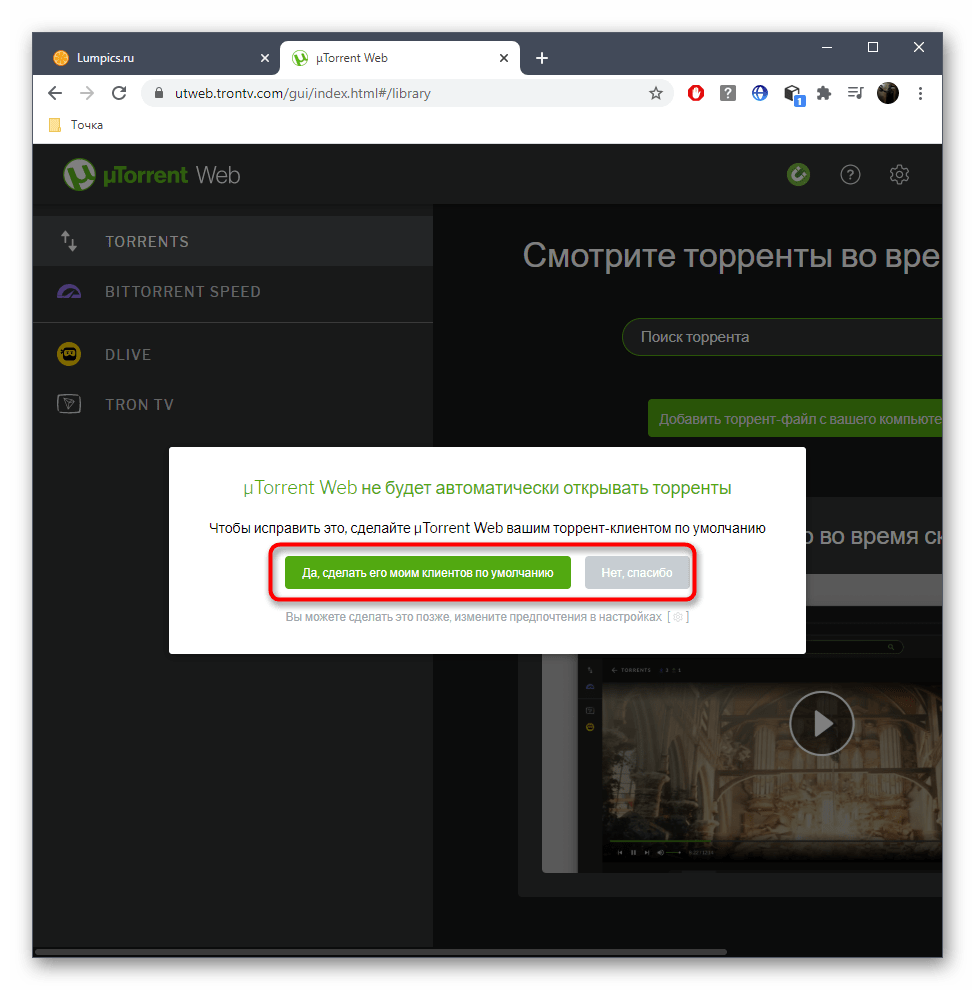
- Во время первого запуска вы можете сделать uTorrent Web средством для открытия торрент-файлов по умолчанию, кликнув всего по одной кнопке.
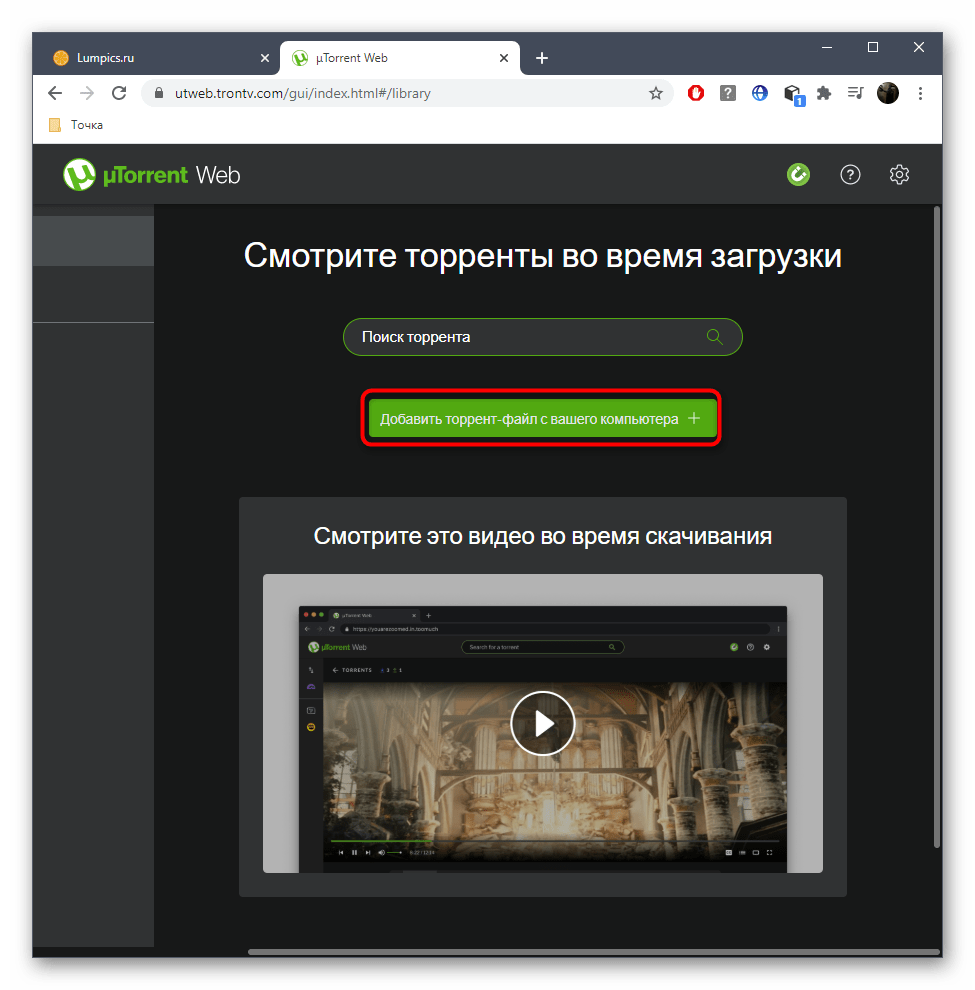
- Далее переходите к поиску торрентов через встроенную функцию или добавьте файл с компьютера.
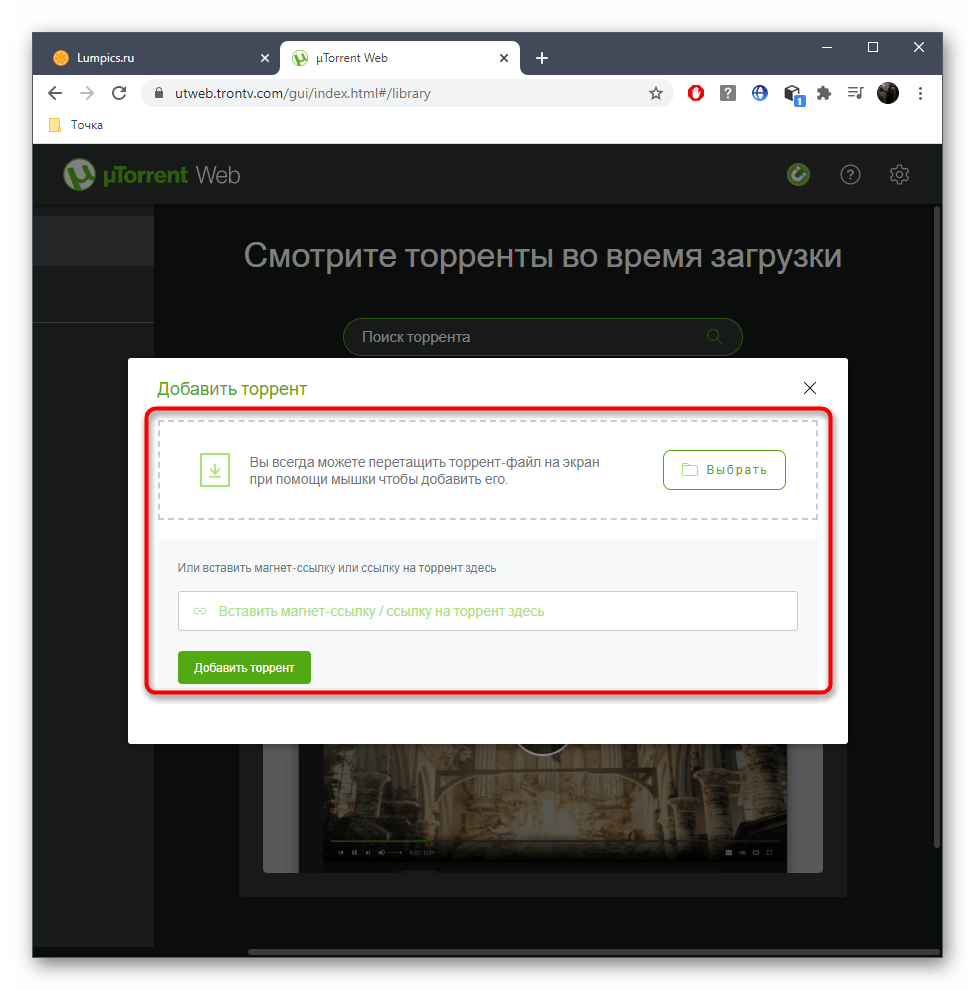
- Дополнительно поддерживаются магнет-ссылки и другие ссылки на торрент, которые можно вставить в этом же окне.
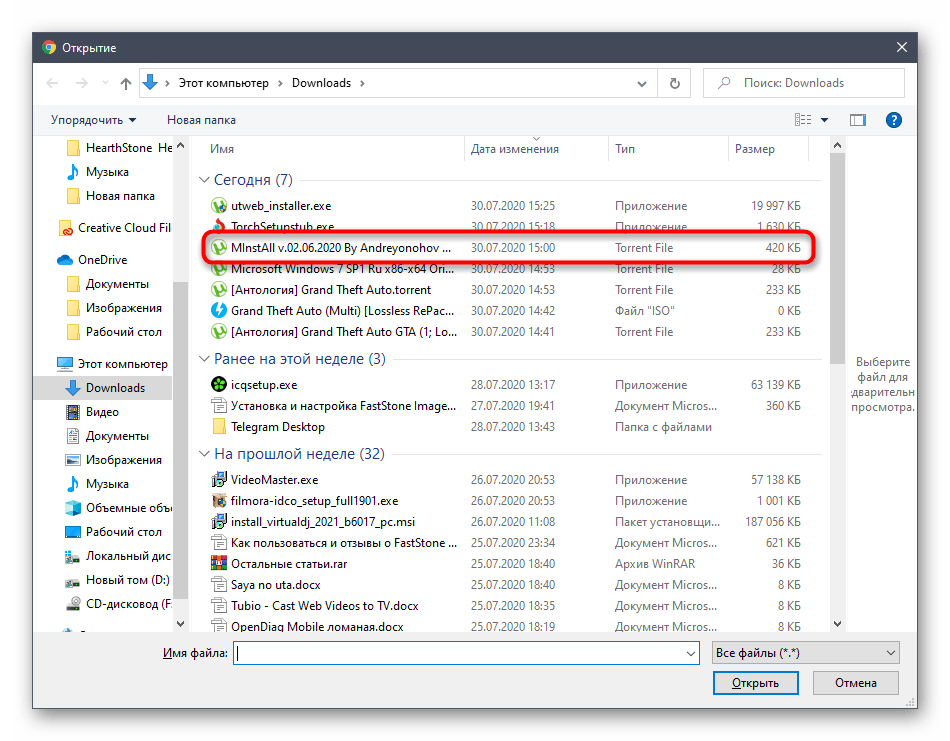
- В «Проводнике» же от вас требуется просто выбрать подходящий объект.
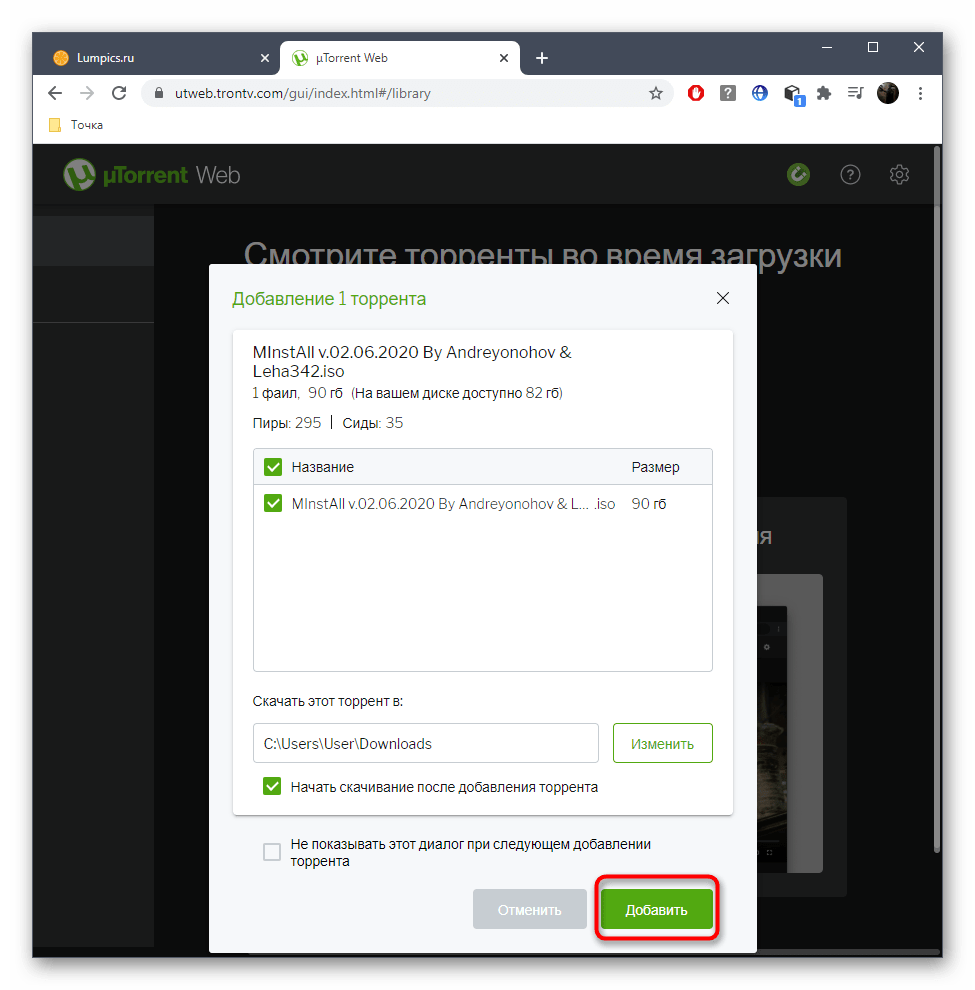
- Выделите все файлы, которые нужно скачать, укажите место на жестком диске и начинайте загрузку.
- Следите за прогрессом на вкладке браузера, управляя им при помощи присутствующих инструментов.
Как скачивать торрент-файлы напрямую через браузер
Seedr — сервис, который делает торренты практически мгновенно доступными, позволяет скачивать или просто хранить содержимое в облаке.
Как воспользоваться:
1 Перейдите по ссылке и зарегестрируйтесь.
2 Скопируйте ссылку торрента и вставьте его в поле «Paste link URL».
В результате файл будет доступен для загрузки или просмотра — через встроенный медиаплеер.
Твой репост — огромный вклад в развитие канала.
Твоя реакция — наша мотивация.
Спасибо за участие и поддержку Друг!
9 Best Online Torrent Clients for 2023
An online torrent client lets you download torrents online, in your browser, without sharing them and without using a traditional, desktop program. All you need is a browser like Chrome, Edge, Firefox, etc., and a torrent file, which you can get on any torrent site.

Best Online Torrent Downloaders: Quick Look
Then: Pick one one of these websites that let you download torrents:
-
: Watch movie torrents free without downloading or even waiting long for them to load. Subtitles are supported, as is link sharing. (Webtor review) : Free, no user account, and streams videos quickly. (Instant.io review) : Cheap per-day plan, plus other options. Worth it for storage and instant media access. : Free for 2 GB of space. (Seedr review) : Pay for just five days, or use free. (Zbigz review) : Unlimited usage with an affordable, two-year plan. : Unlimited speeds, Google Drive syncing. : Free, no user account, accepts large files. (βTorrentreview) : Download torrents and more with unlimited usage.
If you just need to share some files, use a P2P file sharing site.
Below is a list of some of the best online torrent downloaders. Some have free plans, but others are only usable after you pay (use Privacy.com to avoid exposing your real payment info), and they all have unique features. We may receive commission for purchases made through these links.

Put.io: Best Online Torrent Client for Media Streaming

Put.io downloads torrent files for you and then stores the files in your account. You can then download the files to your computer, stream media files directly from the site, and share your torrent files with other Put.io users.
One of this site’s best features is the ability to instantly load lots of files. If it has already cached the file you’re requesting, which typically is the case for popular files, then the data will be placed directly in your account immediately.
You’re also able to watch RSS feeds for new files and auto-add them to your account. There are apps and devices that can be used with Put.io, too, such as Chromecast, IFTTT, Apple TV, Roku, Kodi, AirPlay, and others.
This online torrent client also acts as a simple storage container for any file of your own. You can upload files directly from your computer to your Put.io account for online storage.
Settings include the ability to change the server location for your files to help speed up downloads, use a dark theme, remember your current place in video and audio files for easy resuming, change the default subtitle language, and more.
There are three primary plans you can choose from with this online torrent downloader. Each of them supports unlimited downloads to and from your account, meaning that you can download files into your account as often as you want as well as download them from your account to your computer an unlimited number of times.
However, there are some differences between them:
| 100 GB | 1 TB | 10 TB | |
| Price | $9.99 /month | $19.99 /month | $49.99 /month |
| Price (paid yearly) | $8.25/month | $16.58 /month | $41.58 /month |
| Seeding Ratio | 2.00 or 10 days | 20.00 or 14 days | 20.00 or 14 days |
| Simultaneous Active Transfers | 10 | 50 | 100 |
| Share With Family | X | 4 people | 9 people |
Tip: There’s also a one-day version of the 100 GB plan that you can grab for $0.99.
Seedr: Best Free Online Torrent Client

Another online torrent client is Seedr. Anyone can get 2 GB of free storage with limited features, or you can pay for more storage and abilities through one of their three paid plans.
Create folders to organize your torrent data, load torrents by URL, file, or magnet link, change the streaming server to something faster if you need to, and copy the download link to any file so that non-users can download the content, too.
Seedr lets you stream media files as well, so if you’ve loaded a movie torrent into your account, you can play it right there in the browser without downloading it. Plus, if the movie is well-known, you might even be able to auto-load subtitles.
All torrent files loaded in Seedr are scanned with Kaspersky to check for malware. This is rare to find with an online torrent downloader, especially a free one.
The Seedr free version provide 2 GB of storage with unlimited bandwidth, but you can’t stream videos in HD. You can, however, earn more free space by completing certain tasks.
Here are the other paid options:
| Basic | Pro | Master | |
| Price | $6.95 /month | $9.95 /month | $19.95 /month |
| Storage | 30 GB | 100 GB | 1 TB |
| Seeding Ratio | 1:1 or 12 hours | 2:1 or 24 hours | 5:1 or 5 days |
| Simultaneous Links | 2 | 5 | 25 |
| Private Tracker Support | No | Yes | Yes |
Zbigz: Best Online Torrent Downloader With Quick Access

Zbigz is a popular name when it comes to free online torrent clients because it offers 1 GB of free storage for torrents. With a free account, you get your own user account, download resume support, and streaming for videos and music.
Direct links are supported, too, so you can share your torrent files with others even if they don’t use Zbigz.
However, more features are waiting if you upgrade to a paid Zbigz plan. Premium Zbigz users get the option to upload their files to Google Drive directly from their Zbigz account, faster caching speeds, no ads, and truly unlimited storage and file sizes.
Another feature Zbigz Premium offers that’s important for some users is its ability to cache torrent files even after you’ve exited the site. Free users of this online torrent downloader don’t have that luxury, so after adding a torrent, they have to wait with the page open until the cache completes.
| Free | Premium | |
| Price | $0 | $99.90 /year |
| Max File Size | 1 GB | Unlimited |
| File Storage | Might be limited | Unlimited |
| Concurrent Files in Storage | 2 | Unlimited |
| File Lifetime | 7 days | Unlimited |
| Download Speed | 150 Kbps | Unlimited |
There are five ways to purchase Zbigz Premium, and you can use PayPal, a debit or credit card, or Bitcoin (get some free BTC here) to complete the payment:
- 1 Year: $99.90 (27 cents /day)
- 6 Months: $49.90 (27 cents /day)
- 3 Months: $25.90 (29 cents /day)
- 1 Month: $9.90 (33 cents /day)
- 5 Days: $5.99 ($1.20 /day)
Torrent Safe: Download Torrents Online for Cheap

Torrent Safe has a free account you can use without even making an account, but you’re limited in how large the torrents can be. Or, you can pay for a Premium membership with unlimited file sizes for as low as $2 /month.
When you sign up, you need to enter your email address to receive your license key. Other than that, this is a pretty anonymous torrent client. You don’t have to register for a user account because each time you want to use Torrent Safe to download torrents, you just have to enter your license key.
We do not keep logs identifying user download files. Your ISP will not be able to see you downloading any torrent files.
Torrent Safe FAQ
Torrent files, magnet links, and torrent URLs are supported. There’s also a Chrome extension for loading torrents directly into Torrent Safe from any website you’re on.
This online downloader for torrents lets you stream some torrent files directly from Torrent Safe if they’re in a supported format like MP4. Otherwise, you can download any of the torrent files to your computer as often as you want to, either through your browser or with a download manager.
The Torrent Safe Basic account is free forever with unlimited use. It differs from paid accounts in how long the files stay in your account before getting automatically deleted and how large torrent files can be.
| Month | 3 Month | 1 Year | 2 Year | |
| Price | $4.95 /month | $4.32 /month (pay $12.95) |
$2.99 /month (pay $35.95) |
$1.99 /month (pay $47.99) |
| File Lifetime | 7 days | 7 days | 7 days | 7 days |
| Max File Size | Unlimited | Unlimited | Unlimited | Unlimited |
| Monthly Files | Unlimited | Unlimited | Unlimited | Unlimited |
| Seeding Ratio | 3:1 | 3:1 | 3:1 | 3:1 |
Note: Neither the free nor paid edition of Torrent Safe will scan your torrents for viruses, so be sure to take that step yourself.
Instant.io: Best Online Torrent Client to Instantly Stream Media

Instant.io is a free online torrent downloader that uses WebTorrent to load torrents from the web directly into the web page. This is a great pick if you’re wanting to watch movie torrents without downloading them or stream music from torrent files.
Some media files are loaded almost instantaneously so that you can start streaming them in seconds. For non-media files, you’ll have to wait for the site to download the files and then offer them to you so that you can download them to your computer.
No user account is needed to use Instant.io, so you can just upload a torrent file or enter a magnet link/info hash to get started. It also supports seeding your own files to share with others.
Bitport.io: Best Unlimited Torrent Client

The Bitport.io online torrent downloader has two general plans: a limited-featured free one and an unlimited Premium version, of which there are three that differ slightly. You have to make an account first, but then you can use either one.
One feature that sets this online client apart from the rest is the sync client you can download to your computer. What it does is auto-downloads all files from your account directly to your computer. You can load torrents into the web client, leave, and return later to the files already downloaded to your computer.
There are also web browser extensions you can install that makes importing torrents from a torrent site into your Bitport.io account really easy. Also supported is media file streaming, subtitles for videos, bulk downloading via ZIP files, and torrent loading through .torrent files and magnet links.
Folder and file sharing isn’t supported at Bitport.io.
The free version of Bitport.io supports just 1 GB of storage space, one torrent download per day, one download slot, limited download speeds, and no extra features such as antivirus scanning, RSS downloading, HTTPS access, and Google Drive sync.
| 30 GB | 100 GB | 250 GB | |
| Price (per month) | $5 | $10 | $15 |
| File Storage | 30 GB | 100 GB | 250 GB |
| Daily Torrent Limit | Unlimited | Unlimited | Unlimited |
| Download Speed | Unlimited | Unlimited | Unlimited |
| Max Download Slots | 5 | 10 | 20 |
βTorrent: No User Account Necessary

βTorrent is another web-based torrent downloader that utilizes WebTorrent. It’s 100% free, requires no user account, and seems to accept rather large torrent files; it’s actually unclear what it’s limitations are, but it seems to play nicely with big files and runs smoothly.
You can load torrents by .torrent files, hash, or magnet links. It also lets you seed files if you want to share with others, too, all straight from the website with no downloads necessary.
Unlike some online torrent clients that just show the ETA, this one identifies the speed at which the torrents are being loaded into βTorrent as well as the peer count and seed/download ratio.
Offcloud: Cloud Storage Mixed With Online Torrents

The Offcloud online torrent downloader is far more than a simple torrent client for your browser. You can save any file on the internet directly into your account, including not only torrent files and magnet links but also files from popular sites and from FTP, SFTP, and cloud storage servers.
There’s an Instant area of Offcloud that lets you instantaneously stream or download files. This means you can use this website to stream torrent files without downloading them.
There’s also an RSS function so that you can auto-add files from RSS feeds into your Offcloud account, perfect for something like a TV show.
You get 10 GB of storage for free, and that supports up to three files per month, whether they be torrents or other kinds of files. Or, you can pay for more features:
| Month | 3 Month | 1 Year | 2 Year | |
| Price | $9.99 | $29.97 ($9.99 /month) |
$69.99 ($5.83 /month) |
$139.98 ($5.83 /month) |
| Proxy Bandwidth | Unlimited | Unlimited | Unlimited | Unlimited |
| File Storage | Unlimited | Unlimited | Unlimited | Unlimited |
| Remote Uploads | Unlimited | Unlimited | Unlimited | Unlimited |
You can also buy a lifetime plan to Offcloud.
You can pay for an Offcloud subscription in several ways, including credit card, Bitcoin, altcoins, Alipay, PayPal, WebMoney, UnionPay, and others.
Как скачивать торренты прямо через браузер?
Как скачивать торренты прямо через браузер?
⠀
Программы для установки торрентов, такие как uTorrent и его аналоги, тормозят и нагружают ПК. К тому же, их нужно скачивать. А на iOS так вообще заблокированы torrent-файлы. Но есть проверенный способ скачать файлы такого типа прямо в браузере — и на любом устройстве.
⠀
Облачный торрент-клиент Seedr заметно упрощает это дело. Регистрируемся и подтверждаем электронную почту. Затем вставляем адрес torrent-страницы или magnet-ссылку в поле «Paste Link URL Here» — далее кликаем на значок загрузки. Готово! На выходе получаем zip-архив, который нужно распаковать.
⠀
Также в Seedr встроен веб-плеер: как только скачали фильм, он сразу доступен к просмотру. Правда, есть ограничения — можно загружать только файлы размером до 2 ГБ, этого хватит на один фильм. Совет: поищите реферальные ссылки в Интернете, они дают ещё больше хранилища.
⠀
#сервисы . Команда Pro DGTL.