The Ultimate Guide to Fixing Telegram's "Group Can't Be Displayed" Error [2023]
Fix Telegram's "This group can't be displayed" error with this reference guide!
Santiago Mendez

Telegram, a popular messaging platform known for its privacy features and group communication capabilities, has become an integral part of our daily lives. Whether for social gatherings, professional networking, or community building, Telegram groups and channels provide a valuable space for like-minded individuals to connect and share interests. However, you might have encountered a frustrating hurdle along the way—the perplexing «This group can’t be displayed» error.
In this comprehensive article, tailored for Telegram enthusiasts and community admins, we’ll decode the enigma behind the «This group can’t be displayed» error on Telegram. We’ll explore the various reasons that can lead to this issue for both groups and channels and provide practical insights on how to address it. Additionally, if you’re part of the growing community of InviteMember users who leverage Telegram for monetization and content delivery, this article will equip you with the knowledge to overcome this obstacle and ensure a seamless experience for your subscribers.
Whether you’re an avid Telegram user, an InviteMember enthusiast, or someone who values seamless communication, understanding the causes of this error will help ensure a smoother and more enjoyable experience on the platform.
Let’s dive in and shed light on the factors that may trigger the «This group can’t be displayed» error, along with essential tips to resolve it effectively.
The easy fix: Turn on the “Disable Filtering” Option
If you’ve encountered the frustrating «Group Can’t Be Displayed» error while using Telegram, take heart. The good news is that this error can be resolved by adjusting a simple parameter within the Telegram app itself. By making a small tweak in your settings, you can swiftly regain access to the affected groups and channels. In the following steps, we’ll guide you through resolving this issue and restoring your seamless Telegram experience.
- Open Telegram.
- Access the Settings in the menu.
- Then click on Privacy and Security.
- Under the Sensitive content section, enable the “Disable filtering” option.
- Now restart your Telegram app on your smartphone and see if you can access the group or channel.
While the solution we just discussed can resolve the ‘Group Can’t Be Displayed’ error in many cases, it’s essential to understand that there can be other underlying causes behind this issue. Telegram’s commitment to user privacy and content moderation means that certain groups and channels may be subject to restrictions or removal. Additionally, technical glitches, copyright infringement concerns, or administrative actions can also result in the error message. In the following sections, we’ll explore these different factors in more detail, providing insights into why this error may occur and how to address it. By understanding the possible reasons behind the ‘Group Can’t Be Displayed’ error, you’ll be better equipped to troubleshoot and navigate this challenge effectively.
Unraveling the «This Channel is Unavailable Due to Copyright Infringement» Error on Telegram
The message «This channel is unavailable due to copyright infringement» can be distressing for channel creators on Telegram. This notice indicates that copyrighted content has been shared without proper authorization or attribution. Telegram takes copyright protection seriously and responds to complaints from original content owners by issuing warnings and restricting channels found in violation.
Copyright infringement occurs when you copy, reproduce, or distribute someone else’s work without permission. When such violations are reported, Telegram takes appropriate action to ensure compliance with copyright laws and protect the intellectual property of content creators. It’s crucial for channel creators to respect copyright regulations and secure necessary permissions before sharing copyrighted material on the platform.
Preventing Copyright Infringement: Effective Practices for Channel Owners
To ensure a safe and compliant environment on Telegram, channel owners should be mindful of copyright regulations and take proactive measures to prevent infringement. By following these best practices, you can protect yourself and your channel from potential legal issues:
- Create original content: The most foolproof way to avoid copyright infringement is by producing your own unique content. Write your own articles, compose your own music, or create your own videos to showcase your creativity and originality.
- Seek permission: If you wish to include copyrighted material in your channel, obtain explicit permission from the content owner. This can be done by acquiring a license or reaching out to the copyright holder for authorization.
- Utilize public domain resources: Public domain materials are not protected by copyright and can be freely used by anyone. Before incorporating such content, verify its public domain status to ensure compliance.
- Respect Creative Commons licenses: Some creators choose to share their work under Creative Commons licenses, which outline specific terms of use. Familiarize yourself with these licenses and adhere to the stipulated conditions when utilizing Creative Commons content.
- Provide proper attribution: Always give proper credit and attribution when using someone else’s copyrighted material with permission. Acknowledging the original creator demonstrates respect for their work and helps avoid any potential infringement claims.
- Understand fair use: Familiarize yourself with the concept of fair use, which allows for limited use of copyrighted material without permission in certain contexts such as criticism, commentary, news reporting, teaching, scholarship, or research. Be aware of the limitations and guidelines surrounding fair use and ensure your usage aligns with legal requirements.
By adhering to these practices, channel owners can create a safe and legally compliant space on Telegram while showcasing their creativity and engaging with their audience effectively.

Resolving «Telegram Channel/Group Can’t Be Displayed» Due to Country Limitations
In some cases, Telegram imposes content restrictions on channels originating from countries with strict content filtering policies. This can lead to the «Channel Can’t Be Displayed» error message when attempting to access the channel from outside that specific country.
To bypass these limitations, many users turn to Virtual Private Network (VPN) applications. A VPN allows you to mask your location and appear as if you are browsing from another country. By setting your VPN to the country of origin for the desired channel, you can potentially overcome the display issue. If immediate access is not granted, wait a few hours and try again.
Utilizing a VPN offers a workaround to country-based restrictions and allows you to access channels that would otherwise be inaccessible. By leveraging this technology, Telegram users can expand their content reach and connect with channels from across the globe.
Using the official APK from Telegram
In the official Telegram application for Android, iOS, and computer clients, certain channels, groups, and bots with specific content may be restricted and inaccessible. Content limitations can be related to copyright infringement, explicit content, or prohibited materials, resulting in error messages like «This channel is unavailable due to copyright infringement» or «This message couldn’t be displayed on your device due to copyright infringement.»
While content restrictions are often related to store guidelines on Google Play and Apple App Store, Telegram offers official features that users can leverage to bypass these limitations. For Android users, bypassing restrictions is relatively straightforward by downloading the Telegram APK file from the official website and enabling installation from unreliable sources in Android settings.
However, iOS users may need to use the official web version of Telegram or the desktop clients for Windows or macOS to access restricted content. By downloading the official Telegram version from the website, not from official app stores, and adjusting privacy settings to disable sensitive materials as mentioned at the beginning of this article, users can sync their settings across all devices, making previously inaccessible content available.
It’s essential to note that content restrictions may still apply based on the user’s country regulations, which cannot be bypassed through these methods. By understanding these workarounds, users can enhance their Telegram experience and access the content they desire within the confines of the platform’s policies.
Understanding «This Channel Can’t Be Displayed Because It Violated Local Laws”
While some channel restrictions on Telegram can be circumvented using a reliable VPN, encountering a channel displaying the message «This channel can’t be displayed because it violated local laws» typically indicates a more serious situation.
Channels that have been terminated for spreading hateful, inflammatory, or illegal content are unlikely to be accessible again. Although you may still see the channel listed, its content will remain permanently inaccessible.
Telegram’s enforcement of local laws aims to maintain a safe and lawful environment for its users. It is essential to respect these guidelines and seek out channels that promote positive and legal content.
Exploring Alternatives: Overcoming Telegram Channel Errors
Even with the solutions we’ve discussed, resolving the «Group Can’t Be Displayed» error on Telegram can be challenging in certain cases. If you find yourself still unable to access the desired content, don’t lose hope. There are alternative paths to explore that might offer a way forward. While these alternatives might not always guarantee success, they provide an additional toolkit for navigating Telegram channel errors and optimizing your messaging experience. Consider trying these options if all else fails, and you may uncover new possibilities to connect and engage with the Telegram community.
Change the Channel
Telegram diligently moderates content to maintain a safe and pleasant environment. Channels that violate community guidelines may be subject to removal. If you encounter persistent access issues, the channel may have been discontinued for valid reasons. In such cases, it’s best to refrain from seeking similar channels and instead focus on more reputable sources.
Try Using Another Device
Occasionally, the error «This channel cannot be displayed» may be attributed to compatibility issues with a specific operating system. Attempting to access the channel from an alternative device, be it iOS or Android, might alleviate the issue and restore accessibility.
Contact Telegram Support
Should the above measures prove ineffective, don’t hesitate to seek assistance from Telegram’s support team. By reaching out through their official website, you can provide details of the encountered problem, your email, and your phone number to initiate the inquiry process.
By exploring these alternatives, you enhance your chances of overcoming Telegram channel errors and optimizing your messaging experience. Embrace these solutions, and you’ll be on your way to seamless communication in no time.
Final thoughts and tips
In conclusion, the «Group Can’t Be Displayed» error on Telegram may appear daunting, but with the insights gained from this article, you can now navigate through its causes and resolutions. By understanding the platform’s sensitivity filters, copyright regulations, country limitations, and adherence to local laws, you empower yourself to create a safe and enjoyable space for communication. As Telegram continues to evolve, embrace the knowledge shared here to ensure a seamless experience. With the right approach and a commitment to compliance, you can confidently connect, communicate, and explore the endless possibilities Telegram offers. Happy messaging!
By understanding the platform’s sensitivity filters, copyright regulations, country limitations, and adherence to local laws, you empower yourself to create a safe and enjoyable space for communication.
As Telegram continues to evolve, embrace the knowledge shared here to ensure a seamless experience. With the right approach and a commitment to compliance, you can confidently connect, communicate, and explore the endless possibilities Telegram offers. Happy messaging!
How To Fix “Sorry This Group Is Not Accessible” Error on Telegram?
Here is a solution to fix this error on your telegram account!
 By Chinmayee H On Sep 17, 2021
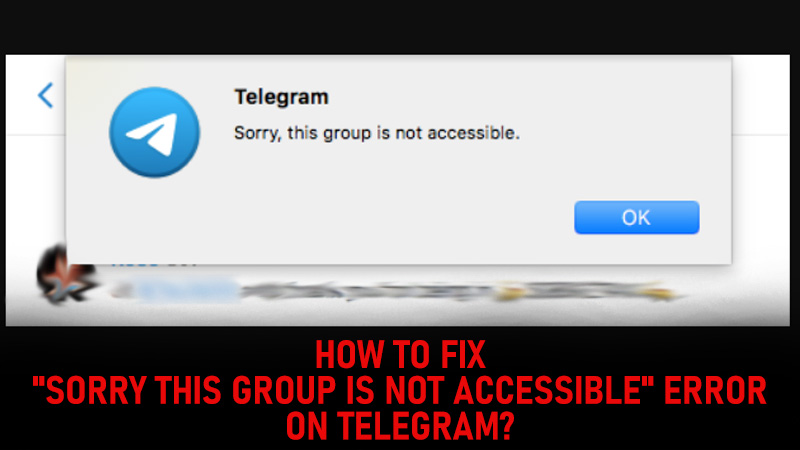
Telegram is an instant messaging app available on Google Play Store and Apple App Store. It has a cloud-based system with free and open-source, cross-platform for all its users. It also provides end-to-end encrypted video calling and messaging. If you recently come across a “Sorry This Group Is Not Accessible” error on your Telegram account and don’t know why did it appear and how you can fix it then here is a guide for you!
How To Resolve “Sorry This Group Is Not Accessible” On Telegram?
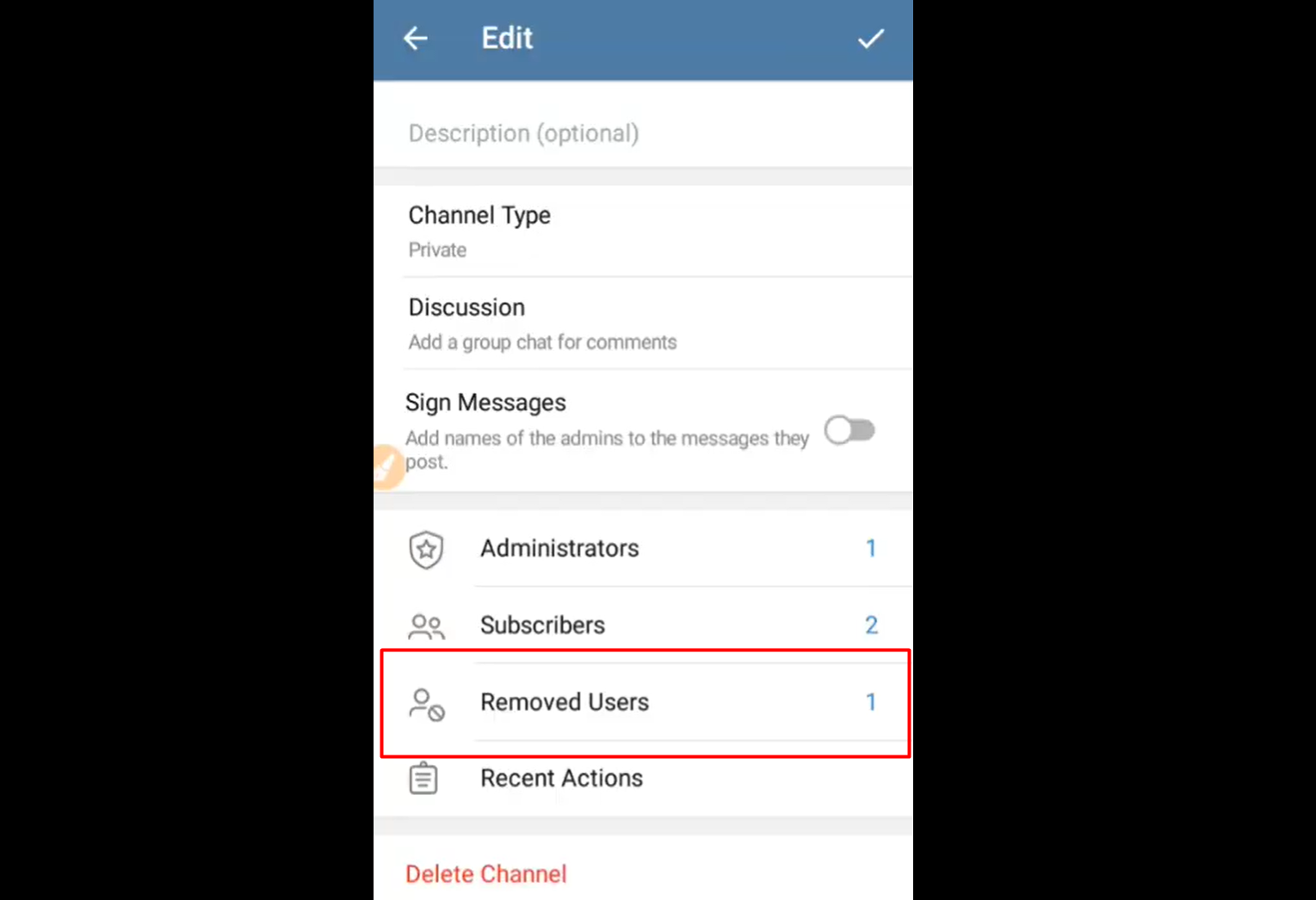
Telegram has many open and close groups which anybody can join to get all the latest updates about various things. You can join these groups by searching for them or by clicking on the link provided by your friends or family members. If you are a part of any group and you suddenly receive a “Sorry This Group Is Not Accessible” message on your screen then it is because you may be banned by the admin or the participants in the group.
This message appears when someone usually removes you from a Telegram group and you are put in the removed user’s list for that group.
Here are multiple ways to fix it and join the group again.
1) Restart your mobile phone and try opening Telegram again.
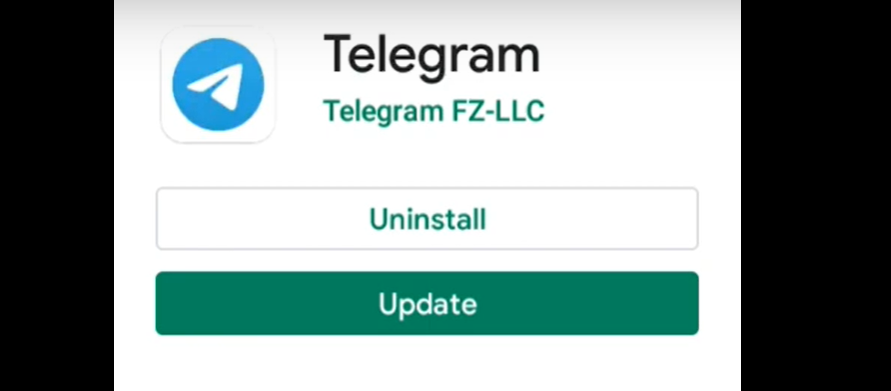
2) Go to the Google Play Store or Apple App Store and check whether your app is up to date. If not then update it right away.
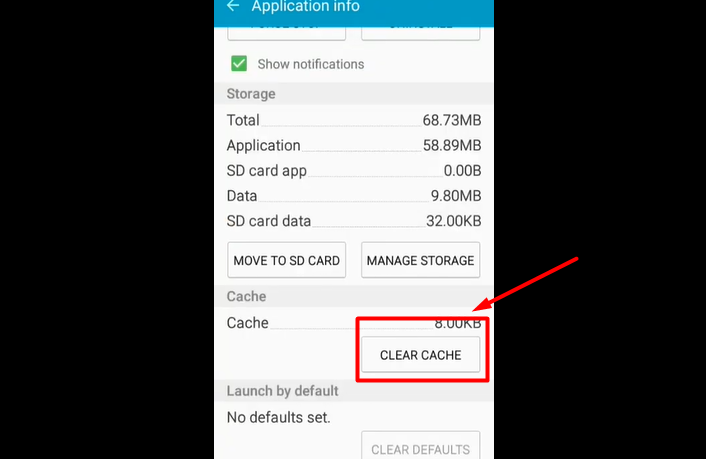
3) Clear all the cache from settings and try to access the group again. Settings > Applications > App Manager> All apps > Telegram > Clear Cache
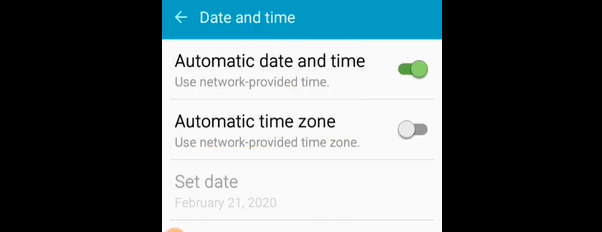
5) Make sure you have set your phone on the correct date and time and the correct time zone. If not check for date and time settings on your mobile. Settings > date and time > automatics date and time > automatic time zone > turn both the options ON.
6) Uninstall Telegram on your device and install it again. Log in using your same user ID again and check if the “Sorry This Group Is Not Accessible” error remains.
7) If any of the above solutions did not work then try and send a request to the admin of the group to remove you from the removed user’s list and add you again to the group.
8) The last option for you to fix this issue is to create a new account and join the group you want to form the new login id.
That’s it about how to fix the “Sorry This Group Is Not Accessible” error on Telegram. Read another article on how to import WhatsApp chat to Telegram?
7 Ways to Fix Telegram “This Group Is Not Accessible” Error
Are you grappling with the annoying error message on Telegram that reads, “Sorry this group is not accessible“.
This error message has stumped many users and could be a sign of various underlying issues. But don’t worry!
This comprehensive guide will unravel the reasons behind this error and provide seven tried-and-true methods to fix it.
How to Fix Telegram Error Message Saying “Sorry This Group Is Not Accessible”
Here are seven (7) ways you can try to fix it.
Method 1: Using a Virtual Private Network (VPN) if Region-Locked
The “Sorry this group is not accessible” message might appear if the group is region-locked.
This means the group’s content is restricted in certain geographical areas. Using a Virtual Private Network (VPN) can help bypass these restrictions if you are in one of these areas.
- Choose a Reliable VPN Service: There are many VPN providers available, some of the popular ones being NordVPN, ExpressVPN, and SurfShark. Select a provider with servers in the region where the Telegram group is accessible.
- Install the VPN Application: Download and install the VPN application on your device. Most providers offer applications for various platforms like Windows, macOS, Android, and iOS.
- Connect to a Server in an Accessible Region: Once the application is installed, open it, and select a server located in a region where the group is not restricted. For example, if the group is restricted in your country, you may connect to a server in the United States or the United Kingdom.
- Open Telegram and Access the Group: After connecting to the desired server, open the Telegram app, and try reaccessing the group. The error message should no longer appear.
- Disconnect the VPN When Done: Once you’re finished, remember to disconnect from the VPN to revert to your regular internet connection.
By utilizing a VPN, you’re masking your location, making it appear that you’re accessing Telegram from a region where the group isn’t restricted.
This method is handy not only for accessing region-locked Telegram groups but also for maintaining privacy online.
Method 2: Checking Group Settings and Permissions
The access issue might result from specific group settings or an unintentional ban. If you’re wondering, “Why can’t I open a group chat in Telegram?” it could be related to the permissions set by the group admin.
- Ask a Group Member: Reach out to a friend or acquaintance who is still part of the group. They can check the group’s settings or ask the admin to see if you’ve been banned or if any restrictions are preventing you from joining.
- Contact the Group Admin: If you know the group admin, message them directly to inquire if there have been changes to the group’s settings or if you’ve been accidentally banned. For example, you can politely ask, “Hey, I can’t seem to access the group. Can you please check if there’s a restriction on my account?”
- Request to be Unbanned: If you discover that you’ve been banned, you may request the admin to unban you. Be sure to understand the reason behind the ban and assure that you’ll comply with the group’s rules moving forward.
- Join Through a Different Link: Sometimes, the invitation link might expire or become invalid. Ask a group member or the admin to send you a new invite link. This simple step might solve the problem.
- Explore Other Ways to Join: If you were trying to view a Telegram private group without joining, there might be permissions preventing that. Instead, consider joining the group properly through an invite link or approval from the admin.
By communicating openly with group members and admins, you can clear up any misunderstandings or correct any accidental settings changes.
This method relies on human interaction, so remember to be polite and understanding, as people are more likely to assist if approached respectfully.
Method 3: Clearing Telegram Cache
Sometimes, the simplest solutions are the most effective. Clearing the Telegram cache might do the trick.
Cached data might lead to conflicts and glitches; a fresh start might be all you need. Here’s how to clear the Telegram cache:
- Open Settings: On your device, go to “Settings” > “Apps & notifications” > “See all apps.”
- Find Telegram: Scroll down and tap on the “Telegram” app.
- Access Storage: Tap on “Storage & cache.”
- Clear Cache: Tap the “Clear Cache” button. Restart the Telegram app and try accessing the group again.
For iOS Users:
- Go to iPhone Settings: Open “Settings” > “General” > “iPhone Storage.”
- Find Telegram: Scroll down and tap on the “Telegram” app.
- Offload the App: Tap “Offload App” and confirm. This will remove the app but keep its documents and data.
- Reinstall Telegram: Tap “Reinstall App.” After reinstalling, open Telegram and try accessing the group again.
- Log Out of Telegram: Click on the three horizontal lines (menu) > “Settings” > “Log Out.”
- Log Back In: After logging out, log back into your account and try accessing the group again.
Clearing cache is like giving the app a fresh start, and it can resolve minor glitches and conflicts. This method is quick, risk-free, and often highly effective.
Method 4: Request Admin to Unban
Sometimes, the error message may result from being banned from the group. This can happen intentionally or accidentally; the solution may require contacting the group’s admin.
- Find the Admin’s Contact: If you know who the admin is, you can directly message them on Telegram. If not, you may need to ask a friend in the group or find a related community where the admin might be reachable.
- Politely Inquire About the Ban: Send a respectful message to the admin, such as, “Hello, I noticed I can’t access the group anymore. Could you please check if I’ve been banned, and if so, let me know why?”
- Understand the Reason: If the admin confirms the ban, understand the reason behind it. Was it a violation of group rules, or perhaps a misunderstanding?
- Request to be Unbanned: If you feel that the ban was unjustified or if you understand your mistake and commit to following the rules, you can politely request to be unbanned. A message like, “I understand my mistake, and I’ll make sure to follow the rules in the future. Could you please unban me?” can be effective.
Method 5: Create a New Telegram Account
If you’ve exhausted the previous methods and still cannot access the group, creating a new Telegram account might be the way to go.
This can be especially helpful if you suspect you’ve been permanently banned or if there’s a glitch with your account that you can’t resolve.
You can have multiple Telegram accounts on the same device, making it easy to switch between them.
Virtual phone numbers can be obtained from various online services, but be cautious and use reputable providers to avoid potential issues.
Method 6: Clear Cache and Reinstall Telegram
Sometimes, the underlying issue behind the “Sorry this group is not accessible” error may lie within the app’s cache or corrupted files.
- Clear Cache:
- For Android: Go to Settings > Apps > Telegram > Storage > Clear Cache.
- For iOS: Unfortunately, iOS doesn’t allow you to clear cache for individual apps. You’ll need to uninstall and reinstall Telegram to achieve the same effect.
- Press and hold the Telegram app icon, then tap “Uninstall” (Android) or the ‘X’ symbol (iOS).
Method 7: Request Admin to Unban
Sometimes, the reason behind the error message “sorry this group is not accessible” might be as simple as being banned from the group.
If you think this might be the case and the ban was a mistake or you believe you deserve another chance, you can reach out to the group admin and request to be unbanned. Here’s a guide to doing just that:
- Identify the Admin: Find the group admin’s contact from another group member or previous interactions.
- Draft a Polite Message: Write a courteous and concise message explaining the situation and requesting to be unbanned.
- Send the Message: Send the message to the admin and wait for their response.
- Follow Any Given Instructions: If the admin agrees to unban you, they might have specific instructions or conditions. Make sure to follow them.
- Rejoin the Group: Once unbanned, you should be able to join the group again without any issues.
Remember, politeness and respect go a long way in these situations. The admin has the final say, so make your case but accept their decision, whatever it may be.
Conclusion
And there you have it! The mysterious “sorry this group is not accessible” error on Telegram need no longer keep you puzzled.
Whether you’ve been banned, there’s a glitch, or something else altogether, we’ve covered all the angles.
From contacting the admin to unbanning, to creating a new Telegram account, these seven methods have been handpicked to offer you the most effective and reliable solutions.
These strategies should guide you through fixing this issue in no time, getting you right back into the group chats and channels you love.
Related Posts
3 Ways to Bypass WhatsApp SMS Verification Code [Without SIM]
When registering for WhatsApp, you will be asked to provide a mandatory mobile number for account activation. WhatsApp will send you a one-time password (OTP)…
3 Proven Ways to Verify Telegram Without SIM Phone Number
When registering for a new Telegram account, the app requires you to provide a phone number to verify you with a five-digit one-time password (OTP)…

5 Ways to Bypass and Increase WhatsApp Video Transfer Limit
Using WhatsApp to send videos and photo is a common way to share media files. However, WhatsApp does have a limit to the maximum allowed…
7 Ways to Block WhatsApp Notifications during Do Not Disturb
There are times when Do Not Disturb (DND) mode is enabled, yet WhatsApp calls and notifications can still come through. WhatsApp voice and video calls…
Does Telegram Show Your Phone Number [And How to Hide It]
With over 700 million+ users worldwide, Telegram is one of the most popular private messaging apps. Each Telegram account is registered uniquely to one (1)…
3 Ways to Have an Invisible Name on WhatsApp [& Other Sites]
With more than 2 billion users worldwide, Whatsapp is currently the most commonly-used communication app. Many people have asked if it is possible to have…
5 Ways to FIX “Proxy Server Refused Connection” in Android
When using the Tails OS or the Tor web browser on your Android mobile device, you encounter an error message saying “Proxy Server Refused Connection“.…
3 Ways to Recover Telegram Account Without a Phone Number
Every Telegram account is associated with a unique mobile number, which is used during the registration of each new Telegram user. You can still use…
Что делать, если пишет – к сожалению, группа временно недоступна на вашем устройстве, поскольку ее модераторам необходимо удалить, как исправить
По мере развития интернета пользователи все чаще сталкиваются с цензурой и блокируют контент, который по разным причинам нарушает законы государств или правила компаний. Потому многие пользователи сталкиваются с сообщением: к сожалению, группа на вашем устройстве временно недоступна. Эта проблема характерна для людей, которые применяют Телеграм. При этом справиться с ней несложно – достаточно выполнить простые действия.
Описание ошибки
Многие считают, что блокировка связана с действиями модераторов мессенджера или органа государственной власти. Однако в сообщении сказано, что группа недоступна именно на конкретном девайсе. Это означает, что на другом устройстве ее можно использовать.
Причины возникновения
Цензура может вводиться не только государственными органами, но и крупными компаниями. Это связано с необходимостью соответствовать законам стран. Блокировка публикаций и сообществ в Телеграме на определенном девайсе часто связана с особенностями работы магазинов Google Play и iOs.
К примеру, орган государственной власти посчитал контент какого-то сообщества в Телеграме незаконным. Поскольку распространение мессенджера происходит через Google Play или App Store, он выдвигает магазинам предложение об остановке распространения Телеграма. Сотрудники ресурсов предупреждают администраторов мессенджера о том, что он может быть исключен из магазина, если не убрать контент.

В результате создатели Телеграма выпускают особый вариант мессенджера, который поступает в магазин приложений. Там контент, запрещенный государством, уже не доступен. Потому его нельзя загрузить только на устройства с Андроид или исключительно на девайсы с iOs.
Способы обхода блокировки
Чтобы обойти блокировку, можно прибегнуть к разным способам. При этом стоит учитывать операционную систему, установленную на устройстве.

На Android
При появлении уведомления о том, что группа временно недоступна на девайсе с Андроид, значит, Play Market выдвинул Телеграму просьбу ее заблокировать. В итоге разработчики специально для магазина создали версию, в которой доступа к сообществу нет. Чтобы решить проблему, рекомендуется скачать другую версию программы для Андроид и поставить ее на свой девайс. В этом случае ограничений не будет.
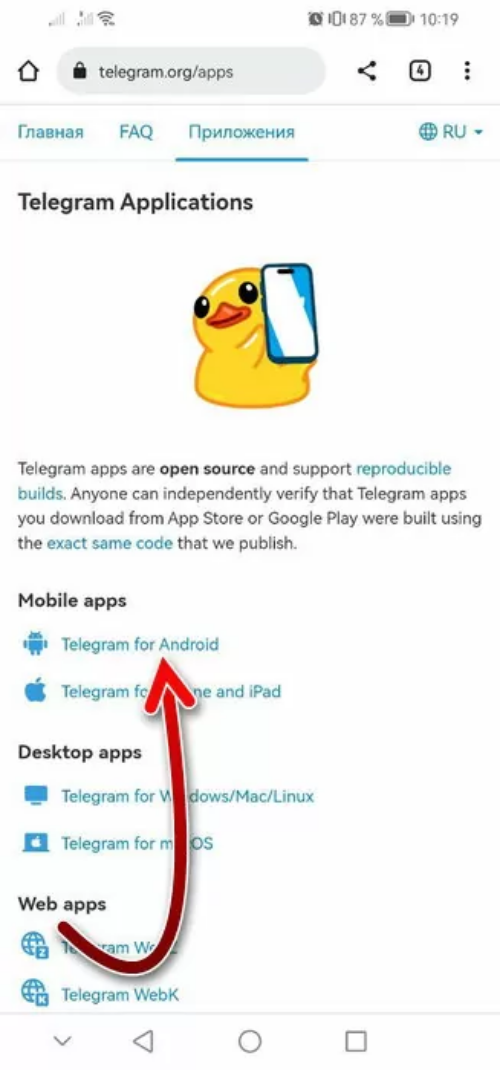
Самым надежным источником Телеграма считается официальный сайт, который находится по адресу https://telegram.org/apps. При этом требуется совершить следующие действия:
- Перейти по ссылке на сайт.
- Загрузить мессенджер. Это нужно сделать в виде файла, который обладает расширением .apk.
- Установить программу на свое устройство.
- Авторизоваться в аккаунте.
- Зайти в группу, которая была недоступна в официальном варианте мессенджера, представленном в Play Market.
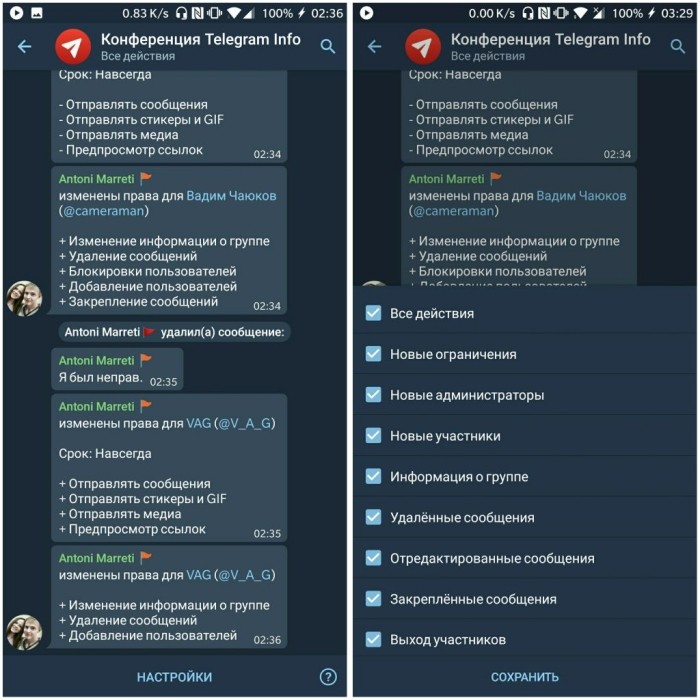
При этом софт можно не устанавливать. Если такой путь удобнее, стоит выбрать одну из таких версий. Для этого на той же странице рекомендуется выбрать раздел «Web Apps». Стоит отметить, что требуется использовать лишь те версии Телеграма, которые представлены на официальном сайте. Не стоит ничего скачивать с подозрительных ресурсов.
На iOS
Эта операционная система имеет свои особенности. Основная трудность кроется в том, что сюда нельзя ничего ставить из других источников. Загружать софт можно только из App Store. Появление ошибки говорит о том, что блокировка случилась по инициативе магазина. Однако решить проблему все же можно.
Для этого стоит воспользоваться веб-ресурсом. При этом рекомендуется сделать следующее:
- Открыть Телеграм в браузере для смартфонов Safari.
- Авторизоваться в аккаунте.
- Зайти в группу, которая была недоступна в приложении AppStore.

Для реализации второго способа стоит сделать следующее:
- Пройти авторизацию в профиле Телеграма через веб-версию.
- Зайти в настройки.

- Выбрать раздел «Конфиденциальность».
- Кликнуть на строчку «Включить ограничение».
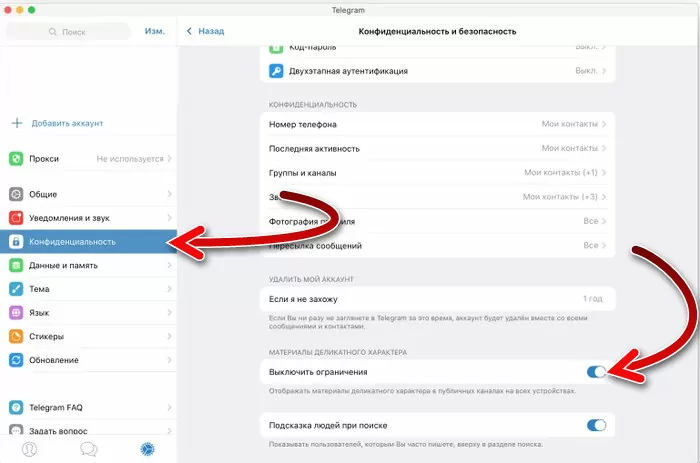
После этого требуется перезапустить Телеграм на ПК или в онлайн-версии и то же самое сделать на девайсе iOs, на котором возникала проблема с группой. После выполнения перечисленных действий заблокированное сообщество будет доступно в мобильном мессенджере на iOs. При этом важно учитывать, что возможен ряд ограничений:
- Заблокированный контент не удастся найти при помощи поиска. Доступ к нему удастся получить только по ссылке.
- На заблокированном сообществе не удастся увидеть аватар.
- В отдельных государствах реализовать этот метод нельзя.

Ничего не помогает – что делать
Если ничего не помогает, можно использовать и другие способы. Для этого рекомендуется совершить следующее:
- Обновить приложение Телеграм. Это требуется делать в том случае, если вышли актуальные версии. Возможно, в новом варианте программе уже нет ограничения на группу, поскольку модераторы удалили запрещенную информацию. В этом случае модераторы не заинтересованы в длительном отсутствии доступа к сообществу.
- При появлении ограничения на Андроиде можно попытаться установить мессенджер, предназначенный для устройств с iOs. Также на айфон можно попробовать установить версию Телеграма для Андроида. Дело в том, что ограничения одного магазина не затрагивают другой.
- При наличии на смартфоне брендового магазина приложений скачать мессенджер оттуда. При этом важно вначале удалить старую версию.
- Зайти в программу с компьютера и найти сообщество там. При этом софт требуется скачивать исключительно с официального ресурса.
Блокирование контента в Телеграме может быть связано с законодательными ограничениями. Справиться с проблемой можно разными способами. При установке мессенджера важно ориентироваться на вид операционной системы.